MagicMirror Forum
    • Recent
    • Tags
    • Unsolved
    • Solved
    • MagicMirror² Repository
    • Documentation
    • 3rd-Party-Modules
    • Donate
    • Discord
    • Register
    • Login
    A New Chapter for MagicMirror: The Community Takes the Lead
    Read the statement by Michael Teeuw here.

    CSS: Color And Style

    Scheduled Pinned Locked Moved Utilities
    15 Posts 2 Posters 3.8k Views 2 Watching
    Loading More Posts
    • Oldest to Newest
    • Newest to Oldest
    • Most Votes
    Reply
    • Reply as topic
    Log in to reply
    This topic has been deleted. Only users with topic management privileges can see it.
    • A Offline
      agentJames
      last edited by

      These are the pictures. This is what it looks like right now.

      safety.JPG
      I want it to look like:
      871a7600-9b98-485e-ae50-50f70e116d76-image.png

      mumblebajM 1 Reply Last reply Reply Quote 0
      • mumblebajM Offline
        mumblebaj Module Developer @agentJames
        last edited by

        @agentJames Have you set the config option for colored to true?

        colored: true,
        

        Check out my modules at: https://github.com/mumblebaj?tab=repositories
        Check my blog-post: https://mumblebaj.xyz/
        Check my MM Container: https://hub.docker.com/repository/docker/mumblebaj/magicmirror/general

        A 1 Reply Last reply Reply Quote 0
        • A Offline
          agentJames @mumblebaj
          last edited by

          @mumblebaj Someone else told me to do that, so I did. Now it looks like this:

          ac30936b-6c4b-4a44-9db5-2c567750b01f-image.png
          Next is like how do I remove “United States” and how do I add multiple-colors so it will look like:5836d3d7-0ee6-4231-b833-2b2798ade9e0-image.png

          mumblebajM 1 Reply Last reply Reply Quote 0
          • mumblebajM Offline
            mumblebaj Module Developer @agentJames
            last edited by

            @agentJames Can you share your config for the module? Which calendar are you using?

            Check out my modules at: https://github.com/mumblebaj?tab=repositories
            Check my blog-post: https://mumblebaj.xyz/
            Check my MM Container: https://hub.docker.com/repository/docker/mumblebaj/magicmirror/general

            1 Reply Last reply Reply Quote 0
            • A Offline
              agentJames
              last edited by

              e59546e8-8944-4050-9a67-c3d793243432-image.png

              mumblebajM 1 Reply Last reply Reply Quote 0
              • mumblebajM Offline
                mumblebaj Module Developer @agentJames
                last edited by mumblebaj

                @agentJames The URL you are using does not look right. Can you swop it for the following? http://www.calendarlabs.com/templates/ical/US-Holidays.ics

                I think what you might be seeing is the example calendar

                Check out my modules at: https://github.com/mumblebaj?tab=repositories
                Check my blog-post: https://mumblebaj.xyz/
                Check my MM Container: https://hub.docker.com/repository/docker/mumblebaj/magicmirror/general

                A 1 Reply Last reply Reply Quote 0
                • A Offline
                  agentJames @mumblebaj
                  last edited by

                  @mumblebaj I tried this URL and it gave me:e4df5d0f-1a79-4ba8-87aa-7e930e513f62-image.png

                  1 Reply Last reply Reply Quote 0
                  • A Offline
                    agentJames
                    last edited by agentJames

                    I did some changing and now it looks like this:
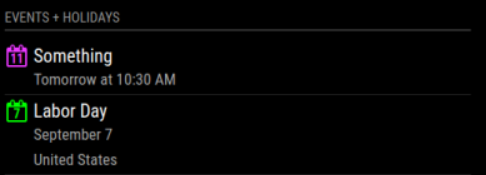
                    2477676d-bc39-47f4-b505-6288b0cba559-image.png

                    The next question is what do I need to write in the config file to have 2 columns?

                    mumblebajM 1 Reply Last reply Reply Quote 0
                    • mumblebajM Offline
                      mumblebaj Module Developer @agentJames
                      last edited by

                      @agentJames I just installed the module and it works fine for me.

                      14621910-ec07-4c8a-adf3-2797d443083d-image.png

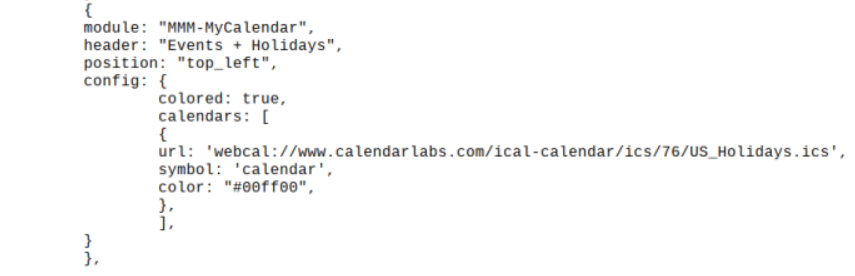
                      The config:
                            {
                                      module: "MMM-MyCalendar",
                                      header: "Events + Holidays",
                                      position: "top_left",
                                      config: {
                                              colored: true,
                                              calendars: [
                                                      {
                                                      url: "https://www.officeholidays.com/ics/ics_country_iso.php?tbl_country=ZA"
                                                      symbol: 'calendar',
                                                      color: "#ffb350"
                                                      } ]
                                              }
                              },
                      

                      Although, I used a different calendar to test with.

                      Check out my modules at: https://github.com/mumblebaj?tab=repositories
                      Check my blog-post: https://mumblebaj.xyz/
                      Check my MM Container: https://hub.docker.com/repository/docker/mumblebaj/magicmirror/general

                      A 1 Reply Last reply Reply Quote 0
                      • A Offline
                        agentJames @mumblebaj
                        last edited by agentJames

                        @mumblebaj It works for me as well, thanks for the help, do you know how to make it into 2 columns so more events/holidays can show? Like this:aedf8b76-26e2-4190-b089-fe7a4cb8e3c3-image.png

                        mumblebajM 1 Reply Last reply Reply Quote 0
                        • mumblebajM Offline
                          mumblebaj Module Developer @agentJames
                          last edited by

                          @agentJames You should be able to set the config

                          columns: true
                          

                          Check out my modules at: https://github.com/mumblebaj?tab=repositories
                          Check my blog-post: https://mumblebaj.xyz/
                          Check my MM Container: https://hub.docker.com/repository/docker/mumblebaj/magicmirror/general

                          A 1 Reply Last reply Reply Quote 0
                          • A Offline
                            agentJames @mumblebaj
                            last edited by

                            @mumblebaj If it is suppose to be written like this, I am getting no change.
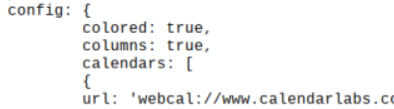
                            70c5c653-6ed9-4383-a361-5be584dafd6a-image.png

                            mumblebajM 1 Reply Last reply Reply Quote 0
                            • mumblebajM Offline
                              mumblebaj Module Developer @agentJames
                              last edited by

                              @agentJames seems like there was a branch for the using-nunjucks. Maybe @j-e-f-f can advise on how to grab that branch as I don’t see the option in the default branch

                              Check out my modules at: https://github.com/mumblebaj?tab=repositories
                              Check my blog-post: https://mumblebaj.xyz/
                              Check my MM Container: https://hub.docker.com/repository/docker/mumblebaj/magicmirror/general

                              A 1 Reply Last reply Reply Quote 0
                              • A Offline
                                agentJames @mumblebaj
                                last edited by agentJames

                                This post is deleted!
                                1 Reply Last reply Reply Quote 0

                                Hello! It looks like you're interested in this conversation, but you don't have an account yet.

                                Getting fed up of having to scroll through the same posts each visit? When you register for an account, you'll always come back to exactly where you were before, and choose to be notified of new replies (either via email, or push notification). You'll also be able to save bookmarks and upvote posts to show your appreciation to other community members.

                                With your input, this post could be even better 💗

                                Register Login

                                • 1 / 1
                                • First post
                                  Last post
                                Enjoying MagicMirror? Please consider a donation!
                                MagicMirror created by Michael Teeuw.
                                Forum managed by Sam, technical setup by Karsten.
                                This forum is using NodeBB as its core | Contributors
                                Contact | Privacy Policy