Read the statement by Michael Teeuw here.
Is it possible to ad an Arduino?
-
@sdetweil Not as far as i can see.
-
@Shinji0912 so, I would use the linked examples outside mm to make sure it works
-
@sdetweil Ok so i have installed Serialport on the Pi and told the arduino to digitalwrite 10 but how to i let the Pi read 10?
-
@Shinji0912 Google , there are many examples
-
Ok , so now i got the Arduino to communicate with the PI via usb, (i got the right Portname using NodeRed). This is the current Arduino Script :
#include <Wire.h>
#include "DHT.h"

#define DHTPIN 2
#define DHTTYPE 11

DHT dht (DHTPIN, DHTTYPE);


void setup()
{
  Wire.begin();
  Serial.begin(9600);
  dht.begin();
}


void loop()
{
  delay(2000);
  float temp = dht.readTemperature();
  float rel_hum = dht.readHumidity();


  if (isnan(rel_hum) || isnan(temp)) {
    Serial.println(F("Daten vom Sensor konnten nicht gelesen werden!"));
    return;
  }
  float hif = dht.computeHeatIndex(rel_hum);
  float hic = dht.computeHeatIndex(temp, rel_hum, false);

  Serial.print(F("Luftfeuchtigkeit: "));
  Serial.print(rel_hum);
  Serial.print(F("%  Temperatur: "));
  Serial.print(temp);

  Serial.print(F("°C "));

  Serial.println(F(""));
}
Some things are in german so dont be suprised ^^
and via NodeRed i know that it is working and the Pi is currently reading the data.
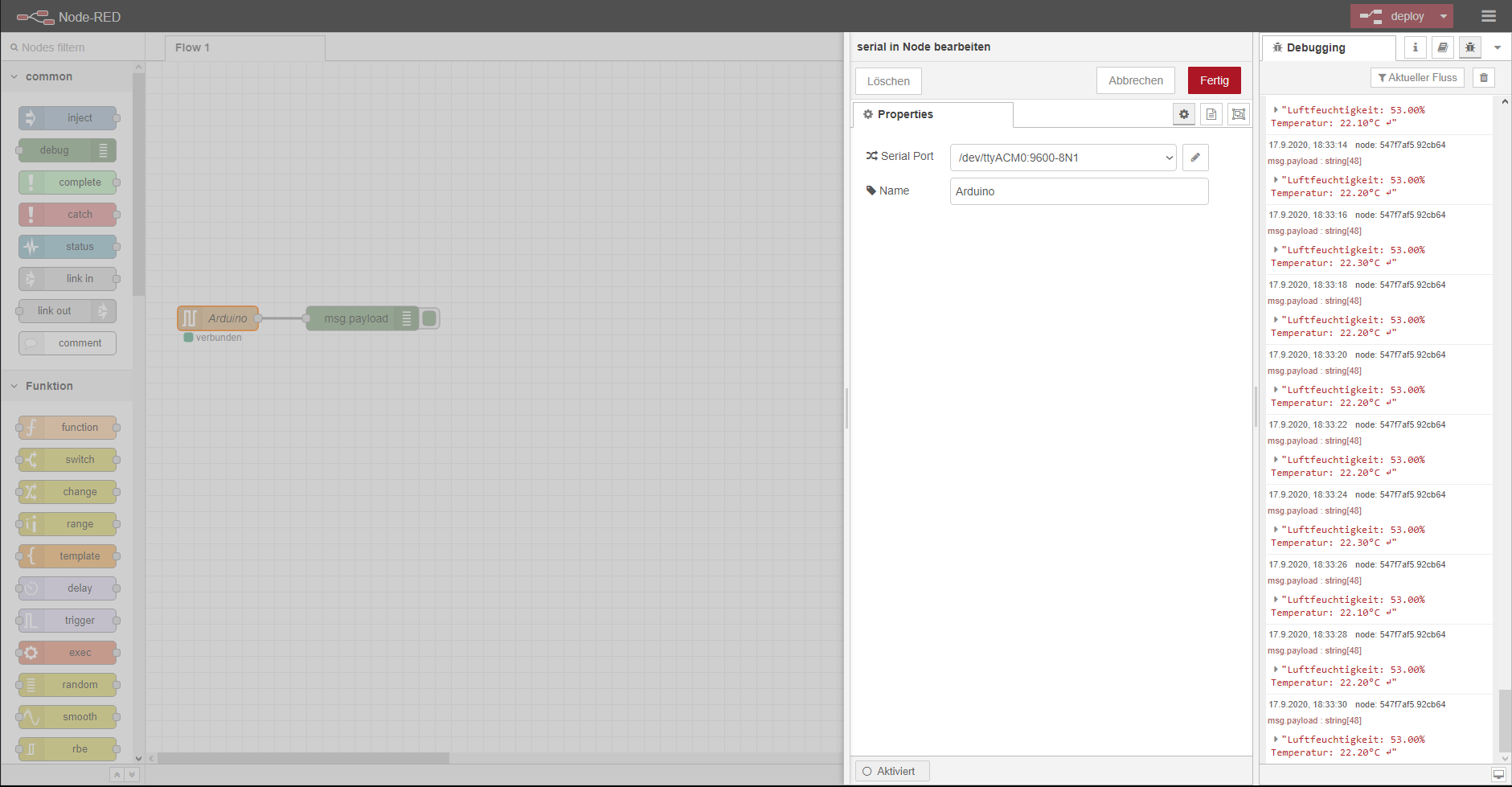
My issue now is that my Config.js isn’t working anymore after installing ArduPorts ??
This is the current config :
/* Magic Mirror Config Sample
 *
 * By Michael Teeuw https://michaelteeuw.nl
 * MIT Licensed.
 *
 * For more information on how you can configure this file
 * See https://github.com/MichMich/MagicMirror#configuration
 *
 */

var config = {
	address: "localhost", 	// Address to listen on, can be:
							// - "localhost", "127.0.0.1", "::1" to listen on loopback interface
							// - another specific IPv4/6 to listen on a specific interface
							// - "0.0.0.0", "::" to listen on any interface
							// Default, when address config is left out or empty, is "localhost"
	port: 8080,
	basePath: "/", 	// The URL path where MagicMirror is hosted. If you are using a Reverse proxy
					// you must set the sub path here. basePath must end with a /
	ipWhitelist: ["127.0.0.1", "::ffff:127.0.0.1", "::1"], 	// Set [] to allow all IP addresses
															// or add a specific IPv4 of 192.168.1.5 :
															// ["127.0.0.1", "::ffff:127.0.0.1", "::1", "::ffff:192.168.1.5"],
															// or IPv4 range of 192.168.3.0 --> 192.168.3.15 use CIDR format :
															// ["127.0.0.1", "::ffff:127.0.0.1", "::1", "::ffff:192.168.3.0/28"],

	useHttps: false, 		// Support HTTPS or not, default "false" will use HTTP
	httpsPrivateKey: "", 	// HTTPS private key path, only require when useHttps is true
	httpsCertificate: "", 	// HTTPS Certificate path, only require when useHttps is true

	language: "de",
	logLevel: ["INFO", "LOG", "WARN", "ERROR"],
	timeFormat: 24,
	units: "metric",
	// serverOnly:  true/false/"local" ,
	// local for armv6l processors, default
	//   starts serveronly and then starts chrome browser
	// false, default for all NON-armv6l devices
	// true, force serveronly mode, because you want to.. no UI on this device

	modules: [


{
		module: 'MMM-ArduPort',
		position: "bottom_right",
		config: {

		portname: "/dev/ttyACM0",
		updateInterval: 2,
		animationSpeed: 1000,
		displayIcons: ture,
		showDescription: true,
		useColors: true,
	sensors: [ {
	name: "DHT11",
	description: "Temperatur",
		   }
		 ]

		}
	},

{
		module: 'MMM-TelegramBot',
		config: {

			telegramAPIKey: '',
			allowedUser: [''],
			adminChatId: ''

		}
	},


{
			module: "MMM-Online-State",
			position: "top_left",

		},

{
			module: "updatenotification",
			position: "bottom_bar"
		},

		{
			module: "clock",
			position: "top_right"
		},
		{
            module: 'MMM-RBB-Weather',
            position: "top_left", // All available positions
            config: {
                         id: "18228265",
                         days: "0",
                         updateInterval: "600",
                         }
        },
{
			module: "calendar",
			header: "Events",
			position: "top_left",
			config: {
				calendars: [
					{
						symbol: "calendar-check-o ",
						url: "",
						maximumEntries: "5",
						maximumNumberOfDays: "7"
					}
				]
			}
		},


{
  module: "MMM-NowPlayingOnSpotify",
  position: "bottom_left",

  config: {
    showCoverArt: false,
    clientID: "",
    clientSecret: "",
    accessToken: "",
    refreshToken: ""
  }
},
	]
};

/*************** DO NOT EDIT THE LINE BELOW ***************/
if (typeof module !== "undefined") {module.exports = config;}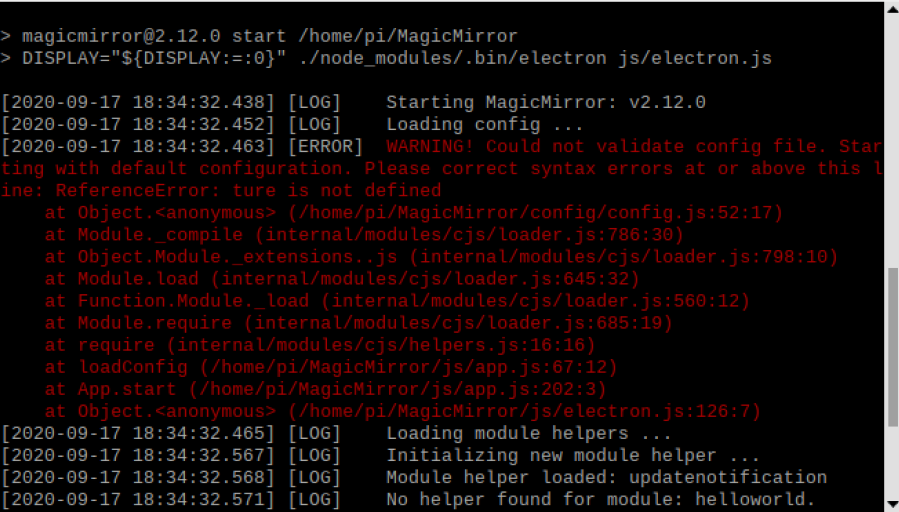
i don’t know what to do now :C i thought i had it working this time finally …EDIT :
Found the mistake i’ve written “ture” not “true” fml…EDIT 2 :
But it’s still not working as i want it to it still says :“Waiting for Connection” on the Arduport module when launching the MagicMirror. -
@Shinji0912 and u did the npm install in the arduport module folder?
-
@sdetweil yes i did .-.
-
@Shinji0912 ok, need to see the console logs
from nom start or pm2 logs
and the developers window ctrl-shift-i on the keyboard, then select the console tab and scroll up to see any errors.
u can also filter messages by.module, by adding part.of the module name to the filter field, ardu for example
-
@sdetweil Ok currently im not at home but will upload when home ^^
-
-
This post is deleted! -
Ok so like i said it starts now , but the ArduPorts module still says : “waiting for connection”
and i added thedebug: true,line. And for some reason Ctrl + shift + i does nothing for me except that the radeon software takes a screenshot… so heres the full console log :
pi@raspberrypi:~/MagicMirror $ npm run start

> magicmirror@2.12.0 start /home/pi/MagicMirror
> DISPLAY="${DISPLAY:=:0}" ./node_modules/.bin/electron js/electron.js

[2020-09-18 18:12:43.751] [LOG]    Starting MagicMirror: v2.12.0
[2020-09-18 18:12:43.764] [LOG]    Loading config ...
[2020-09-18 18:12:43.776] [LOG]    Loading module helpers ...
[2020-09-18 18:12:43.801] [LOG]    Initializing new module helper ...
[2020-09-18 18:12:43.802] [LOG]    Module helper loaded: MMM-ArduPort
node-telegram-bot-api deprecated Automatic enabling of cancellation of promises is deprecated.
In the future, you will have to enable it yourself.
See https://github.com/yagop/node-telegram-bot-api/issues/319. internal/modules/cjs/loader.js:786:30
[2020-09-18 18:12:45.439] [LOG]    Initializing new module helper ...
[2020-09-18 18:12:45.440] [LOG]    Module helper loaded: MMM-TelegramBot
[2020-09-18 18:12:45.442] [LOG]    No helper found for module: MMM-Online-State.
[2020-09-18 18:12:45.519] [LOG]    Initializing new module helper ...
[2020-09-18 18:12:45.520] [LOG]    Module helper loaded: updatenotification
[2020-09-18 18:12:45.521] [LOG]    No helper found for module: clock.
[2020-09-18 18:12:45.698] [LOG]    Initializing new module helper ...
[2020-09-18 18:12:45.700] [LOG]    Module helper loaded: MMM-RBB-Weather
[2020-09-18 18:12:46.359] [LOG]    Initializing new module helper ...
[2020-09-18 18:12:46.360] [LOG]    Module helper loaded: calendar
[2020-09-18 18:12:47.125] [LOG]    Initializing new module helper ...
[2020-09-18 18:12:47.126] [LOG]    Module helper loaded: MMM-NowPlayingOnSpotify
[2020-09-18 18:12:47.126] [LOG]    All module helpers loaded.
[2020-09-18 18:12:47.336] [LOG]    Starting server on port 8080 ...
[2020-09-18 18:12:47.362] [LOG]    Server started ...
[2020-09-18 18:12:47.364] [LOG]    Connecting socket for: MMM-ArduPort
[2020-09-18 18:12:47.365] [LOG]    [MMM-ArduPort]:: Starting node_helper for module [MMM-ArduPort]
[2020-09-18 18:12:47.366] [LOG]    Connecting socket for: MMM-TelegramBot
[2020-09-18 18:12:47.367] [LOG]    Connecting socket for: updatenotification
[2020-09-18 18:12:47.369] [LOG]    Connecting socket for: MMM-RBB-Weather
[2020-09-18 18:12:47.369] [LOG]    Starting module helper: MMM-RBB-Weather
[2020-09-18 18:12:47.371] [LOG]    Connecting socket for: calendar
[2020-09-18 18:12:47.371] [LOG]    Starting node helper for: calendar
[2020-09-18 18:12:47.372] [LOG]    Connecting socket for: MMM-NowPlayingOnSpotify
[2020-09-18 18:12:47.373] [LOG]    Sockets connected & modules started ...
[2020-09-18 18:12:47.553] [LOG]    Launching application.
[2020-09-18 18:12:50.879] [LOG]    Create new calendar fetcher for url: https://calendar.google.com/calendar/ical/oliver.kuck12%40gmail.com/public/basic.ics - Interval: 300000
[2020-09-18 18:12:51.091] [LOG]    MMM-RBB-Weather[18.9.2020, 18:12:50]: Load data for ID "18228265" and "0" days ...
[2020-09-18 18:12:51.100] [INFO]   Checking git for module: MMM-ArduPort
[2020-09-18 18:12:51.132] [INFO]   Checking git for module: MMM-TelegramBot
[2020-09-18 18:12:51.168] [INFO]   Checking git for module: MMM-Online-State
[2020-09-18 18:12:51.209] [INFO]   Checking git for module: MMM-RBB-Weather
[2020-09-18 18:12:51.246] [INFO]   Checking git for module: MMM-NowPlayingOnSpotify
[2020-09-18 18:12:51.281] [ERROR]  (node:1451) [DEP0005] DeprecationWarning: Buffer() is deprecated due to security and usability issues. Please use the Buffer.alloc(), Buffer.allocUnsafe(), or Buffer.from() methods instead.
[2020-09-18 18:12:51.283] [ERROR]  (node:1451) [DEP0005] DeprecationWarning: Buffer() is deprecated due to security and usability issues. Please use the Buffer.alloc(), Buffer.allocUnsafe(), or Buffer.from() methods instead.
[2020-09-18 18:12:51.420] [LOG]    MMM-RBB-Weather[18.9.2020, 18:12:51]: Fetch data for day "0" ...
[2020-09-18 18:12:51.446] [LOG]    { debug: 'SerialPort shell started...' }
[2020-09-18 18:12:51.458] [LOG]    undefined[MMM-ArduPort] SerialPort shell started...
[2020-09-18 18:12:51.459] [LOG]    { debug: 'Waiting Ardunio to connect on port...' }
[2020-09-18 18:12:51.460] [LOG]    undefined[MMM-ArduPort] Waiting Ardunio to connect on port...
[2020-09-18 18:12:51.461] [LOG]    { status: { name: 'connect', data: 'connected' } }
[2020-09-18 18:12:51.462] [LOG]    { name: 'connect', data: 'connected' }
[2020-09-18 18:12:51.484] [ERROR]  Whoops! There was an uncaught exception...
[2020-09-18 18:12:51.485] [ERROR]  SyntaxError: Unexpected token E in JSON at position 0
   at JSON.parse (<anonymous>)
   at PythonShell.asJson (/home/pi/MagicMirror/modules/MMM-ArduPort/node_modules/python-shell/index.js:381:21)
   at /home/pi/MagicMirror/modules/MMM-ArduPort/node_modules/python-shell/index.js:323:42
   at Array.forEach (<anonymous>)
   at PythonShell.receiveInternal (/home/pi/MagicMirror/modules/MMM-ArduPort/node_modules/python-shell/index.js:319:15)
   at PythonShell.receiveStderr (/home/pi/MagicMirror/modules/MMM-ArduPort/node_modules/python-shell/index.js:303:21)
   at Socket.emit (events.js:205:15)
   at addChunk (_stream_readable.js:294:12)
   at readableAddChunk (_stream_readable.js:271:13)
   at Socket.Readable.push (_stream_readable.js:210:10)
   at Pipe.onStreamRead (internal/stream_base_commons.js:166:17)
[2020-09-18 18:12:51.494] [ERROR]  MagicMirror will not quit, but it might be a good idea to check why this happened. Maybe no internet connection?
[2020-09-18 18:12:51.495] [ERROR]  If you think this really is an issue, please open an issue on GitHub: https://github.com/MichMich/MagicMirror/issues
[2020-09-18 18:12:51.515] [LOG]    [MMM-ArduPort] finished running...
[2020-09-18 18:12:52.033] [LOG]    Refreshed access token because it has expired. Expired at: 18:12:50 now is: 18:12:52
[2020-09-18 18:12:52.074] [LOG]    Refreshed access token because it has expired. Expired at: 19:12:52 now is: 18:12:52
[2020-09-18 18:12:52.241] [LOG]    MMM-RBB-Weather[18.9.2020, 18:12:52]: Data received, send to module ...
[2020-09-18 18:12:52.420] [INFO]   Calendar-Fetcher: Broadcasting 0 events.
[2020-09-18 18:13:14.146] [LOG]    Shutting down server...
[2020-09-18 18:13:14.149] [LOG]    Stopping module helper: MMM-ArduPort
[2020-09-18 18:13:14.150] [LOG]    Stopping module helper: MMM-TelegramBot
[2020-09-18 18:13:14.152] [LOG]    Stopping module helper: updatenotification
[2020-09-18 18:13:14.153] [LOG]    Stopping module helper: MMM-RBB-Weather
[2020-09-18 18:13:14.155] [LOG]    Stopping module helper: calendar
[2020-09-18 18:13:14.157] [LOG]    Stopping module helper: MMM-NowPlayingOnSpotify
pi@raspberrypi:~/MagicMirror $
EDIT:
Seems like it can’t find the Arduino but via NodeRed i can see it is sending Informations which the Pi is able to read. -
@Shinji0912 it found the Arduino and then died when the data arrived on wrong format
-
@sdetweil Ok … so is it the Arduino sketch that is the problem and if yes what should i change?
-
@Shinji0912 says json.parse failed. are u sending json formatted data as required?
-
@sdetweil Im not sure about that …
Like i said im a reallyyy bloody newbie… sry :C#include #include "DHT.h" #define DHTPIN 2 #define DHTTYPE 11 DHT dht (DHTPIN, DHTTYPE); void setup() { Wire.begin(); Serial.begin(9600); dht.begin(); } void loop() { delay(2000); float temp = dht.readTemperature(); float rel_hum = dht.readHumidity(); if (isnan(rel_hum) || isnan(temp)) { Serial.println(F("Daten vom Sensor konnten nicht gelesen werden!")); return; } float hif = dht.computeHeatIndex(rel_hum); float hic = dht.computeHeatIndex(temp, rel_hum, false); Serial.print(F("Luftfeuchtigkeit: ")); Serial.print(rel_hum); Serial.print(F("% Temperatur: ")); Serial.print(temp); Serial.print(F("°C ")); Serial.println(F("")); }this is the arduino code
When i tried to rewrite the given code by ArduPorts it didn’t even showed me the temperature in the SerialMonitor this was the sketch ;
volatile int32_t m_counter = 0;
bool WasStarted = false;

static const char *pcDHT11Prefix = "[sensor:DHT11:";
static const char *pcPostfix = "]";

void setup() {
  Serial.begin(9600);
  while(!Serial);

  Serial.println("[status:setup:starting]");
  Serial.println("[sensor:DHT11:11]");

  int test = 1;
  m_counter = test;

  if(test > 1) {
    WasStarted = false;
    Serial.println("[status:setup:failed]");
    return;
  }

  delay(3000);
  WasStarted = true;
  Serial.println("[status:setup:started]");
  delay(100);
}

void loop() {
  Serial.print(m_counter + 11);
  Serial.println(pcPostfix);

  if(m_counter % 3 == 0) {
    delay(1000);
    Serial.print(pcDHT11Prefix);
    Serial.print(m_counter + 11);
    Serial.println(pcPostfix);
    delay(2000);
  }
  if(m_counter >= 60) m_counter = 0;
  m_counter++;

  delay(1000);

  }
EDIT 2 :
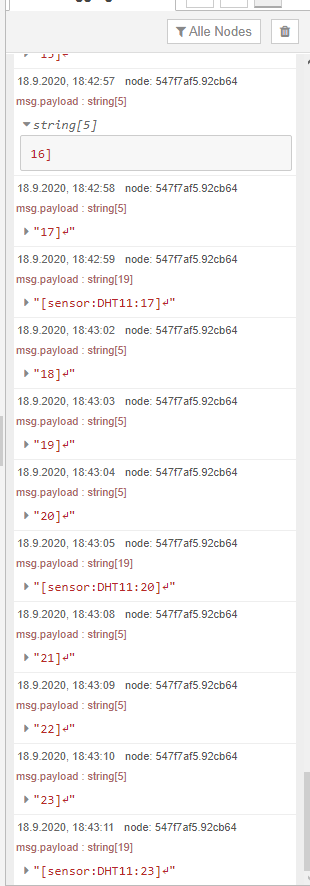
This is what the Arduino SerialOutput looks like in NoteRed
( using the Rewritten ArduPorts Sketch)
:
-
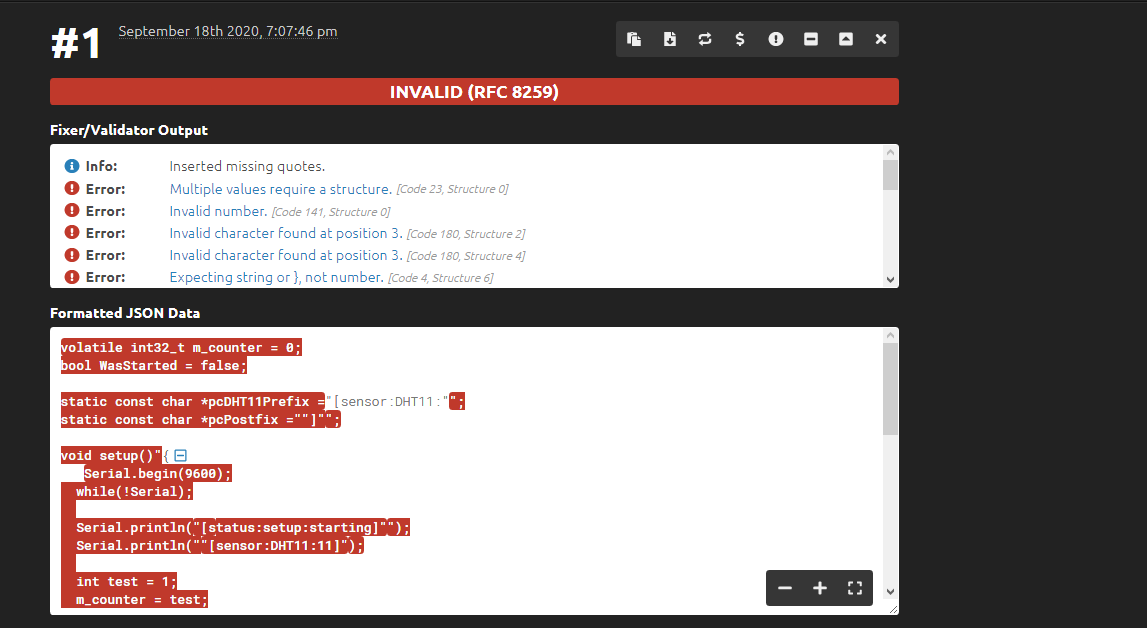
@Shinji0912 use one of the online json validators to check your messages
-
-
@Shinji0912 only what u send(println) not the whole sketch
json, all text strings must be in double quotes
Serial.print(pcMQ2Prefix);
Serial.print(m_counter);
Serial.println(pcPostfix);
sample shows sketch sending sensor info -
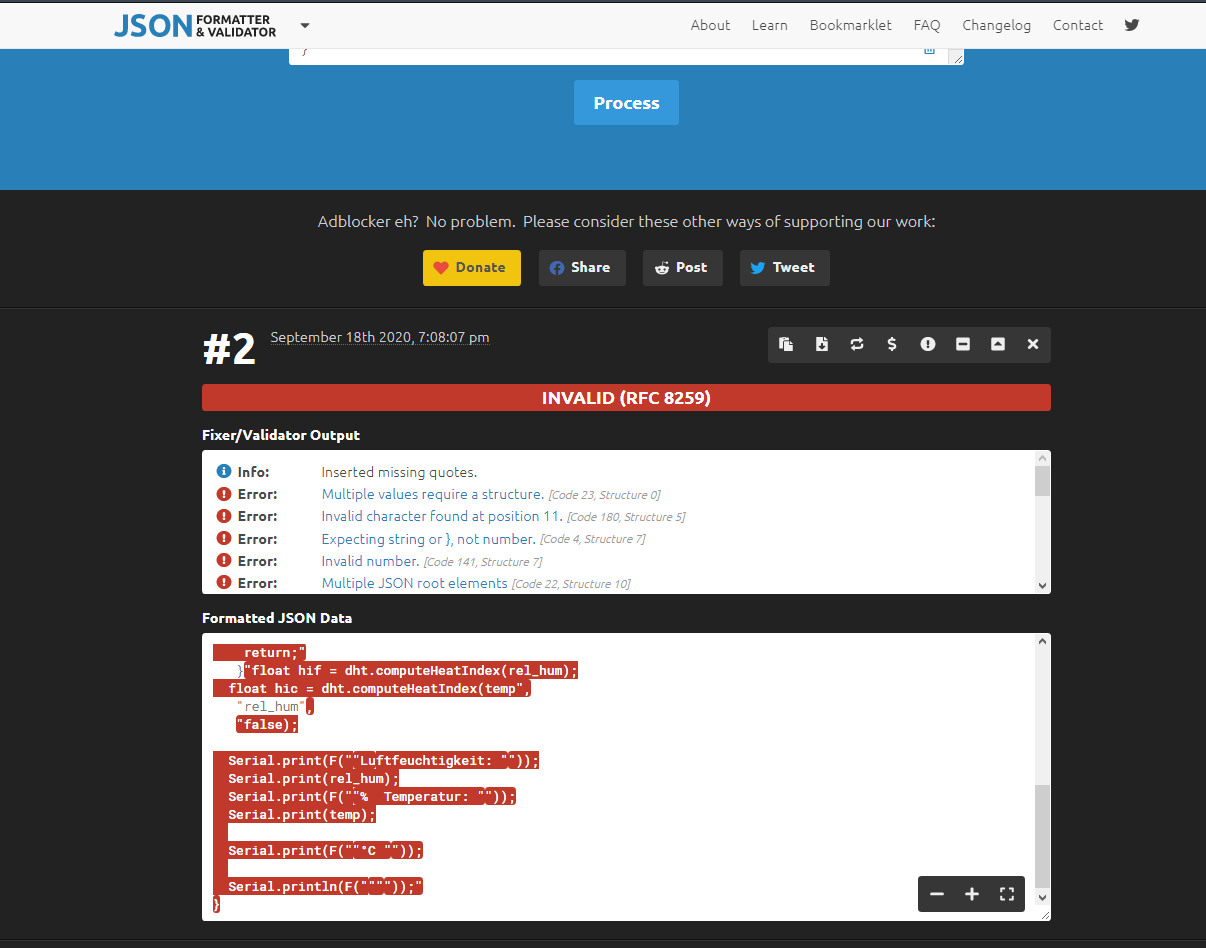
@sdetweil U mean like this?
{
   Serial.println("pcPostfix)"
}{
   "Serial.println(""[status:setup:starting]"")"
}{
   "Serial.println(""[sensor:DHT11:11]"")"
}{
   "Serial.println(""[status:setup:failed]"")"
}
Hello! It looks like you're interested in this conversation, but you don't have an account yet.
Getting fed up of having to scroll through the same posts each visit? When you register for an account, you'll always come back to exactly where you were before, and choose to be notified of new replies (either via email, or push notification). You'll also be able to save bookmarks and upvote posts to show your appreciation to other community members.
With your input, this post could be even better 💗
Register Login