Read the statement by Michael Teeuw here.
Different calendars result in different layouts!?
-
Hi there,
I’m not shure if this is really a css topic, so feel free to move it to a better place if neccessary.
Just running my first complete build up new MM as my wife wished. :-) (picture will follow)
Now try some tests with the setup of selected modules. I included the default calendar module in different regions with different calendars. The problem is, their layouts differ and I don’t understand why.
I build up an example setup to show the problem.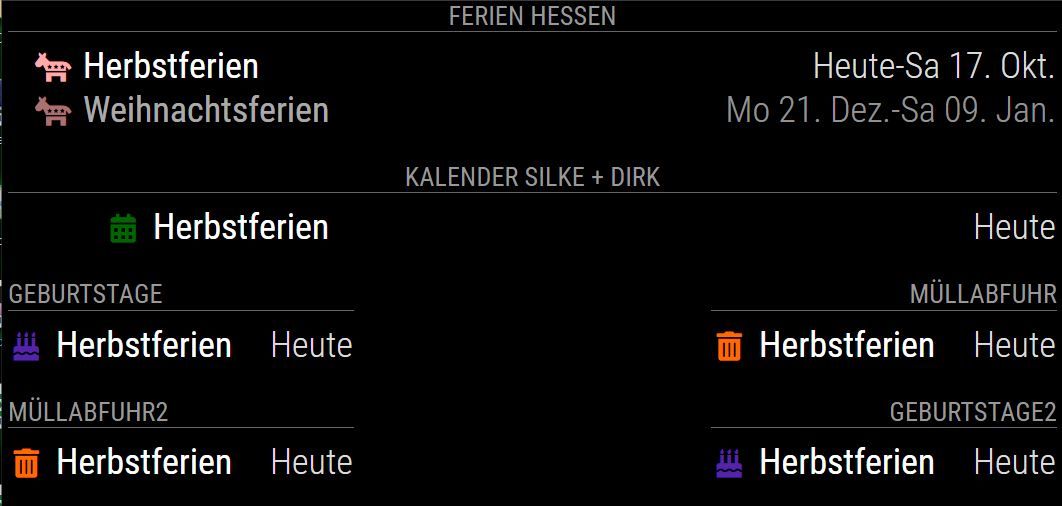
You see the two upper calendars have different layouts, but I think, their config ist the same, isn’t it?Here the config for the scrennshot
var config = {
	timeFormat: 24,

	modules: [

/**********************
 *	TOP_BAR
 **********************/
		{
			module: "calendar",
			header: "Ferien Hessen",
			position: "top_bar",
			config: {
				tableClass: "medium",
				colored: true,
				fetchInterval: 60000,
				fullDayEventDateFormat: "dd DD. MMM",
				timeFormat: "absolute",
				urgency: 0,
				getRelative: 0,
				maximumEntries: 2,
				maxTitleLength: 50,
				showEnd: true,
				dateEndFormat: "dd DD. MMM",
				calendars: [
					{
						// Ferien Hessen 2020
						symbol: "democrat",
						color: "#ffaaaa",
						url: "https://www.ferienwiki.de/exports/ferien/2020/de/hessen"
					},
				]
			}
		},
		{
			module: "calendar",
			header: "Kalender Silke + Dirk",
			position: "top_bar",
			config: {
				tableClass: "medium",
				colored: true,
				coloredSymbolOnly: true,
				fetchInterval: 60000,
				dateFormat: "dd DD. MMM HH:mm",
				fullDayEventDateFormat: "dd DD. MMM",
				timeFormat: "absolute",
				urgency: 0,
				getRelative: 0,
				maximumNumberOfDays: 30,
				maximumEntries: 2,
				maxTitleLength: 50,
				excludedEvents: [
					"Geb.",
					"Geburtstag ",
					" Geburtstag"
//					{filterBy: "Geb."},
				],
				calendars: [
					{
						// Dirk
						symbol: "calendar",
						color: "#006600",
						url: "https://www.ferienwiki.de/exports/ferien/2020/de/hessen"
					},
				]
			}
		},

/**********************
 *	TOP_LEFT
 **********************/
		{
			module: "calendar",
			header: "Geburtstage",
			position: "top_left",
			config: {
				tableClass: "medium",
				colored: true,
				coloredSymbolOnly: true,
				fetchInterval: 60000,
				nextDaysRelative: false,
				fullDayEventDateFormat: "ddd DD. MMM",
				timeFormat: "absolute",
				urgency: 0,
				getRelative: 0,
				maximumEntries: 2,
				maximumNumberOfDays: 30,
				calendars: [
					{
						// Geburtstage
						symbol: "birthday-cake",
						color: "#5522aa",
						url: "https://www.ferienwiki.de/exports/ferien/2020/de/hessen",
					},
				]
			}
		},
		{
			module: "calendar",
			header: "Müllabfuhr2",
			position: "top_left",
			config: {
				tableClass: "medium",
				colored: true,
				fetchInterval: 60000,
				nextDaysRelative: false,
				fullDayEventDateFormat: "ddd DD. MMM",
				timeFormat: "absolute",
				urgency: 0,
				getRelative: 0,
				maximumNumberOfDays: 8,
				maximumEntries: 2,
				fadePoint: 0.3,
				calendars: [
					{
						// Müllabfuhr
						symbol: "trash-alt",
						color: "#FF6A00",
						url: "https://www.ferienwiki.de/exports/ferien/2020/de/hessen",
					},
				]
			}
		},

/**********************
 *	TOP_RIGHT
 **********************/
		{
			module: "calendar",
			header: "Müllabfuhr",
			position: "top_right",
			config: {
				tableClass: "medium",
				colored: true,
				fetchInterval: 60000,
				nextDaysRelative: false,
				fullDayEventDateFormat: "ddd DD. MMM",
				timeFormat: "absolute",
				urgency: 0,
				getRelative: 0,
				maximumNumberOfDays: 8,
				maximumEntries: 2,
				fadePoint: 0.3,
				calendars: [
					{
						// Müllabfuhr
						symbol: "trash-alt",
						color: "#FF6A00",
						url: "https://www.ferienwiki.de/exports/ferien/2020/de/hessen",
					},
				]
			}
		},
		{
			module: "calendar",
			header: "Geburtstage2",
			position: "top_right",
			config: {
				tableClass: "medium",
				colored: true,
				coloredSymbolOnly: true,
				fetchInterval: 60000,
				nextDaysRelative: false,
				fullDayEventDateFormat: "ddd DD. MMM",
				timeFormat: "absolute",
				urgency: 0,
				getRelative: 0,
				maximumEntries: 2,
				maximumNumberOfDays: 30,
				calendars: [
					{
						// Geburtstage
						symbol: "birthday-cake",
						color: "#5522aa",
						url: "https://www.ferienwiki.de/exports/ferien/2020/de/hessen",
					},
				]
			}
		},
	]
};
Is the config responsible for this layout? Or the calendar connected?
For all calendars I Wish the icon to be aligned left, followed by the text and the date (the third column) aligned right the same way.
How do I get this done?
Every help is welcome.Regards
-
@wmx remember that top bar is all the way across the screen, while left and right are not
-
@wmx so you have two stacked, all the way across, title centered, content left/right aligned (in area)
.region.bar {
  width: 100%;
  text-align: center;
}
two stacked, title left text aligned , content left/right aligned (in area)
top-center is not used
and two stacked, title right text aligned, content left/right aligned (in area)
each calendar creates an HTML table
-
@sdetweil said in Different calendars result in different layouts!?:
.region.bar {
width: 100%;
text-align: center;
}If I add this css snippet to custom.css nothing changes!?
Is there a way to format each column in each calendar (table) with css?
How do I address one single calendar with css? -
@wmx I was showing that top bar goes all the way across 100%
that is the existing css -
@wmx I do not know how to target one calendar.
yes there are ways to target specific elements in specific spot in the dom tree. I have to search for it every time.
Hello! It looks like you're interested in this conversation, but you don't have an account yet.
Getting fed up of having to scroll through the same posts each visit? When you register for an account, you'll always come back to exactly where you were before, and choose to be notified of new replies (either via email, or push notification). You'll also be able to save bookmarks and upvote posts to show your appreciation to other community members.
With your input, this post could be even better 💗
Register Login