MagicMirror Forum
    • Recent
    • Tags
    • Unsolved
    • Solved
    • MagicMirror² Repository
    • Documentation
    • 3rd-Party-Modules
    • Donate
    • Discord
    • Register
    • Login
    A New Chapter for MagicMirror: The Community Takes the Lead
    Read the statement by Michael Teeuw here.

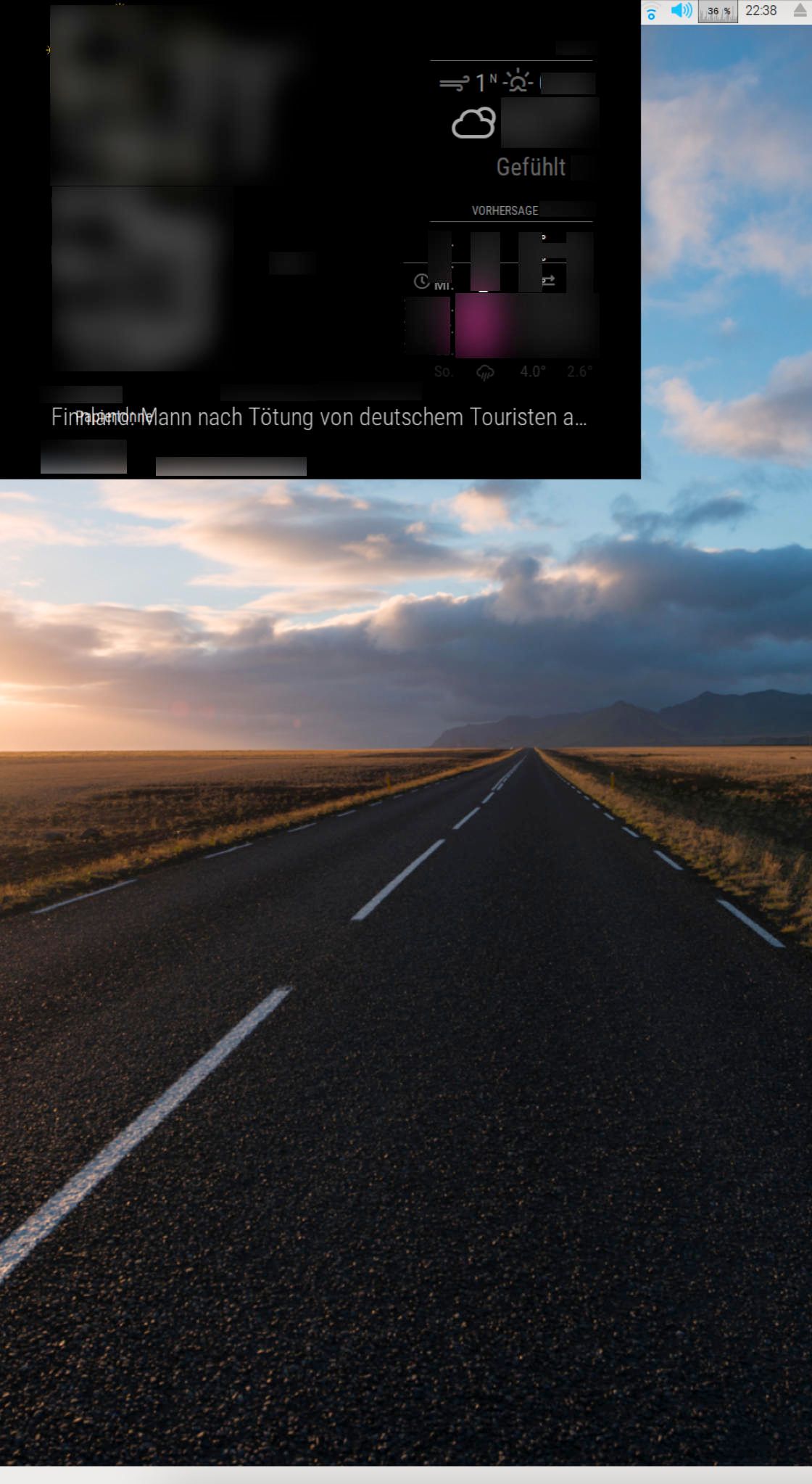
    MagicMirror runs in small window after update

    Scheduled Pinned Locked Moved Troubleshooting
    17 Posts 2 Posters 4.8k Views 2 Watching
    Loading More Posts
    • Oldest to Newest
    • Newest to Oldest
    • Most Votes
    Reply
    • Reply as topic
    Log in to reply
    This topic has been deleted. Only users with topic management privileges can see it.
    • M Offline
      maxheartrate @sdetweil
      last edited by

      @sdetweil Hi Sam, CTRL + “-” decreases the size of the modules in the window. However, the Magic Mirror window’s overall size remains the same. I would like to show it full screen again so that I don’t see the desktop.
      Best, Max

      1 Reply Last reply Reply Quote 0
      • M Offline
        maxheartrate
        last edited by

        I just tried to start MM with npm start from the MagicMirror directory. Didn’t work.

        This is the message I receive:

        magicmirror@2.13.0 start /home/pi/MagicMirror
        DISPLAY=“${DISPLAY:=:0}” ./node_modules/.bin/electron js/electron.js

        1 Reply Last reply Reply Quote 0
        • M Offline
          maxheartrate
          last edited by maxheartrate

          I was able to almost fix my problem using

          electronOptions : { width: 1080, height: 1920 }
          

          However, I have a thin line from the desktop at the right and bottom edge shining through. The electron window does not cover the whole screen. I tried to use fullscreen: true and kiosk: trueand set the width and height to values higher than my display size but it didn’t change anything. Interesting though, when I set x: 1 in electronOptions to offset the window by a pixel, the thin line will disappear on the right side but appears on the left.

          Any ideas how to fix this? @sdetweil

          S 1 Reply Last reply Reply Quote 0
          • S Offline
            sdetweil @maxheartrate
            last edited by

            @maxheartrate x:0, and width: add one

            Sam

            How to add modules

            learning how to use browser developers window for css changes

            M 1 Reply Last reply Reply Quote 0
            • M Offline
              maxheartrate @sdetweil
              last edited by

              @sdetweil Thank you for your advise, Sam.
              This is what I already tried - and just tried again:

              electronOptions:{ x:0, width: 1081, height: 1921, fullscreen: false, kiosk: true }

              The problem remains the same. I also added more than one pixel to width and height but it wouldn’t change the result.

              S 1 Reply Last reply Reply Quote 0
              • S Offline
                sdetweil @maxheartrate
                last edited by

                @maxheartrate kiosk sets full-screen to true

                Sam

                How to add modules

                learning how to use browser developers window for css changes

                M 1 Reply Last reply Reply Quote 0
                • M Offline
                  maxheartrate @sdetweil
                  last edited by

                  @sdetweil O.k. Thank you for the information. I still wonder why the Magic Mirror does not cover the full desktop. Before the latest update, I did not see anything but the Mirror window.

                  S 1 Reply Last reply Reply Quote 0
                  • S Offline
                    sdetweil @maxheartrate
                    last edited by

                    @maxheartrate good question. Can u tell me the version.

                    grep version ~/MagicMirror/package.json

                    The develop branch is a big jump on electron version…

                    Sam

                    How to add modules

                    learning how to use browser developers window for css changes

                    M 1 Reply Last reply Reply Quote 0
                    • M Offline
                      maxheartrate @sdetweil
                      last edited by

                      @sdetweil said in MagicMirror runs in small window after update:

                      grep version ~/MagicMirror/package.json

                      Hi Sam,

                      it’s "version": "2.13.0".

                      Best, Max

                      1 Reply Last reply Reply Quote 0
                      • M Offline
                        maxheartrate
                        last edited by

                        Unfortunately, I wasn’t able to fix my problem yet. Does anyone have an idea how to get the full fullscreen?
                        @sdetweil or someone else? Advise would be highly appreciated. Best, Max

                        S 1 Reply Last reply Reply Quote 0
                        • S Offline
                          sdetweil @maxheartrate
                          last edited by

                          @maxheartrate i am away from my computer for another week. So can’t try things.

                          Sam

                          How to add modules

                          learning how to use browser developers window for css changes

                          S 1 Reply Last reply Reply Quote 0
                          • S Offline
                            sdetweil @sdetweil
                            last edited by sdetweil

                            @sdetweil there is a folder where electron settings are saved… off your home folder… dont remember name … starts with a .

                            ~/.config maybe

                            Sam

                            How to add modules

                            learning how to use browser developers window for css changes

                            M 1 Reply Last reply Reply Quote 0
                            • M Offline
                              maxheartrate @sdetweil
                              last edited by

                              @sdetweil Sorry. I didn’t mean to push you. I just checked my home directory. There is no config folder. I don’t really see any other folder that looks like one.

                              S 1 Reply Last reply Reply Quote 0
                              • S Offline
                                sdetweil @maxheartrate
                                last edited by sdetweil

                                @maxheartrate note it starts w a dot
                                do

                                ls ~/* -laF
                                

                                Sam

                                How to add modules

                                learning how to use browser developers window for css changes

                                M 1 Reply Last reply Reply Quote 0
                                • M Offline
                                  maxheartrate @sdetweil
                                  last edited by

                                  @sdetweil My .folders are

                                  .cirlceci
                                  .git
                                  .github
                                  

                                  No .config folder.

                                  1 Reply Last reply Reply Quote 0

                                  Hello! It looks like you're interested in this conversation, but you don't have an account yet.

                                  Getting fed up of having to scroll through the same posts each visit? When you register for an account, you'll always come back to exactly where you were before, and choose to be notified of new replies (either via email, or push notification). You'll also be able to save bookmarks and upvote posts to show your appreciation to other community members.

                                  With your input, this post could be even better 💗

                                  Register Login

                                  • 1 / 1
                                  • First post
                                    Last post
                                  Enjoying MagicMirror? Please consider a donation!
                                  MagicMirror created by Michael Teeuw.
                                  Forum managed by Sam, technical setup by Karsten.
                                  This forum is using NodeBB as its core | Contributors
                                  Contact | Privacy Policy