MagicMirror Forum
    • Recent
    • Tags
    • Unsolved
    • Solved
    • MagicMirror² Repository
    • Documentation
    • 3rd-Party-Modules
    • Donate
    • Discord
    • Register
    • Login
    A New Chapter for MagicMirror: The Community Takes the Lead
    Read the statement by Michael Teeuw here.

    Complete Walkthrough - Install MagicMirror on a PC - Windows 7/10

    Scheduled Pinned Locked Moved Troubleshooting
    324 Posts 55 Posters 783.2k Views 59 Watching
    Loading More Posts
    • Oldest to Newest
    • Newest to Oldest
    • Most Votes
    Reply
    • Reply as topic
    Log in to reply
    This topic has been deleted. Only users with topic management privileges can see it.
    • earnestrichardsE Offline
      earnestrichards @djkj84
      last edited by earnestrichards

      @djkj84 I had this same problem on Win7.

      I searched the forum and found this post by @sdetweil…

      fix

      1 Reply Last reply Reply Quote 0
      • U Offline
        Uwe Kretsen @Mykle1
        last edited by

        @Mykle1 said in Complete Walkthrough - Install MagicMirror on a PC - Windows 7/10:

        Had enough? Lets run that MagicMirror, NOW!

        Hallo there,
        if you will find some free time to help :
        I tried a few times to process the whole procedure of starting new MM software on PC - I am not even a newbie so it is really hard to say what I am doing wrong.
        see pic - does it say to you anything? 18f689c8-c4ec-4f15-9558-c554ee194971-image.png
        it seems I will have to give up - programming is not for all ;-)
        BR

        S 1 Reply Last reply Reply Quote 0
        • S Offline
          sdetweil @Uwe Kretsen
          last edited by sdetweil

          @Uwe-Kretsen do not install under mingw, just open a command prompt/ powershell prompt and do the git clone/npm install

          u need git of course and node/npm (google how to install)

          then u need to do some more steps as the setup is for linux

          cd MagicMirror
          cd vendor
          npm install
          cd ..
          cd fonts
          npm install
          cd ..
          

          then edit package.json and change the start line
          from

          		"start": "DISPLAY=\"${DISPLAY:=:0}\" ./node_modules/.bin/electron js/electron.js",
          

          to

          		"start": "node_modules/.bin/electron js/electron.js",
          

          then npm start works as expected

          also, you must manually copy the MagicMirror/config/config.js.sample to the initial config.js
          also create the empty MagicMirror/css/custom.css

          Sam

          How to add modules

          learning how to use browser developers window for css changes

          U B A M 4 Replies Last reply Reply Quote 2
          • U Offline
            Uwe Kretsen @sdetweil
            last edited by

            @sdetweil Dear Sam, thank you for the help - it start to work. I am really grateful fro support.
            Now I will spend some days or weeks :-) to find out how to add /remove extra modules. hope to do my MagicMirror project to the end.
            once again thank you
            and stay healthy
            BR Uwe

            S 1 Reply Last reply Reply Quote 0
            • S Offline
              sdetweil @Uwe Kretsen
              last edited by

              @Uwe-Kretsen see the links in my signature , they will help you

              Sam

              How to add modules

              learning how to use browser developers window for css changes

              1 Reply Last reply Reply Quote 0
              • B Offline
                bhumin
                last edited by

                @Mykle1 said in Complete Walkthrough - Install MagicMirror on a PC - Windows 7/10:

                git clone https://github.com/MichMich/MagicMirror.git

                following error arrives when start

                magicmirror@2.13.0 start C:\Users\bhumi\MagicMirror
                DISPLAY=“${DISPLAY:=:0}” ./node_modules/.bin/electron js/electron.js

                ‘DISPLAY’ is not recognized as an internal or external command,
                operable program or batch file.
                npm ERR! code ELIFECYCLE
                npm ERR! errno 1
                npm ERR! magicmirror@2.13.0 start: DISPLAY="${DISPLAY:=:0}" ./node_modules/.bin/electron js/electron.js
                npm ERR! Exit status 1
                npm ERR!
                npm ERR! Failed at the magicmirror@2.13.0 start script.
                npm ERR! This is probably not a problem with npm. There is likely additional logging output above.

                npm ERR! A complete log of this run can be found in:
                npm ERR! C:\Users\bhumi\AppData\Roaming\npm-cache_logs\2020-12-16T05_04_47_316Z-debug.log

                1 Reply Last reply Reply Quote 0
                • B Offline
                  bhumin @sdetweil
                  last edited by

                  @sdetweil thanks man

                  1 Reply Last reply Reply Quote 0
                  • H Offline
                    Humez
                    last edited by

                    Thank you for your tutorial! I’m a absolute beginner. I followed the steps above but when I try to start magicmirror I get the below message:
                    magicmirror@2.14.0 start C:\Users\1234\magicmirror

                    DISPLAY=“${DISPLAY:=:0}” ./node_modules/.bin/electron js/electron.js

                    ‘DISPLAY’ is not recognized as an internal or external command,
                    operable program or batch file.
                    npm ERR! code ELIFECYCLE
                    npm ERR! errno 1
                    npm ERR! magicmirror@2.14.0 start: DISPLAY="${DISPLAY:=:0}" ./node_modules/.bin/electron js/electron.js
                    npm ERR! Exit status 1
                    npm ERR!
                    npm ERR! Failed at the magicmirror@2.14.0 start script.
                    npm ERR! This is probably not a problem with npm. There is likely additional logging output above.

                    S 1 Reply Last reply Reply Quote 0
                    • S Offline
                      sdetweil @Humez
                      last edited by

                      @humez read and follow the steps here

                      https://forum.magicmirror.builders/topic/4089/complete-walkthrough-install-magicmirror-on-a-pc-windows-7-10/141?_=1612997713585

                      u have not edited package.json as required

                      Sam

                      How to add modules

                      learning how to use browser developers window for css changes

                      1 Reply Last reply Reply Quote 1
                      • K Offline
                        kithaam
                        last edited by

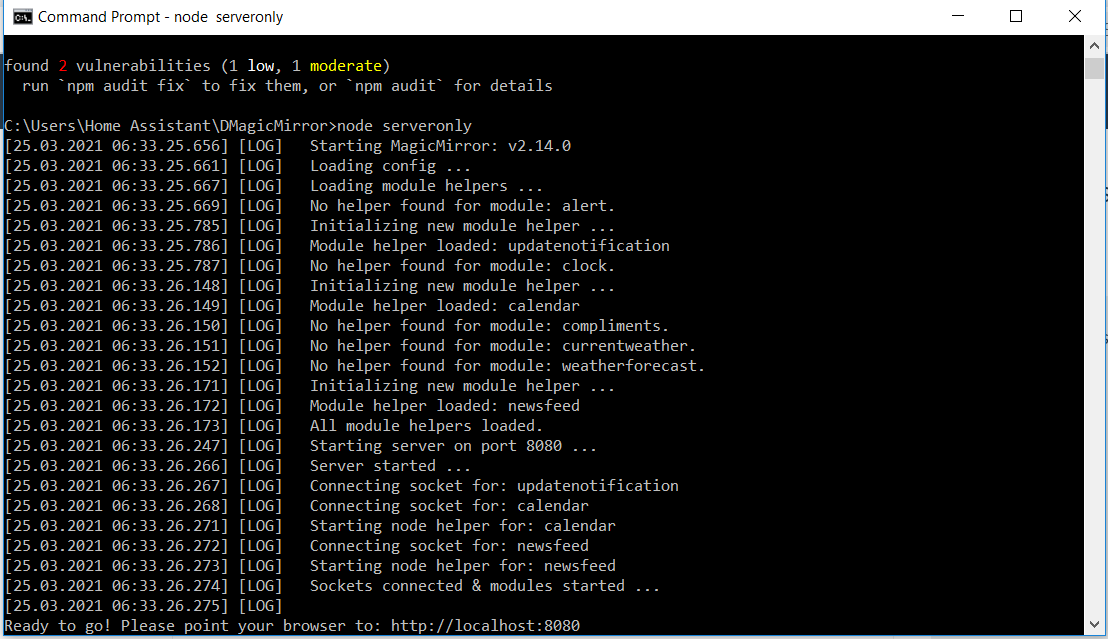
                        Hi Please help install Magic Mirror on my PC please assist with below

                        http://localhost:8080 is just a black screen No date and Time on

                        !f250c354-bbc7-411e-8653-0772e8acc696-image.png

                        S 1 Reply Last reply Reply Quote 0
                        • S Offline
                          sdetweil @kithaam
                          last edited by

                          @kithaam yes, some missing steps.

                          do

                          cd MagicMirror
                          cd vendor
                          npm install
                          cd ..
                          cd fonts
                          npm install
                          cd ..
                          

                          restart mm

                          Sam

                          How to add modules

                          learning how to use browser developers window for css changes

                          K G 3 Replies Last reply Reply Quote 0
                          • K Offline
                            kithaam @sdetweil
                            last edited by

                            @sdetweil Thank you its working

                            1 Reply Last reply Reply Quote 0
                            • K Offline
                              kithaam @sdetweil
                              last edited by

                              @sdetweil Hi where do i go and change the Time and date? im new to this

                              1 Reply Last reply Reply Quote 0
                              • G Offline
                                goEasy @sdetweil
                                last edited by

                                @sdetweil hello, i have done as you mentioned, but i have this trouble. please Help

                                cd MagicMirror
                                cd vendor
                                npm install
                                
                                1 package is looking for funding
                                  run `npm fund` for details
                                
                                found 0 vulnerabilities
                                
                                $ npm fund
                                magicmirror-vendors
                                `-- https://github.com/sponsors/jonschlinkert
                                  `-- picomatch@2.2.2
                                
                                S 1 Reply Last reply Reply Quote 0
                                • S Offline
                                  sdetweil @goEasy
                                  last edited by

                                  @goeasy no trouble… warnings… ignore

                                  Sam

                                  How to add modules

                                  learning how to use browser developers window for css changes

                                  G 1 Reply Last reply Reply Quote 0
                                  • G Offline
                                    goEasy @sdetweil
                                    last edited by

                                    @sdetweil you are a legend… btw all i had to do was

                                    exit 
                                    

                                    then start mm again :grinning_face_with_sweat:

                                    1 Reply Last reply Reply Quote 0
                                    • G Offline
                                      goEasy @Mykle1
                                      last edited by

                                      @mykle1 Please Help, i am running into this ERROR…

                                      Cowplain@DESKTOP-4IAPDRU MINGW64 ~
                                      $ cd magicmirror
                                      
                                      Cowplain@DESKTOP-4IAPDRU MINGW64 ~/magicmirror (master)
                                      $ npm start
                                      
                                      > magicmirror@2.14.0 start
                                      > ./node_modules/.bin/electron js/electron.js
                                      
                                      '.' is not recognized as an internal or external command,
                                      operable program or batch file.
                                      
                                      
                                      S 1 Reply Last reply Reply Quote 0
                                      • S Offline
                                        sdetweil @goEasy
                                        last edited by

                                        @goeasy do NOT install under MINGW64, just straight under windows

                                        Sam

                                        How to add modules

                                        learning how to use browser developers window for css changes

                                        G 1 Reply Last reply Reply Quote 0
                                        • G Offline
                                          goEasy @sdetweil
                                          last edited by

                                          @sdetweil Hey, thank you for the reply…

                                          i am new to this MM and coding, at one point everything was working then i cant remember what happened.

                                          i think is something to do with the Electron settings…

                                          Opening with CMD

                                          C:\Users\Cowplain\MagicMirror>npm start
                                          
                                          > magicmirror@2.14.0 start
                                          > ./node_modules/.bin/electron js/electron.js
                                          
                                          '.' is not recognized as an internal or external command,
                                          operable program or batch file.
                                          
                                          C:\Users\Cowplain\MagicMirror>
                                          

                                          Opening with Git Bash

                                          Cowplain@DESKTOP-4IAPDRU MINGW64 ~/magicmirror (master)
                                          $ npm start
                                          '.' is not recognized as an internal or external command,
                                          operable program or batch file.


                                          Please help

                                          S 1 Reply Last reply Reply Quote 0
                                          • S Offline
                                            sdetweil @goEasy
                                            last edited by

                                            @goeasy on windows, its support to say

                                            node_modules/.bin/electron js/electron.js

                                            take off the ./

                                            windows doesn’t use that

                                            Sam

                                            How to add modules

                                            learning how to use browser developers window for css changes

                                            G 1 Reply Last reply Reply Quote 0

                                            Hello! It looks like you're interested in this conversation, but you don't have an account yet.

                                            Getting fed up of having to scroll through the same posts each visit? When you register for an account, you'll always come back to exactly where you were before, and choose to be notified of new replies (either via email, or push notification). You'll also be able to save bookmarks and upvote posts to show your appreciation to other community members.

                                            With your input, this post could be even better 💗

                                            Register Login

                                            • 1
                                            • 2
                                            • 6
                                            • 7
                                            • 8
                                            • 9
                                            • 10
                                            • 16
                                            • 17
                                            • 8 / 17
                                            • First post
                                              Last post
                                            Enjoying MagicMirror? Please consider a donation!
                                            MagicMirror created by Michael Teeuw.
                                            Forum managed by Sam, technical setup by Karsten.
                                            This forum is using NodeBB as its core | Contributors
                                            Contact | Privacy Policy