Read the statement by Michael Teeuw here.
MMM-DumpsterDay
-
Hey guys,
I finally found some time to review and practically remaster whole module. Now it’s finally working correctly and the console logging is improved and more readable.Please let me know if you still encounter some issues.
Stay safe in these difficult times!
-
@DeanoNoire The download link isn’t in the original post anymore?
-
@robertybob originaly there was a github card for the repository, but it seems the card is not supported anymore.
And as I’m not able to edit the original post, here is the link:
https://github.com/DeanoNoire/MMM-DumpsterDay -
Hello how can i reduce the space between the header and the image? as you can see from the screenshot
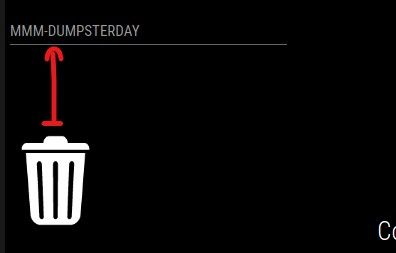 Thank you very much
 -
Hello @blackeaglece ,
I do not use the headers, but I presume it’s always on the top of the module wrapper.
So first thing I’d try is decreasing the height value of trashcan_wrapper.
This is done in MMM-DumpsterDay.css file in the module folder.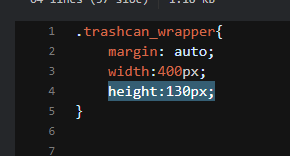
Please let me know if you managed moving it by these steps.
Deano
-
Hi, is there any way to add a option for a 4th icon ? We have 3 different types of recycling (glass, cardboard and plastic), as well as the usual rubbish/trash, and of course, they all come at different times ! :)
-
Hey @Bob ,
sure thing. Any tips for cardboard and glass bin image and color?
This brings me to an idea of making the colors and images parameterizable.Deano
-
@DeanoNoire Our colours are blue (glass), grey (cardboard), green (plastic) and black (trash/rubbish), but I suspect if you compare local areas, they’ll all have different colour schemes. I’ve even seen places where the bins were all the same, they just had different logos on them for the relevant product.
As you say, either paramatize them, or even just reference the icons by name/type, and let people change the image behind them to their colour of choice ?
-
Just when I thought there were a standard set of colours, I find this…
https://en.wikipedia.org/wiki/Recycling_bin
Looks like the most sensible thing is to simply ensure the recycling symbol is on the icon, and then give people the option of different colours.
-
Cool… I will look into it as soon as I dont have that much work :)
-
Hi all, I’m having trouble getting the exact icon of the garbage collection to display with the chosen day. Example, today there is no collection but it shows me 3 icons that should not display. Also, from us the collection of organic materials occurs 3 times a week how could I put more dates for the same collection? I attach links for my icons and the code of both MMM-Dumpster and config.js
Glass, Paper, Organic, Plastic and Other Garbage
Thank you
-
@blackeaglece does anyone know how to fix date display error in images?
-
@blackeaglece I’m quite certain you have to create functions and instances for every landscape reccuring date. Act like second and third landscape instances are different kind of trash with the same image.
-
@deanonoire said in MMM-DumpsterDay:
@blackeaglece I’m quite certain you have to create functions and instances for every landscape reccuring date. Act like second and third landscape instances are different kind of trash with the same image.
Hi, but it doesn’t display me landscape but glass or organic. I created a new instance called landscape1 but it still shows me all the images . This is the code of config.js. How can I do?
{
	module:"MMM-DumpsterDay",
	position:"top_left",
	header: "Raccola Differenziata",

	config: {
		refreshInterval: 18000000, // Default: 18000000 = 5 hours
		pulse: false, 			   // Default: true - Makes the module pulsating

	enableBasic: true, 				// Abilita indifferenziata trashcan
		basicStartDate: "09.04.2021", 		// The first dumpster day (Always use 2 digit dates (01 instead of 1))
		basicDateDiff_1: 7,			// Trashday reoccurance - Default: 14 (every 14 days)
		basicNotifyDayBefore: true,		//Default: true - If you want the notification to appear also the day before the dumpster day
	enablePaper: true,			// Abilita bidoncino carta bianco
		paperStartDate: "06.04.2021",
		paperDateDiff_1: 7,
		paperNotifyDayBefore: true,
	enablePlastic: true,			// Same values as basic but for Plastic
		plasticStartDate: "13.04.2021",
		plasticDateDiff_1: 7,
		plasticNotifyDayBefore: true,
	enableVetro: true,			// Same values as basic but for Plastic
		vetroStartDate: "08.04.2021",
		vetroDateDiff_1: 7,
		vetroNotifyDayBefore: true,
	enableLandscape: true,			// Abilita bidoncino umido
		landscapeStartDate: "04.04.2021",
		landscapeDateDiff_1: 7,
		landscapeNotifyDayBefore: true,
	enableLandscape1: true,			// Abilita bidoncino umido
		landscape1StartDate: "06.04.2021",
		landscape1DateDiff_1: 7,
		landscape1NotifyDayBefore: true,
}
},
and this is how it is displayed
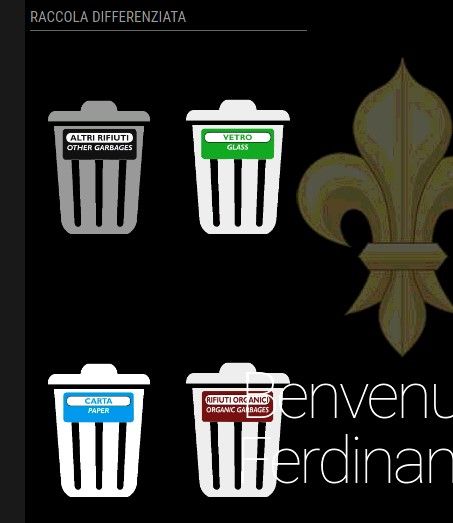
-
@blackeaglece I see. What is in the log? There should be evaluations if its trashday or not.
Also can you inspect the elements if .non_today class is present on the divs? If yes, check if the css file is loaded properly, as it should be hiding the images when it’s not dumpster day.https://github.com/DeanoNoire/MMM-DumpsterDay/blob/master/MMM-DumpsterDay.css
-
@deanonoire Ok now it’s all ok i was wrong, some lines of css code had disappeared
Thank you very much -
@blackeaglece Glad I could help ;) stay safe ;)
-
@deanonoire said in MMM-DumpsterDay:
@blackeaglece Glad I could help ;) stay safe ;)
Thank you :ok_hand:
-
@deanonoire How do I create instances and functions? Also, to make them work, do I have to create different images even if they serve the same thing? e.g. landscape.png landscape-1.png and landscape-2.png, with relative css code?
thank you very much -
Hi Deanonoire,
is it possible to show the can only the day before collecting? In Germany we put our trash cans outside the day before. So the notification on the collection day is not nessesary?
Greetings
Hello! It looks like you're interested in this conversation, but you don't have an account yet.
Getting fed up of having to scroll through the same posts each visit? When you register for an account, you'll always come back to exactly where you were before, and choose to be notified of new replies (either via email, or push notification). You'll also be able to save bookmarks and upvote posts to show your appreciation to other community members.
With your input, this post could be even better 💗
Register Login