Read the statement by Michael Teeuw here.
calendar shading
-
Hi guys,
could you please help me out with the settings of calendar module:
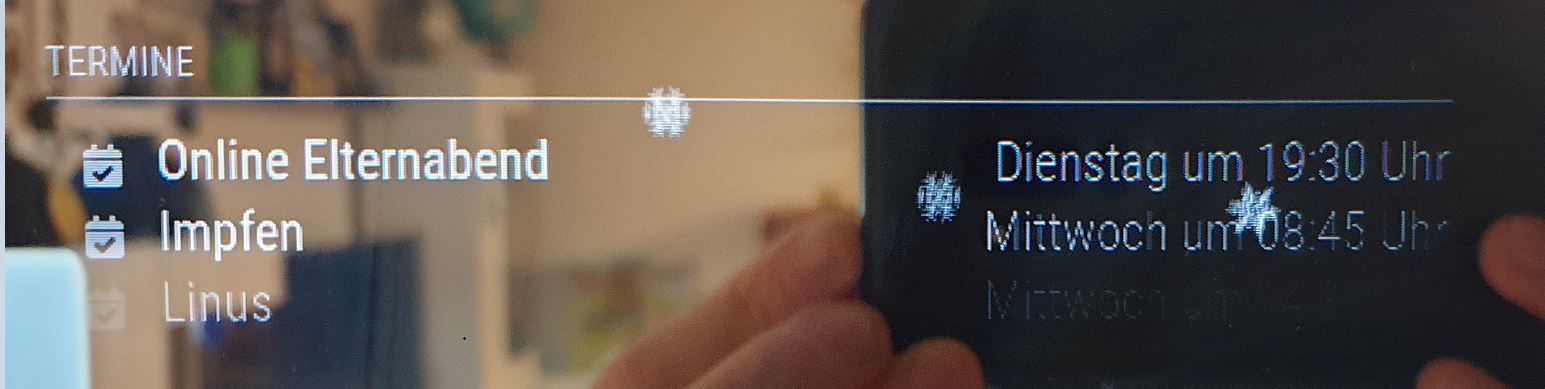
The color of event name is in strong white. Otherside the color of the event time (date) is shaded.
I want both in strong white.
How is the command to unify both with same visualization?Hope you know what i mean. Take a look on this pic.
-
@sceetch , hi, open “modules” folder, open “MMM-MyCalendar” folder and “MMM-MyCalendar.css”. There you can change the font, color and size settings.
-
@george Sorry George but that’s not the appropriate way to do it.
Doing that you will mess things up as soon as you want to update the module.Every css-thing you want to change, you transfer to custom.css and make your changes there.
custom.css always overwrites entries in the module css files, so it takes precedence.Also I think the calendar module is meant here and not MMM-MyCalendar.
@Sceetch congrats to the vaccination :-).
Also, move into the modules/default/calendar folder, look into the calendar.css for any time entries. You will find:.calendar .time { padding-left: 30px; text-align: right; vertical-align: top; }Now edit custom.css and add
.calendar .time {

}
Every entry you make here adds to the above from calendar.css.
Try to play with this, e.g. by putting infont-wight: bold

Hello! It looks like you're interested in this conversation, but you don't have an account yet.
Getting fed up of having to scroll through the same posts each visit? When you register for an account, you'll always come back to exactly where you were before, and choose to be notified of new replies (either via email, or push notification). You'll also be able to save bookmarks and upvote posts to show your appreciation to other community members.
With your input, this post could be even better 💗
Register Login