Read the statement by Michael Teeuw here.
MMM-MyWastePickup date problem
-
@mymirror you are on the wrong node version
need 14 or preferably 16
the steps outlined here might help
https://github.com/MichMich/MagicMirror/issues/2772my mm install script does that as part of mm install
-
@sdetweil
Hi Sam,i’ve downgraded node but without success. MMM-MyWastePickup is still “Loading”
pi@MM3:~ $ node -v
v16.13.2
pi@MM3:~ $ npm -v
8.1.2
The content (test entries) of my schedule_custom.csv:
Calendar,WeekStarting,GreenBin,Garbage,Recycling,YardWaste,ChristmasTree
Custom,02/07/22,0,1,0,0,0
Custom,02/08/22,0,0,1,0,0
Custom,03/02/22,0,1,0,0,0
Custom,03/09/22,0,1,0,0,0
Custom,03/10/22,1,0,0,0,0
Aus der Config.js:
                {
                        module: "MMM-MyWastePickup",
                        position: "top_center",
  //                    header: "Müllabfuhr",
                        header: "WASTE",
                        config: {
                                collectionCalendar: "Custom",
                                weeksToDisplay: "2"
                        }
                },
pm2 log:
pi@MM3:~/MagicMirror $ pm2 log
[TAILING] Tailing last 15 lines for [all] processes (change the value with --lines option)
/home/pi/.pm2/pm2.log last 15 lines:
PM2        | 2022-02-06T22:00:22: PM2 log: PM2 version          : 5.1.2
PM2        | 2022-02-06T22:00:22: PM2 log: Node.js version      : 17.4.0
PM2        | 2022-02-06T22:00:22: PM2 log: Current arch         : arm
PM2        | 2022-02-06T22:00:22: PM2 log: PM2 home             : /home/pi/.pm2
PM2        | 2022-02-06T22:00:22: PM2 log: PM2 PID file         : /home/pi/.pm2/pm2.pid
PM2        | 2022-02-06T22:00:22: PM2 log: RPC socket file      : /home/pi/.pm2/rpc.sock
PM2        | 2022-02-06T22:00:22: PM2 log: BUS socket file      : /home/pi/.pm2/pub.sock
PM2        | 2022-02-06T22:00:22: PM2 log: Application log path : /home/pi/.pm2/logs
PM2        | 2022-02-06T22:00:22: PM2 log: Worker Interval      : 30000
PM2        | 2022-02-06T22:00:22: PM2 log: Process dump file    : /home/pi/.pm2/dump.pm2
PM2        | 2022-02-06T22:00:22: PM2 log: Concurrent actions   : 2
PM2        | 2022-02-06T22:00:22: PM2 log: SIGTERM timeout      : 1600
PM2        | 2022-02-06T22:00:22: PM2 log: ===============================================================================
PM2        | 2022-02-06T22:00:22: PM2 log: App [mm:0] starting in -fork mode-
PM2        | 2022-02-06T22:00:22: PM2 log: App [mm:0] online

/home/pi/.pm2/logs/MagicMirror-error.log last 15 lines:
0|mm       |     at /home/pi/MagicMirror/modules/MMM-MyWastePickup/node_helper.js:36:9
0|mm       |     at FSReqCallback.readFileAfterClose [as oncomplete] (node:internal/fs/read_file_context:68:3)
0|mm       | [06.02.2022 21:37.41.484] [ERROR] MagicMirror will not quit, but it might be a good idea to check why this happened. Maybe no internet connection?
0|mm       | [06.02.2022 21:37.41.485] [ERROR] If you think this really is an issue, please open an issue on GitHub: https://github.com/MichMich/MagicMirror/issues
0|mm       | [1468:0100/000000.525475:ERROR:connection.cc(66)] X connection error received.
0|mm       | [07.02.2022 06:05.42.345] [WARN]  The module 'weatherforecast' is deprecated in favor of the 'weather'-module, please refer to the documentation for a migration path
0|mm       | [1440:0207/060546.132881:ERROR:viz_main_impl.cc(161)] Exiting GPU process due to errors during initialization
0|mm       | [1483:0207/060547.287531:ERROR:viz_main_impl.cc(161)] Exiting GPU process due to errors during initialization
0|mm       | [1502:0207/060550.327609:ERROR:sandbox_linux.cc(376)] InitializeSandbox() called with multiple threads in process gpu-process.
0|mm       | [07.02.2022 06:05.57.254] [ERROR] Whoops! There was an uncaught exception...
0|mm       | [07.02.2022 06:05.57.264] [ERROR] TypeError: parse is not a function
0|mm       |     at /home/pi/MagicMirror/modules/MMM-MyWastePickup/node_helper.js:36:9
0|mm       |     at FSReqCallback.readFileAfterClose [as oncomplete] (node:internal/fs/read_file_context:68:3)
0|mm       | [07.02.2022 06:05.57.266] [ERROR] MagicMirror will not quit, but it might be a good idea to check why this happened. Maybe no internet connection?
0|mm       | [07.02.2022 06:05.57.267] [ERROR] If you think this really is an issue, please open an issue on GitHub: https://github.com/MichMich/MagicMirror/issues

/home/pi/.pm2/logs/MagicMirror-out.log last 15 lines:
0|mm       | [07.02.2022 06:05.42.349] [LOG]   Starting node helper for: newsfeed
0|mm       | [07.02.2022 06:05.42.350] [LOG]   Sockets connected & modules started ...
0|mm       | [07.02.2022 06:05.43.840] [LOG]   Launching application.
0|mm       | [07.02.2022 06:05.56.764] [LOG]   Create new newsfetcher for url: https://rss.nytimes.com/services/xml/rss/nyt/HomePage.xml - Interval: 300000
0|mm       | [07.02.2022 06:05.56.895] [INFO]  Checking git for module: MMM-MyWastePickup
0|mm       | [07.02.2022 06:05.57.216] [INFO]  Checking git for module: MMM-Fuel
0|mm       | [07.02.2022 06:05.57.294] [INFO]  Checking git for module: MMM-OpenWeather24Hours
0|mm       | [07.02.2022 06:05.57.357] [INFO]  Checking git for module: default
0|mm       | [07.02.2022 06:05.58.648] [INFO]  Newsfeed-Fetcher: Broadcasting 61 items.
0|mm       | [07.02.2022 06:10.59.278] [INFO]  Newsfeed-Fetcher: Broadcasting 62 items.
0|mm       | [07.02.2022 06:15.59.864] [INFO]  Newsfeed-Fetcher: Broadcasting 62 items.
0|mm       | [07.02.2022 06:21.00.369] [INFO]  Newsfeed-Fetcher: Broadcasting 62 items.
0|mm       | [07.02.2022 06:26.00.875] [INFO]  Newsfeed-Fetcher: Broadcasting 62 items.
BR
Jens -
And the output of your script (test run):
pi@MM3:~/MagicMirror $ bash -c "$(curl -sL https://raw.githubusercontent.com/sdetweil/MagicMirror_scripts/master/upgrade-script.sh)" No LSB modules are available. doing test run = true, NO updates will be applied! update log will be in /home/pi/MagicMirror/installers/upgrade.log Check current Node installation ... Node currently installed. Checking version number. Minimum Node version: v16.9.1 Installed Node version: v16.13.2 No Node.js upgrade necessary. Check current NPM installation ... NPM currently installed. Checking version number. Minimum npm version: V7.11.2 Installed npm version: V8.1.2 No npm upgrade necessary. saving custom.css upgrading from version 2.18.0 to 2.18.0 fetching latest revisions there are 2 local files that are different than the master repo installers/mm.sh package.json do you want to save these files for later (Y/n)? Checking for modules with removed libraries require for request in module MMM-SystemStats not found in package.json package.json for module MMM-SystemStats bypass installing request for module MMM-SystemStats , doing test run processing dependency changes for active modules with package.json files processing for module MMM-MyWastePickup please wait ---------------------------------- skipped processing for MMM-MyWastePickup, doing test run processing complete for module MMM-MyWastePickup processing for module MMM-Fuel please wait ---------------------------------- skipped processing for MMM-Fuel, doing test run processing complete for module MMM-Fuel restoring custom.css test run, restoring files stashed pi@MM3:~/MagicMirror $ -
@mymirror said in MMM-MyWastePickup date problem:
! There was an uncaught exception…
0|mm | [07.02.2022 06:05.57.264] [ERROR] TypeError: parse is not a function
0|mm | at /home/pi/MagicMirror/modules/MMM-MyWastePickup/node_helper.js:36:9the module is having a problem, I would report that to the module GitHub page
-
@bravooscar said in MMM-MyWastePickup date problem:
MMM-MyWastePickup
Make sure that you only have one (1) empty line after the last in the schedule_custom.csv. If you have more empty lines it will break.
-
@mickecarlsson
Thanks for your hint.i actually had 2 blank lines at the end of the list.
But nothing changed, no matter if there were 2, 1 or no blank lines at the end of the list (not even after a restart of the MM or of the whole Pi.Jens
-
Hi there,
I recently installed this module and found no problems.
Hereby a screenshot from the last lines in the csv file.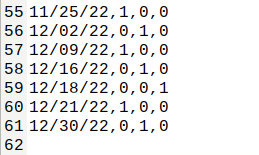
and a screenshot to show you that it works;
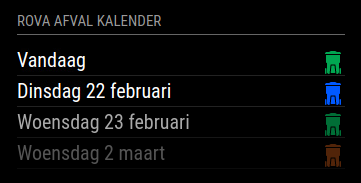
Best regards,
John -
@johndb
?? Without “Custom” in the beginning of every line?As described here https://github.com/jclarke0000/MMM-MyWastePickup, however, it should look like this:
Calendar,WeekStarting,GreenBin,Garbage,Recycling,YardWaste,ChristmasTree
Custom,03/07/18,1,0,1,0,0
Custom,03/14/18,1,1,1,0,0
Custom,03/21/18,1,0,1,0,0
Custom,03/28/18,1,1,1,0,0And then there is the error message (see above).
I have the version 2.18 of the MM running under Bullseye. -
@all
Who can help?
I think the problem is here:! There was an uncaught exception… 0|mm | [07.02.2022 06:05.57.264] [ERROR] TypeError: parse is not a function 0|mm | at /home/pi/MagicMirror/modules/MMM-MyWastePickup/node_helper.js:36:9Jens
-
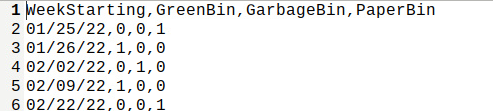
@mymirror
correct without “Custom” in the beginning of each line.My first lines;
-
Did not work on my site:
Just shows “Loading …”My modules/MMM-MyWastePickup/schedule_custom.csv :
WeekStarting,GreenBin,Garbage,Recycling,YardWaste,ChristmasTree
02/09/22,0,1,0,0,0
02/10/22,0,0,1,0,0
03/02/22,0,1,0,0,0
03/09/22,0,1,0,0,0
03/10/22,1,0,0,0,0
But on github (https://github.com/jclarke0000/MMM-MyWastePickup) is following:
Using Your Own Custom Schedule
If you live outside of Toronto and you’d like to use this module, you can create your own schedule to use with this module.First, in your config specify collectionCalendar: ‘Custom’.
Create a CSV based on the following template:
Calendar,WeekStarting,GreenBin,Garbage,Recycling,YardWaste,ChristmasTree
Custom,03/07/18,1,0,1,0,0
Custom,03/14/18,1,1,1,0,0
Custom,03/21/18,1,0,1,0,0
Custom,03/28/18,1,1,1,0,0
Add lines for each pickup date as neededI did so before Bullseye and everything was fine.
Now with Bullseye, MM 2.18 and new node, npm i have a problem.Ideas?
-
@mymirror have you already found a solution?
-
@mr_cd can u show the config section from config.js?
the code checks
this.config.collectionCalendarthis.scheduleCSVFile = this.path + "/schedule.csv"; this.scheduleCustomCSVFile = this.path + "/schedule_custom.csv";if not found it sets to look for
var scheduleFile = this.scheduleCSVFile;
      if (payload.collectionCalendar == "Custom") {
        scheduleFile = this.scheduleCustomCSVFile;
      }
if you don’t have the collectionCalendar set
then it will use “schedule.csv”; -
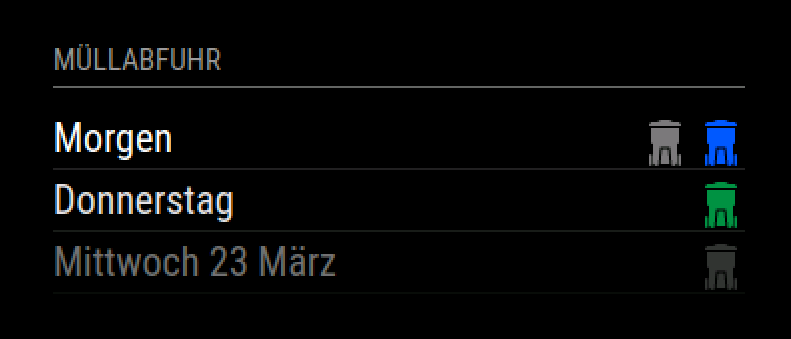
Not really. I took another module for now. Here I have no foliage or Christmas trees, but until that applies, it still takes a little.
                {
                        module: 'MMM-MyGarbage',
                        position: 'top_left',
                        header: 'Müllabfuhr',
                        config: {
                                alert: 4,
                                weeksToDisplay: 2,
                                limitTo: 99,
                                fade: true,
                                dateFormat: "dddd D MMMM",
                                fadePoint: 0.25
                        }
                },
Hello! It looks like you're interested in this conversation, but you don't have an account yet.
Getting fed up of having to scroll through the same posts each visit? When you register for an account, you'll always come back to exactly where you were before, and choose to be notified of new replies (either via email, or push notification). You'll also be able to save bookmarks and upvote posts to show your appreciation to other community members.
With your input, this post could be even better 💗
Register Login