Read the statement by Michael Teeuw here.
Config for a simple clean montly calendar
-
Re: MMM-CalendarExt2
Is there a way to format the calendar so it looks like the attached image. This is from a dakboard example but is clean and simple. I’ve tried some configuration of the MMM-calendarext2 but not getting anywhere close. Basically looking to get plain white text, equal sized “day” boxes, and a color chip/button to designate what calendar an event is from.
Some pointers would be great.

-
@mlcampbe
Did you ever get a reply? I have been looking for that exact calendar setup. -
@Plainbroke-0
Not exactly like it. I made one that looks like this post and I am pretty happy with it.https://forum.magicmirror.builders/topic/9601/some-magicmirror-modules-are-really-confusing/6#
Actually I have changed my setup from the above screenshot. I switched from the “month” view to a “week” view so that I can show the next 7 weeks on my screen. The current week is always the top row and then 6 following weeks afterwards.
-
Hey.
Is it possible to see your Design? I am searching for a clean Design too. -
@Clubjack
Here is what I am currently using.
-
@mlcampbe
Thank You. I Like it.
Which Module did you use? CalendarExt or Ext2?
Possible to get your config? -
@Clubjack
On the right-hand side I am using the modules all in the top-right region:
default clock
MMM-DarkSkyForecast
default calendar
MMM-SimpleLogo (used to display a static image that is my calendar color legend)The main calendar is using MMM-CalendarExt2 in the top-left region with 7 different google/icloud calendar URLs defined in the “calendars” section of the module. The rest of the MMM-CalendarExt2 config in the config.js is for the view/scene and I am using this:
views: [
          {
            name: "view1",
            mode: "week",
            slotCount: "7",
            maxItems: "1000",
            hideOverflow: false,
            slotMaxHeight: "95px",
            monthFormat: "MMMM YYYY",
            position: "top_left",
            calendars: []
          },
        ],
        scenes: [
          {
            name: "DEFAULT",
          },
        ],
All of the formatting is done within the custom.css file which is heavily customized like this:
body { background-size: cover; margin: 20px; height: calc(100% - 40px); width: calc(100% - 40px); } .xsmall { font-size: 17px; } .region.top.right { width: 23%; } .region.top.left { width: 77%; } .calendar .time { padding-left: 20px; color: #FFF; font-weight: normal; } .MMM-DarkSkyForecast .module-content { width: unset; } .CX2 { --font-size: 14px; } .CX2 .event { padding: 0px; } .CX2 .weekSlot .timelineSleeve { height: calc(var(--font-size) + 5px); } .CX2 .weeksmark { display:none; } .CX2 .event.passed::before { background: none; } .CX2 .cellSlot.weekday_6 .slotSubTitle { color: #F66; } .CX2 .cellSlot.weekday_7 .slotSubTitle { color: #F66; } .CX2 .cellSlot .slotTitle, .CX2 .cellSlot .slotSubTitle, .CX2 .cellSlot .slotAltTitle { font-size: 20px; color: #FFF; } .CX2 .today .slotHeader { background: rgba(64,64,64,0.8); color: #000; } .CX2 .today .slotHeader .slotTitle { color: #FFF; } .CX2 .today .slotContent { background: #eeeeee69; #border: 1px solid white; } .CX2 .me, .me.event.fullday { border-radius: 5px; background-color: #83CCD5; color: #000; } .CX2 .wife, .wife.event.fullday { border-radius: 5px; background-color: #EB738B; color: #000; } .CX2 .social, .social.event.fullday { border-radius: 5px; background-color: #D59C73; color: #000; } .CX2 .piano, .piano.event.fullday { border-radius: 5px; background-color: #B4CC5A; color: #000; } .CX2 .birthday, .birthday.event.fullday { border-radius: 5px; background-color: #F0E68C; color: #000; } .CX2 .college, .college.event.fullday { border-radius: 5px; background-color: #A473AC; color: #000; } .CX2 .holiday, .holiday.event.fullday { border-radius: 5px; background-color: #7B9CCC; color: #000; .CX2 .slot > .slotContent { background-image: none; } .CX2 .monthViewTitle { text-align: left; } .CX2 .eventTitle { font-weight: normal; } -
@mlcampbe
Thank You for that.I never worked with custom.css before.
Is there an tutorial for custom.css, to understand all whats inside? -
@Clubjack said in Config for a simple clean montly calendar:
Is there an tutorial for custom.css, to understand all whats inside?
nothing inside, until you add it…
it overrides (or adds to) the main.css so you can customize the styles of elements
never modify the main.css -
@Clubjack
In my case it was mostly trial and error. I am not a css guru by any stretch of the imagination. You might want to take a look at https://forum.magicmirror.builders/topic/6808/css-101-getting-started-with-css-and-understanding-how-css-works which has some tips. -
@mlcampbe What is the size of your logo you are using? Can I see that part of your config as well maybe? Thanks!
-
By logo do you mean the legend that is below the calendar event details on the right-hand side of the screen? If so then that is using the MMM-SimpleLogo module with the below config and an image that is 294x135 pixels.
{
  module: "MMM-SimpleLogo",
  disabled: false,
  position: "top_right",
  config: {
    position: "right",
    text: "",
    width: "250px"
  }
Note that the width: 250px is used so that it will be centered within the right-hand “column”.
-
@mlcampbe that’s exactly the info i was looking for! thanks!
-
@Clubjack style sheets cascade. newer can replace/override prior classes and styles…
so MM does this
main.css (1st)
modules adding their own style sheets (thru the getStyles() method response if used)
custom.css (last)so, anything that happened BEFORE custom.css is loaded can be changed with entries in custom.css
custom.css is empty by default
-
@mlcampbe
I know this is an old post, but I need some help setting up a full screen calendar.Can you send me your config.Js and custom.css or however you made that calendar you show above. I have been waiting for someone to come up with that exact calendar…
Did you use the default calendar or something else…? I could combine my 3 different calendars into one… Saving realestate.Jeff Burdick aka Plainbroke
-
Take a look at https://forum.magicmirror.builders/topic/11001/config-for-a-simple-clean-montly-calendar/8 as it has the css and necessary config needed.
-
Here is a sample for you.
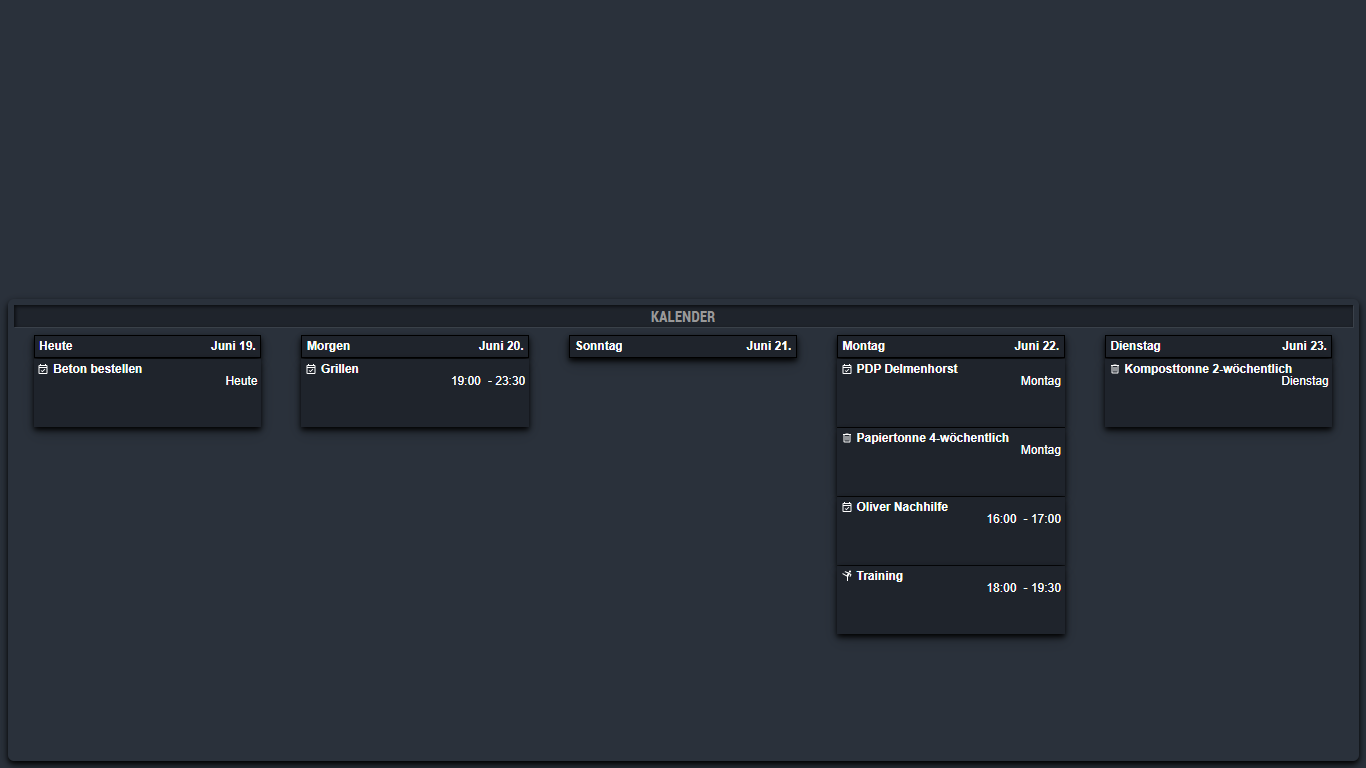
/** * module.width_height */ .module.MMM-CalendarExt2 { height: 600px; } /** * module.color_border_shadow */ .module.MMM-CalendarExt2 { background-color:#2a313b; border-radius:8px; padding:8px; box-shadow: 0 4px 8px 0 rgba(0, 0, 0, 1), 0 8px 20px 0 rgba(0, 0, 0, 0.19); } /** * MMM-CalendarExt2. */ .CX2 .slot .event{ background: #1f242c; } .CX2 .agenda .eventSub { display:none; } .CX2 .slot .slotHeader{ background: #1f242c; border: 1px solid black; box-shadow: 0 4px 8px 0 rgba(0, 0, 0, 1), 0 8px 20px 0 rgba(0, 0, 0, 0.19); color: white; } .CX2 .today .slotHeader * { color: white; } .CX2 .event.fullday { background: #1f242c; border-radius:0px; } .CX2 .event[data-calendar-name="Google"] { box-shadow: 0 4px 8px 0 rgba(0, 0, 0, 1), 0 8px 20px 0 rgba(0, 0, 0, 0.19); color: white; min-height:80px; } .CX2 .event[data-calendar-name="Karate"] { box-shadow: 0 4px 8px 0 rgba(0, 0, 0, 1), 0 8px 20px 0 rgba(0, 0, 0, 0.19); color: white; min-height:80px; } .CX2 .event[data-calendar-name="Abfall"] { box-shadow: 0 4px 8px 0 rgba(0, 0, 0, 1), 0 8px 20px 0 rgba(0, 0, 0, 0.19); color: white; min-height:80px; } .CX2 .event[data-calendar-name="Arbeit"] { box-shadow: 0 4px 8px 0 rgba(0, 0, 0, 1), 0 8px 20px 0 rgba(0, 0, 0, 0.19); color: white; min-height:80px; } .CX2 .event[data-calendar-name="Feiertage"] { box-shadow: 0 4px 8px 0 rgba(0, 0, 0, 1), 0 8px 20px 0 rgba(0, 0, 0, 0.19); color: white; min-height:80px; } /** * Iconsize. */ .CX2 .event .eventIcon { min-width: calc(var(--font-size) * 2,5); min-height: calc(var(--font-size) * 2,5); margin-right:5px; float:left; } .CX2 .period .eventIcon { min-width: calc(var(--font-size) * 2,5); min-height: calc(var(--font-size) * 2,5); margin-right:5px; float:left; } .CX2 .weekSlot .eventIcon { min-width: var(--font-size); min-height: var(--font-size); margin-right:3px; display:block; padding-bottom:3px; } -
@Piranha1605 said in Config for a simple clean montly calendar:
.CX2 .event[data-calendar-name=“Google”]
Enter the name of your calendar here
-
@mlcampbe
Hey. Last days i created my calendar with your helpfull custom.css.Do You know the Code for changing the height of the Event-Bar?
I need it a little bit smaller.Thank You.
-
@Clubjack
I am not quite sure what you mean by the Event-Bar. Is that the height of a row or title size or what exactly are you talking about? I no longer use the calendar as my needs were only for about 1 years time but might be able to help if you can tell me exactly what part you need to modify.

Hello! It looks like you're interested in this conversation, but you don't have an account yet.
Getting fed up of having to scroll through the same posts each visit? When you register for an account, you'll always come back to exactly where you were before, and choose to be notified of new replies (either via email, or push notification). You'll also be able to save bookmarks and upvote posts to show your appreciation to other community members.
With your input, this post could be even better 💗
Register Login