Read the statement by Michael Teeuw here.
MMM-Hotword won't recognize the hotword
-
I guess I successfully install mmm-assistantmk2 along with mmm-hotword. I followed this method for installation.
I configured my config file and I can see Google logo on my MM screen as well, however no matter how much I shout “Computer” or “Smart Mirror” there is no detection.
Is there any way I can debug and see what’s going on? Or what did I misconfigure?
Config.js
{
	module: "MMM-Hotword",
	config: {
		record: {
			recordProgram : "arecord",
			device        : "plughw:1"
				},
			autostart:true,
			onDetected: {
				notification: (payload) => {
					return "ASSISTANT_ACTIVATE"
					},
				payload: (payload) => {
						return {
						  profile: payload.hotword
						}
					}
				},
		},
},
{
	module: "MMM-AssistantMk2",
	position: "bottom_left",
	config: {
		deviceLocation: {
			coordinates: { // set the latitude and longitude of the device to get localized information like weather or time. (ref. mygeoposition.com)
			latitude: , // -90.0 - +90.0
			longitude: 	, // -180.0 - +180.0
				},
				},
				record: {
					recordProgram : "arecord",
					device        : "plughw:1",
				},
				notifications: {
					ASSISTANT_ACTIVATED: "HOTWORD_PAUSE",
					ASSISTANT_DEACTIVATED: "HOTWORD_RESUME",
				},
				useWelcomeMessage: "brief today",
				profiles: {
					"default" : {
						lang: "en-IN"
					}
				},
		}
},
Edit 1 : I ran using npm start dev and I got this error [HOTWORD] No model to load
Edit 2 : I added cuple of models in config file, running npm start says it detected hotword but received no response.
[HOTWORD] Detected: computer [HOTWORD] stops. [HOTWORD] Final Result: { detected: true, hotword: 'computer', file: null } -
@Newbie007
Your profile of AssistantMk2 is “computer”? You are calling “computer” as a profile, but you have defined only “default” profile.
And removeuseWelcomeMessageunless you control start modules manually. -
Do you mean I should change like this in config.js file?
//useWelcomeMessage: "brief today", profiles: { "computer" : { lang: "en-IN" } profiles: { "smart_mirror" : { lang: "en-IN" } }, -
@Newbie007
First, what was wrong was that you are using the configuration for MMM-Hotword 1.X. It is updated to 2.X, so you should use https://github.com/eouia/MMM-AssistantMk2/wiki/Configuration#with-mmm-hotwordv2 -
@Sean yes this worked thanks!
I didn’t even realise the first config was for v1
-
Hello,
after some difficults this module works…but i can’t use hotword jarvis as model (snowboy and computer are ok)…what 's the difference ?
Thanks -
@chassain-0
Some of the voice models of snowboy sometimes looks weird.Jarvisis one example.
They put the 2 voice patterns in one model(“jarvis.umdl”), so you should use like this;
https://github.com/eouia/MMM-Hotword/blob/master/documents/models.md
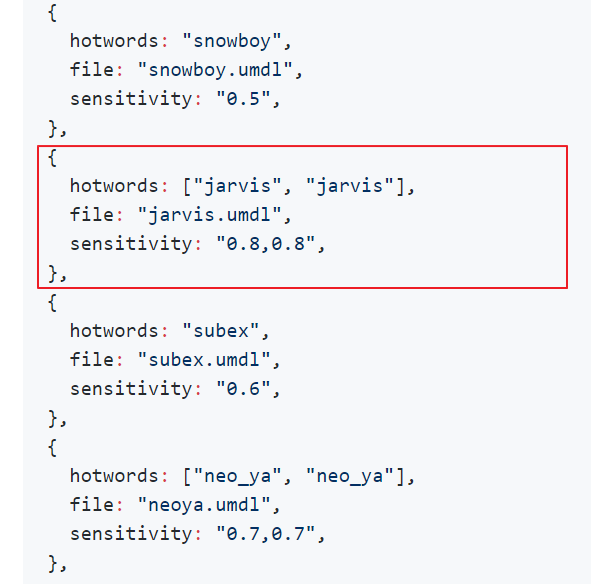
Or you can assign a different identifier to each pattern like this;
{
  hotwords: ["jarvis_1", "jarvis_2"],
  file: "jarvis.umdl",
  sensitivity: "0.8,0.8",
},
Hello! It looks like you're interested in this conversation, but you don't have an account yet.
Getting fed up of having to scroll through the same posts each visit? When you register for an account, you'll always come back to exactly where you were before, and choose to be notified of new replies (either via email, or push notification). You'll also be able to save bookmarks and upvote posts to show your appreciation to other community members.
With your input, this post could be even better 💗
Register Login