MagicMirror Forum
    • Recent
    • Tags
    • Unsolved
    • Solved
    • MagicMirror² Repository
    • Documentation
    • 3rd-Party-Modules
    • Donate
    • Discord
    • Register
    • Login
    A New Chapter for MagicMirror: The Community Takes the Lead
    Read the statement by Michael Teeuw here.

    MMM-CountUP (COVID19 example)

    Scheduled Pinned Locked Moved Utilities
    46 Posts 6 Posters 19.0k Views 6 Watching
    Loading More Posts
    • Oldest to Newest
    • Newest to Oldest
    • Most Votes
    Reply
    • Reply as topic
    Log in to reply
    This topic has been deleted. Only users with topic management privileges can see it.
    • B Offline
      bibaldo
      last edited by

      Description
      MMM-CountUP allows you to have a progressive count from a specific date.
      It’s easy to use. You only have to put a date and a time (start point).

      The repo is https://github.com/bibaldo/MMM-CountUP and feel free to open any Issue (suggestions and ideas are more than welcome)

      The example I used was related to COVID19 and the time/date was when our government (Argentina) began the mandatory quarantine
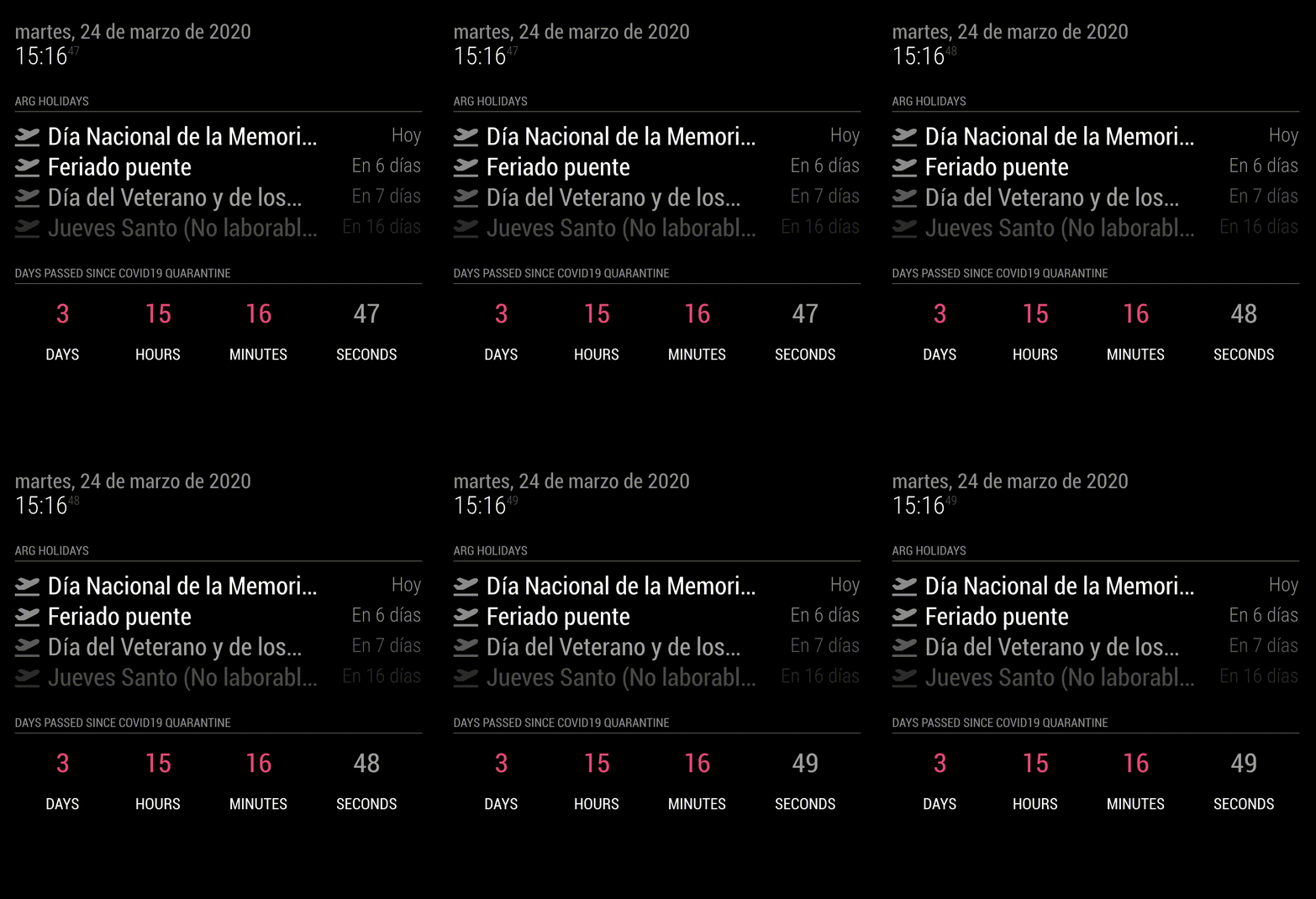
      alt text

      1 Reply Last reply Reply Quote 1
      • B Offline
        Bromley47
        last edited by

        Hi -I cannot get this feature to show on my Magic Mirror. I am not sure that there is sufficient room on my fairly small screen. Could this be the issue? I have tried positioning at top left before the date and also bottom mid position without anything showing. I have checked code and no faults returned. Also the update showed on the MM from which I assume it must be working but not sure where. Any help would be appreciated.

        bheplerB S S 3 Replies Last reply Reply Quote 0
        • bheplerB Offline
          bhepler Module Developer @Bromley47
          last edited by

          @Bromley47 - As an experiment, put the module in position “fullscreen_below” and see if it appears. If it does not, it’s not a sizing issue.

          1 Reply Last reply Reply Quote 0
          • S Offline
            sdetweil @Bromley47
            last edited by

            @Bromley47 what is your position: setting… if its wrong, MM won’t show the data

            Sam

            How to add modules

            learning how to use browser developers window for css changes

            1 Reply Last reply Reply Quote 0
            • S Offline
              sonicgoose @Bromley47
              last edited by sonicgoose

              @Bromley47 @bibaldo Same problem here. My config:

                              {
                                      disabled: false,
                                      module: "MMM-CountUp",
                                      position: "bottom_left",
                                      config: {
                                              header: "Days Working From Home",
                                              date: '2020-03-17',
                                              time: '00:00:00',
                                      },
                               },
              
              B 1 Reply Last reply Reply Quote 0
              • B Offline
                Bromley47 @sonicgoose
                last edited by

                @sonicgoose My apologies for multiple postings - just didn’t know which category would be best!
                I have got the module to show on the Mirror (thanks to TimerWolf) I positioned in the top bar and it shows OK, but although I set the date to 2020-03-16 it seems not to count from that date (33 days?) and shows 2 days on the Mirror. Also would like to just count days and maybe hours, not interested in minutes or seconds!!

                S S 2 Replies Last reply Reply Quote 0
                • S Offline
                  sdetweil @Bromley47
                  last edited by sdetweil

                  @Bromley47 said in MMM-CountUP (COVID19 example):

                  just didn’t know which category would be best!

                  yah pick one… I’ll delete the other two

                  you could ask one of us moderators to move it if you don’t get the kind of response you think you need…
                  (there are no commitments that anyone will reply on this forum)

                  Sam

                  How to add modules

                  learning how to use browser developers window for css changes

                  1 Reply Last reply Reply Quote 0
                  • S Offline
                    sonicgoose @Bromley47
                    last edited by

                    @Bromley47 How did you get it to show up? I don’t see a solution here and the other posts appear to now be gone.

                    S B 3 Replies Last reply Reply Quote 0
                    • S Offline
                      sdetweil @sonicgoose
                      last edited by

                      @sonicgoose neither of those two topics had any technical content

                      he said here

                      I have got the module to show on the Mirror (thanks to TimerWolf)

                      I don’t know who that is

                      Sam

                      How to add modules

                      learning how to use browser developers window for css changes

                      1 Reply Last reply Reply Quote 0
                      • B Offline
                        Bromley47 @sonicgoose
                        last edited by

                        @sonicgoose If you go to github and search for the MMM-CountUP module there you will see my config file and some helpful suggestions. Although still cannot solve start time (33 days ago) and remove mins and secs. Need someone more expert than me…!

                        1 Reply Last reply Reply Quote 0
                        • S Offline
                          sdetweil @sonicgoose
                          last edited by

                          @sonicgoose @Bromley47’s problem was he put the config on the wrong module definition in config.js

                          Sam

                          How to add modules

                          learning how to use browser developers window for css changes

                          1 Reply Last reply Reply Quote 0
                          • bheplerB Offline
                            bhepler Module Developer
                            last edited by

                            I haven’t played with this module yet. Does it require a specific date format? “2020-04-01” can be written as “2020-01-04” depending on which country you’re using as a default format.

                            It has been my experience that Javascript is absolutely rubbish with dates.

                            B 1 Reply Last reply Reply Quote 0
                            • B Offline
                              Bromley47 @bhepler
                              last edited by

                              @bhepler The read me for this module shows the date format as YYYY-MM-DD so I entered 2020-03-16 because I wanted it to run from 16th March 2020 which up until today is 33 days, but it only shows 2 days on the Mirror?

                              S 1 Reply Last reply Reply Quote 0
                              • S Offline
                                sdetweil @Bromley47
                                last edited by sdetweil

                                @Bromley47 try 2020-02-16

                                I bet he didn’t adjust the month. Date/moment code uses 0 as january
                                I opened issue on the module github site
                                https://github.com/bibaldo/MMM-CountUP/issues/3

                                Sam

                                How to add modules

                                learning how to use browser developers window for css changes

                                B 1 Reply Last reply Reply Quote 0
                                • B Offline
                                  Bromley47 @sdetweil
                                  last edited by

                                  @sdetweil Hi Sam - thanks for your continued interest in this - I tried the 2020-02-16 date but still showing 2 day??

                                  S 1 Reply Last reply Reply Quote 0
                                  • S Offline
                                    sdetweil @Bromley47
                                    last edited by sdetweil

                                    @Bromley47 ok, so the problem is in default (showFullDate = false) he truncates the year/month/week count,
                                    but does NOT adjust number of days… my original guess was wrong, so the date is the one u want to count from.

                                    I have submitted a pull request to fix this…

                                    ||
                                    || bibaldo’s repo has integrated the fix i provided, I am closing my repo
                                    || May 8, 2020
                                    ||

                                    when he merges my fix, you can git pull in the .original folder
                                    rename them back and delete mine

                                    Sam

                                    How to add modules

                                    learning how to use browser developers window for css changes

                                    B S 2 Replies Last reply Reply Quote 1
                                    • B Offline
                                      Bromley47 @sdetweil
                                      last edited by

                                      @sdetweil Fantastic Sam - many thanks - managed to edit with the help of my son who’s well into JavaScript (says it pays the mortgage!) and now shows the correct number of days etc. The remaining problem I have is that to restart the MM when I have done any mods. (such as this one) I have to power off the Raspberry O, which is a bit of a faff. I have tried to use the instructions on git hub by MichMich (Auto starting Magic Mirror) but when I run pm2 restart mm it says Process or Namespace mm not found.
                                      I can only think the Magic Mirror is called by another name but how do I find that out?

                                      pi@raspberrypi:~ $ pm2 restart mm
                                      Use --update-env to update environment variables
                                      [PM2][ERROR] Process or Namespace mm not found

                                      S 2 Replies Last reply Reply Quote 0
                                      • S Offline
                                        sdetweil @Bromley47
                                        last edited by

                                        @Bromley47 pm2 status will show the names… if u used my installation script it is call MagicMirror
                                        you can also use the number pm2 restart 0

                                        Sam

                                        How to add modules

                                        learning how to use browser developers window for css changes

                                        B 1 Reply Last reply Reply Quote 0
                                        • S Offline
                                          sdetweil @Bromley47
                                          last edited by

                                          @Bromley47 so you didn’t use my repo with the fix?

                                          Sam

                                          How to add modules

                                          learning how to use browser developers window for css changes

                                          B 1 Reply Last reply Reply Quote 0
                                          • B Offline
                                            Bromley47 @sdetweil
                                            last edited by

                                            @sdetweil id │ name │ mode │ ↺ │ status │ cpu │ memory │
                                            ├────┼────────────────────┼──────────┼──────┼───────────┼──────────┼──────────┤
                                            │ 0 │ mmstart │ fork │ 0 │ online │ 0% │ 2.4mb │
                                            └────┴────────────────────┴──────────┴──────┴───────────┴──────────┴───

                                            S 1 Reply Last reply Reply Quote 0

                                            Hello! It looks like you're interested in this conversation, but you don't have an account yet.

                                            Getting fed up of having to scroll through the same posts each visit? When you register for an account, you'll always come back to exactly where you were before, and choose to be notified of new replies (either via email, or push notification). You'll also be able to save bookmarks and upvote posts to show your appreciation to other community members.

                                            With your input, this post could be even better 💗

                                            Register Login

                                            • 1
                                            • 2
                                            • 3
                                            • 1 / 3
                                            • First post
                                              Last post
                                            Enjoying MagicMirror? Please consider a donation!
                                            MagicMirror created by Michael Teeuw.
                                            Forum managed by Sam, technical setup by Karsten.
                                            This forum is using NodeBB as its core | Contributors
                                            Contact | Privacy Policy