MagicMirror Forum
    • Recent
    • Tags
    • Unsolved
    • Solved
    • MagicMirror² Repository
    • Documentation
    • 3rd-Party-Modules
    • Donate
    • Discord
    • Register
    • Login
    A New Chapter for MagicMirror: The Community Takes the Lead
    Read the statement by Michael Teeuw here.

    Google Calendar not updating

    Scheduled Pinned Locked Moved Troubleshooting
    22 Posts 2 Posters 6.3k Views 3 Watching
    Loading More Posts
    • Oldest to Newest
    • Newest to Oldest
    • Most Votes
    Reply
    • Reply as topic
    Log in to reply
    This topic has been deleted. Only users with topic management privileges can see it.
    • V Offline
      vanced54
      last edited by

      Complete Noob here. I am not getting my calendar to work in MM. I have tried many different ways but still no success. The holiday calendar works fine. Is there something not working with Google Calendar?

      calendar error 404: Not Found is what I’m getting when I control +Q out of MM

      S 1 Reply Last reply Reply Quote 0
      • S Offline
        sdetweil @vanced54
        last edited by

        @vanced54 said in Google Calendar not updating:

        calendar error 404: Not Found

        that means the URL you provided is not working (not found)

        put the url in the browser on the pi, it must download an ics file… if not fix til it does
        then add THAT url to MM calendar config

        Sam

        How to add modules

        learning how to use browser developers window for css changes

        V 2 Replies Last reply Reply Quote 0
        • V Offline
          vanced54 @sdetweil
          last edited by

          @sdetweil Thanks. I will give it a go!

          1 Reply Last reply Reply Quote 0
          • V Offline
            vanced54 @sdetweil
            last edited by

            @sdetweil said in Google Calendar not updating:

            @vanced54 said in Google Calendar not updating:

            calendar error 404: Not Found

            that means the URL you provided is not working (not found)

            put the url in the browser on the pi, it must download an ics file… if not fix til it does
            then add THAT url to MM calendar config

            So I have gotten the 404 error to clear but there are no events coming in.

            {
            module: “calendar”,
            header: “Dustin’s Calendar”,
            position: “top_left”,
            config: {
            calendars: [
            {
            symbol: “calendar-check-o”,
            url: “https://calendar.google.com/calendar/ical/USERNAME%40gmail.com/private-CODE/basic.ics” }
            ]
            }
            },

            Here is the code. I did change my user name to USERNAME and the private code to CODE

            S 1 Reply Last reply Reply Quote 0
            • S Offline
              sdetweil @vanced54
              last edited by

              @vanced54 if u edit the downloaded ics file. Do you see the events u are looking for?

              Sam

              How to add modules

              learning how to use browser developers window for css changes

              V 1 Reply Last reply Reply Quote 0
              • V Offline
                vanced54 @sdetweil
                last edited by

                @sdetweil I sure do

                S 1 Reply Last reply Reply Quote 0
                • S Offline
                  sdetweil @vanced54
                  last edited by

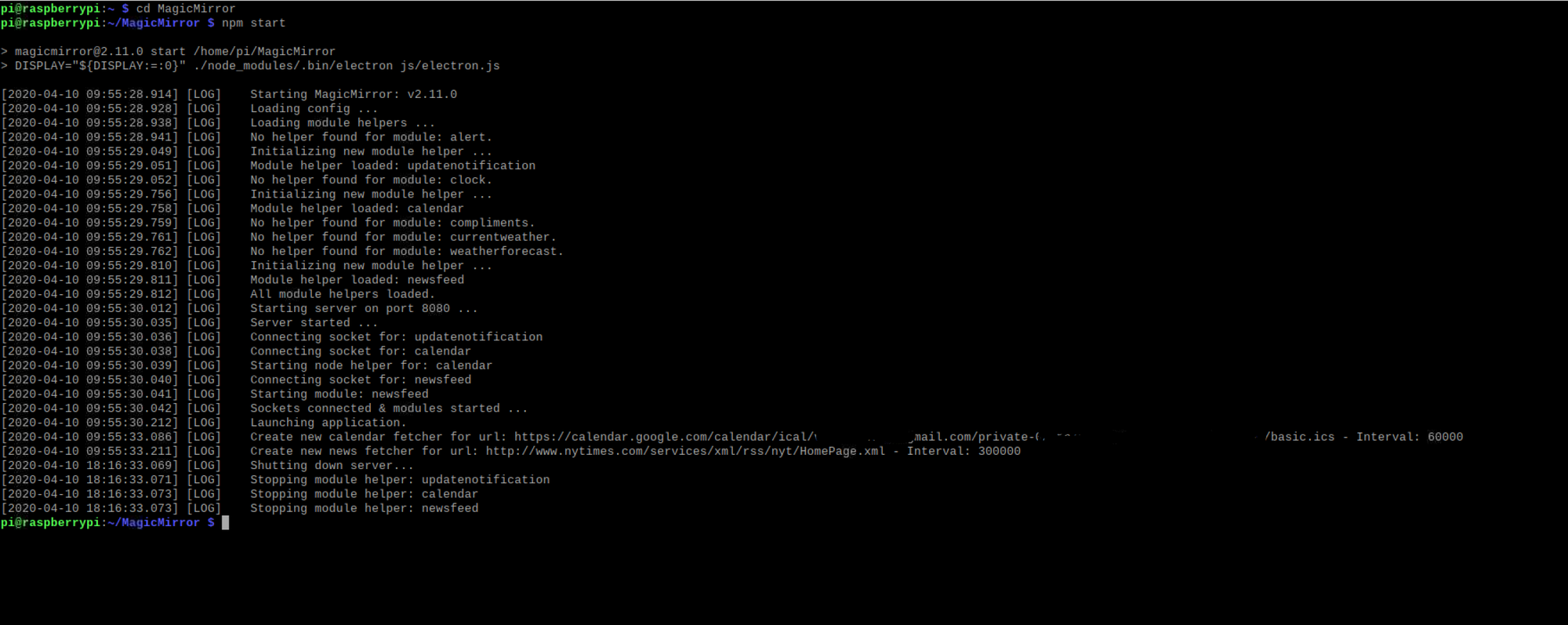
                  @vanced54 do you see in the terminal window, or pm2 logs

                   Create new calendar fetcher for url: http://www.calendarlabs.com/ical-calendar/ics/76/US_Holidays.ics - Interval: 300000


                  but with your url?

                  do you see any errors?

                  Sam

                  How to add modules

                  learning how to use browser developers window for css changes

                  V 1 Reply Last reply Reply Quote 0
                  • V Offline
                    vanced54 @sdetweil
                    last edited by

                    @sdetweil

                    Not that I see but there may be something I am overlooking

                    75dbe11d-a2be-4912-9cdd-fb84f27c0cad-image.png

                    S 1 Reply Last reply Reply Quote 0
                    • S Offline
                      sdetweil @vanced54
                      last edited by

                      @vanced54 ok, there is a debug tool in the /modules/default/calendar folder

                      edit the debug.js and put your url in the place of the one there

                      and then do

                      node debug.js

                      it should display events read from the calendar

                      Sam

                      How to add modules

                      learning how to use browser developers window for css changes

                      V 1 Reply Last reply Reply Quote 0
                      • V Offline
                        vanced54 @sdetweil
                        last edited by

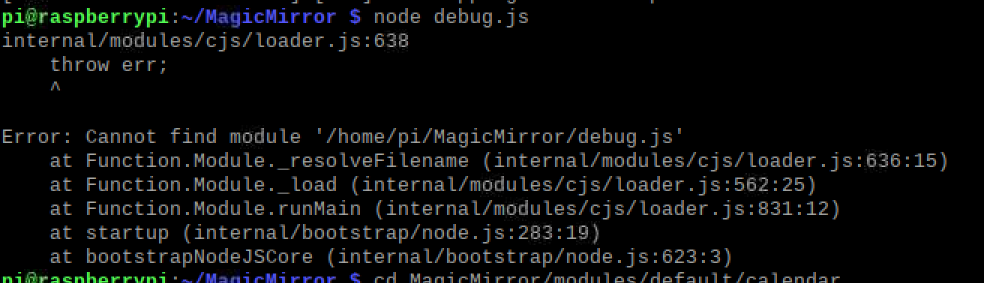
                        @sdetweil where do I do the node debug.js?

                        I tried it but doesn’t seem to worka22cc263-c285-48e6-bf1c-420fccb1e735-image.png

                        I did edit the debug.js file with the same link.

                        S 1 Reply Last reply Reply Quote 0
                        • S Offline
                          sdetweil @vanced54
                          last edited by

                          @vanced54 you have to be in the MagicMirror/modules/default/calendar folder

                          Sam

                          How to add modules

                          learning how to use browser developers window for css changes

                          V 1 Reply Last reply Reply Quote 0
                          • V Offline
                            vanced54 @sdetweil
                            last edited by

                            @sdetweil

                            It does find events. So that means the link is good I belive.

                            S 1 Reply Last reply Reply Quote 0
                            • S Offline
                              sdetweil @vanced54
                              last edited by sdetweil

                              @vanced54 are the events in the future?

                              open the developers window on the mirror
                              using the ctrl-shift-i on the keyboard or npm start dev

                              then select the console tab, and scroll up… u can also filter to just the module
                              by putting part of the module name in the filter field ‘cal’ (no quotes) for example

                              Sam

                              How to add modules

                              learning how to use browser developers window for css changes

                              V 1 Reply Last reply Reply Quote 0
                              • V Offline
                                vanced54 @sdetweil
                                last edited by

                                @sdetweil

                                The events were in the past. Only 10 were there but it seems like that is what the max events were set to.

                                S 1 Reply Last reply Reply Quote 0
                                • S Offline
                                  sdetweil @vanced54
                                  last edited by

                                  @vanced54 yeh, the calendar will not show events in the past… it will (with settings change) broadcast those as part of the calendar data to OTHER modules, which might use it… I have a module that uses the calendar broadcast, but not events in the past

                                  Sam

                                  How to add modules

                                  learning how to use browser developers window for css changes

                                  V 1 Reply Last reply Reply Quote 0
                                  • V Offline
                                    vanced54 @sdetweil
                                    last edited by

                                    @sdetweil So what does that mean? Does that provide a clue as to why I’m not getting calendar events to show up?

                                    S 1 Reply Last reply Reply Quote 0
                                    • S Offline
                                      sdetweil @vanced54
                                      last edited by

                                      @vanced54 no… cause the calendar shows them and THEN sends a message for others to use…

                                      if the calendar doesn’t find any usable events, then there is nothing to send

                                      Sam

                                      How to add modules

                                      learning how to use browser developers window for css changes

                                      V 1 Reply Last reply Reply Quote 0
                                      • V Offline
                                        vanced54 @sdetweil
                                        last edited by

                                        @sdetweil

                                        So any other suggestions as to figure out what is going on?

                                        S 1 Reply Last reply Reply Quote 0
                                        • S Offline
                                          sdetweil @vanced54
                                          last edited by

                                          @vanced54 if u send me your cal url, I will test it here.

                                          Send email to my same user ID at gmail

                                          Sam

                                          How to add modules

                                          learning how to use browser developers window for css changes

                                          V 1 Reply Last reply Reply Quote 0
                                          • V Offline
                                            vanced54 @sdetweil
                                            last edited by

                                            @sdetweil

                                            I did Thank you

                                            S 1 Reply Last reply Reply Quote 0

                                            Hello! It looks like you're interested in this conversation, but you don't have an account yet.

                                            Getting fed up of having to scroll through the same posts each visit? When you register for an account, you'll always come back to exactly where you were before, and choose to be notified of new replies (either via email, or push notification). You'll also be able to save bookmarks and upvote posts to show your appreciation to other community members.

                                            With your input, this post could be even better 💗

                                            Register Login

                                            • 1
                                            • 2
                                            • 1 / 2
                                            • First post
                                              Last post
                                            Enjoying MagicMirror? Please consider a donation!
                                            MagicMirror created by Michael Teeuw.
                                            Forum managed by Sam, technical setup by Karsten.
                                            This forum is using NodeBB as its core | Contributors
                                            Contact | Privacy Policy