MagicMirror Forum
    • Recent
    • Tags
    • Unsolved
    • Solved
    • MagicMirror² Repository
    • Documentation
    • 3rd-Party-Modules
    • Donate
    • Discord
    • Register
    • Login
    A New Chapter for MagicMirror: The Community Takes the Lead
    Read the statement by Michael Teeuw here.

    Fullscreen help

    Scheduled Pinned Locked Moved Troubleshooting
    15 Posts 3 Posters 4.1k Views 3 Watching
    Loading More Posts
    • Oldest to Newest
    • Newest to Oldest
    • Most Votes
    Reply
    • Reply as topic
    Log in to reply
    This topic has been deleted. Only users with topic management privileges can see it.
    • P Offline
      prvrami
      last edited by

      Hey,

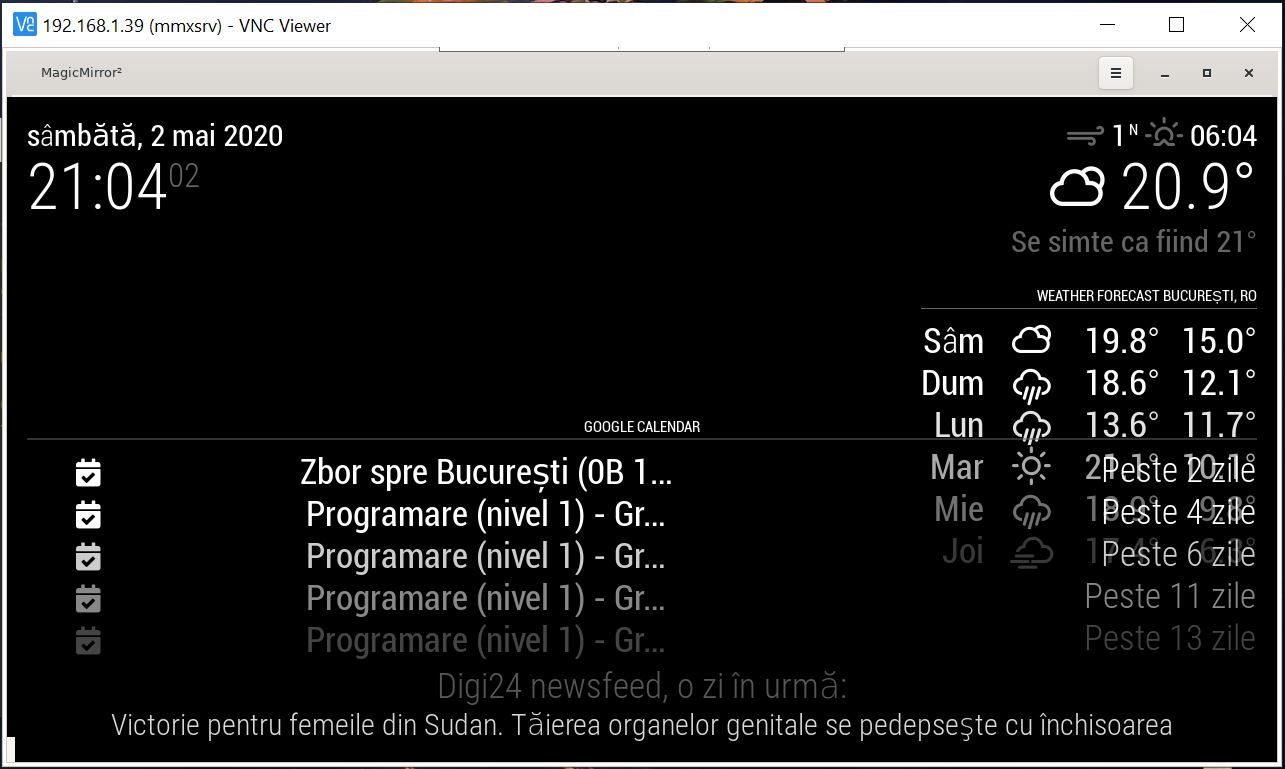
      Need some help with to make MM fullscreen. As seen in photo attached, i can’t get rid of the MagicMirror header on Midori browser and neither the white edges.
      Please, your solution will be highly appreciated.

      Regards,
      GImm2.JPG

      S 1 Reply Last reply Reply Quote 0
      • S Do not disturb
        sdetweil @prvrami
        last edited by

        @prvrami hit f11 key?

        Sam

        How to add modules

        learning how to use browser developers window for css changes

        P 1 Reply Last reply Reply Quote 0
        • P Offline
          prvrami @sdetweil
          last edited by

          @sdetweil if it was that easy…

          S 1 Reply Last reply Reply Quote 0
          • S Do not disturb
            sdetweil @prvrami
            last edited by

            @prvrami everybody else uses that

            Sam

            How to add modules

            learning how to use browser developers window for css changes

            S P 2 Replies Last reply Reply Quote 0
            • S Do not disturb
              sdetweil @sdetweil
              last edited by sdetweil

              @prvrami looks like you have to pass param to get it to go fs

              midori -e Fullscreen -a [url_to_site] 
              

              Sam

              How to add modules

              learning how to use browser developers window for css changes

              P 1 Reply Last reply Reply Quote 0
              • P Offline
                prvrami @sdetweil
                last edited by

                @sdetweil ok, i give up. Tried a common keyboard, tried VNC-ing from my laptop but nothing seems to work. Is there another key combination for Midori ?

                S 1 Reply Last reply Reply Quote 0
                • S Do not disturb
                  sdetweil @prvrami
                  last edited by sdetweil

                  @prvrami i didn’t find any keyboard operation to go fs, in my google searches

                  see my comment about about parameter

                  Sam

                  How to add modules

                  learning how to use browser developers window for css changes

                  P 1 Reply Last reply Reply Quote 0
                  • P Offline
                    prvrami @sdetweil
                    last edited by

                    @sdetweil said in Fullscreen help:

                    i -e Ful

                    is already set

                    1 Reply Last reply Reply Quote 0
                    • P Offline
                      prvrami @sdetweil
                      last edited by

                      @sdetweil

                      #!/bin/sh
                      unclutter &
                      xset -dpms
                      xset s off
                      xset s noblank
                      matchbox-window-manager &
                      midori -e Fullscreen -a http://localhost:8080
                      
                      S 1 Reply Last reply Reply Quote 0
                      • S Do not disturb
                        sdetweil @prvrami
                        last edited by

                        @prvrami

                        unclutter &
                        xset -dpms
                        xset s off
                        xset s noblank
                        

                        that turns off screen saver and power mgmt

                        matchbox-window-manager &
                        

                        that must be the trick

                        Sam

                        How to add modules

                        learning how to use browser developers window for css changes

                        P 1 Reply Last reply Reply Quote 0
                        • P Offline
                          prvrami @sdetweil
                          last edited by

                          @sdetweil

                          I thought the same thing but it doesn’t work. Still the same after cutting the line you mentioned…

                          S 1 Reply Last reply Reply Quote 0
                          • S Do not disturb
                            sdetweil @prvrami
                            last edited by

                            @prvrami weird

                            Sam

                            How to add modules

                            learning how to use browser developers window for css changes

                            P 1 Reply Last reply Reply Quote 0
                            • P Offline
                              prvrami @sdetweil
                              last edited by

                              @sdetweil
                              yeah, looks like i need to start from scratch. I honestly don’t know why i can’t go fullscreen…

                              1 Reply Last reply Reply Quote 0
                              • P Offline
                                prvrami
                                last edited by

                                Update: Reinstalled everything from scratch, still the same. Changed the sd card, reinstalled again and everything worked flawless. Cheers!

                                1 Reply Last reply Reply Quote 1
                                • V Offline
                                  valentindey
                                  last edited by valentindey

                                  For anyone experiencing similar problems, another solution could be to build midori from source.

                                  With midori v7.0.2 (latest you can install for raspberry os at the time of writing) I couldn’t get rid of the tab bar and some window borders. Building midori v9.0 from source it works nicely in full screen mode with the parameter -e Fullscreen. See description how to do that here https://github.com/midori-browser/core . There are also some related and resolved issues on github.

                                  1 Reply Last reply Reply Quote 0

                                  Hello! It looks like you're interested in this conversation, but you don't have an account yet.

                                  Getting fed up of having to scroll through the same posts each visit? When you register for an account, you'll always come back to exactly where you were before, and choose to be notified of new replies (either via email, or push notification). You'll also be able to save bookmarks and upvote posts to show your appreciation to other community members.

                                  With your input, this post could be even better 💗

                                  Register Login

                                  • 1 / 1
                                  • First post
                                    Last post
                                  Enjoying MagicMirror? Please consider a donation!
                                  MagicMirror created by Michael Teeuw.
                                  Forum managed by Sam, technical setup by Karsten.
                                  This forum is using NodeBB as its core | Contributors
                                  Contact | Privacy Policy