Read the statement by Michael Teeuw here.
MMM-GoogleAssistant doesn't run
-
Hello How are you ?, I was trying to install Google Assistant in my Magic Mirror, according to the tutorial: https://github.com/bugsounet/MMM-GoogleAssistant/wiki/Installation and it was installed correctly, but at the time of testing it comes out a console error and the screen goes black. I need help please, thanks. I am testing it in Ubuntu and the configuration is copied from the page


-
@Mauro-1998
Hello. Sure is downloaded in modules directory? Retry npm install in MMM-GoogleAssistant directory. -
wait, I’m installing Ubuntu for debugging ;)
I will try to do a cross linux platform :p
-
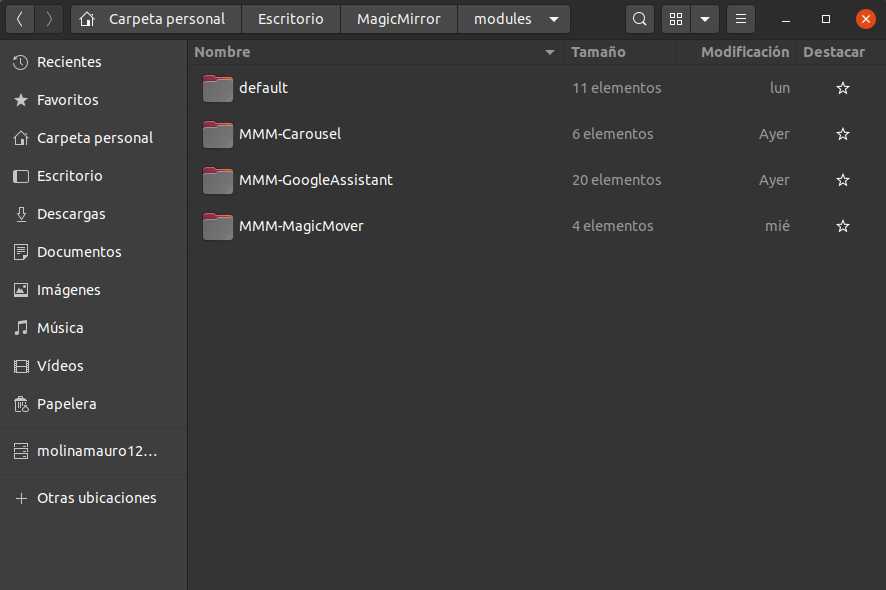
@saljoke Yes, here is a photo
-
@Bugsounet Ok, I will wait, thanks!
-
@Mauro-1998
There problem is not there
The problem is a snowboy library needed by snowboy in main core is not found
so it’s not an GA issue but a snowboy isssue
I will install Ubuntu for see what happen -
@Bugsounet Ok thanks for your help!
-
@Bugsounet
Fix the problem by re-installing the snowboy library at @ bugsounet / snowboy, thanks for your help! -
fixed so ?
-
@Bugsounet
yes, install the library again in case it was an installation error and it worked, thanks for your help, it works perfectly! -
@Mauro-1998 hai, could you tell me how you reinstall the snowboy library? I have the same Problem, after installing the GoogleAssistant only black screen :-(
Thanks. -
can help with … reading wiki for example ?
-
@Bugsounet sorry, I am a beginner. I have installed GoogleAssistant successfully
as in Wiki. But when I start MagicMirror, I have only blank screen. -
@bryan_1 said in MMM-GoogleAssistant doesn't run:
hai, could you tell me how you reinstall the snowboy library?
for me you have updated the module
I have installed GoogleAssistant successfully as in Wiki
now you tell me you have just installed
Sorry but I don’t know which answer to choose
or just maybe i’m stupid !? -
@Bugsounet I was trying to install Google Assistant in my Magic Mirror, according to the tutorial: https://github.com/bugsounet/MMM-GoogleAssistant/wiki/Installation and it was installed correctly, but at the time of testing it comes out a console error and the screen goes black.
@Mauro-1998 he wrote, that he solved it by reinstalling the snowboy library. That’s why my question. -
Wiki says for installing:
cd ~/MagicMirror/modules
git clone https://github.com/bugsounet/MMM-GoogleAssistant

cd MMM-GoogleAssistant
npm install
I think … you do that ;)
after wiki says :
Don’t forget to do ALL electron-rebuild steps. [You have to respond Y]
No other npm commands are needed after installation (it can broken dependencies package) ! [not other command ! no
npm fix,npm audit fixor other]to solve it try update command:
cd ~/MagicMirror/modules/MMM-GoogleAssistant
npm run update
Note like you see… i just COPY/PAST the wiki …
-
@Bugsounet i did the npm run update, It works now. Thanks a lot…man you’re the best
-
@Bugsounet said in MMM-GoogleAssistant doesn't run:
can help with … reading wiki for example ?
my wiki help ONLY if you want to read it ! ;)
-
i follow your steps but still am getting error 225
what to do am really upset please help me
the error looks like thisnpm ERR! code ELIFECYCLE
npm ERR! errno 255
npm ERR! MMM-GoogleAssistant@ preinstall:installer/preinstall.sh
npm ERR! Exit status 255 -
@chethan the author has left the forums. i have noticed that some of his modules are becoming unstable. either no longer installing or failing to run.
Hello! It looks like you're interested in this conversation, but you don't have an account yet.
Getting fed up of having to scroll through the same posts each visit? When you register for an account, you'll always come back to exactly where you were before, and choose to be notified of new replies (either via email, or push notification). You'll also be able to save bookmarks and upvote posts to show your appreciation to other community members.
With your input, this post could be even better 💗
Register Login