MagicMirror Forum
    • Recent
    • Tags
    • Unsolved
    • Solved
    • MagicMirror² Repository
    • Documentation
    • 3rd-Party-Modules
    • Donate
    • Discord
    • Register
    • Login
    A New Chapter for MagicMirror: The Community Takes the Lead
    Read the statement by Michael Teeuw here.

    MMM-AdminPanel get problem

    Scheduled Pinned Locked Moved Utilities
    10 Posts 2 Posters 2.1k Views 2 Watching
    Loading More Posts
    • Oldest to Newest
    • Newest to Oldest
    • Most Votes
    Reply
    • Reply as topic
    Log in to reply
    This topic has been deleted. Only users with topic management privileges can see it.
    • E Offline
      emrah_asl
      last edited by

      Hello, I applied all steps and follow ipWhiteList rules.

      https://github.com/ItayXD/MMM-Admin-Interface![alt text](![image url](![image url](image url)))

      When i try in over browser

      http://localhost:8080/MMM-Admin-Interface/

      It says with white screen

      Cannot GET /MMM-Admin-Interface/

      1- git clone projects
      2- adding module in config js

      `{
      module: “MMM-Admin-Interface”
      },

      3- My internal Ip is 192.168.0.29

      ipWhitelist: [“127.0.0.1”, “::ffff:127.0.0.1”, “::1”, “192.168.0.29” , “::ffff:192.168.0.29”], // Set [] to allow all IP addresses bla bla

      Thanks for helping me, what is the point here?

      S 2 Replies Last reply Reply Quote 0
      • S Offline
        sdetweil @emrah_asl
        last edited by sdetweil

        @emrah_asl does

        http://pi_address:8080
        

        from your pc open the mm?

        assuming 192.168.0.29 is your PC address?

        Sam

        How to add modules

        learning how to use browser developers window for css changes

        1 Reply Last reply Reply Quote 0
        • S Offline
          sdetweil @emrah_asl
          last edited by

          @emrah_asl localhost means from this machine, so browser running on mm machine

          Sam

          How to add modules

          learning how to use browser developers window for css changes

          1 Reply Last reply Reply Quote 0
          • E Offline
            emrah_asl
            last edited by

            @emrah_asl said in MMM-AdminPanel get problem:

            When i try in over browser
            http://localhost:8080/MMM-Admin-Interface/

            Hi, I’m doing this inside my raspberry browser.

            http://localhost:8080/

            is working for MM.

            192.168.0.29 is my rpi internal ip which means i connect via VNC server

            S 1 Reply Last reply Reply Quote 0
            • S Offline
              sdetweil @emrah_asl
              last edited by

              @emrah_asl said in MMM-AdminPanel get problem:

              http://localhost:8080/MMM-Admin-Interface/

              where do you do this from?

              note that the ipWhitelist addresses are not correct

              if using ipv4, its address/mask

              I usually make ipWhilelist:[],
              to allow anyone on my local network to access, until I get it the way I want

              Sam

              How to add modules

              learning how to use browser developers window for css changes

              E 1 Reply Last reply Reply Quote 0
              • E Offline
                emrah_asl @sdetweil
                last edited by

                @sdetweil said in MMM-AdminPanel get problem:

                http://localhost:8080/MMM-Admin-Interface/

                //where do you do this from?

                answe is, I’m writing inside raspberry 4b browser

                S 1 Reply Last reply Reply Quote 0
                • S Offline
                  sdetweil @emrah_asl
                  last edited by sdetweil

                  @emrah_asl hm…

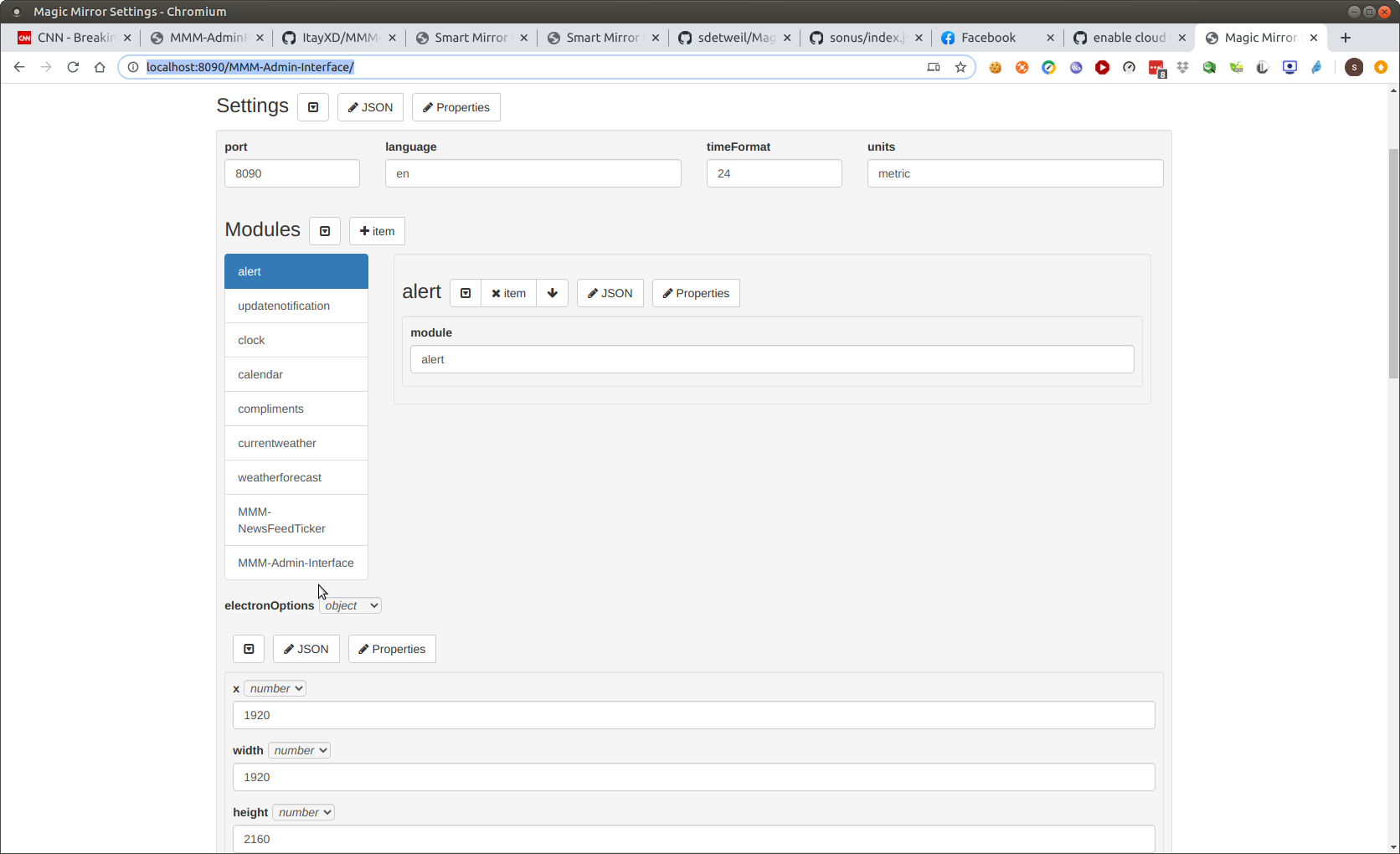
                  i added module and default config,

                  and (my MM on port 8090 as another app is using 8080)

                  http://localhost:8090/MMM-Admin-Interface/
                  

                  shows
                  Screenshot at 2020-08-09 08-13-44.png

                  so I would blank out the ipWhitelist to

                  ipWhitelist:[],
                  

                  Sam

                  How to add modules

                  learning how to use browser developers window for css changes

                  1 Reply Last reply Reply Quote 0
                  • E Offline
                    emrah_asl
                    last edited by

                    Hi @sdetweil

                    Yeah you right again ! When I leave blanks ipWhitelist, It is works.

                    Bu interesting, what should do coorect restrictons about this point.

                    I’m connecting my rpi over VNC servier with 192.168.0.29 in my windows.

                    S 1 Reply Last reply Reply Quote 0
                    • S Offline
                      sdetweil @emrah_asl
                      last edited by

                      @emrah_asl what is your windows pc IP address

                      ipWhitelist: [ windows_ip/32 ],
                      

                      my windows IP is 192.168.2.106, so would be

                      ipWhitelist:[192.168.2.106/32],
                      

                      that means, ipv4 addresses are 32 bits wide (4 chars)

                      so, allow this address windows_ip, and use all 32 bits for address matching

                      you can match the local network

                      windows_ip/24 which would be
                      any system with address starting with 192.168.0

                      Sam

                      How to add modules

                      learning how to use browser developers window for css changes

                      S 1 Reply Last reply Reply Quote 0
                      • S Offline
                        sdetweil @sdetweil
                        last edited by

                        @emrah_asl also, vnc vs mm. mm implements its own network security . so vnc connection has nothing to do with mm connection

                        Sam

                        How to add modules

                        learning how to use browser developers window for css changes

                        1 Reply Last reply Reply Quote 0

                        Hello! It looks like you're interested in this conversation, but you don't have an account yet.

                        Getting fed up of having to scroll through the same posts each visit? When you register for an account, you'll always come back to exactly where you were before, and choose to be notified of new replies (either via email, or push notification). You'll also be able to save bookmarks and upvote posts to show your appreciation to other community members.

                        With your input, this post could be even better 💗

                        Register Login

                        • 1 / 1
                        • First post
                          Last post
                        Enjoying MagicMirror? Please consider a donation!
                        MagicMirror created by Michael Teeuw.
                        Forum managed by Sam, technical setup by Karsten.
                        This forum is using NodeBB as its core | Contributors
                        Contact | Privacy Policy