MagicMirror Forum
    • Recent
    • Tags
    • Unsolved
    • Solved
    • MagicMirror² Repository
    • Documentation
    • 3rd-Party-Modules
    • Donate
    • Discord
    • Register
    • Login
    A New Chapter for MagicMirror: The Community Takes the Lead
    Read the statement by Michael Teeuw here.

    MMM Awesome Alexa installing snowboy.

    Scheduled Pinned Locked Moved Troubleshooting
    44 Posts 4 Posters 15.6k Views 4 Watching
    Loading More Posts
    • Oldest to Newest
    • Newest to Oldest
    • Most Votes
    Reply
    • Reply as topic
    Log in to reply
    This topic has been deleted. Only users with topic management privileges can see it.
    • S Offline
      sdetweil @Ameyalgudkar
      last edited by

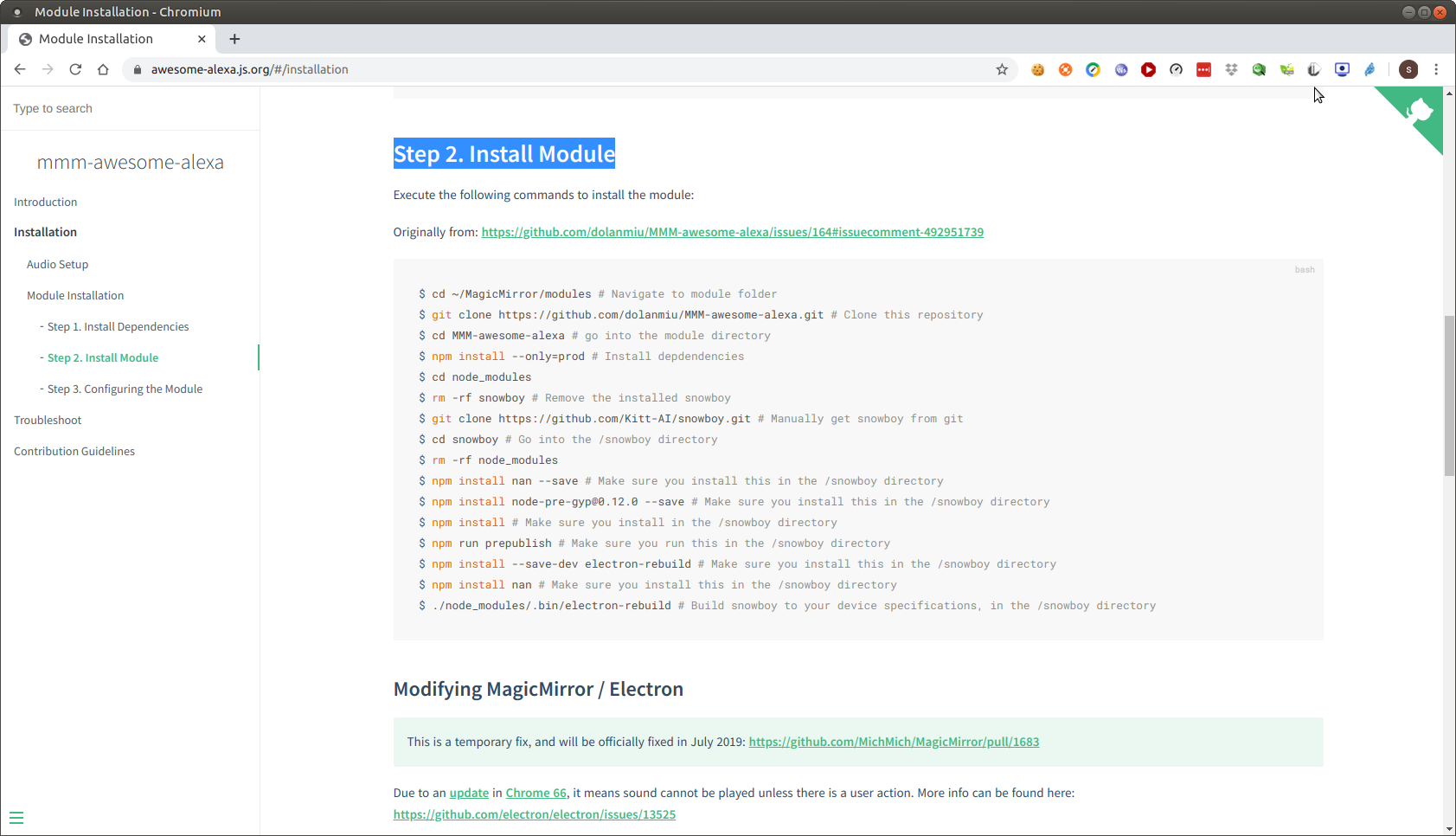
      @Ameyalgudkar these steps, right?

      https://awesome-alexa.js.org/#/installation,
      Step 2. Install Module
      Screenshot at 2020-09-11 09-35-31.png

      Sam

      How to add modules

      learning how to use browser developers window for css changes

      A 1 Reply Last reply Reply Quote 0
      • A Offline
        Ameyalgudkar @sdetweil
        last edited by

        @sdetweil yes those steps.
        The one I am referring to is 4th to last.

        1 Reply Last reply Reply Quote 0
        • S Offline
          sdetweil
          last edited by

          @Ameyalgudkar said in MMM Awesome Alexa installing snowboy.:

          5.4.51-v7l+

          are u trying to install on 64bit RaspiOS?

          my PI’s are running kernel 4.19 on 32bit raspiOS

          Sam

          How to add modules

          learning how to use browser developers window for css changes

          A 2 Replies Last reply Reply Quote 0
          • A Offline
            Ameyalgudkar @sdetweil
            last edited by

            @sdetweil I believe I’m on 5.4.51 kernel but not sure if that’s the one. and don’t know if 32/64 bit.

            S 1 Reply Last reply Reply Quote 0
            • S Offline
              sdetweil @Ameyalgudkar
              last edited by

              @Ameyalgudkar no idea if it will work

              Sam

              How to add modules

              learning how to use browser developers window for css changes

              1 Reply Last reply Reply Quote 0
              • A Offline
                Ameyalgudkar @sdetweil
                last edited by

                @sdetweil Screenshot 2020-09-11 202939.png

                there.
                and if there’s a way to run it on 4.19 then how do I downgrade?

                S 1 Reply Last reply Reply Quote 0
                • S Offline
                  sdetweil @Ameyalgudkar
                  last edited by

                  @Ameyalgudkar no idea… i see the latest images are all at kernel 5.4

                  https://www.raspberrypi.org/downloads/raspberry-pi-os/

                  Sam

                  How to add modules

                  learning how to use browser developers window for css changes

                  A 1 Reply Last reply Reply Quote 0
                  • A Offline
                    Ameyalgudkar @sdetweil
                    last edited by

                    @sdetweil If you could make a copy of your image file or if you have it saved on your disk maybe?
                    could you upload it to google cloud or something?

                    S 1 Reply Last reply Reply Quote 0
                    • S Offline
                      sdetweil @Ameyalgudkar
                      last edited by

                      @Ameyalgudkar see the chat messages I sent you

                      Sam

                      How to add modules

                      learning how to use browser developers window for css changes

                      1 Reply Last reply Reply Quote 0
                      • ? Offline
                        A Former User
                        last edited by

                        @sdetweil :

                        I confirm new update of RPI are now in 5.4.x kernel

                        bugs@debian:~/MagicMirror/modules$ ssh pi@192.168.X.XX
                        pi@192.168.X.XX's password: 
                        Linux Raspberry 5.4.51-v7l+ #1333 SMP Mon Aug 10 16:51:40 BST 2020 armv7l
                        

                        I have not see :)
                        my npm library can make the build of @bugsounet/snowboy

                        pi@Raspberry:~/MagicMirror/modules/MMM-Spotify $ npm install @bugsounet/snowboy
                        npm WARN deprecated request@2.88.2: request has been deprecated, see https://github.com/request/request/issues/3142
                        npm WARN deprecated har-validator@5.1.5: this library is no longer supported
                        
                        > @bugsounet/snowboy@1.6.2 install /home/pi/MagicMirror/modules/MMM-Spotify/node_modules/@bugsounet/snowboy
                        > bash scripts/installer.sh
                        
                        make : on entre dans le répertoire « /home/pi/MagicMirror/modules/MMM-Test-Blank/node_modules/@bugsounet/snowboy/build »
                          CXX(target) Release/obj.target/snowboy/lib/snowboy.o
                          SOLINK_MODULE(target) Release/obj.target/snowboy.node
                          COPY Release/snowboy.node
                          COPY /home/pi/MagicMirror/modules/MMM-Test-Blank/node_modules/@bugsounet/snowboy/lib/node/binding/Release/node-v64-linux-arm/snowboy.node
                          TOUCH Release/obj.target/action_after_build.stamp
                        make : on quitte le répertoire « /home/pi/MagicMirror/modules/MMM-Test-Blank/node_modules/@bugsounet/snowboy/build »
                        
                        [@bugsounet/snowboy] Do you want to execute electron rebuild ? [Y/n]
                        Your choice: y
                        ✔ Rebuild Complete
                        
                        > @bugsounet/snowboy@1.6.2 postinstall /home/pi/MagicMirror/modules/MMM-Test-Blank/node_modules/@bugsounet/snowboy
                        > tsc -p tsconfig.json
                        
                        + @bugsounet/snowboy@1.6.2
                        added 187 packages from 137 contributors and audited 190 packages in 107.058s
                        
                        4 packages are looking for funding
                          run `npm fund` for details
                        
                        found 0 vulnerabilities
                        

                        after official version, i don’t know…
                        it’s always been a bit boring to do a build correctly…

                        @Ameyalgudkar:
                        I see in the error log it’s an x64 build…

                        In MagicMirror requirement it’s specified to download the lasted version of raspbian with desktop

                        The official website is https://www.raspberrypi.org/ and on the download page there no x64 version
                        So you use a beta version with … beta bugs and Complex Module of MagicMirror don’t support x64 version.

                        Best way ?
                        Like windows and others OS you can’t transform x64 to 32bits (and 32bits to x64 too)
                        so best way is reinstall OS with 32bits version

                        @bugsounet

                        S A 2 Replies Last reply Reply Quote 0
                        • S Offline
                          sdetweil @Guest
                          last edited by sdetweil

                          @Bugsounet he is doing on pi, System Linux 5.4.51-v7l+ < — v7l

                          i am going to test ubuntu pi 64 bit tomorrow.

                          couldn’t wait…

                          fix

                          need to install libcblas

                          sudo apt-get install libatlas-base-dev
                          

                          then both my installations using snowboy correctly rebuilt… on ubuntu 64 on pi4.

                          Sam

                          How to add modules

                          learning how to use browser developers window for css changes

                          1 Reply Last reply Reply Quote 0
                          • ? Offline
                            A Former User
                            last edited by A Former User

                            ah… that’s why my library have no problem for installing :)
                            I force it to install with installer lol :)

                            nedeed dependencies

                            1 Reply Last reply Reply Quote 0
                            • A Offline
                              Ameyalgudkar @Guest
                              last edited by

                              @Bugsounet said in MMM Awesome Alexa installing snowboy.:

                              @Ameyalgudkar:
                              I see in the error log it’s an x64 build…
                              so best way is reinstall OS with 32bits version

                              I am indeed running the 32bit Raspberry Pi OS latest from the official downloads, and not any beta versions.
                              I don’t know why the installer is running it in x64.

                              1 Reply Last reply Reply Quote 0
                              • A Offline
                                Ameyalgudkar
                                last edited by

                                Also now I am facing this problem where, no matter what I do, RPI4 does not take any other sd card boot image and boot that particular system.
                                For instance, My 32gb with working MM and RPI OS 32bit, boot up without any problem.
                                But then, I tried booting with a older build of RPI OS, Ubuntu(https://ubuntu.com/download/raspberry-pi) 32bit for Pi4.

                                Both tried on different sd cards with 8gb/32gb and also reformatting it several times and everything.

                                I feel just so exhausted doing all this and thinking of returning my RPI4 if it has so may issues.

                                1 Reply Last reply Reply Quote 0
                                • ? Offline
                                  A Former User
                                  last edited by

                                  internal firmware :) (eeprom)

                                  S 1 Reply Last reply Reply Quote 0
                                  • S Offline
                                    sdetweil @Guest
                                    last edited by sdetweil

                                    @Bugsounet doesn’t the newer system apply the firmware update automatically?

                                    see here for the firmware test and update procedure
                                    https://www.raspberrypi.org/documentation/hardware/raspberrypi/booteeprom.md

                                    Sam

                                    How to add modules

                                    learning how to use browser developers window for css changes

                                    A 1 Reply Last reply Reply Quote 0
                                    • A Offline
                                      Ameyalgudkar @sdetweil
                                      last edited by

                                      @sdetweil I tried the boot recovery mentioned in the link, but no luck with that. Still gets stuck in boot and with a red light. no green light. should I try to get a replacement for my device?

                                      S 2 Replies Last reply Reply Quote 0
                                      • S Offline
                                        sdetweil @Ameyalgudkar
                                        last edited by

                                        @Ameyalgudkar I would guess yes

                                        Sam

                                        How to add modules

                                        learning how to use browser developers window for css changes

                                        1 Reply Last reply Reply Quote 0
                                        • ? Offline
                                          A Former User
                                          last edited by

                                          and Recovery ?

                                          A 1 Reply Last reply Reply Quote 0
                                          • S Offline
                                            sdetweil @Ameyalgudkar
                                            last edited by

                                            @Ameyalgudkar this procedure to verify and then fix

                                            Is the bootloader working correctly?
                                            To check that the bootloader is working correctly, turn off the power, unplug everything from the Raspberry Pi 4, including the SD card, and then turn the power back on. If the green LED blinks with a repeating pattern then the bootloader is running correctly, and indicating that start*.elf has not been found. Any other actions imply that the bootloader is not working correctly and should be reinstalled using recovery.bin.
                                            
                                            Recovery image
                                            If the Raspberry Pi is not booting it's possible that the bootloader EEPROM is corrupted. This can easily be reprogrammed using the Raspberry Pi Imager tool which is available via the raspberrypi.org downloads page.
                                            
                                            Using the recovery image will erase any custom configuration options, resetting the bootloader back to factory defaults.
                                            
                                            Updating the bootloader
                                            Bootloader updates are instigated during a normal apt update, apt full-upgrade cycle, this means you will get new features and bug fixes during your normal updates.
                                            
                                            Bootloader updates are performed by the rpi-eeprom package, which installs a service that runs at boot-time to check for critical updates.
                                            
                                            To update your system, including the bootloader:
                                            
                                            sudo apt update
                                            sudo apt full-upgrade
                                            sudo reboot
                                            

                                            and the bootloader recovery process is documented on the imager page, right?
                                            https://www.raspberrypi.org/downloads/

                                            Sam

                                            How to add modules

                                            learning how to use browser developers window for css changes

                                            S A 2 Replies Last reply Reply Quote 0

                                            Hello! It looks like you're interested in this conversation, but you don't have an account yet.

                                            Getting fed up of having to scroll through the same posts each visit? When you register for an account, you'll always come back to exactly where you were before, and choose to be notified of new replies (either via email, or push notification). You'll also be able to save bookmarks and upvote posts to show your appreciation to other community members.

                                            With your input, this post could be even better 💗

                                            Register Login

                                            • 1
                                            • 2
                                            • 3
                                            • 1 / 3
                                            • First post
                                              Last post
                                            Enjoying MagicMirror? Please consider a donation!
                                            MagicMirror created by Michael Teeuw.
                                            Forum managed by Sam, technical setup by Karsten.
                                            This forum is using NodeBB as its core | Contributors
                                            Contact | Privacy Policy