Read the statement by Michael Teeuw here.
new update Assistant2Display
-
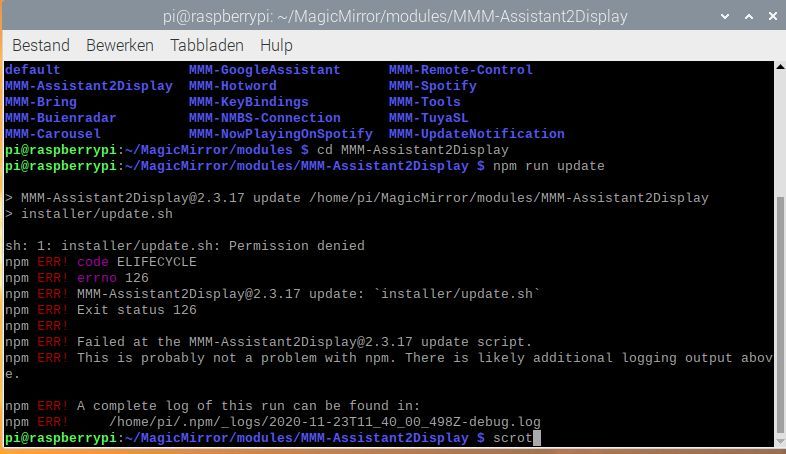
how can i fix all this
updating does not work after trying the new update this morning from the Assistant2Display
thanks in advance -
@raf
when i do (npm run update) i get black screen on reboot -
try this:
ls -la ~/MagicMirrorand again
ls -la ~/MagicMirror/modulesand to finish
ls -la ~/MagicMirror/modules/MMM-Assistant2Display
ls -la ~/MagicMirror/modules/MMM-Assistant2Display/installer
give me result to each command thx
-
pi@raspberrypi:~ $ ls -la ~/MagicMirror totaal 146824 drwxr-xr-x 17 pi pi 4096 nov 23 17:53 . drwxr-xr-x 20 pi pi 4096 nov 23 19:15 .. -rw-r--r-- 1 pi pi 0 nov 17 18:12 0 -rw-r--r-- 1 pi pi 45549 nov 17 15:04 CHANGELOG.md drwxr-xr-x 2 pi pi 4096 nov 17 15:04 clientonly drwxr-xr-x 2 pi pi 4096 nov 22 16:45 config -rw------- 1 pi pi 156508160 nov 23 17:53 core drwxr-xr-x 2 pi pi 4096 nov 17 15:30 css -rw-r--r-- 1 pi pi 860 nov 17 15:04 dangerfile.js -rw-r--r-- 1 pi pi 238 nov 17 15:04 .editorconfig -rw-r--r-- 1 pi pi 34 nov 17 15:04 .eslintignore -rw-r--r-- 1 pi pi 563 nov 17 15:04 .eslintrc.json drwxr-xr-x 3 pi pi 4096 nov 17 15:12 fonts drwxr-xr-x 8 pi pi 4096 nov 23 19:13 .git drwxr-xr-x 2 pi pi 4096 nov 17 15:04 .github -rw-r--r-- 1 pi pi 1009 nov 17 15:04 .gitignore -rw-r--r-- 1 pi pi 2674 nov 17 15:04 index.html drwxr-xr-x 2 pi pi 4096 nov 17 16:05 installers drwxr-xr-x 2 pi pi 4096 nov 17 15:04 js -rw-r--r-- 1 pi pi 264 nov 17 15:04 jsconfig.json -rw-r--r-- 1 pi pi 1098 nov 17 15:04 LICENSE.md drwxr-xr-x 17 pi pi 4096 nov 23 16:29 modules -rw-r--r-- 1 pi pi 1040 nov 17 15:04 module-types.ts drwxr-xr-x 794 pi pi 28672 nov 23 16:19 node_modules -rw-r--r-- 1 pi pi 3353 nov 23 16:19 package.json -rw-r--r-- 1 pi pi 419593 nov 23 16:19 package-lock.json -rw-r--r-- 1 pi pi 63 nov 17 15:04 .prettierignore -rw-r--r-- 1 pi pi 29 nov 17 15:04 .prettierrc.json -rw-r--r-- 1 pi pi 3612 nov 17 15:04 README.md drwxr-xr-x 2 pi pi 4096 nov 17 15:04 serveronly drwxr-xr-x 2 pi pi 4096 nov 17 15:04 splashscreen -rw-r--r-- 1 pi pi 131 nov 17 15:04 .stylelintrc.json drwxr-xr-x 7 pi pi 4096 nov 17 15:04 tests drwxr-xr-x 2 pi pi 4096 nov 17 15:04 translations -rw-r--r-- 1 pi pi 433 nov 17 15:04 .travis.yml drwxr-xr-x 4 pi pi 4096 nov 17 15:12 vendor pi@raspberrypi:~ $ ls -la ~/MagicMirror/modules totaal 68 drwxr-xr-x 17 pi pi 4096 nov 23 16:29 . drwxr-xr-x 17 pi pi 4096 nov 23 17:53 .. drwxr-xr-x 12 pi pi 4096 nov 17 15:15 default drwxr-xr-x 9 pi pi 4096 nov 23 16:32 MMM-Assistant2Display drwxr-xr-x 6 pi pi 4096 nov 22 15:07 MMM-Bring drwxr-xr-x 3 pi pi 4096 nov 19 19:45 MMM-Buienradar drwxr-xr-x 5 pi pi 4096 nov 17 15:16 MMM-Carousel drwxr-xr-x 11 pi pi 4096 nov 17 15:18 MMM-GoogleAssistant drwxr-xr-x 9 pi pi 4096 nov 17 15:19 MMM-Hotword drwxr-xr-x 6 pi pi 4096 nov 17 15:19 MMM-KeyBindings drwxr-xr-x 5 pi pi 4096 nov 20 10:54 MMM-NMBS-Connection drwxr-xr-x 8 pi pi 4096 nov 17 15:20 MMM-NowPlayingOnSpotify drwxr-xr-x 9 pi pi 4096 nov 21 18:22 MMM-Remote-Control drwxr-xr-x 6 pi pi 4096 nov 17 15:20 MMM-Spotify drwxr-xr-x 6 pi pi 4096 nov 17 15:20 MMM-Tools drwxr-xr-x 6 pi pi 4096 nov 17 15:21 MMM-TuyaSL drwxr-xr-x 6 pi pi 4096 nov 17 18:06 MMM-UpdateNotification pi@raspberrypi:~ $ ls -la ~/MagicMirror/modules/MMM-Assistant2Display totaal 256 drwxr-xr-x 9 pi pi 4096 nov 23 16:32 . drwxr-xr-x 17 pi pi 4096 nov 23 16:29 .. drwxr-xr-x 2 pi pi 4096 nov 23 16:29 components drwxr-xr-x 8 pi pi 4096 nov 23 19:16 .git -rw-r--r-- 1 pi pi 34 okt 13 18:15 .gitignore drwxr-xr-x 2 pi pi 4096 nov 23 16:29 installer -rw-r--r-- 1 pi pi 1064 okt 13 18:14 LICENSE -rw-r--r-- 1 pi pi 24083 okt 13 18:15 MMM-Assistant2Display.js -rw-r--r-- 1 pi pi 7294 okt 13 18:15 node_helper.js drwxr-xr-x 385 pi pi 12288 nov 23 16:32 node_modules -rw-r--r-- 1 pi pi 870 okt 13 18:15 package.json -rw-r--r-- 1 pi pi 151852 okt 13 18:18 package-lock.json -rw-r--r-- 1 pi pi 635 okt 13 18:15 README.md -rw-r--r-- 1 pi pi 4142 okt 13 18:15 screen.css drwxr-xr-x 2 pi pi 4096 nov 23 16:32 screenshot -rw-r--r-- 1 pi pi 597 nov 23 18:32 spotify-token.json drwxr-xr-x 2 pi pi 4096 nov 23 16:32 translations drwxr-xr-x 5 pi pi 4096 nov 23 16:32 ui pi@raspberrypi:~ $ ls -la ~/MagicMirror/modules/MMM-Assistant2Display/installer totaal 40 drwxr-xr-x 2 pi pi 4096 nov 23 16:29 . drwxr-xr-x 9 pi pi 4096 nov 23 16:32 .. -rw-r--r-- 1 pi pi 1233 okt 13 18:15 librespot.sh -rw-r--r-- 1 pi pi 1716 okt 13 18:15 postinstall.sh -rw-r--r-- 1 pi pi 1159 okt 13 18:15 preinstall.sh -rw-r--r-- 1 pi pi 1327 okt 13 18:15 spotify-setup.js -rw-r--r-- 1 pi pi 1371 okt 13 18:15 update.sh -rw-r--r-- 1 pi pi 9138 okt 13 18:14 utils.sh -
so, user (pi) is correct
but can you explain to me why file mod is changed in installer directory ?
just because in repository it’s a different chmod … -
@Bugsounet
I have no explanation for it, I am a real layman and it all sounds Chinese to me
I really don’t know anything about it but I think it’s a great project and that’s why I installed it on my pi
but I want to take your advice and try to make any changes you suggest -
I think you do some commands but you don’t know what is means so the result is : You have broken all install system and all update system
So to repair:
make executable all sh file of installer directory -
I don’t know how to do that, maybe someone via team viewer
-
chmod +x
-
@Bugsounet
and where do I carry out this assignment -
I says:
So to repair:
make executable all sh file of installer directoryjust read and search …
I will don’t tell you the entire command
I just tell to you a part of the command (chmod +x)… now just search a little
sorry … you do some commands without search the signification, so now searchYou have internet and you have google, you have the part of command… better way for learning ;)
For your information, it’s not an Assistant2Display issue (all setting is correct in the repository) it’s just a mismake user command issue
-
@Bugsounet
I’m trying my best -
I’ll just remove the google assistant and assistant2display because I can’t find the error (then just a mirror without assistant)
thank you in advance -
@raf no problem make as you want but don’t ask helping if you make some mismake command by your self
I think it not very difficult to search the syntaxe for chmod +x some files
If you don’t want to search a little on Google, I can’t do anything for youAll module are free… We send you the Way to find and correct User error.
I repeat it s not an A2D error or an A2D mismake script
It a mismake command by yourself
By your react you will never understand anything.
Good luck for future ;) -
@Bugsounet
because I like the module too much I don’t remove it after months of work that it has already taken me to install it, so look a little further:face_savouring_delicious_food: -
could I solve it with this script?
bash -c " $ ( curl -sL https://raw.githubusercontent.com/sdetweil/MagicMirror_scripts/master/upgrade-script.sh ) "
-
@raf no, that is only to upgrade MagicMirror itself
-
@raf please see this
https://www.hostinger.com/tutorials/linux-commands
and here
https://maker.pro/linux/tutorial/basic-linux-commands-for-beginnerscause it has a different start , which may prove helpful forever
-
I’ve read a lot but don’t know where to start
I even don’t know where to look for the error let alone fix it -
@raf come on, commands are executed in a terminal window. the second link shows you how to open one from the desktop.
some commands work on files…
so you either need to be in the same folder as the files, or use the full path to the files from the current folder.
u know the error, u and Bugsounet have discussed it… the program needs to be marked executable… this is a linux permissions thing, you cannot execute just anything… (like on windows)
u need to learn the system , and will be better off because of it. we are not here to give u every command in every situation…
Hello! It looks like you're interested in this conversation, but you don't have an account yet.
Getting fed up of having to scroll through the same posts each visit? When you register for an account, you'll always come back to exactly where you were before, and choose to be notified of new replies (either via email, or push notification). You'll also be able to save bookmarks and upvote posts to show your appreciation to other community members.
With your input, this post could be even better 💗
Register Login