Read the statement by Michael Teeuw here.
Calendar issue - Private work calendar
-
I have seen some other posts here with a similar issue, but nothing quite like what I am facing. The odd thing is this seemed to have broken recently, as it was working just a few days ago…
The company I work for makes our calendars private, and that’s fine with me, all I want to show on my MM is the “Busy” subject for when I have meetings (will make it easier for my wife to know when I am in a meeting or when I am not)
These are the settings of the calendar:
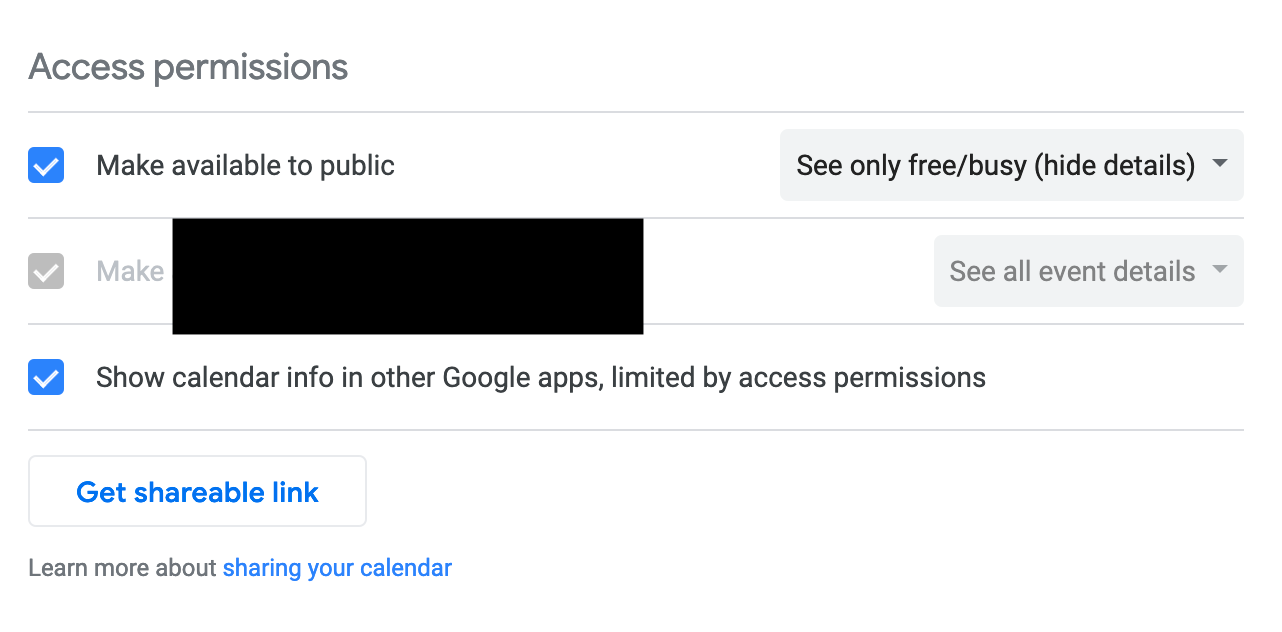
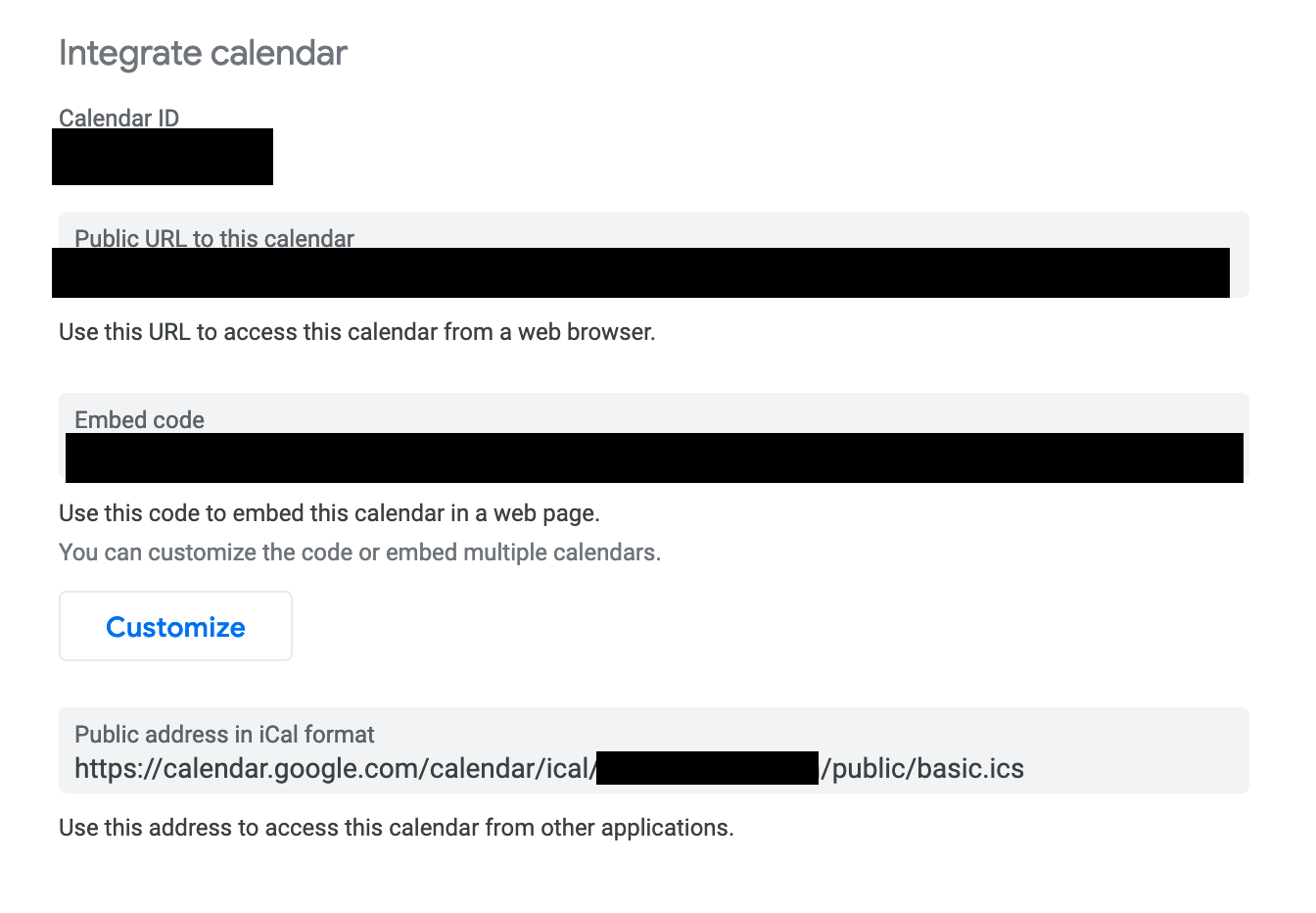
I am trying to use the
basic.icsone at the bottom of that second image, but its not pulling in any of the data.Things I have tried:
- running
curl -L https://calendar.google.com/calendar/ical/********************/public/basic.icson my computer and my raspberry pi (both are pulling in the data correctly as far as I can tell)
I am getting data like this back:
BEGIN:VCALENDAR BEGIN:VEVENT DTSTART:20201105T200000Z DTEND:20201105T210000Z UID:*********@google.com ATTENDEE;X-NUM-GUESTS=0:mailto:************** SUMMARY:Busy END:VEVENT END:VCALENDAR-
I have manually typed in the
/basic.icsurl into Chromium on my Raspberry Pi and it downloads it properly too -
I have manually added this calendar yo my personal google account and it pulls it in properly
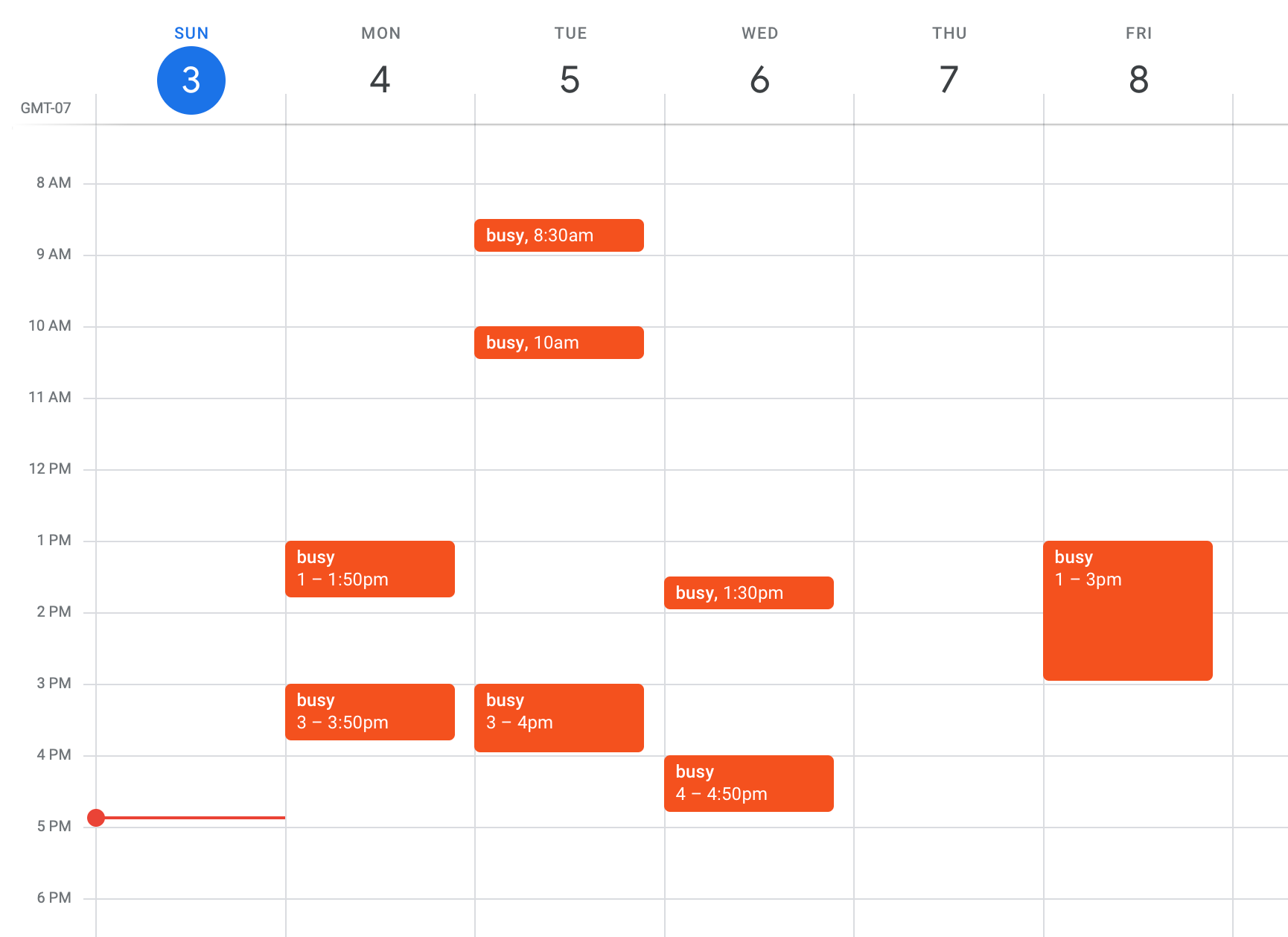
Any other recommendations would be much appreciated!
- running
-
@trev125 said in Calendar issue - Private work calendar:
BEGIN:VCALENDAR
BEGIN:VEVENT
DTSTART:20201105T200000Z
DTEND:20201105T210000Z
UID:@google.com
ATTENDEE;X-NUM-GUESTS=0:mailto:*****
SUMMARY:Busy
END:VEVENT
END:VCALENDARwell, THAT event is november 5th
we don’t display events in the past
I changed the date, but because it has no timezone associated (only UTC start/stop)
my TZ is used, and its STILL in the past
Sun Jan 03 2021 14:00:00 GMT-0600if I make it jan 4, at 20:00 UTC it shows and says in 20 hours, as its 6 pm (18:00) here and the appt says 2 pm (14:00)
-
I made a lot of changes to calendar this last 3 months to get it right.
u could email me the ics file, its text, sanitize anything u need to.
my email in my same userid here at gmail
-
@sdetweil said in Calendar issue - Private work calendar:
@trev125 said in Calendar issue - Private work calendar:
BEGIN:VCALENDAR
BEGIN:VEVENT
DTSTART:20201105T200000Z
DTEND:20201105T210000Z
UID:@google.com
ATTENDEE;X-NUM-GUESTS=0:mailto:*****
SUMMARY:Busy
END:VEVENT
END:VCALENDARwell, THAT event is november 5th
we don’t display events in the past
I changed the date, but because it has no timezone associated (only UTC start/stop)
my TZ is used, and its STILL in the past
Sun Jan 03 2021 14:00:00 GMT-0600if I make it jan 4, at 20:00 UTC it shows and says in 20 hours, as its 6 pm (18:00) here and the appt says 2 pm (14:00)
Youre right, I put in the oldest one instead of the newest, I didnt realize the
.icswas in that order. It looks like I have appointments ranging from 2020 to 2022. One that should be valid is this (I added the header and footer of the.icsto this to make it more clear):BEGIN:VCALENDAR PRODID:-//Google Inc//Google Calendar 70.9054//EN VERSION:2.0 CALSCALE:GREGORIAN METHOD:PUBLISH X-WR-CALNAME:****** X-WR-TIMEZONE:America/Denver BEGIN:VEVENT DTSTART:20210104T220000Z DTEND:20210104T225000Z DTSTAMP:20210103T224853Z UID:**********@google.com ATTENDEE;X-NUM-GUESTS=0:mailto:********* RECURRENCE-ID:20210104T220000Z SUMMARY:Busy END:VEVENT END:VCALENDARAnd its still not showing up in my calendar
-
@trev125 ok, shows on mine… what mm version are u on?
grep version ~/MagicMirror/package.json
-
@sdetweil “version”: “2.14.0”,
-
@trev125 ok, change config.js
add
logLevel: ["INFO", "LOG", "WARN", "ERROR","DEBUG"],if its already there, add “DEBUG”
then restart MM
If you are using pm2, the
pm2 flush
pm2 restart 0this is what I see for the latest event u posted, i set my timezone to yours
[03.01.2021 20:35.36.727] [DEBUG]  parsed data={"**********@google.com":{"type":"VEVENT","params":[],"start":"2021-01-04T22:00:00.000Z","datetype":"date-time","end":"2021-01-04T22:50:00.000Z","dtstamp":"2021-01-03T22:48:53.000Z","uid":"**********@google.com","attendee":{"params":{"X-NUM-GUESTS":0},"val":"mailto:*********"},"recurrenceid":"2021-01-04T22:00:00.000Z","summary":"Busy","recurrences":{"2021-01-04":{"type":"VEVENT","params":[],"start":"2021-01-04T22:00:00.000Z","datetype":"date-time","end":"2021-01-04T22:50:00.000Z","dtstamp":"2021-01-03T22:48:53.000Z","uid":"**********@google.com","attendee":{"params":{"X-NUM-GUESTS":0},"val":"mailto:*********"},"recurrenceid":"2021-01-04T22:00:00.000Z","summary":"Busy"}}}}
[03.01.2021 20:35.36.727] [DEBUG] there are 1 calendar entries
[03.01.2021 20:35.36.729] [DEBUG] have entries
[03.01.2021 20:35.36.730] [DEBUG]
event={"type":"VEVENT","params":[],"start":"2021-01-04T22:00:00.000Z","datetype":"date-time","end":"2021-01-04T22:50:00.000Z","dtstamp":"2021-01-03T22:48:53.000Z","uid":"**********@google.com","attendee":{"params":{"X-NUM-GUESTS":0},"val":"mailto:*********"},"recurrenceid":"2021-01-04T22:00:00.000Z","summary":"Busy","recurrences":{"2021-01-04":{"type":"VEVENT","params":[],"start":"2021-01-04T22:00:00.000Z","datetype":"date-time","end":"2021-01-04T22:50:00.000Z","dtstamp":"2021-01-03T22:48:53.000Z","uid":"**********@google.com","attendee":{"params":{"X-NUM-GUESTS":0},"val":"mailto:*********"},"recurrenceid":"2021-01-04T22:00:00.000Z","summary":"Busy"}}}
[03.01.2021 20:35.36.730] [DEBUG]  start=Mon Jan 04 2021 15:00:00 GMT-0700 (Mountain Standard Time) end=Mon Jan 04 2021 15:50:00 GMT-0700 (Mountain Standard Time)
[03.01.2021 20:35.36.730] [DEBUG]  if no tz, guess based on now
[03.01.2021 20:35.36.742] [DEBUG] initial tz=America/Denver
[03.01.2021 20:35.36.743] [DEBUG] corrected tz=America/Denver
[03.01.2021 20:35.36.743] [DEBUG] start date/time=Mon Jan 04 2021 15:00:00 GMT-0700 (Mountain Standard Time)
[03.01.2021 20:35.36.744] [DEBUG] start offset=-420
[03.01.2021 20:35.36.745] [DEBUG] start date/time w tz =Mon Jan 04 2021 15:00:00 GMT-0700 (Mountain Standard Time)
[03.01.2021 20:35.36.745] [DEBUG] event date=Mon Jan 04 2021 15:00:00 GMT-0700 (Mountain Standard Time)
[03.01.2021 20:35.36.745] [DEBUG] event offset=-420 hour=15 event date=Mon Jan 04 2021 15:00:00 GMT-0700 (Mountain Standard Time)
[03.01.2021 20:35.36.745] [DEBUG] adjustHours=0
[03.01.2021 20:35.36.746] [INFO]  Calendar-Fetcher: Broadcasting 1 events.
also, can u show the calendar config entry, not the url
u would see this data in the pm2 logs
using command
pm2 logs --lines=100 -
@sdetweil Thanks for the quick responses. It looks like the calendar that I am pulling in has around 600 events, if that is anything.
Because of that, it makes it hard to read the debugger, but I did see this:
"2021-01-05":{"type":"VEVENT","params":[],"start":"2021-01-05T17:00:00.000Z","datetype":"date-time","end":"2021-01-05T17:25:00.000Z","dtstamp":"2021-01-04T03:46:12.000Z","uid":"*******@google.com","attendee":{"params":{"X-NUM-GUESTS":0},"val":"mailto:******"},"recurrenceid":"2021-01-05T17:00:00.000Z","summary":"Busy"},Then I have some things like this, but I dont notice any of them for any dates coming up soon:
[03.01.2021 20:46.13.274] [DEBUG]  start=Tue Jan 03 2023 10:00:00 GMT-0700 (Mountain Standard Time) end=Tue Jan 03 2023 10:25:00 GMT-0700 (Mountain Standard Time)
[03.01.2021 20:46.13.274] [DEBUG] have entries
Also: here is my calendar config:
		{
			module: "calendar",
			header: "Calendar",
			position: "top_bar",
			maximumEntries: 80,
			config: {
				calendars: [
					{
						symbol: "calendar-check",
						url: "https://calendar.google.com/calendar/ical/******/public/basic.ics"
					}
				]
			}
		},
I can edit and send you the
.icsif that would be helpful, I can sanitize it -
@trev125 yes, please, the sanitized ics would be awesome…
I won’t get to it til tomorrow tho -
@trev125 i got it and sent u an email back
Hello! It looks like you're interested in this conversation, but you don't have an account yet.
Getting fed up of having to scroll through the same posts each visit? When you register for an account, you'll always come back to exactly where you were before, and choose to be notified of new replies (either via email, or push notification). You'll also be able to save bookmarks and upvote posts to show your appreciation to other community members.
With your input, this post could be even better 💗
Register Login