MagicMirror Forum
    • Recent
    • Tags
    • Unsolved
    • Solved
    • MagicMirror² Repository
    • Documentation
    • 3rd-Party-Modules
    • Donate
    • Discord
    • Register
    • Login
    A New Chapter for MagicMirror: The Community Takes the Lead
    Read the statement by Michael Teeuw here.

    Current Weather and Weather Forecast looks grey out.

    Scheduled Pinned Locked Moved Custom CSS
    24 Posts 6 Posters 7.1k Views 5 Watching
    Loading More Posts
    • Oldest to Newest
    • Newest to Oldest
    • Most Votes
    Reply
    • Reply as topic
    Log in to reply
    This topic has been deleted. Only users with topic management privileges can see it.
    • ? Offline
      A Former User
      last edited by

      This post is deleted!
      1 Reply Last reply Reply Quote 0
      • N Offline
        negrito Project Sponsor
        last edited by

        first of all I would like to emphasize that I really appreciate your help. I’ve tried both, but no change. I cleared the settings for color icons to see if it worked, but nothing. See my custom.css here…
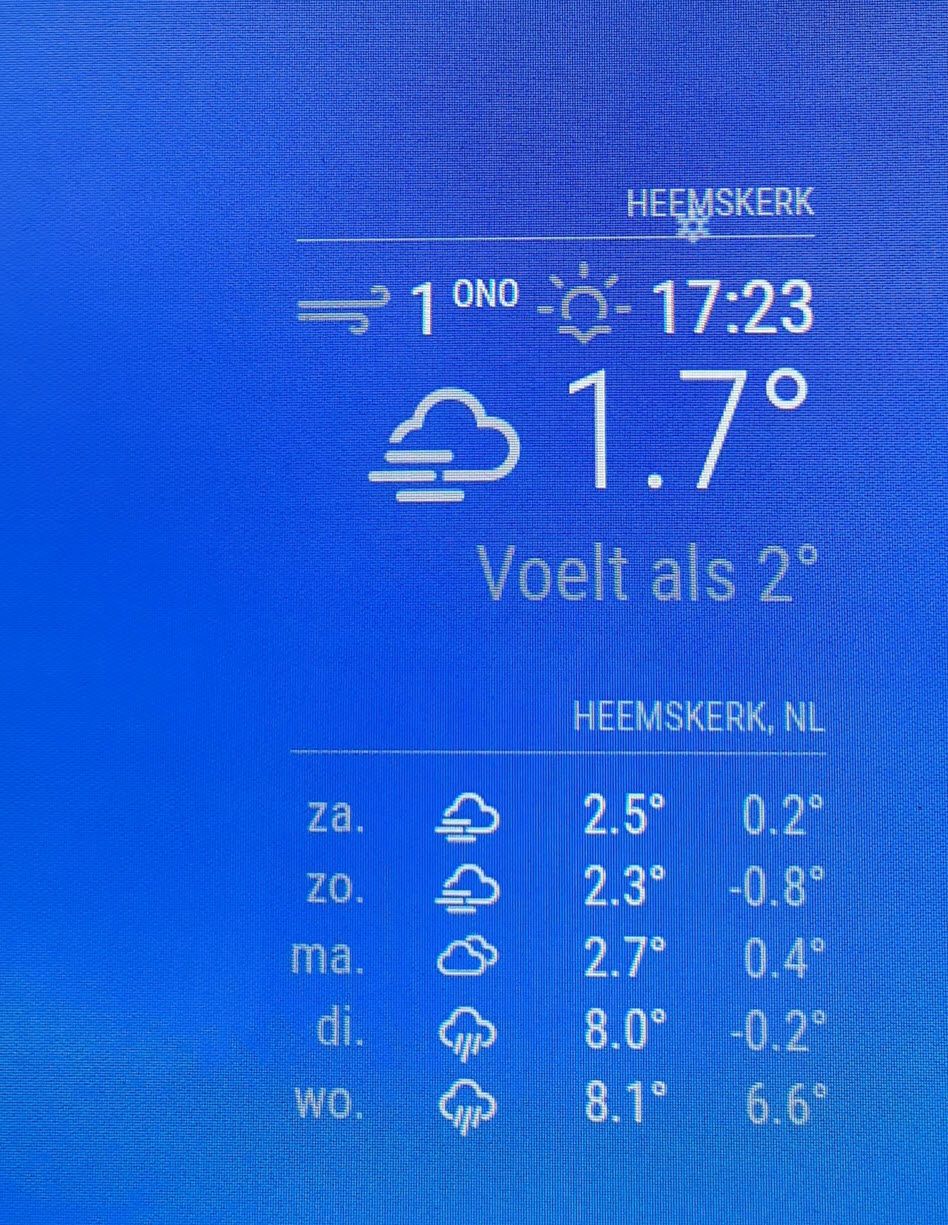
        20210130_143515.jpg

        .newsfeed .small {
        font-size: 30px;
        line-height: 25px;
        }
        
        .newsfeed .medium {
        font-size: 35px;
        line-height: 30px;
        }
        
        .clock .date {
        	color: #fff;
        }
        
        .calendar td {
        color: #fff;
        }
        
        .calendar .header {
        	color: #fff;
        }
        .MMM-COVID19-SPARKLINE{
          color:#fff;
        }
        
        .calendar .time {
          color:#fff;
        }
        
        .normal {
            color: white !important;
        }
        
        1 Reply Last reply Reply Quote 0
        • ? Offline
          A Former User
          last edited by A Former User

          This post is deleted!
          1 Reply Last reply Reply Quote 0
          • N Offline
            negrito Project Sponsor
            last edited by

            Yes, the rest of the custom.css is working an here is the config.js part for that:

            		{
            			module: "currentweather",
            			position: "top_right",
            			config: {
            				location: "Heemskerk",
            				locationID: "2754696",
            				appid: "key removed"
            			}
            		},
            		{
            			module: "weatherforecast",
            			position: "top_right",
            			header: "",
            			config: {
            				location: "Heemskerk",
            				locationID: "2754696",
            				appid: "key removed",
            				fade: false
            			}
            		},
            
            
            1 Reply Last reply Reply Quote 0
            • ? Offline
              A Former User
              last edited by A Former User

              This post is deleted!
              1 Reply Last reply Reply Quote 0
              • N Offline
                negrito Project Sponsor
                last edited by

                I don’t have any reference to the custom.css in my config.js I feel bad al ready:disappointed_face:

                ? 1 Reply Last reply Reply Quote 0
                • ? Offline
                  A Former User @negrito
                  last edited by

                  This post is deleted!
                  S 1 Reply Last reply Reply Quote 0
                  • R Offline
                    raf
                    last edited by

                    /home/pi/MagicMirror/modules/default/weatherforecast/weatherforecast.js
                    in this file change colored from false to true

                    S 1 Reply Last reply Reply Quote 0
                    • S Offline
                      sdetweil @raf
                      last edited by

                      @raf please dont edit the code. use config.js

                      Sam

                      How to add modules

                      learning how to use browser developers window for css changes

                      1 Reply Last reply Reply Quote 0
                      • ? Offline
                        A Former User
                        last edited by A Former User

                        This post is deleted!
                        S 1 Reply Last reply Reply Quote 1
                        • S Offline
                          sdetweil @Guest
                          last edited by

                          @hango no

                          custom.css is in css always. hard coded to be loaded last

                          never referenced in config.js

                          Sam

                          How to add modules

                          learning how to use browser developers window for css changes

                          ? S 2 Replies Last reply Reply Quote 0
                          • ? Offline
                            A Former User @sdetweil
                            last edited by A Former User

                            This post is deleted!
                            1 Reply Last reply Reply Quote 0
                            • S Offline
                              shagtimetim @sdetweil
                              last edited by

                              @sdetweil Following this: If not in config.js, where do we reference the custom.css?

                              S 1 Reply Last reply Reply Quote 0
                              • S Offline
                                sdetweil @shagtimetim
                                last edited by

                                @shagtimetim you never reference custom.css.

                                it is hard coded in the mm runtime to load custom.css last, to allow it to override any styles set before

                                u have to do nothing

                                Sam

                                How to add modules

                                learning how to use browser developers window for css changes

                                S 1 Reply Last reply Reply Quote 0
                                • S Offline
                                  shagtimetim @sdetweil
                                  last edited by

                                  @sdetweil As always, thank you sir.

                                  1 Reply Last reply Reply Quote 0
                                  • S Offline
                                    sdetweil @Guest
                                    last edited by

                                    @hango altho u can, you shouldnt. there is only one. normal place should be fine

                                    Sam

                                    How to add modules

                                    learning how to use browser developers window for css changes

                                    ? 1 Reply Last reply Reply Quote 0
                                    • ? Offline
                                      A Former User @sdetweil
                                      last edited by

                                      This post is deleted!
                                      S 1 Reply Last reply Reply Quote 0
                                      • S Offline
                                        sdetweil @Guest
                                        last edited by sdetweil

                                        @hango remember you can use the dev window elements tab, to edit the css, get what u want, and code that in custom.css

                                        quit guessing

                                        Sam

                                        How to add modules

                                        learning how to use browser developers window for css changes

                                        ? 1 Reply Last reply Reply Quote 0
                                        • ? Offline
                                          A Former User @sdetweil
                                          last edited by A Former User

                                          This post is deleted!
                                          S 1 Reply Last reply Reply Quote 0
                                          • S Offline
                                            sdetweil @Guest
                                            last edited by

                                            @hango good that u have skill most of us dont. just want to educate people on a different process than guess and try

                                            Sam

                                            How to add modules

                                            learning how to use browser developers window for css changes

                                            Mykle1M 1 Reply Last reply Reply Quote 0

                                            Hello! It looks like you're interested in this conversation, but you don't have an account yet.

                                            Getting fed up of having to scroll through the same posts each visit? When you register for an account, you'll always come back to exactly where you were before, and choose to be notified of new replies (either via email, or push notification). You'll also be able to save bookmarks and upvote posts to show your appreciation to other community members.

                                            With your input, this post could be even better 💗

                                            Register Login

                                            • 1
                                            • 2
                                            • 1 / 2
                                            • First post
                                              Last post
                                            Enjoying MagicMirror? Please consider a donation!
                                            MagicMirror created by Michael Teeuw.
                                            Forum managed by Sam, technical setup by Karsten.
                                            This forum is using NodeBB as its core | Contributors
                                            Contact | Privacy Policy