MagicMirror Forum
    • Recent
    • Tags
    • Unsolved
    • Solved
    • MagicMirror² Repository
    • Documentation
    • 3rd-Party-Modules
    • Donate
    • Discord
    • Register
    • Login
    A New Chapter for MagicMirror: The Community Takes the Lead
    Read the statement by Michael Teeuw here.

    MMM-Domoticz-ext: interact with Domoticz

    Scheduled Pinned Locked Moved Utilities
    121 Posts 14 Posters 101.5k Views 16 Watching
    Loading More Posts
    • Oldest to Newest
    • Newest to Oldest
    • Most Votes
    Reply
    • Reply as topic
    Log in to reply
    This topic has been deleted. Only users with topic management privileges can see it.
    • N Offline
      najtram @steps39
      last edited by

      @steps39

      Symbols are unicode symbols in the names of the domoticz devices…

      eg: Unicode Character “⚇” (U+2687)

      Just edit the devicename in Domoticz…

      G 1 Reply Last reply Reply Quote 0
      • G Offline
        goedh452 @najtram
        last edited by goedh452

        @najtram & @steps39

        I made some changes to the code:

        • When min value for the gauge is < 0 then 0 is centered. Otherwise zero is not centered.

        • Made the config for utility gauges much more flexible

        It is now possible to set config options for each individual gauge, including width, line width, marker width and marker color. Also a symbol of font awesome can be used.

        Please download the latest code from GitHub. You will also have to modify the config file. I updated the readme accordingly. My config for utilities is now:

        utilities: {
          utilityLabel: "Gas - Water - Licht",
          showLabel: true,
          devices: [
            {
               idx: "304",
               deviceHeader: "Elektriciteit",
               counterTodayLabel: "Vandaag",
               gaugeMinValue: -3000,
               gaugeMaxValue: 3000,
               gaugeAppendText: "Watt",
               gaugeWidth: 200,
               lineWidth: 16,
               markerWidth: 16,
               markerColor: "#F4D03F"
             },
             {
               idx: "329",
               deviceHeader: "Gas",
               useHeaderSymbol: true,
               headerSymbol: "fire",
               counterTodayLabel: "Vandaag",
               gaugeMaxValue: 25,
               gaugeAppendText: "m³",
             },
             {
               idx: "1614",
               deviceHeader: "Water",
               useHeaderSymbol: false,
               headerSymbol: "water",
               counterTodayLabel: "Vandaag",
               gaugeMaxValue: 1500,
               gaugeAppendText: "liter",
             }
           ],
         },
        

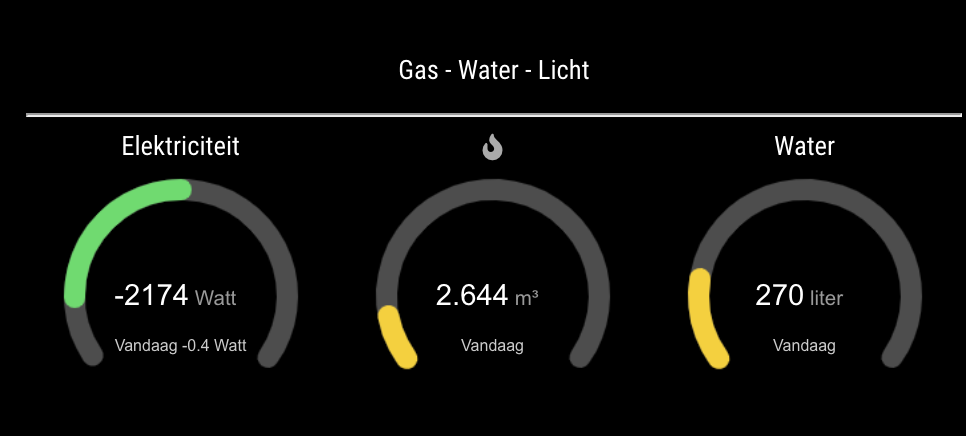
        Which results in:
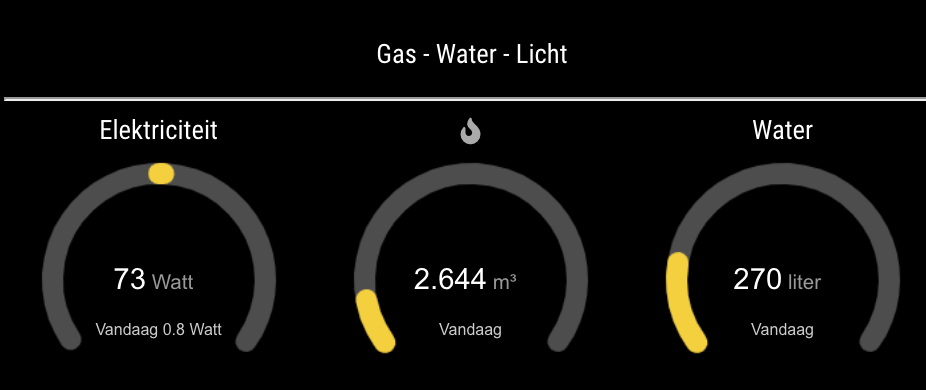
        Schermafbeelding 2021-04-17 om 13.13.36.png

        Schermafbeelding 2021-04-17 om 13.47.39.png

        N 1 Reply Last reply Reply Quote 0
        • N Offline
          najtram @goedh452
          last edited by najtram

          @goedh452 said in MMM-Domoticz-ext: interact with Domoticz:

          Great work! Small detail… The Watt vs the kWh? Where did this option go?

          See screenshot.

          Also a minor detail. The font used for Watt, and Today, isn’t the default font the MMM uses. Is there a reason for not using that default font?

          Again, thanks for your great work!
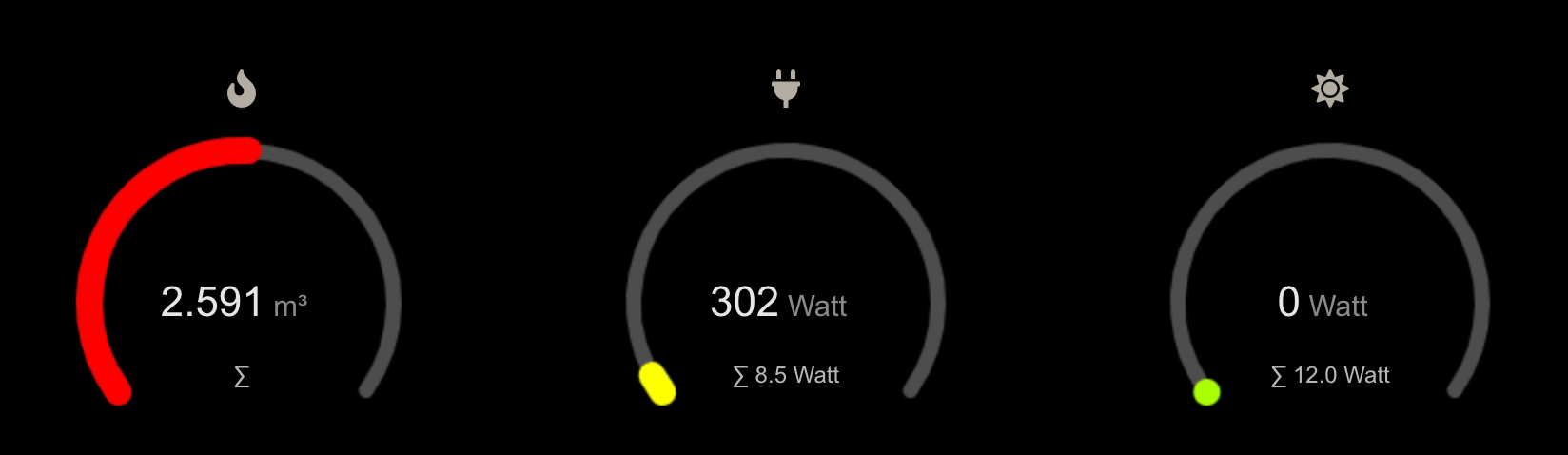
          Schermafbeelding 2021-04-19 om 21.32.58.png

          G 2 Replies Last reply Reply Quote 0
          • G Offline
            goedh452 @najtram
            last edited by goedh452

            @najtram

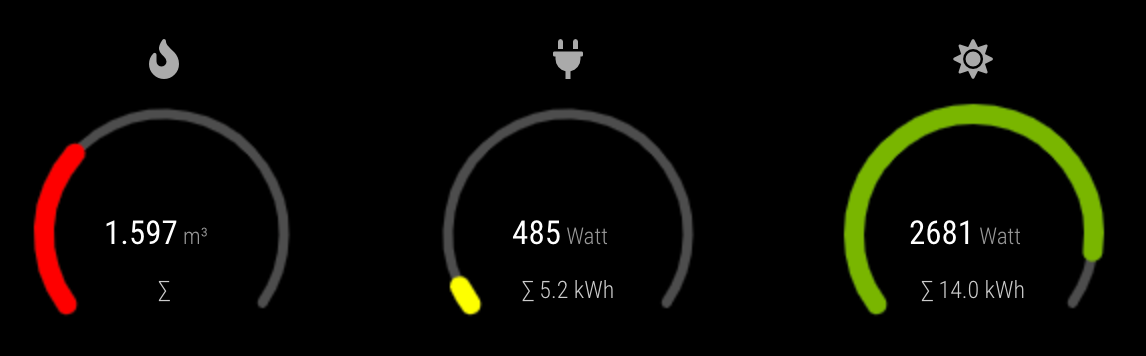
            You are right. I overlooked that. I added an option ‘counterTodayAppendText’ which defaults to ‘kWh’. So you can set it yourself in the config or leave it a ‘kWh’. Latest code is on GitHub.

            1 Reply Last reply Reply Quote 0
            • G Offline
              goedh452 @najtram
              last edited by goedh452

              @najtram

              Fixed the font. Set to default MM font in GaugeMeter.js.

              Thanks for the suggestions!

              N 1 Reply Last reply Reply Quote 0
              • N Offline
                najtram @goedh452
                last edited by

                @goedh452

                These are great improvements!

                -kWh is working
                -Font is working partially. Actual usage is MM-font, but daily totals still looks like Arial…

                G 1 Reply Last reply Reply Quote 0
                • G Offline
                  goedh452 @najtram
                  last edited by

                  @najtram

                  Right again! All fonts should be the default MM font now.

                  Thanks for the feedback.

                  N 1 Reply Last reply Reply Quote 0
                  • N Offline
                    najtram @goedh452
                    last edited by najtram

                    @goedh452

                    @goedh452

                    Thanks for making this adjustment.

                    I am currently having problems. I was curious about your update. So I updated the module with the MagicMirror remote module. (there is an update in the menu.)
                    Somehow I updated my entire mirror.
                    ⮑ Guess what! → MMM-Domoticz-ext no longer works. (Another calendar module is now also “broken”.) But for the MMM-Domoticz-ext I received this error.

                    So again, I’m asking for your help. But I can imagine this could be a big thing. Thanks in advance if you can manage to fix this!

                    pm2 logs mm ↓

                    0|mm  | [23.04.2021 21:58.08.734] [ERROR] 
                    0|mm  | ERROR! Could not validate main module js file.
                    0|mm  | [23.04.2021 21:58.08.796] [ERROR] 
                    0|mm  | SyntaxError: Error parsing /home/pi/MagicMirror/modules/MMM-Domoticz-ext/package.json: Unexpected token } in JSON at position 669
                    0|mm  |     at parse (<anonymous>)
                    0|mm  |     at readPackage (internal/modules/cjs/loader.js:269:20)
                    0|mm  |     at readPackageScope (internal/modules/cjs/loader.js:294:19)
                    0|mm  |     at Object.Module._extensions..js (internal/modules/cjs/loader.js:1164:17)
                    0|mm  |     at Module.load (internal/modules/cjs/loader.js:992:32)
                    0|mm  |     at Module._load (internal/modules/cjs/loader.js:885:14)
                    0|mm  |     at Function.f._load (electron/js2c/asar_bundle.js:5:12738)
                    0|mm  |     at Module.require (internal/modules/cjs/loader.js:1032:19)
                    0|mm  |     at require (internal/modules/cjs/helpers.js:72:18)
                    0|mm  |     at Class.loadModuleDefaultConfig (/home/pi/MagicMirror/modules/MMM-Remote-Control/node_helper.js:313:30) {
                    0|mm  |   path: '/home/pi/MagicMirror/modules/MMM-Domoticz-ext/package.json'
                    0|mm  | }
                    
                    
                    G 1 Reply Last reply Reply Quote 0
                    • G Offline
                      goedh452 @najtram
                      last edited by

                      @najtram

                      Wow, that’s strange. It seams like a more strict interpretation of the code in package.json. I validated the JSON again and made one minor change. Could you pull the code from GitHub and try again? Really hope this solves the problem.

                      N 1 Reply Last reply Reply Quote 0
                      • N Offline
                        najtram @goedh452
                        last edited by

                        @goedh452

                        Similar result:

                        pi@raspberrypi:~/MagicMirror/config $ pm2 logs mm
                        [TAILING] Tailing last 15 lines for [mm] process (change the value with --lines option)
                        /home/pi/.pm2/logs/mm-error.log last 15 lines:
                        0|mm       |     at require (internal/modules/cjs/helpers.js:72:18)
                        0|mm       |     at Object.<anonymous> (/home/pi/MagicMirror/modules/MMM-Domoticz-ext/node_helper.js:2:22)
                        0|mm       |     at Module._compile (internal/modules/cjs/loader.js:1152:30)
                        0|mm       |     at Object.Module._extensions..js (internal/modules/cjs/loader.js:1173:10) {
                        0|mm       |   code: 'MODULE_NOT_FOUND',
                        0|mm       |   requireStack: [
                        0|mm       |     '/home/pi/MagicMirror/modules/MMM-Domoticz-ext/node_helper.js',
                        0|mm       |     '/home/pi/MagicMirror/js/app.js',
                        0|mm       |     '/home/pi/MagicMirror/js/electron.js',
                        0|mm       |     '/home/pi/MagicMirror/node_modules/electron/dist/resources/default_app.asar/main.js',
                        0|mm       |     undefined
                        0|mm       |   ]
                        0|mm       | }
                        0|mm       | [24.04.2021 12:09.55.294] [ERROR] MagicMirror will not quit, but it might be a good idea to check why this happened. Maybe no internet connection?
                        0|mm       | [24.04.2021 12:09.55.296] [ERROR] If you think this really is an issue, please open an issue on GitHub: https://github.com/MichMich/MagicMirror/issues
                        
                        S 1 Reply Last reply Reply Quote 0
                        • S Offline
                          sdetweil @najtram
                          last edited by

                          @najtram looks like u need to do npm install after the git pull.

                          your log output needs a few more lines to identify the missing module

                          Sam

                          How to add modules

                          learning how to use browser developers window for css changes

                          G 1 Reply Last reply Reply Quote 0
                          • G Offline
                            goedh452 @sdetweil
                            last edited by

                            @sdetweil @najtram

                            Does this indeed solve the problem? I updated the readme this morning with the install and performed the update with a script that automatically does the npm install for alle modules.

                            N 1 Reply Last reply Reply Quote 0
                            • N Offline
                              najtram @goedh452
                              last edited by najtram

                              @goedh452 & @sdetweil

                              YES!

                              It’s working again! MANY thanks

                              For the kicks result: ↓

                              Schermafbeelding 2021-04-24 om 15.24.56.png

                              N 1 Reply Last reply Reply Quote 0
                              • G Offline
                                goedh452 @najtram
                                last edited by

                                The plugin now supports basic auth for Domoticz.

                                1 Reply Last reply Reply Quote 0
                                • N Offline
                                  najtram @najtram
                                  last edited by

                                  It is still working great.

                                  Why is this IMHO great plugin not mentioned (yet) on:
                                  ⮑ https://github.com/MichMich/MagicMirror/wiki/3rd-Party-Modules

                                  G 1 Reply Last reply Reply Quote 0
                                  • G Offline
                                    goedh452 @najtram
                                    last edited by

                                    @najtram

                                    Thanks for the suggestion! I added the module to the page.

                                    1 Reply Last reply Reply Quote 0
                                    • S Offline
                                      Sp0nsje
                                      last edited by

                                      Hi @goedh452 ,

                                      Thanks for the MM Module its great!
                                      I’m an beginner with MM and Domoticz.
                                      Is it possible to display texts and distances (dummy text and Dummy Distance) i use the ‘‘both’’ function on my mirror.
                                      The distance is now grouped with the switches.
                                      I’m using it for my water softener salt level.

                                      Mayby its somehow possible to overrule the grouped option and show defined idx numbers at the bottom.

                                      Do you have a link on how u managed your luxaflex to work in domoticz ?
                                      (Hunter Douglas hub) i’ve got 2 top down bottom up blinds would love to read the state on my mirror.

                                      If its not possible let me know.

                                      gr,
                                      Martijn

                                      G 1 Reply Last reply Reply Quote 0
                                      • G Offline
                                        goedh452 @Sp0nsje
                                        last edited by

                                        @sp0nsje

                                        Would an option be that you add the module a second time in the config with option “All”? Then the devices are displayed separately.

                                        My luxaflex are operated with MQTT. I build in a servo myself and attached it to a NodeMCU. Domoticz sends an MQTT command when I press a dummy switch.

                                        S 1 Reply Last reply Reply Quote 0
                                        • P Offline
                                          peterh
                                          last edited by peterh

                                          @goedh452
                                          Thanks for this awesome MagicMirror Domoticz module.
                                          I’ve switched over to using this one and the pretty gauges make it look great.
                                          Electricity use/consumption works well, but I cannot seem to get other “meter” type sensor/devices to show up.
                                          Temperature sensors appear in the module “Weather” section, but Text, Voltage (V) or Current (I) sensor in the Domoticz Utilities tab, do not appear to display in any section.

                                          Feature request :-)

                                          Is it possible to have an arbitrary numeric device displayed as a gauge in its own section of the display?

                                          thanks for your time so far.

                                          G 1 Reply Last reply Reply Quote 0
                                          • G Offline
                                            goedh452 @peterh
                                            last edited by goedh452

                                            @peterh I’ll have a look at it this weekend. Could you post the JSON output from the devices so I can have a look where de field with the data are?

                                            This can be done with the following link:
                                            "http://DOMOTICZ-IP:PORT/json.htm?type=devices&rid=IDX
                                            1 Reply Last reply Reply Quote 0

                                            Hello! It looks like you're interested in this conversation, but you don't have an account yet.

                                            Getting fed up of having to scroll through the same posts each visit? When you register for an account, you'll always come back to exactly where you were before, and choose to be notified of new replies (either via email, or push notification). You'll also be able to save bookmarks and upvote posts to show your appreciation to other community members.

                                            With your input, this post could be even better 💗

                                            Register Login

                                            • 1
                                            • 2
                                            • 3
                                            • 4
                                            • 5
                                            • 6
                                            • 7
                                            • 3 / 7
                                            • First post
                                              Last post
                                            Enjoying MagicMirror? Please consider a donation!
                                            MagicMirror created by Michael Teeuw.
                                            Forum managed by Sam, technical setup by Karsten.
                                            This forum is using NodeBB as its core | Contributors
                                            Contact | Privacy Policy