MagicMirror Forum
    • Recent
    • Tags
    • Unsolved
    • Solved
    • MagicMirror² Repository
    • Documentation
    • 3rd-Party-Modules
    • Donate
    • Discord
    • Register
    • Login
    A New Chapter for MagicMirror: The Community Takes the Lead
    Read the statement by Michael Teeuw here.

    Alignmend of modules

    Scheduled Pinned Locked Moved Troubleshooting
    11 Posts 5 Posters 4.6k Views 5 Watching
    Loading More Posts
    • Oldest to Newest
    • Newest to Oldest
    • Most Votes
    Reply
    • Reply as topic
    Log in to reply
    This topic has been deleted. Only users with topic management privileges can see it.
    • C Offline
      codac
      last edited by

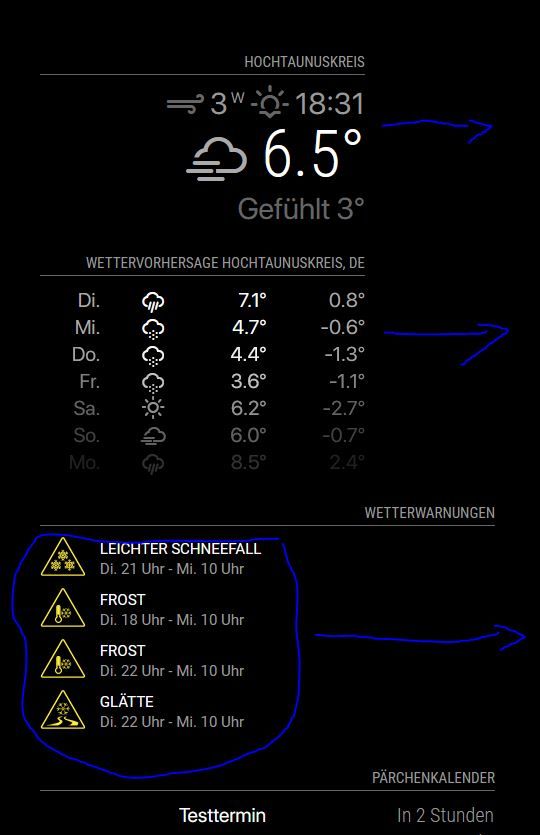
      As I have the default calendar plugin, which needs a width of 475px, the upper modules currentweather, weatherforecast and MMM-DWD-WarnWeather are not really right-aligned. As you can see on the screenshot, I would like to keep the module on the right border of the frame. For the DWD-WarnWeather module, the module itself is placed correct, but the content is not right aligned.

      What Do I need to do in order to fix that?
      mm.JPG

      karsten13K 1 Reply Last reply Reply Quote 0
      • karsten13K Offline
        karsten13 @codac
        last edited by

        @codac all these modules have the same position top_right?

        For the warnings module you could use custom.css and overwrite the text-align: left; in the module css with text-align: right;

        You can also play with css in the browser, e.g. see this thread.

        1 Reply Last reply Reply Quote 0
        • C Offline
          codac
          last edited by

          @karsten13 correct they are all top_right. Your suggestion worked:

          .MMM-DWD-WarnWeather .status {
              font-family: "SFPro";
              text-align: right;
          }
          

          Your hint with playing with css in my browser helped to figure out that currentweather and weatherforecast behave like this because of a max-width of 325 that I already had set in the custom.css, as where the calendar has 475px.

          M 1 Reply Last reply Reply Quote 1
          • M Offline
            MajorC Project Sponsor @codac
            last edited by

            @codac I think you have to add

            .MMM-DWD-WarnWeather .description {
                text-align: right;
            }
            
            1 Reply Last reply Reply Quote 0
            • M Offline
              MajorC Project Sponsor
              last edited by

              I have a similar problem.

              I would like to have the yellow icon closer to the right in the module: ‘MMM-DWD-WarnWeather’.
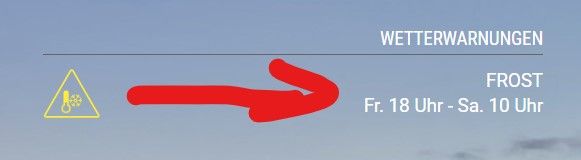
              dwd.jpg

              And I would like to get rid of the space on the right in the module: “MMM-DWD-Pollen”.
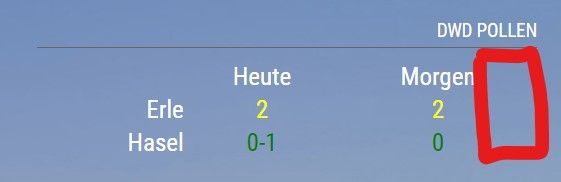
              pollen.jpg

              C S 2 Replies Last reply Reply Quote 0
              • C Offline
                codac @MajorC
                last edited by

                @majorc The question with the MMM-DWD-WarnWeather module I can answer. Was a bit tricky to find out, but what works for me is to set the follwing into the custom.css:

                .MMM-DWD-WarnWeather .warning {
                    float: right;
                }
                
                M 1 Reply Last reply Reply Quote 1
                • M Offline
                  MajorC Project Sponsor @codac
                  last edited by

                  @codac said in Alignmend of modules:

                  .MMM-DWD-WarnWeather .warning {
                  float: right;
                  }

                  Thanks, that is a good one!

                  1 Reply Last reply Reply Quote 0
                  • S Do not disturb
                    sdetweil @MajorC
                    last edited by sdetweil

                    @majorc u could try the same float-right for the pollen module

                    u may need to look in the developers window, elements tab to see the class used

                    ctrl-shift-i, select the elements tab, expand the nav tree in the left column to locate the module (top, top-right…)

                    set the module background to blue, to see the whole thing
                    and then add styles to the content

                    see how to use the elements tab info here
                    https://forum.magicmirror.builders/topic/14782/make-a-remove-header-space-or-overlap-two-modules/5

                    Sam

                    How to add modules

                    learning how to use browser developers window for css changes

                    C 1 Reply Last reply Reply Quote 0
                    • C Offline
                      CarstenD @sdetweil
                      last edited by

                      @sdetweil for MMM-DWD-Pollen you can change the following classes in CSS:

                      tab-center
                      pollen-low
                      pollen-low-medium
                      pollen-medium
                      pollen-mediumhigh
                      pollen-high
                      pollen-nodata


                      and just make

                      text-align: right
                      

                      That should do the trick. Float will not work - it pushes everything to the right w/o spacing.

                      I am still thinking how one can save the space on the right side but I am not an CSS / HTML expert.

                      S M 2 Replies Last reply Reply Quote 0
                      • S Do not disturb
                        sdetweil @CarstenD
                        last edited by

                        @carstend said in Alignmend of modules:

                        but I am not an CSS / HTML expert

                        me neither… i hate working on the UI

                        Sam

                        How to add modules

                        learning how to use browser developers window for css changes

                        1 Reply Last reply Reply Quote 0
                        • M Offline
                          MajorC Project Sponsor @CarstenD
                          last edited by MajorC

                          @carstend I added the question to the DWD-Pollen thread, but no respond so far.

                          https://forum.magicmirror.builders/topic/12247/mmm-dwd-pollen/19?_=1616656403635

                          text-align: right
                          

                          will move the text, so it is not centered anymore. But the goal is, to get rid of the space on the right side.

                          Update:
                          I now use:

                          .MMM-DWD-Pollen table {
                          	margin-left: auto;
                          	margin-right: -40px;
                          }
                          

                          Not sure if this is a good way, but it works for me at the moment.

                          1 Reply Last reply Reply Quote 0

                          Hello! It looks like you're interested in this conversation, but you don't have an account yet.

                          Getting fed up of having to scroll through the same posts each visit? When you register for an account, you'll always come back to exactly where you were before, and choose to be notified of new replies (either via email, or push notification). You'll also be able to save bookmarks and upvote posts to show your appreciation to other community members.

                          With your input, this post could be even better 💗

                          Register Login

                          • 1 / 1
                          • First post
                            Last post
                          Enjoying MagicMirror? Please consider a donation!
                          MagicMirror created by Michael Teeuw.
                          Forum managed by Sam, technical setup by Karsten.
                          This forum is using NodeBB as its core | Contributors
                          Contact | Privacy Policy