Read the statement by Michael Teeuw here.
weather module just shows loading?
-
I just noticed that the ‘currentweather’ module I’ve set up a long time ago, is now deprecated, and I should use weather instead.
So I tried setting it up, but it just shows ‘loading’.
The config I’ve built looks like this:{ module: 'weather', position: 'top_right', classes: 'day_schedule', config: { weatherProvider: 'openweathermap', type: "current", units: 'metric', timeFormat: '24', decimalSymbol: ',', initialLoadDelay: '0', onlyTemp: 'true', location: 'Greve', locationID: '2621215', appid: 'xxx' } },I then tried stripping it to the example:
{
  module: "weather",
  position: "top_right",
  config: {
    // See 'Configuration options' for more information.
    type: 'current'
  }
},
Still just shows loading…
-
Are your single quotes ’ just an accident in your examples?
{
			module: "currentweather",
			position: "top_right",
			header: "my header",
			config: {
				location: "my village",
//				locationID: "numbers",  //ID from http://bulk.openweathermap.org/sample/; unzip the gz file and find your city
				appid: "wholelottanumbers",
				appendLocationNameToHeader: false,
				degreeLabel: true,
				useBeaufort: false,
				useKMPHwind: true,
				showHumidity: true
			}
		},
Hope this helps.
-
@scumbelly single or double doesn’t matter as long as they are the same
please use code markers around config info.
there is a third kinds of quote mark used by the forum without code blocks. they are word processing type, they are curved, both single and double. they are bad." and ’
notice the difference" and ' -
O.K.
and… onlyTemp: ‘true’, would not have any quotes.
-
@scumbelly right…
general config.js rules
thing to the left of colon (:) does not need quotes
if the thing to the right of colon is a number or true/false,
should NOT have quotes,
otherwise the thing to the right needs quotes.
single or double doesn’t matter, as long as both ends are the same -
Thanks, I always thought I needed double quotes.
-
Ok, I found out what was wrong, despite the confusion with the ’ or " use.
It’s the appid, it’s called apiKey in the weather module.
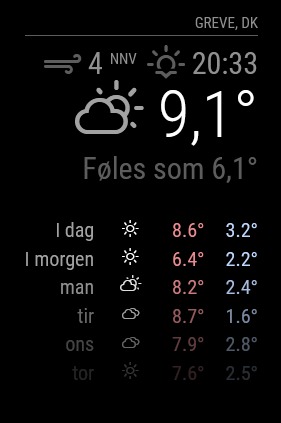
So after changing that (and also changing all ’ to " in the config), removing quotes around numbers, only have the locationID instead of both location and locationID and other cleanup stuff, it is shows properly :-)So I replaced both my currentweather and YrThen modules with two weather modules:
{
      module: "weather",
      position: "top_right",
      classes: "day_schedule",
      config: {
        weatherProvider: "openweathermap",
        type: "current",
        units: "metric",
        timeFormat: 24,
        decimalSymbol: ",",
        initialLoadDelay: 0,
        onlyTemp: false,
        locationID: 2621215,
        apiKey: "xxx"
      }
    },
    {
      module: "weather",
      position: "top_right",
      classes: "day_schedule",
      config: {
        weatherProvider: "openweathermap",
        type: "forecast",
        units: "metric",
        timeFormat: 24,
        decimalSymbol: ",",
        initialLoadDelay: 0,
        onlyTemp: true,
		maxNumberOfDays: 7,
		colored: true,
		appendLocationNameToHeader: false,
        locationID: 2621215,
        apiKey: "xxx"
      }
    },
Looks very nice indeed
Hello! It looks like you're interested in this conversation, but you don't have an account yet.
Getting fed up of having to scroll through the same posts each visit? When you register for an account, you'll always come back to exactly where you were before, and choose to be notified of new replies (either via email, or push notification). You'll also be able to save bookmarks and upvote posts to show your appreciation to other community members.
With your input, this post could be even better 💗
Register Login