MagicMirror Forum
    • Recent
    • Tags
    • Unsolved
    • Solved
    • MagicMirror² Repository
    • Documentation
    • 3rd-Party-Modules
    • Donate
    • Discord
    • Register
    • Login
    A New Chapter for MagicMirror: The Community Takes the Lead
    Read the statement by Michael Teeuw here.

    Are you tired of editing config.js, or have trouble doing it, see my new module

    Scheduled Pinned Locked Moved Utilities
    293 Posts 28 Posters 399.4k Views 31 Watching
    Loading More Posts
    • Oldest to Newest
    • Newest to Oldest
    • Most Votes
    Reply
    • Reply as topic
    Log in to reply
    This topic has been deleted. Only users with topic management privileges can see it.
    • BKeyportB Offline
      BKeyport Module Developer @sdetweil
      last edited by

      @sdetweil OK, it seems to be horribly broken on my side. From save to save, it’s not keeping the modules in config.js - example, my MMM-Multimonth won’t stay configured.

      I can’t disable default modules. (Calendar, which I don’t use due to incompatibility with my agenda provider)

      You want the config files to look though and see what’s happening?

      The "E" in "Javascript" stands for "Easy"

      S 1 Reply Last reply Reply Quote 0
      • S Offline
        sdetweil @BKeyport
        last edited by

        @bkeyport yes please…

        Sam

        How to add modules

        learning how to use browser developers window for css changes

        1 Reply Last reply Reply Quote 0
        • S Offline
          sdetweil
          last edited by

          I have updated the module now to support multiple instances of the same module,
          a little config (adding name to a file) … altho the module will auto detect if multiples are being used NOW, regardless of the file

          ALSO, one lacking feature of this solution is being able to get the form exactly right… as the info is missing in the module data…

          BUT i am creating the form info ANYHOW, so it can be saved and manually edited to improve the module experience, and I will use THAT instead of constructing the info every time…

          this means u can add selection lists, and other features (very easily)
          see the two issues for instructions

          multi-module
          https://github.com/sdetweil/MMM-Config/issues/2

          and save and use schema file
          https://github.com/sdetweil/MMM-Config/issues/11

          Sam

          How to add modules

          learning how to use browser developers window for css changes

          Mykle1M 1 Reply Last reply Reply Quote 2
          • Mykle1M Offline
            Mykle1 Project Sponsor Module Developer @sdetweil
            last edited by

            @sdetweil said in Are you tired of editing config.js, or have trouble doing it, see my new module:

            I have updated the module now to support multiple instances of the same module,

            Oh, this is quite a feature, and much appreciated. :thumbsup:

            Create a working config
            How to add modules

            1 Reply Last reply Reply Quote 0
            • S Offline
              sdetweil
              last edited by

              if u downloaded to test out multi-module, do another git pull…

              I had turned off rename of config.js while I tested save… oops… forgot to turn it back on
              corrected now

              Sam

              How to add modules

              learning how to use browser developers window for css changes

              1 Reply Last reply Reply Quote 0
              • S Offline
                sdetweil
                last edited by

                I have promoted the multi-module version to be the only version…

                no need for any git checkout now

                Sam

                How to add modules

                learning how to use browser developers window for css changes

                Mykle1M 1 Reply Last reply Reply Quote 0
                • Mykle1M Offline
                  Mykle1 Project Sponsor Module Developer @sdetweil
                  last edited by Mykle1

                  @sdetweil

                  Screenshot from 2021-06-08 16-33-29.png

                  65 emails from your repo. Come on man!

                  :laughing:

                  Create a working config
                  How to add modules

                  S BKeyportB 2 Replies Last reply Reply Quote 1
                  • S Offline
                    sdetweil @Mykle1
                    last edited by

                    @mykle1 nah… you got a pool… I am jealous!!

                    Sam

                    How to add modules

                    learning how to use browser developers window for css changes

                    1 Reply Last reply Reply Quote 0
                    • BKeyportB Offline
                      BKeyport Module Developer @Mykle1
                      last edited by

                      @mykle1 We’re working hard. wanna help? 🤣🤣🤣

                      The "E" in "Javascript" stands for "Easy"

                      Mykle1M 1 Reply Last reply Reply Quote 0
                      • Mykle1M Offline
                        Mykle1 Project Sponsor Module Developer @BKeyport
                        last edited by

                        @bkeyport said in Are you tired of editing config.js, or have trouble doing it, see my new module:

                        We’re working hard. wanna help?

                        Where were you at the very beginning of development of this module? I don’t remember seeing you anywhere. You were probably off policing the forum. :-)

                        Create a working config
                        How to add modules

                        BKeyportB 1 Reply Last reply Reply Quote 1
                        • BKeyportB Offline
                          BKeyport Module Developer @Mykle1
                          last edited by

                          @mykle1 When it was under early development I was in the very VERY busy part of my job.

                          I’m a tax guy.

                          The "E" in "Javascript" stands for "Easy"

                          BKeyportB 1 Reply Last reply Reply Quote 0
                          • BKeyportB Offline
                            BKeyport Module Developer @BKeyport
                            last edited by

                            I’ve now added support for MMM-Config to the modules I’m working with actively.

                            Was rather easy, all things considered - if you write a module, I would strongly recommend working with MMM-Config, who knows where this will go!

                            The "E" in "Javascript" stands for "Easy"

                            1 Reply Last reply Reply Quote 0
                            • A Offline
                              anima
                              last edited by

                              hello i have a question, i am running MagiMirror ² in Docker on my Unraid Server, i have installed the module but cant open the config form site. do i need to make some special configurations because it runs in docker ?

                              S 1 Reply Last reply Reply Quote 0
                              • S Offline
                                sdetweil @anima
                                last edited by

                                @anima what is your config.js setting for address:

                                you would have to use the container IP address and port on the form url. because it it not mapped to the docker host port

                                Sam

                                How to add modules

                                learning how to use browser developers window for css changes

                                A 1 Reply Last reply Reply Quote 0
                                • A Offline
                                  anima @sdetweil
                                  last edited by

                                  @sdetweil do you mean this https://imgur.com/a/jzi0Idj ?

                                  S 1 Reply Last reply Reply Quote 0
                                  • S Offline
                                    sdetweil @anima
                                    last edited by sdetweil

                                    @anima only needed the line with address:“0.0.0.0”

                                    ok, so we need to find out the ip address of the MM container

                                    docker ps 
                                    

                                    will give u a line like this

                                    11e836525b8d   xxxyyyzzz   "/usr/bin/supervisord"   4 months ago   Up 3 weeks   0.0.0.0:82->81/tcp, :::82->81/tcp, 0.0.0.0:5901->5900/tcp, :::5901->5900/tcp, 0.0.0.0:8280->8080/tcp, :::8280->8080/tcp
                                    

                                    the 1st token is the container id

                                    then do this

                                    docker inspect 11e836525b8d
                                    

                                    and in the stream of info is

                                                "IPAddress": "172.17.0.2",
                                    

                                    then use that from the system running the docker container

                                    http://172.17.0.2:8300

                                    to get that as one line of output, u can create this one line bash script

                                    docker inspect $(docker ps -q | awk '{print $1}') | grep -m 1 '"IPAddress"' | awk -F\" '{print $4}'
                                    

                                    you can’t use it from another system as there is no path to the container from outside

                                    now, you could fix the startup of the MM container by adding

                                    -p 8300:8300
                                    

                                    to the docker run command
                                    this map the container port 8300 to the host port 8300

                                    then from your pc or non-docker-host machine

                                    http://docker_host_ip:8300 
                                    

                                    should bring up the form

                                    Sam

                                    How to add modules

                                    learning how to use browser developers window for css changes

                                    A 1 Reply Last reply Reply Quote 0
                                    • A Offline
                                      anima @sdetweil
                                      last edited by

                                      @sdetweil ok thx, but then it should be better to run it from a pi (i have a spare one) because the container port is used by another service which i need.

                                      S 1 Reply Last reply Reply Quote 0
                                      • S Offline
                                        sdetweil @anima
                                        last edited by

                                        @anima well, each container has its own set…

                                        the code looks for a free port from 8300 - 8500… but in a container it will be fresh, so 8300

                                        the code hard codes 8300, so you can’t map it to anything else

                                        Sam

                                        How to add modules

                                        learning how to use browser developers window for css changes

                                        uros76U 1 Reply Last reply Reply Quote 0
                                        • uros76U Offline
                                          uros76 @sdetweil
                                          last edited by uros76

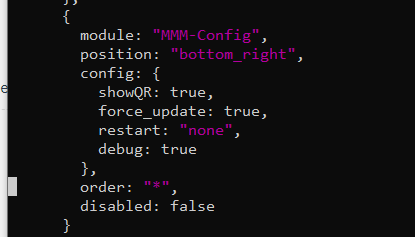
                                          Hi. I am trying to implement it on my MM and get only get below header in the browser. I am trying to open it with this address http://raspberrypi:8080/modules/MMM-Config/review
                                          The same happens if I open MM via IP address.

                                          Did I miss something? I saw on page6 of this thread someone else had same problem but that solution didn’t help me.

                                          0c30df56-bb0c-414b-b15a-bbe6438eab34-image.png

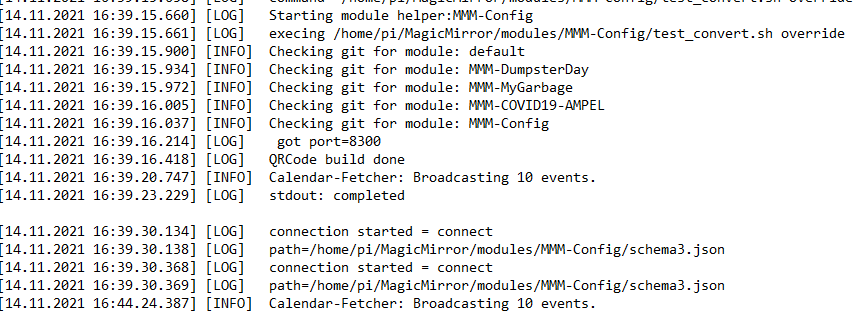
                                          Doing ctrl+shift+I and looking at console output I get this error:

                                          837393e3-26af-4fa8-9434-b1259a0b1dd0-image.png

                                          My magicmirror projects: https://forum.magicmirror.builders/post/79889, https://forum.magicmirror.builders/post/93241 and https://forum.magicmirror.builders/post/94586

                                          S 2 Replies Last reply Reply Quote 0
                                          • S Offline
                                            sdetweil @uros76
                                            last edited by

                                            @uros76 can u show me the config.js for the module?

                                            does it show on the MM screen?

                                            is your config.js address:“localhost”

                                            if so, you can only access from the PI system itself (localhost means only apps INSIDE the pi can access that app)

                                            Sam

                                            How to add modules

                                            learning how to use browser developers window for css changes

                                            uros76U 1 Reply Last reply Reply Quote 1

                                            Hello! It looks like you're interested in this conversation, but you don't have an account yet.

                                            Getting fed up of having to scroll through the same posts each visit? When you register for an account, you'll always come back to exactly where you were before, and choose to be notified of new replies (either via email, or push notification). You'll also be able to save bookmarks and upvote posts to show your appreciation to other community members.

                                            With your input, this post could be even better 💗

                                            Register Login

                                            • 1
                                            • 2
                                            • 3
                                            • 4
                                            • 5
                                            • 6
                                            • 14
                                            • 15
                                            • 4 / 15
                                            • First post
                                              Last post
                                            Enjoying MagicMirror? Please consider a donation!
                                            MagicMirror created by Michael Teeuw.
                                            Forum managed by Sam, technical setup by Karsten.
                                            This forum is using NodeBB as its core | Contributors
                                            Contact | Privacy Policy