MagicMirror Forum
    • Recent
    • Tags
    • Unsolved
    • Solved
    • MagicMirror² Repository
    • Documentation
    • 3rd-Party-Modules
    • Donate
    • Discord
    • Register
    • Login
    A New Chapter for MagicMirror: The Community Takes the Lead
    Read the statement by Michael Teeuw here.

    PIR Sensor ??

    Scheduled Pinned Locked Moved Troubleshooting
    28 Posts 5 Posters 9.0k Views 5 Watching
    Loading More Posts
    • Oldest to Newest
    • Newest to Oldest
    • Most Votes
    Reply
    • Reply as topic
    Log in to reply
    This topic has been deleted. Only users with topic management privileges can see it.
    • M Offline
      MDLefevere @sdetweil
      last edited by

      @sdetweil

      I’m not yet that good with Python, so some parts are a bit hard to understand.
      I’ve seen a couple of modules/posts over here and gave them a shot.

      One was working half. Screen turns of but no way to get it back on.
      This was: MMM-Pir-Sensor

      Just found a dutch how-to: here so i will give this a shot.

      S 1 Reply Last reply Reply Quote 0
      • S Offline
        sdetweil @MDLefevere
        last edited by

        @mdlefevere said in PIR Sensor ??:

        One was working half. Screen turns of but no way to get it back on.
        This was: MMM-Pir-Sensor

        off is easy, PIR doesn’t report , so nobody there, by default, so turn off…

        make sure u have ssh enabled, so u can get in from your PC and turn display back on…

        put the sensor is not reporting, or the module config isn’t looking at the right GPIO pin .

        make it work outside MM… then it will be better

        Sam

        How to add modules

        learning how to use browser developers window for css changes

        M 1 Reply Last reply Reply Quote 0
        • M Offline
          MDLefevere @sdetweil
          last edited by

          @sdetweil

          Alright i got i working with this guide.

          The only thing i’m now facing is, and i can’t understand this, that i get the message “Cable not connected” on my display.

          When i was using it in crontab with “vcgencmd display_power 0” (timebased) it put the monitor in sleep mode and the led’s of the monitor turned off.
          Now when using it in a .sh command the monitor stays on with this message.

          Do you have any idea?

          S 1 Reply Last reply Reply Quote 0
          • S Offline
            sdetweil @MDLefevere
            last edited by

            @mdlefevere well, when u ran in cron, you ran as root

            in your script do you do

            sudo vcgencmd display_power 0
            

            Sam

            How to add modules

            learning how to use browser developers window for css changes

            M 1 Reply Last reply Reply Quote 0
            • M Offline
              MDLefevere @sdetweil
              last edited by

              @sdetweil said in PIR Sensor ??:

              sudo vcgencmd display_power 0

              No i don’t
              But i tried it already and didn’t make a difference.

              Also if i sudo su and then use vcgencmd display_power 0 it’s not sleeping.

              S 1 Reply Last reply Reply Quote 0
              • S Offline
                sdetweil @MDLefevere
                last edited by

                @mdlefevere this is where I have trouble… all my displays behave as u describe…

                turn off the hdml and then they holler about no input… , and 15 mins later power off (energy start complaince) …

                Sam

                How to add modules

                learning how to use browser developers window for css changes

                M 1 Reply Last reply Reply Quote 0
                • M Offline
                  MDLefevere @sdetweil
                  last edited by

                  @sdetweil

                  Hmm alright.
                  So do you have a “workaround”?. How do you handle this?. I just want the screen to be not on all day long when i’m just home for a couple of hours

                  S cowboysdudeC 2 Replies Last reply Reply Quote 0
                  • S Offline
                    sdetweil @MDLefevere
                    last edited by

                    @mdlefevere I use module hiding. never turn the display ‘off’

                    Sam

                    How to add modules

                    learning how to use browser developers window for css changes

                    M 1 Reply Last reply Reply Quote 0
                    • M Offline
                      MDLefevere @sdetweil
                      last edited by

                      @sdetweil

                      Ahh so. But doesn’t the backlight stay on all nigjt?. Not very energy efficiënt 😋

                      S 1 Reply Last reply Reply Quote 0
                      • S Offline
                        sdetweil @MDLefevere
                        last edited by

                        @mdlefevere yes. but can’t turn it off programatically… what else can I do?

                        Sam

                        How to add modules

                        learning how to use browser developers window for css changes

                        M 1 Reply Last reply Reply Quote 0
                        • M Offline
                          MDLefevere @sdetweil
                          last edited by

                          @sdetweil

                          So weird. I can’t imagine that a crontab can do it and the same line in a .sh not.
                          That’s bothering me. To be continued.

                          Saw another module im gonna try tomorrow: MMM-NewPIR

                          S 1 Reply Last reply Reply Quote 0
                          • S Offline
                            sdetweil @MDLefevere
                            last edited by sdetweil

                            @mdlefevere they all use the same 4 commands

                            tvservice
                            vcgencmd
                            dpms
                            cec-client

                            top three turn off hdmi, leaving the ugly message
                            cec-client turns off the display, BUT, needs something 2018 or newer with CEC support
                            for it to work… my 55 in tv will turn off, but not on… (so much for standards!), and only from the pi4… nothing else.

                            this is the screen library in NewPIR
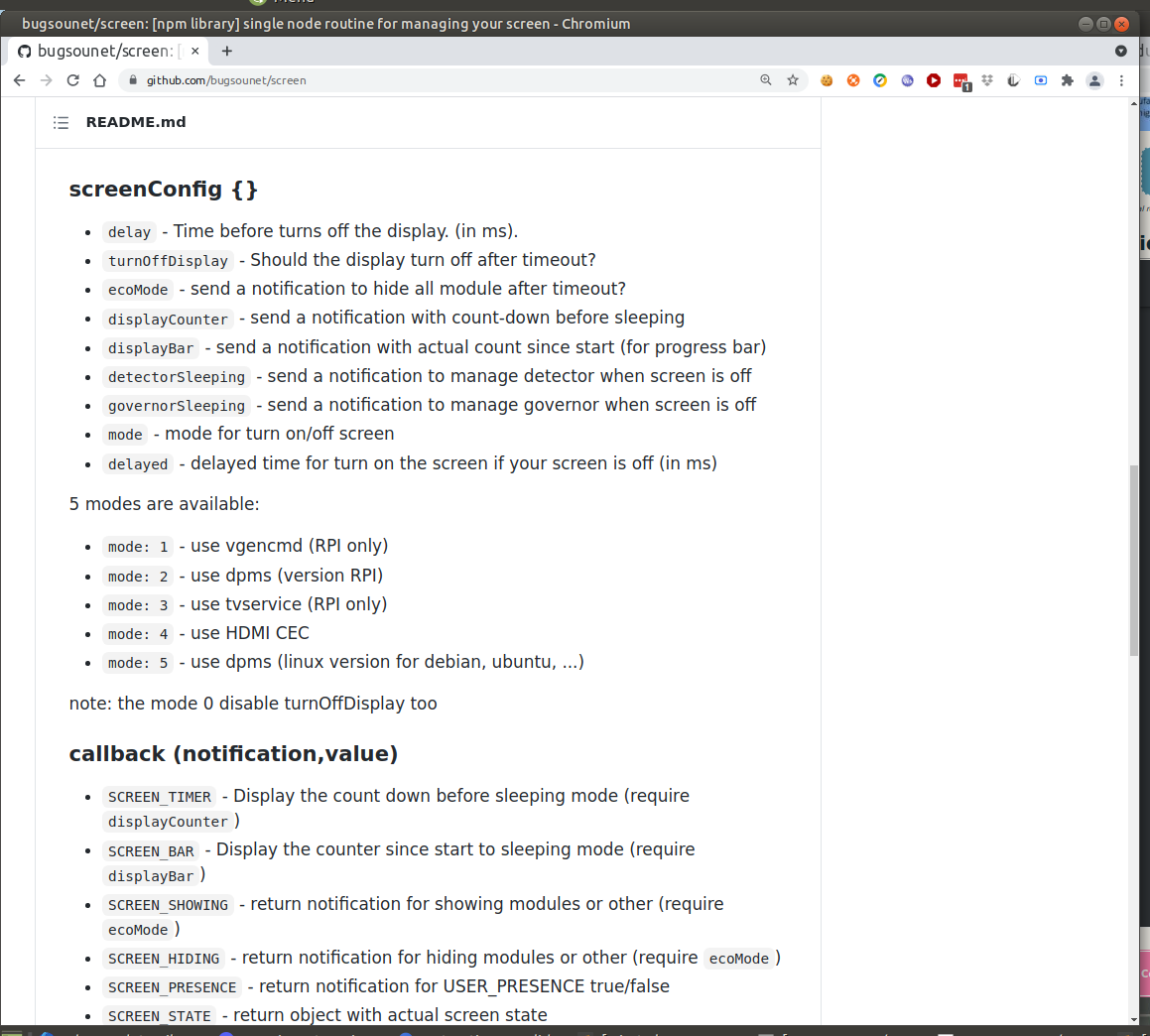
                            https://github.com/bugsounet/screen

                            use the same 4 commands
                            Screenshot at 2021-07-21 16-52-19.png

                            and the matching code

                                switch (this.config.mode) {
                                  case 1:
                                    if (set) exec("/usr/bin/vcgencmd display_power 1")
                                    else exec("/usr/bin/vcgencmd display_power 0")
                                    break
                                  case 2:
                                    if (set) exec("DISPLAY=:0 xset dpms force on")
                                    else exec("DISPLAY=:0 xset dpms force off")
                                    break
                                  case 3:
                                    if (set) exec("tvservice -p && sudo chvt 6 && sudo chvt 7")
                                    else exec("tvservice -o")
                                    break
                                  case 4:
                                    if (set) exec("echo 'on 0' | cec-client -s")
                                    else exec("echo 'standby 0' | cec-client -s")
                                    break
                                  case 5:
                                    if (set) exec("xset dpms force on")
                                    else exec("xset dpms force off")
                                    break
                                }
                            

                            Sam

                            How to add modules

                            learning how to use browser developers window for css changes

                            C 1 Reply Last reply Reply Quote 0
                            • C Offline
                              c1olli @sdetweil
                              last edited by

                              I use a mini pir sensor like this:
                              https://www.ebay.de/itm/133654306312
                              That switches the monitor directy completely off without any programming.
                              That solution works on my MagicMirror since one year without any problems.

                              M 1 Reply Last reply Reply Quote 0
                              • cowboysdudeC Offline
                                cowboysdude Module Developer @MDLefevere
                                last edited by cowboysdude

                                @mdlefevere No real answer for this… I’ve tried several times. I can turn it off but not back on…

                                Are you running a pi4 or pi3?

                                This was my answer to the pi3 and it works… cannot figure out the pi4

                                https://github.com/cowboysdude/Pir-Sensor

                                M 1 Reply Last reply Reply Quote 0
                                • M Offline
                                  MDLefevere @c1olli
                                  last edited by

                                  @c1olli

                                  That might be nice.
                                  But how about the startup?. Do you get the ugly brand boot screen first?. How longt to fire up?

                                  C 1 Reply Last reply Reply Quote 0
                                  • M Offline
                                    MDLefevere @cowboysdude
                                    last edited by

                                    @cowboysdude
                                    @sdetweil

                                    I’m running a 8GB PI4.
                                    I’ve installed NewPIR and configured it like this:

                                    		{
                                    			module: 'MMM-NewPIR',
                                    			position: 'top_left',
                                    			configDeepMerge: true,
                                    			config: {
                                    				screen: {
                                    					delay: 20000,
                                    					turnOffDisplay: true,
                                    					mode: 1,
                                    						},
                                    				pir: {
                                    					gpio: 17
                                    				}, 
                                    			}
                                    		},
                                    

                                    Strange enough it’s working now on another monitor. No sleepy “No Signal” text on screen but just a monitor turning in stand-by.
                                    It’s not a new monitor --> Fujitsu L20T-4 connected with DVI

                                    I can’t get my hands on it…

                                    S 1 Reply Last reply Reply Quote 0
                                    • S Offline
                                      sdetweil @MDLefevere
                                      last edited by

                                      @mdlefevere that monitor is not energy star compliant.

                                      the monitor doesn’t actually turn off, but enters some lower power mode. or they turn off backlight.

                                      Sam

                                      How to add modules

                                      learning how to use browser developers window for css changes

                                      M 1 Reply Last reply Reply Quote 0
                                      • M Offline
                                        MDLefevere @sdetweil
                                        last edited by

                                        @sdetweil

                                        Ah i see.
                                        But on the other hand: It goes into stand-by so the front light turns orange, and the screen goes all black (no backlight).

                                        S 1 Reply Last reply Reply Quote 0
                                        • S Offline
                                          sdetweil @MDLefevere
                                          last edited by

                                          @mdlefevere yes… getting harder and harder to find monitors that do this…
                                          none of mine do.

                                          Sam

                                          How to add modules

                                          learning how to use browser developers window for css changes

                                          M 1 Reply Last reply Reply Quote 0
                                          • M Offline
                                            MDLefevere @sdetweil
                                            last edited by

                                            @sdetweil

                                            So. I came home after work frustrated that it didn’t work.
                                            After connecting another HDMI cable everything is working as expected 🙄.

                                            I had a MicroHDMI to HDMI convertor and a HDMI cable after that.

                                            I ordered a Micro to HDMI so i could get rid of the convertor.

                                            Strange enough it is working with the convertor cable.

                                            S 1 Reply Last reply Reply Quote 1

                                            Hello! It looks like you're interested in this conversation, but you don't have an account yet.

                                            Getting fed up of having to scroll through the same posts each visit? When you register for an account, you'll always come back to exactly where you were before, and choose to be notified of new replies (either via email, or push notification). You'll also be able to save bookmarks and upvote posts to show your appreciation to other community members.

                                            With your input, this post could be even better 💗

                                            Register Login

                                            • 1
                                            • 2
                                            • 1 / 2
                                            • First post
                                              Last post
                                            Enjoying MagicMirror? Please consider a donation!
                                            MagicMirror created by Michael Teeuw.
                                            Forum managed by Sam, technical setup by Karsten.
                                            This forum is using NodeBB as its core | Contributors
                                            Contact | Privacy Policy