MagicMirror Forum
    • Recent
    • Tags
    • Unsolved
    • Solved
    • MagicMirror² Repository
    • Documentation
    • 3rd-Party-Modules
    • Donate
    • Discord
    • Register
    • Login
    A New Chapter for MagicMirror: The Community Takes the Lead
    Read the statement by Michael Teeuw here.

    Calendar events showing on wrong day.

    Scheduled Pinned Locked Moved Unsolved Troubleshooting
    66 Posts 3 Posters 28.5k Views 3 Watching
    Loading More Posts
    • Oldest to Newest
    • Newest to Oldest
    • Most Votes
    Reply
    • Reply as topic
    Log in to reply
    This topic has been deleted. Only users with topic management privileges can see it.
    • S Offline
      sdetweil @Coolie1101
      last edited by

      @coolie1101 yes that’s what the correction should enable

      05:00 ny, +4 (now est) =09:00 utc time

      Sam

      How to add modules

      learning how to use browser developers window for css changes

      1 Reply Last reply Reply Quote 0
      • S Offline
        sdetweil @Coolie1101
        last edited by

        @coolie1101 but there is no time zone set in the appointment

        Sam

        How to add modules

        learning how to use browser developers window for css changes

        Coolie1101C 1 Reply Last reply Reply Quote 0
        • Coolie1101C Offline
          Coolie1101 @sdetweil
          last edited by

          @sdetweil said in Calendar events showing on wrong day.:

          but there is no time zone set in the appointment

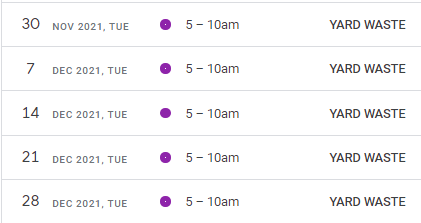
          It shows as set in the calendar itself?

          58c72fe2-b130-4c7d-8dea-3a0b6d3bef9a-image.png

          S 1 Reply Last reply Reply Quote 0
          • S Offline
            sdetweil @Coolie1101
            last edited by

            @coolie1101 yes, BUT it doesn’t show in the ics file…

            anyhow…

            show me the next entry from the debug output

            or send me the debug output file via email

            same userid at gmail

            Sam

            How to add modules

            learning how to use browser developers window for css changes

            Coolie1101C 1 Reply Last reply Reply Quote 0
            • Coolie1101C Offline
              Coolie1101 @sdetweil
              last edited by

              @sdetweil

              Event: {"type":"VEVENT","params":[],"start":"2022-01-26T10:00:00.000Z","datetype":"date-time","end":"2022-01-26T15:00:00.000Z","dtstamp":"2021-11-19T16:07:10.000Z","uid":"0idffl8ue0gac*************@google.com","created":"2021-11-19T13:18:54.000Z","description":"Recycling Bottles, Cans, and Plastic.","lastmodified":"2021-11-19T13:18:54.000Z","location":"","sequence":"0","status":"CONFIRMED","summary":"RECYCLING (BOTTLES, CANS and PLASTIC) ","transparency":"TRANSPARENT"}
              [19.11.2021 11:07.22.130] [DEBUG] startDate (local): Wed Jan 26 2022 05:00:00 GMT-0500 (Eastern Standard Time)
              [19.11.2021 11:07.22.135] [DEBUG] endDate (local): Wed Jan 26 2022 10:00:00 GMT-0500 (Eastern Standard Time)
              [19.11.2021 11:07.22.141] [DEBUG] duration: 18000000
              [19.11.2021 11:07.22.146] [DEBUG] title: RECYCLING (BOTTLES, CANS and PLASTIC) 
              [19.11.2021 11:07.22.160] [DEBUG] initial tz=Etc/UTC
              [19.11.2021 11:07.22.169] [DEBUG] corrected tz=Etc/UTC
              [19.11.2021 11:07.22.174] [DEBUG] start date/time=Wed Jan 26 2022 05:00:00 GMT-0500 (Eastern Standard Time)
              [19.11.2021 11:07.22.178] [DEBUG] start offset=0
              [19.11.2021 11:07.22.182] [DEBUG] start date/time w tz =Wed Jan 26 2022 05:00:00 GMT-0500 (Eastern Standard Time)
              [19.11.2021 11:07.22.189] [DEBUG] event date=Wed Jan 26 2022 05:00:00 GMT-0500 (Eastern Standard Time)
              [19.11.2021 11:07.22.195] [DEBUG] event offset=0 hour=10 event date=Wed Jan 26 2022 05:00:00 GMT-0500 (Eastern Standard Time)
              [19.11.2021 11:07.22.202] [DEBUG] adjustHours=0
              [19.11.2021 11:07.22.209] [DEBUG] Processing entry...
              [19.11.2021 11:07.22.217] [DEBUG] 
              

              This is the Calendar Event I believe we should be looking at

              BEGIN:VEVENT
              DTSTART;TZID=America/New_York:20210406T050000
              DTEND;TZID=America/New_York:20210406T100000
              RRULE:FREQ=WEEKLY;WKST=SU;UNTIL=20211230T045959Z;BYDAY=TU
              EXDATE;TZID=America/New_York:20211123T050000
              DTSTAMP:20211119T165604Z
              UID:0v89h5cit8nq6m************@google.com
              CREATED:20211026T075843Z
              DESCRIPTION:
              LAST-MODIFIED:20211026T080254Z
              LOCATION:
              SEQUENCE:1
              STATUS:CONFIRMED
              SUMMARY:YARD WASTE
              TRANSP:OPAQUE
              END:VEVENT
              

              This last event listed as “UNTIL=20211230T045959Z”, displays as Dec 1st.

              S 1 Reply Last reply Reply Quote 0
              • S Offline
                sdetweil @Coolie1101
                last edited by

                @coolie1101 I added 2 to the end, Yard Waste 2, and see this, with my system set to eastern time. I didn’t delete the prior ics entries
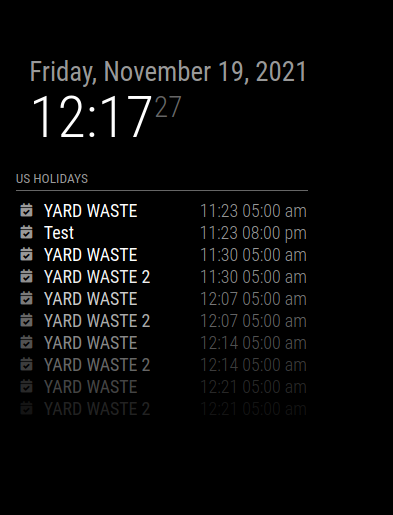
                Screenshot at 2021-11-19 12-17-27.png

                Sam

                How to add modules

                learning how to use browser developers window for css changes

                Coolie1101C 1 Reply Last reply Reply Quote 0
                • Coolie1101C Offline
                  Coolie1101 @sdetweil
                  last edited by

                  @sdetweil I understand that it works, and it is indeed working, but why is it showing a day later is what I am trying to figure out, what about the entries for 11/23-12/6?

                  S 1 Reply Last reply Reply Quote 0
                  • S Offline
                    sdetweil @Coolie1101
                    last edited by sdetweil

                    @coolie1101 I don’t see a day late… the event is Tuesdays, weekly, 11/23 is tuesday, 11/30 is tuesday, 12/7 is tuesday

                    I am looking for the 11/23 entry…

                    DUH, it says exclude 11/23

                    EXDATE;TZID=America/New_York:20211123T050000

                    Sam

                    How to add modules

                    learning how to use browser developers window for css changes

                    Coolie1101C 1 Reply Last reply Reply Quote 0
                    • Coolie1101C Offline
                      Coolie1101 @sdetweil
                      last edited by

                      @sdetweil said in Calendar events showing on wrong day.:

                      11/23 is tuesday, 11/30 is tuesday, 12/7 is tuesday

                      Those dates are correct, the 11/23 entry was deleted and re-added, so it’s not part of the yearly schedule anymore.

                      For me the entry for 11/30 displays on the monitor as Dec 1st.

                      S 1 Reply Last reply Reply Quote 0
                      • S Offline
                        sdetweil @Coolie1101
                        last edited by

                        @coolie1101 said in Calendar events showing on wrong day.:

                        For me the entry for 11/30 displays on the monitor as Dec 1st.

                        its hard to tell which cal entry it comes from when the text is all the same.

                        Sam

                        How to add modules

                        learning how to use browser developers window for css changes

                        Coolie1101C 2 Replies Last reply Reply Quote 0
                        • Coolie1101C Offline
                          Coolie1101 @sdetweil
                          last edited by

                          @sdetweil I believe it’s form the one i posted earlier, top of this page.

                          DTSTART;TZID=America/New_York:20210406T050000
                          DTEND;TZID=America/New_York:20210406T100000
                          RRULE:FREQ=WEEKLY;WKST=SU;UNTIL=20211230T045959Z;BYDAY=TU
                          
                          1 Reply Last reply Reply Quote 0
                          • Coolie1101C Offline
                            Coolie1101 @sdetweil
                            last edited by

                            @sdetweil
                            This is the new (re-created) entry

                            BEGIN:VEVENT
                            DTSTART:20211123T100000Z
                            DTEND:20211123T150000Z
                            DTSTAMP:20211119T165604Z
                            UID:0g4190e8en06vs************@google.com
                            CREATED:20211119T151237Z
                            DESCRIPTION:
                            LAST-MODIFIED:20211119T151237Z
                            LOCATION:
                            SEQUENCE:0
                            STATUS:CONFIRMED
                            SUMMARY:YARD WASTE
                            TRANSP:OPAQUE
                            END:VEVENT
                            

                            This is the old (yearly) entry

                            BEGIN:VEVENT
                            DTSTART;TZID=America/New_York:20210406T050000
                            DTEND;TZID=America/New_York:20210406T100000
                            RRULE:FREQ=WEEKLY;WKST=SU;UNTIL=20211230T045959Z;BYDAY=TU
                            EXDATE;TZID=America/New_York:20211123T050000
                            DTSTAMP:20211119T165604Z
                            UID:0v89h5cit8nq6m************@google.com
                            CREATED:20211026T075843Z
                            DESCRIPTION:
                            LAST-MODIFIED:20211026T080254Z
                            LOCATION:
                            SEQUENCE:1
                            STATUS:CONFIRMED
                            SUMMARY:YARD WASTE
                            TRANSP:OPAQUE
                            END:VEVENT
                            
                            S 1 Reply Last reply Reply Quote 0
                            • S Offline
                              sdetweil @Coolie1101
                              last edited by

                              @coolie1101 I don’t see the wrong date
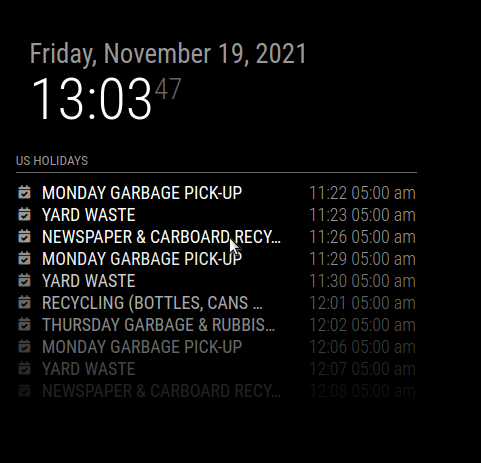
                              Screenshot at 2021-11-19 13-03-47.png

                              yard waste is on 11/30

                              Sam

                              How to add modules

                              learning how to use browser developers window for css changes

                              Coolie1101C 1 Reply Last reply Reply Quote 0
                              • Coolie1101C Offline
                                Coolie1101 @sdetweil
                                last edited by Coolie1101

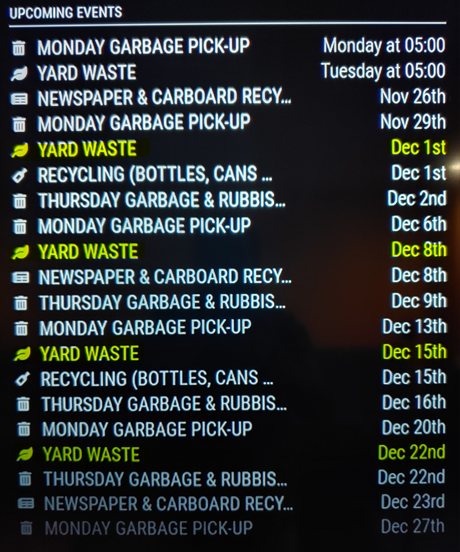
                                All highlited is a day ahead.
                                b1e4d766-ce24-4b7c-add0-2d4421a1d9ae-image.png

                                d9b88cc0-87f4-4985-a794-0d4b5430a906-image.png

                                S 1 Reply Last reply Reply Quote 0
                                • S Offline
                                  sdetweil @Coolie1101
                                  last edited by

                                  @coolie1101 ok, got it…

                                  I had one more fix…

                                  comment out line 101

                                  //					adjustHours = 24;
                                  

                                  Sam

                                  How to add modules

                                  learning how to use browser developers window for css changes

                                  Coolie1101C 1 Reply Last reply Reply Quote 0
                                  • Coolie1101C Offline
                                    Coolie1101 @sdetweil
                                    last edited by

                                    @sdetweil Genius!, that did it, do I still need to leave the other 4 lines commented out?

                                    S 1 Reply Last reply Reply Quote 0
                                    • S Offline
                                      sdetweil @Coolie1101
                                      last edited by sdetweil

                                      @coolie1101 yes

                                      you can remove the ,“DEBUG” from the logLevel entry in config.js

                                      no point generating all the debug every cal refresh cycle

                                      Sam

                                      How to add modules

                                      learning how to use browser developers window for css changes

                                      Coolie1101C 1 Reply Last reply Reply Quote 0
                                      • Coolie1101C Offline
                                        Coolie1101 @sdetweil
                                        last edited by

                                        @sdetweil Did, thanks.

                                        I hope @flyedge was able t get his sorted, and sorry for hijacking the post, hopefully it helps someone else.

                                        1 Reply Last reply Reply Quote 0
                                        • F Offline
                                          flyedge
                                          last edited by flyedge

                                          Sorry to bring up an old thread, but I ended up getting to busy to finish dealing with that issue back when I started the thread. I think I ended up just creating an individual event for each item on the calendar if memory serves.
                                          I have run into the issue again though. I went through the responses of the person with the same issue, and was about to try and add in those same fixes however it appears that they are part of the main program now.

                                          I pulled the ICS file, and the debug file from the event and will attach them here, but from my very basic understanding, it almost appears that it is changing the time zone on the recurring event even when that isn’t appropriate, I am assuming that is where the issue is arising from.

                                          ics:

                                          BEGIN:VEVENT
                                          DTSTART;TZID=America/Edmonton:20220510T190000
                                          DTEND;TZID=America/Edmonton:20220510T210000
                                          RRULE:FREQ=WEEKLY;UNTIL=20220713T055959Z
                                          DTSTAMP:20220504T175603Z
                                          UID:E273826A-0F74-4F0D-BA17-A59824B3D8AC
                                          CREATED:20220216T184435Z
                                          DESCRIPTION:
                                          LAST-MODIFIED:20220216T184435Z
                                          LOCATION:xx
                                          SEQUENCE:0
                                          STATUS:CONFIRMED
                                          SUMMARY:Class
                                          TRANSP:OPAQUE
                                          END:VEVENT


                                          Debug:

                                          {"type":"VEVENT","params":[],"start":"2022-05-11T01:00:00.000Z","datetype":"date-time","end":"2022-05-11T03:00:00.000Z","rrule":{"_cache":{"all":false,"before":[],"after":[],"between":[]},"origOptions":{"tzid":"America/Edmonton","dtstart":"2022-05-11T01:00:00.000Z","freq":2,"until":"2022-07-13T05:59:59.000Z"},"options":{"freq":2,"dtstart":"2022-05-11T01:00:00.000Z","interval":1,"wkst":0,"count":null,"until":"2022-07-13T05:59:59.000Z","tzid":"America/Edmonton","bysetpos":null,"bymonth":null,"bymonthday":[],"bynmonthday":[],"byyearday":null,"byweekno":null,"byweekday":[2],"bynweekday":null,"byhour":[1],"byminute":[0],"bysecond":[0],"byeaster":null}},"dtstamp":"2022-05-01T23:21:41.000Z","uid":"E273826A-0F74-4F0D-BA17-A59824B3D8AC","created":"2022-02-16T18:44:35.000Z","description":"","lastmodified":"2022-02-16T18:44:35.000Z","location":"Canada","sequence":"0","status":"CONFIRMED","summary":"Class","transparency":"OPAQUE","method":"PUBLISH"}
                                          [01.05.2022 17:21.45.608] [DEBUG] start: Tue May 10 2022 19:00:00 GMT-0600 (Mountain Daylight Time)
                                          [01.05.2022 17:21.45.610] [DEBUG] end:: Tue May 10 2022 21:00:00 GMT-0600 (Mountain Daylight Time)
                                          [01.05.2022 17:21.45.629] [DEBUG] duration: 7200000
                                          [01.05.2022 17:21.45.633] [DEBUG] title: Class
                                          [01.05.2022 17:21.45.637] [DEBUG] Search for recurring events between: Sun May 01 2022 17:21:45 GMT-0600 (Mountain Daylight Time) and Wed Jun 29 2022 23:59:59 GMT-0600 (Mountain Daylight Time)
                                          [01.05.2022 17:21.45.654] [DEBUG] Title: Class, with dates: ["2022-05-11T01:00:00.000Z","2022-05-18T01:00:00.000Z","2022-05-25T01:00:00.000Z","2022-06-01T01:00:00.000Z","2022-06-08T01:00:00.000Z","2022-06-15T01:00:00.000Z","2022-06-22T01:00:00.000Z","2022-06-29T01:00:00.000Z"]
                                          [01.05.2022 17:21.45.656] [DEBUG] event.recurrences: undefined
                                          [01.05.2022 17:21.45.659] [DEBUG]  recurring date is Tue May 10 2022 19:00:00 GMT-0600 (Mountain Daylight Time) offset is 360
                                          [01.05.2022 17:21.45.663] [DEBUG]  recurring date is Tue May 10 2022 19:00:00 GMT-0600 (Mountain Daylight Time) offset is 6 Hour is 19
                                          [01.05.2022 17:21.45.665] [DEBUG] new recurring date2 is Wed May 11 2022 19:00:00 GMT-0600 (Mountain Daylight Time)
                                          [01.05.2022 17:21.45.666] [DEBUG] Corrected startDate: Wed May 11 2022 19:00:00 GMT-0600 (Mountain Daylight Time)
                                          [01.05.2022 17:21.45.666] [DEBUG] initial tz=America/Edmonton
                                          [01.05.2022 17:21.45.667] [DEBUG] corrected tz=America/Edmonton
                                          [01.05.2022 17:21.45.668] [DEBUG] start date/time=Tue May 10 2022 19:00:00 GMT-0600 (Mountain Daylight Time)
                                          [01.05.2022 17:21.45.669] [DEBUG] start offset=-360
                                          [01.05.2022 17:21.45.672] [DEBUG] start date/time w tz =Tue May 10 2022 19:00:00 GMT-0600 (Mountain Daylight Time)
                                          [01.05.2022 17:21.45.674] [DEBUG] event date=Wed May 11 2022 19:00:00 GMT-0600 (Mountain Daylight Time)
                                          [01.05.2022 17:21.45.675] [DEBUG] event offset=-360 hour=19 event date=Wed May 11 2022 19:00:00 GMT-0600 (Mountain Daylight Time)
                                          [01.05.2022 17:21.45.676] [DEBUG] adjustHours=0
                                          [01.05.2022 17:21.45.676] [DEBUG] duration: 7200000
                                          [01.05.2022 17:21.45.678] [DEBUG] saving event: false
                                          [01.05.2022 17:21.45.680] [DEBUG]  recurring date is Tue May 17 2022 19:00:00 GMT-0600 (Mountain Daylight Time) offset is 360
                                          [01.05.2022 17:21.45.681] [DEBUG]  recurring date is Tue May 17 2022 19:00:00 GMT-0600 (Mountain Daylight Time) offset is 6 Hour is 19
                                          [01.05.2022 17:21.45.683] [DEBUG] new recurring date2 is Wed May 18 2022 19:00:00 GMT-0600 (Mountain Daylight Time)
                                          [01.05.2022 17:21.45.684] [DEBUG] Corrected startDate: Wed May 18 2022 19:00:00 GMT-0600 (Mountain Daylight Time)
                                          [01.05.2022 17:21.45.685] [DEBUG] initial tz=America/Edmonton
                                          [01.05.2022 17:21.45.688] [DEBUG] corrected tz=America/Edmonton
                                          [01.05.2022 17:21.45.694] [DEBUG] start date/time=Tue May 10 2022 19:00:00 GMT-0600 (Mountain Daylight Time)
                                          [01.05.2022 17:21.45.696] [DEBUG] start offset=-360
                                          [01.05.2022 17:21.45.697] [DEBUG] start date/time w tz =Tue May 10 2022 19:00:00 GMT-0600 (Mountain Daylight Time)
                                          [01.05.2022 17:21.45.698] [DEBUG] event date=Wed May 18 2022 19:00:00 GMT-0600 (Mountain Daylight Time)
                                          [01.05.2022 17:21.45.699] [DEBUG] event offset=-360 hour=19 event date=Wed May 18 2022 19:00:00 GMT-0600 (Mountain Daylight Time)
                                          [01.05.2022 17:21.45.700] [DEBUG] adjustHours=0
                                          [01.05.2022 17:21.45.700] [DEBUG] duration: 7200000
                                          [01.05.2022 17:21.45.702] [DEBUG] saving event: false
                                          
                                          S 1 Reply Last reply Reply Quote 0
                                          • S Offline
                                            sdetweil @flyedge
                                            last edited by sdetweil

                                            @flyedge great info, thank you…

                                            I see the issue, but don’t yet know why it is behaving this way (compared to previous releases) and don’t know how to fix it yet.

                                            luxon (which returns the dates matching a repeating rule RRULE) might have fixed their bad behavior…
                                            where they jammed the non UTC date onto the UTC time
                                            in this old case it would have been
                                            2022-02-5-10T01:00:00Z
                                            where I was correcting the mangled event date

                                            Sam

                                            How to add modules

                                            learning how to use browser developers window for css changes

                                            1 Reply Last reply Reply Quote 0

                                            Hello! It looks like you're interested in this conversation, but you don't have an account yet.

                                            Getting fed up of having to scroll through the same posts each visit? When you register for an account, you'll always come back to exactly where you were before, and choose to be notified of new replies (either via email, or push notification). You'll also be able to save bookmarks and upvote posts to show your appreciation to other community members.

                                            With your input, this post could be even better 💗

                                            Register Login

                                            • 1
                                            • 2
                                            • 3
                                            • 4
                                            • 3 / 4
                                            • First post
                                              Last post
                                            Enjoying MagicMirror? Please consider a donation!
                                            MagicMirror created by Michael Teeuw.
                                            Forum managed by Sam, technical setup by Karsten.
                                            This forum is using NodeBB as its core | Contributors
                                            Contact | Privacy Policy