Read the statement by Michael Teeuw here.
Error while starting Magic Mirror
-
Hey guys,
I am not able to start my Magic Mirror with the command pm2 start MagicMirror.There is always this error:
[21.01.2022 14:17.17.199] [ERROR] Whoops! There was an uncaught exception...
[21.01.2022 14:17.17.201] [ERROR] TypeError: Cannot read properties of undefined (reading 'on')
    at Object.<anonymous> (/home/pi/MagicMirror/js/electron.js:104:5)
    at Module._compile (node:internal/modules/cjs/loader:1101:14)
    at Object.Module._extensions..js (node:internal/modules/cjs/loader:1153:10)
    at Module.load (node:internal/modules/cjs/loader:981:32)
    at Function.Module._load (node:internal/modules/cjs/loader:822:12)
    at Object.<anonymous> (/usr/lib/node_modules/pm2/lib/ProcessContainerFork.js:33:23)
    at Module._compile (node:internal/modules/cjs/loader:1101:14)
    at Object.Module._extensions..js (node:internal/modules/cjs/loader:1153:10)
    at Module.load (node:internal/modules/cjs/loader:981:32)
    at Function.Module._load (node:internal/modules/cjs/loader:822:12)
I have only installed Spotify and calender_monthly module. Yesterday everythink works fine, now nothing works without changing anything
-
@1blaunitrox that looks like a bad position for a module
module:
position: ???see the list here
https://docs.magicmirror.builders/modules/configuration.html -
This is my config:
modules: [ { module: "alert", }, { module: "updatenotification", position: "top_bar" }, { module: "clock", position: "top_left" }, { module: "calendar_monthly", position: "top_left", config: { } }, { module: "weather", position: "top_right", config: { weatherProvider: "openweathermap", type: "current", location: "mycity", locationID: "cityID", //ID from http://bulk.openweathermap.org/sample/city.list.json.gz; unzip the gz file and find your city apiKey: "mykey" } }, { module: "weather", position: "top_right", header: "Wettervorhersage", config: { weatherProvider: "openweathermap", type: "forecast", location: "mycity", locationID: "cityID", //ID from http://bulk.openweathermap.org/sample/city.list.json.gz; unzip the gz file and find your city apiKey: "mykey" } }, { module: "MMM-NowPlayingOnSpotify", position: "bottom_left", config: { clientID: "myid", clientSecret: "myid", accessToken: "mytoken", refreshToken: "mytoken" } }, ] -
@1blaunitrox I don’t see a calendar_monthly module
-
@sdetweil What do you mean?
-
@1blaunitrox thx… I used your module list and dont see any issues…
you did npm install in both new module folders, right?
-
@sdetweil no, it worked without
-
@1blaunitrox both modules provide a package.json file, which means u must
npm install
in their folders -
@1blaunitrox my mistake. I did it
-
@1blaunitrox did u update MM?? git pull?
did you npm install after?
-
@sdetweil what do you mean “update”. Is there a new update?
-
@1blaunitrox just trying to see what changed
every 3 months MM releases a new version… 2.18 now… (January 1)
-
@sdetweil I can try to update. Where should I execute the command “git pull”?
-
@1blaunitrox use my script
-
@sdetweil I can execute the command from any location?
-
@1blaunitrox which command?
from my scripts? yes, they figure it out
-
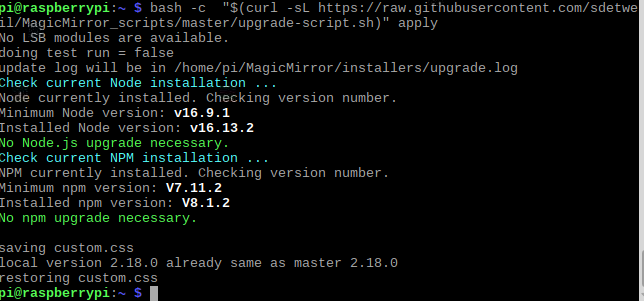
@sdetweil I executed
bash -c "$(curl -sL https://raw.githubusercontent.com/sdetweil/MagicMirror_scripts/master/upgrade-script.sh)"but the Error is the same -
@1blaunitrox notice that upgrade is a TWO part process…
part 1, no parameter, does a TEST to checkout if there are any issues
then
part 2, with apply at the end will DO the upgrade…
looks like you only did part 1
-
-
@1blaunitrox ok, so on latest… when did u do that?
Hello! It looks like you're interested in this conversation, but you don't have an account yet.
Getting fed up of having to scroll through the same posts each visit? When you register for an account, you'll always come back to exactly where you were before, and choose to be notified of new replies (either via email, or push notification). You'll also be able to save bookmarks and upvote posts to show your appreciation to other community members.
With your input, this post could be even better 💗
Register Login