Read the statement by Michael Teeuw here.
MMM-MotionDetector - Error: getUserMedia
-
I reinstalled raspbian with the MMM-MotionDetector module and now keep getting following message:
Error: getUserMedia is not implemented in this browser

Tested older and new versions of raspbian on Pi4, also Stretch version on Pi3.
Config > address: “0.0.0.0”,
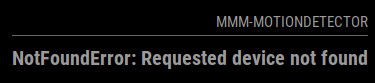
When changing to “localhost” or “127.0.0.1” you get the “NotFoundError: Requested device not found”
Anyone ideas?
I also noticed that in the new Buster the raspi-config camera has changed from camera to legacy camera. Could this have something to do with it?


-
Found a workaround;
Run as server and start chromium > authorize the camera.
Of cours not the same. -
The above workaround doesn’t always work either!
Answer from Github which does work;
FYI: I switched back to the legacy raspios (https://www.raspberrypi.com/news/new-old-functionality-with-raspberry-pi-os-legacy/) and there the bug doesnt seem to appear.
-
It looks like this won’t work again with the latest version of MagicMirror.
When I look at Chromium, you can activate the camera on localhost & 127.0.0.1 (permission for this site) but on 0.0.0.0 it is grayed out. Think this will also be the case for Electronjs.Only possibility I see is;
- list itemmake Electronjs authenticate the camera when starting module
- list itemmake Electronjs authenticate the camera when starting MagicMirror
set camera permission for 0.0.0.0
Hello! It looks like you're interested in this conversation, but you don't have an account yet.
Getting fed up of having to scroll through the same posts each visit? When you register for an account, you'll always come back to exactly where you were before, and choose to be notified of new replies (either via email, or push notification). You'll also be able to save bookmarks and upvote posts to show your appreciation to other community members.
With your input, this post could be even better 💗
Register Login