Read the statement by Michael Teeuw here.
MMM-CalendarExt3
-
- see the “glance” by notification parts in readme.
- And multi-instance also be possible.
-
Thanks. I was able to build a simple module to advance the month via arrow keys using glance. Let me know if that’d be useful to share anywhere.
This question is basic but driving me nuts, but is it possible for the calendar title to include the year? For instance, it now says “July” but I’d like it to say “July 2023”.
-
headerTitleOptions: {
  year: 'numeric',
  month: 'long',
},
But the order of text would be decided by locale. So this will show
2023 JulyorJuly 2023. (and comma included/not, punctuation mark included/not, … depends on the standard rules of the culture by the locale.)
If you want to adjust the order or composition of words, you may need CSS customization additionally. -
@MMRIZE hey, is there a way to increase the size of the month name header? That’s the one bit I’d like to change on my setup.
I’m now using your module for this month, then mine for upcoming. 😉
-
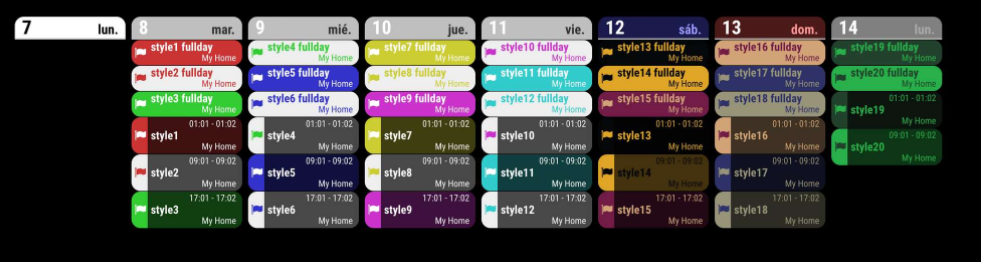
Calendarext2 to Calendarext3 cofiguration is working the same. I’ve upgraded to ext3 and complete wiped and restarted magicmirror with a clean install. Ext3 doesn’t seem to have some of the same functionality i had in ext and ext2. I am attaching a screen shot of what i am looking to achieve and needing some guidance. Can someone point me to couple of configuration files that might work to achieve the same functionality.
-
@pastormingle
What does it mean the same functionality? Maybe equivalent, but not the same.
And if you are satisfied with CX2, just leave it as it works. :) -
For the special calendar, (You should assign
instanceId: "specialCalendar"in config).module.MMM-CalendarExt3:has(.CX3_specialCalendar) .module-header { color: red; font-weight: bold; font-size: 2em; }will show;
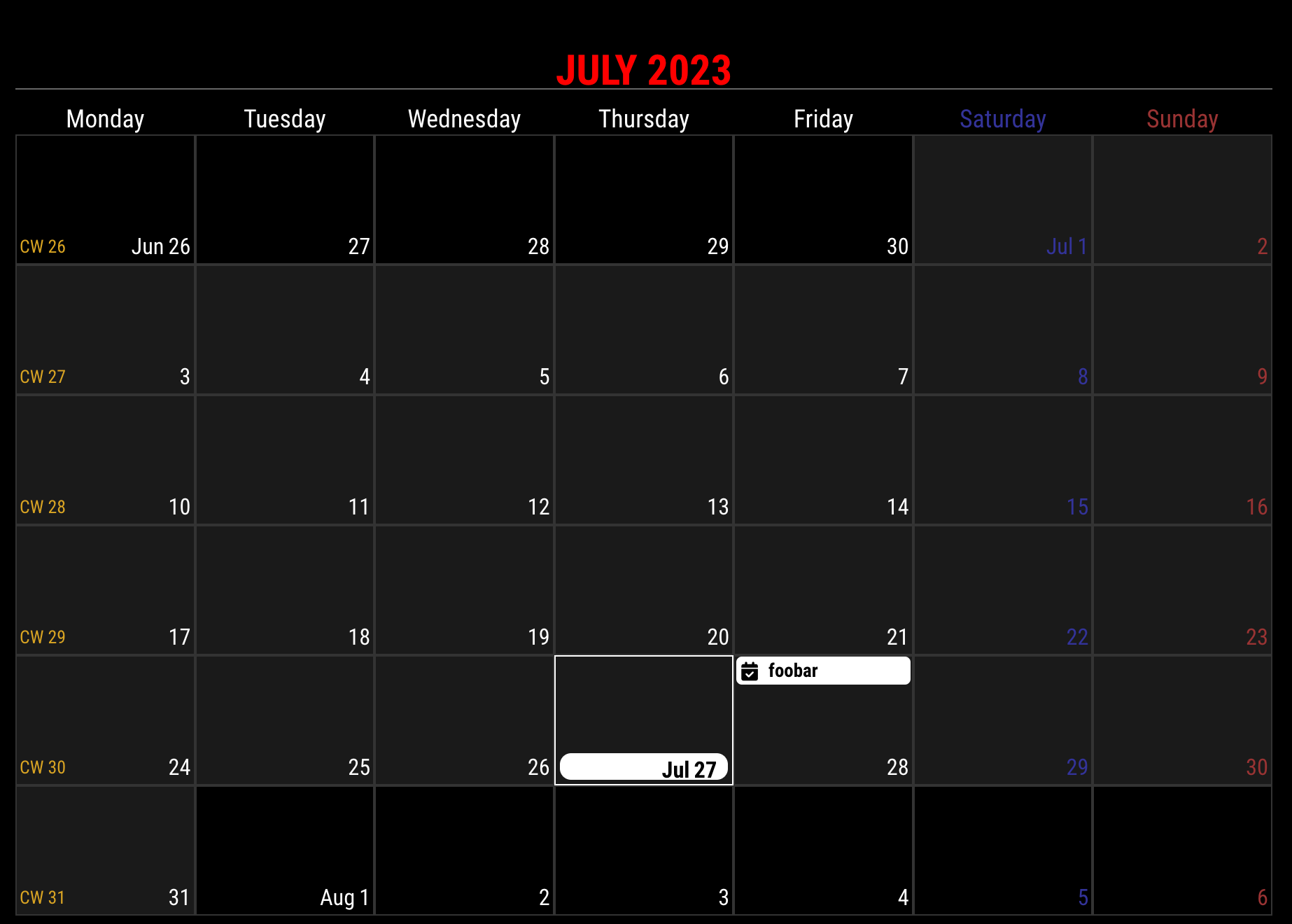
If you want to apply globally or have only one instance of the module;
.module.MMM-CalendarExt3 .module-header {
...
}
will work.
-
@tjat
@MMRIZE said in MMM-CalendarExt3:But the order of text would be decided by locale. So this will show 2023 July or July 2023. (and comma included/not, punctuation mark included/not, … depends on the standard rules of the culture by the locale.)
If you want to adjust the order or composition of words, you may need CSS customization additionally.This is my bad. The module header of this module is not refined to be possible to be a conjunction. So you need to set up your locale for your wish.
Or if you want really that feature, I’ll consider updating it. -
@MMRIZE i changed due to time zones not displaying correctly. I having meetings that are at times from other countries and it wouldn’t display correctly and as Ext3 is the most current it was suggested to upgrade to it… Then my Raspberry PI SD card crashed and i lost my original configuration. So now it’s a learning curve either way.
-
@pastormingle Is there a location were i can look at more detailed instructions on Ext3 or some configuration files that i can look at?
-
@pastormingle
I will show you some examples tomorrow. -
@MMRIZE Thanks.
-
@MMRIZE No worries, it worked perfectly.
My latest issue is that I’m struggling to refresh the calendar when I add a new event to my google calendar. I’m temporarily working on a local copy to play around with the JS and have this step currently. Would this work or is there an easier/better way that you’ve already built?
forceRefresh: function() { console.log("forceRefresh called"); if (this.refreshTimer) { clearTimeout(this.refreshTimer); this.refreshTimer = null; } this.tempMoment = null; this.stepIndex = 0; this.updateDom(this.config.animationSpeed); } -
@tjat ext3 gets its data from the default calendar module…
there is no notification to force refresh its content. only the fetchInterval.
-
@sdetweil so do I instead need to cause the default calendar module to refresh with my google calendar content?
Everything updates when I close and reload the magic mirror so just trying to update on demand within the same instance.
-
@tjat you cannot cause the default calendar to refresh.
it DOES load the ics on startup…so , only thing you could do is cause a complete restart of the MM app
-
@tjat
The process would go like this;- Receiving events from events provider(default calendar module or something)
- Regularizing them and keeping them in store.
- The view will show in the next cycle of the refresh timer with current stored events.
1)+2) and 3) are separated by parallel running.
So, If you want to refresh the view with new events by force,
- The provider should spit out notification ASAP on new events added.
- After processing the received data, update DOM of the module.
For 1), You can shorten the cycle of the provider fetching. (
fetchIntervalof the default calendar module). However, you should know that frequent requests to .ics could burden the calendar hosting server.For 2), your code may work.(Frankly said, you may need
updateDomonly enough) Or you can just reducerefreshIntervalof CX3 to refresh the view sooner.Ok. here is an additional opinion from an old dotard.
Do you really needreal-timeupdate of the event changing? Without any modification, it will show the change in a while. (default refreshing period is set as10 minutes. ) You can reduce the value to 5 min or even 10 seconds. But is it worthy?Refreshing only on change sounds promising, but using .ics doesn’t work like that. iCalendar service is hosted as a read-only thing, unlike
CALDAV. so there is no easy mechanism to detect the calendar change quickly except for frequent requests. So literally, it would not be anon-demandsolution.Most 99% time of the pulling cycle would not find any new changes from the calendar. That would not be the performance issue for your MM, but for the ics provider, it will cost more traffic. (Of course, GoogleCalendar would be generous. :D )
-
All CX3* modules (CalendarExt3, CalendarExt3Agenda, CalendarExt3Timeline) need event provider(e.g. default calendar module or MMM-GoogleCalendar or something similar) as a source of events. (You can hide the module with configuration or CSS)
Configuration itself is very simple.
{
	module: "calendar",
	header: "Fun Holidays",
	position: "top_left",
	config: {
		broadcastPastEvents: true,
		maximumNumberOfDays: 45,
		calendars: [
			{
				fetchInterval: 7 * 24 * 60 * 60 * 1000,
				symbol: "calendar-check",
				url: "https://ics.calendarlabs.com/709/45a0bb64/Fun_Holidays.ics",
				color: "green",
			}
		]
	}
},
{
	module: "MMM-CalendarExt3",
	position: "bottom_bar",
	header: "My Calendar for 3 weeks",
	config: {
		mode: 'week',
	}
},
It will show;
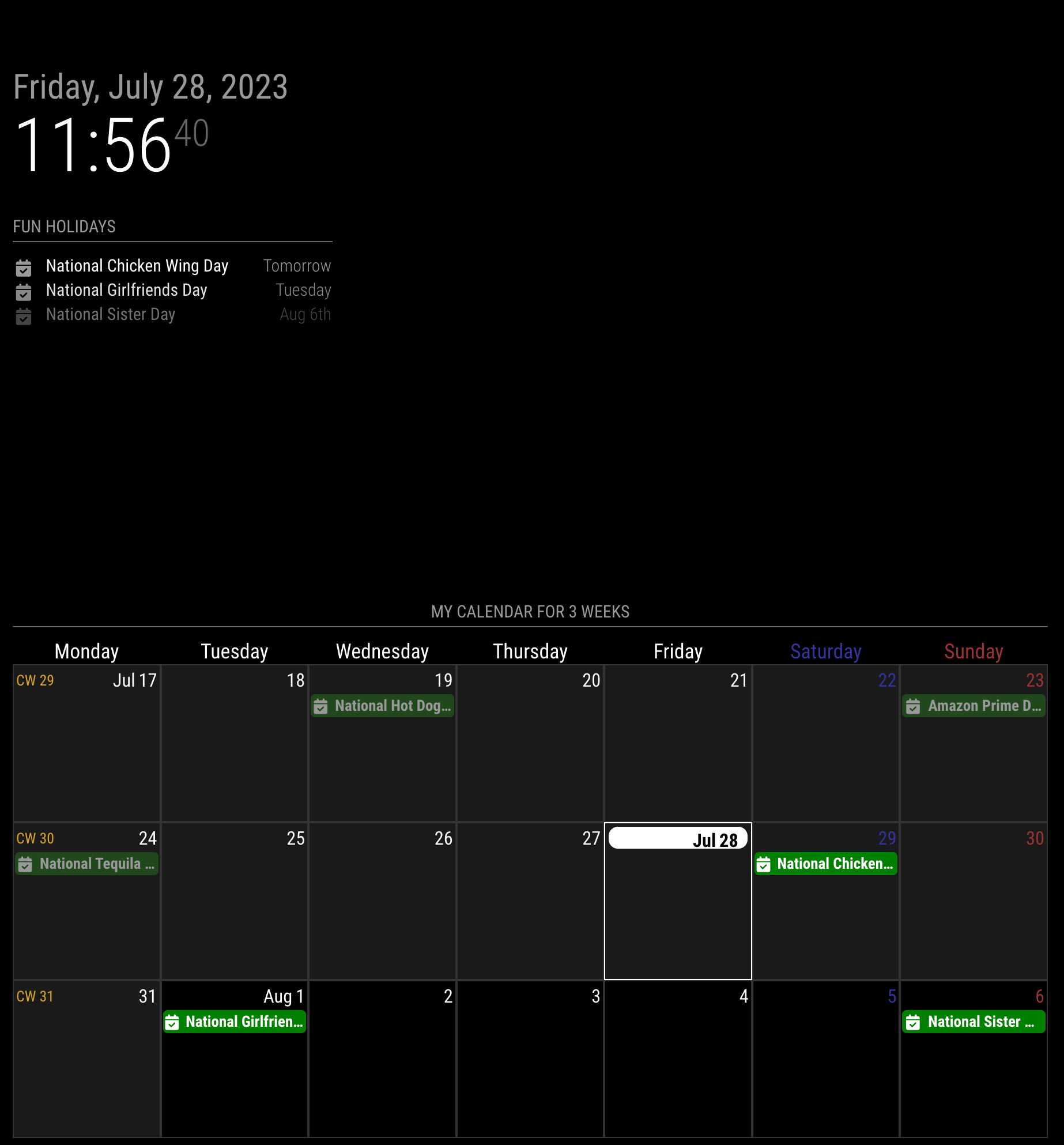
Everything you need is described in README.md.
But you can get many examples in this thread itself. (Read from first post. :D)The most important part of the configuration would be these;
- mode:
weekormonth.
If you adoptweekview, you might need these also ;weekIndex,weeksInView.
All other options are… just options. You can try whatever you want with fun.
Heavy CSS tweek is possible. You can ask me.
Rather, you may need to carefully config your events provider(usually, default calendar module) - most ambiguous accidents happen there.
- mode:
-
@MMRIZE So on version ext2 i had 3 calendars that combine my weekly and upcoming together only used different colors to differentiate them. How do i add the additional calendars here? I had google calendar and business outlook calendar.
-
@pastormingle I added the calendar but it still only shows the one calendar not the addional calendar on the weekly view. here is my configuration.
{
  module: "MMM-CalendarExt3",
  position: "bottom_bar",
  title: "Mikes Calendar",
  config: {
    mode: "week",
    instanceId: "basicCalendar",
   // locale: 'de-DE',
   weekIndex: 0,
    maxEventLines: 5,
    firstDayOfWeek: 1,
    fontSize: "30px",
        //calendarSet: ['us_holiday', 'abfall', 'mytest'],
   calendars: [
      {
        url: "http://outlook.office365.com/owa/calendar/*****f2033a09d6504d21833241fb44dcf8c3c@dxc.com/a53b201c85bf4825a9290ce3ec96a8b2457585490405428856/calendar.ics",
        auth: {
          user: "******",
          pass: "******",
        },
      },
      {
        url:"https://calendar.google.com/calendar/ical/******/private-34995d14cf5ec15efc8bd68f680c508e3/basic.ics",
        auth: {
          user: "*******",
          pass: "C******",
        },
      },
    ],
  },
},

		{
			module: "calendar",
			header: "Upcoming Meetings",
			position: "top_left",
			config: {
				calendars: [
					{
						fetchInterval: 7 * 24 * 60 * 60 * 1000,
						symbol: "calendar-check",
						url: "http://outlook.office365.com/owa/calendar/f2033a0***9d6504d21833241fb44df8c3c@dxc.com/a53b201c85bf4825a92*****b2457585490405428856/calendar.ics",

					}
				]
			}
		},

Hello! It looks like you're interested in this conversation, but you don't have an account yet.
Getting fed up of having to scroll through the same posts each visit? When you register for an account, you'll always come back to exactly where you were before, and choose to be notified of new replies (either via email, or push notification). You'll also be able to save bookmarks and upvote posts to show your appreciation to other community members.
With your input, this post could be even better 💗
Register Login