MagicMirror Forum
    • Recent
    • Tags
    • Unsolved
    • Solved
    • MagicMirror² Repository
    • Documentation
    • 3rd-Party-Modules
    • Donate
    • Discord
    • Register
    • Login
    A New Chapter for MagicMirror: The Community Takes the Lead
    Read the statement by Michael Teeuw here.

    MMM-CalendarExt3

    Scheduled Pinned Locked Moved Utilities
    689 Posts 82 Posters 2.8m Views 86 Watching
    Loading More Posts
    • Oldest to Newest
    • Newest to Oldest
    • Most Votes
    Reply
    • Reply as topic
    Log in to reply
    This topic has been deleted. Only users with topic management privileges can see it.
    • A Offline
      adamaid
      last edited by

      Hey everyone!

      I’m using a Samsung Frame 32" 2022 to display my MagicMirror page.

      I’m trying to avoid using a Raspberry Pi etc. so just serving MM as a web page from a local server, then using the “Internet” app on the TV UI to view the page.

      This approach works fine for other modules (including MMM-CalendarExt2 and the default Calendar) but not for MMM-CalendarExt3. Instead of showing a calendar it just shows the header (i.e. “October”) and nothing else. I’ve verified that the calendar renders OK on other devices (e.g. iPhone).

      Any ideas on what could be causing this? Unfortunately it isn’t easy to debug as there is no console available on the Internet TV app, and MMM-LogExt just prevents the page from loading at all on the TV.

      Thanks!
      Adam

      S 1 Reply Last reply Reply Quote 0
      • S Offline
        sdetweil @adamaid
        last edited by

        @adamaid MMM-CalendarExt3 uses the very latest javascript idioms,
        which most TV browsers have not been upgraded to support…

        here is a table of what browser version supports what
        https://caniuse.com/?search=ECMAScript

        my Samsung 82 in used to run MM, but since a couple years ago it is downlevel

        Sam

        How to add modules

        learning how to use browser developers window for css changes

        1 Reply Last reply Reply Quote 0
        • M Offline
          MMRIZE @czabel
          last edited by

          @czabel
          I’m in holidays this week. I’ll show you next week.

          C 1 Reply Last reply Reply Quote 0
          • C Offline
            czabel @MMRIZE
            last edited by

            @MMRIZE No rush at all, enjoy your holiday! I’ll keep fiddling, but I’ve never been good with CSS :D

            1 Reply Last reply Reply Quote 0
            • R Offline
              Rakutsi
              last edited by

              Hello.

              Have been using MMM-CalendarExt2 for some years now and changed to MMM-CalendarExt3 today.

              The thing was that my birthday events that i have in my my calender, i would like to say a the age of the person. The Calendar module you can use displayRepeatingCountTitle and repeatingCountTitle to show the years from when you put the event in the calendar. For example i tried put my birthday on the year i was born and put repeat every year on same day and it did show number.

              Was wondering if this funktion work in MMM-CalendarExt3?

              S 1 Reply Last reply Reply Quote 0
              • S Offline
                sdetweil @Rakutsi
                last edited by sdetweil

                @Rakutsi no… the stuff shown on the screen isn’t broadcast to the other modules…

                but you could add an ext3 eventTransformer to add it back on (if you know bd, and some pattern in the event subject)

                Sam

                How to add modules

                learning how to use browser developers window for css changes

                R 1 Reply Last reply Reply Quote 0
                • R Offline
                  Rakutsi @sdetweil
                  last edited by

                  @sdetweil thanks then i know.

                  well i dont know how to use the eventFilter for that, is there any example then i could try?
                  I am not the best at those kind of things. Mostly copy paste and trial and error.

                  S 1 Reply Last reply Reply Quote 0
                  • S Offline
                    sdetweil @Rakutsi
                    last edited by sdetweil

                    @Rakutsi see the doc and the ext3 wiki (at the module github page)

                    Sam

                    How to add modules

                    learning how to use browser developers window for css changes

                    R 1 Reply Last reply Reply Quote 0
                    • R Offline
                      Rakutsi @sdetweil
                      last edited by Rakutsi

                      @sdetweil

                      this was the solution i came up with.

                      eventTransformer: (event) => {
                          const currentYear = new Date().getFullYear();
                          const age = currentYear - event.firstYear;
                      
                          event.title = `${event.title} (${age} year)`;
                      
                          return event;
                      },
                      

                      Chatgpt is my friend.

                      S 1 Reply Last reply Reply Quote 1
                      • S Offline
                        sdetweil @Rakutsi
                        last edited by

                        @Rakutsi awesome!

                        Sam

                        How to add modules

                        learning how to use browser developers window for css changes

                        1 Reply Last reply Reply Quote 0
                        • M Offline
                          MMRIZE @czabel
                          last edited by

                          @czabel said in MMM-CalendarExt3:

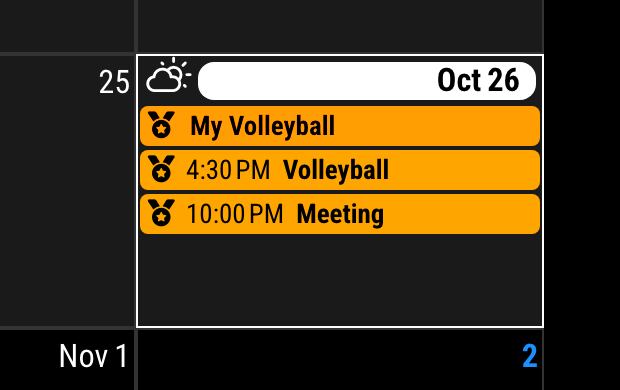
                          Do you have any insight as to how to change my CSS to get the icons to show up for every event? As I mentioned, my current setup makes my non-fullday events colored in, but this deletes the icon. The icon is still there for the real fullday events. I’d like to keep the icon, if at all possible. Thank you!

                          Sorry for the late reply. I was on vacation.

                          Append these codes to your custom.css

                          /* custom.css */
                          .CX3 .event.singleday .headline.useSymbol .symbol {
                            color: var(--oppositeColor);
                          }
                          

                          be250f93-007a-404b-959e-6789995f55aa-image.png

                          C 1 Reply Last reply Reply Quote 0
                          • C Offline
                            czabel @MMRIZE
                            last edited by

                            @MMRIZE said in MMM-CalendarExt3:
                            … Sorry for the late reply…

                            No problem at all, I appreciate the time you spend helping on here.

                            With that CSS adjustment, the events in the calendar look perfect now, thank you.

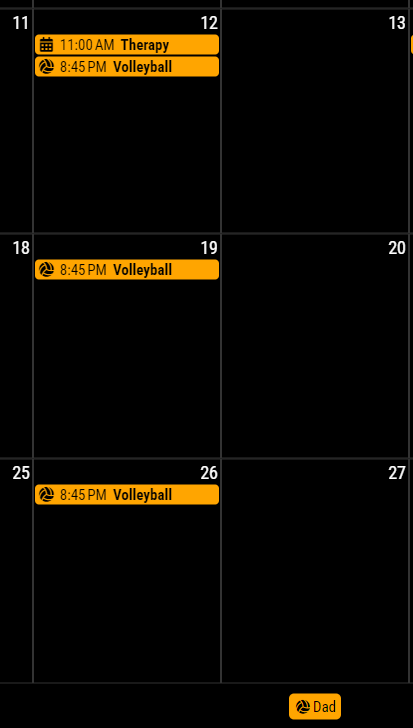
                            But I have a new problem that seems to have just shown up: the volleyball icon that I’m using in the eventTransformer is now being applied to the Legend somehow:
                            ext3_legendIcon.png
                            You can see the events are great (volleyball has the icon, other events are the default)

                            This is especially odd because in the base calendar config, I specify useSymbol: false for the “Dad” calendar, but this element is somehow getting the .useSymbol class.

                            Oh, I just found in a search another user that has this issue, link here

                            M 1 Reply Last reply Reply Quote 0
                            • M Offline
                              MMRIZE @czabel
                              last edited by

                              @czabel
                              Well, that is not the bug, however you might be uncomfortable.
                              It is designed to get the symbol from the first(internally structured) event of the calendar group.
                              Because the default calendar module will broadcast only the events themselves, not the meta-information from the calendar to which the event belonged, So there is no easy way to distinguish the default symbol of the specific calendar.

                              To be honest, getting the default symbol from config of ONLY the default calendar module might be easy, but this module is designed to take events from any other possible modules, so I cannot assume all the user will get the events from the default calendar module only.

                              Not so easy. Has somebody any idea?

                              C 1 Reply Last reply Reply Quote 0
                              • C Offline
                                czabel @MMRIZE
                                last edited by

                                @MMRIZE

                                I probably don’t understand enough about how this system works to help much, but isn’t every calendar entry a separate event, which is why the eventTransformer works to change the individual icons? How is it that this icon spills over into the Legend entry, and not just the specific calendar entries?

                                In any case, what about adding a new config option to hideLegendIcons that forcibly removes the CSS tag, or something like that?

                                M 1 Reply Last reply Reply Quote 0
                                • M Offline
                                  MMRIZE @czabel
                                  last edited by

                                  @czabel
                                  57548b85-227f-497a-a19b-9e893571cdcb-image.png

                                  You can simply append this code to your css/custom.css

                                  .CX3 .legend.useSymbol .symbol {
                                    display: none;
                                  }
                                  
                                  1 Reply Last reply Reply Quote 0
                                  • G Offline
                                    gonzonia
                                    last edited by gonzonia

                                    Recently I noticed my Calendars disappear after a few hours. I’m not sure when it started. If I VNC into my mirror and refresh or restart the mirror they come back only to stop appearing a few hours later. I see no errors in the log.

                                    I’m using
                                    MMM-CalendarExt3 and MMM-CalendarExt3Agenda in conjunction with MMM-Scenes, the instances that are only on specific scenes are the ones that disappear. I have another instance of MMM-CalendarExt3Agenda that is on all the scenes and that one seems to stay, so I’m wondering if it’s an MMM-Scenes issue.

                                    Edit: I’m also using MMM-Pir. I’m wondering if that might be doing something.

                                    S 1 Reply Last reply Reply Quote 0
                                    • S Offline
                                      sdetweil @gonzonia
                                      last edited by

                                      @gonzonia mmm-pir is supposed to put the mirror to sleep if there is no movement

                                      And Scenes make logical pages. Like MMM-pages, or carousel

                                      So you have multiple things making content hide

                                      Sam

                                      How to add modules

                                      learning how to use browser developers window for css changes

                                      G 1 Reply Last reply Reply Quote 0
                                      • G Offline
                                        gonzonia @sdetweil
                                        last edited by

                                        @sdetweil I know. It used to all work great. I don’t think Scenes has updated in a while.
                                        MMM-CalendarExt3 and MMM-pir have both had updates though.

                                        To clarify, when I say disappear, I mean that they are no longer on the screen.Not just that the data is empty. The headers, dates, etc. All not visible. I’ve just restarted recently, I’ll try to look at the page source next time it happens.

                                        G S 2 Replies Last reply Reply Quote 0
                                        • G Offline
                                          gonzonia @gonzonia
                                          last edited by

                                          Also, I’m using the xrandr mode for mmm-pir since I’m in Raspbian 11 and when I use dpms it doesn’t wake the screen for some reason.

                                          1 Reply Last reply Reply Quote 0
                                          • S Offline
                                            sdetweil @gonzonia
                                            last edited by sdetweil

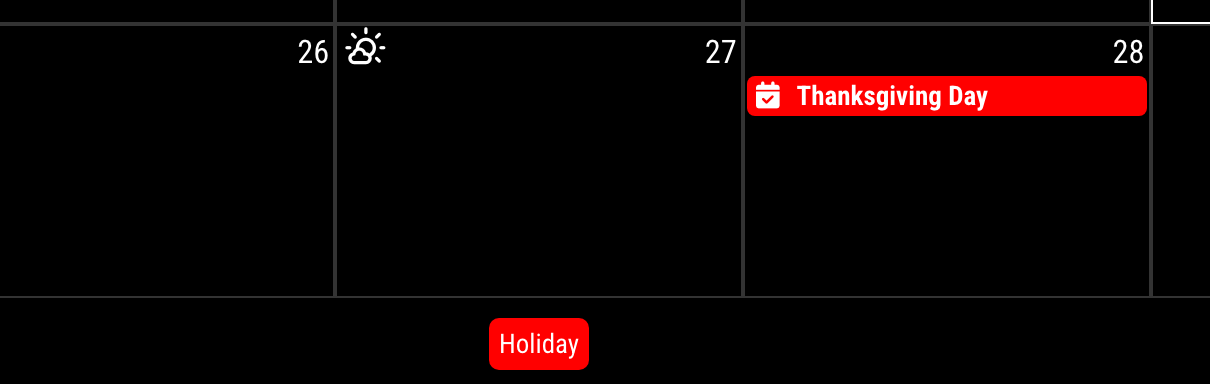
                                            @gonzonia when a module is hidden , nothing shows
                                            Sam

                                            How to add modules

                                            learning how to use browser developers window for css changes

                                            G 1 Reply Last reply Reply Quote 0

                                            Hello! It looks like you're interested in this conversation, but you don't have an account yet.

                                            Getting fed up of having to scroll through the same posts each visit? When you register for an account, you'll always come back to exactly where you were before, and choose to be notified of new replies (either via email, or push notification). You'll also be able to save bookmarks and upvote posts to show your appreciation to other community members.

                                            With your input, this post could be even better 💗

                                            Register Login

                                            • 1
                                            • 2
                                            • 31
                                            • 32
                                            • 33
                                            • 34
                                            • 35
                                            • 35 / 35
                                            • First post
                                              Last post
                                            Enjoying MagicMirror? Please consider a donation!
                                            MagicMirror created by Michael Teeuw.
                                            Forum managed by Sam, technical setup by Karsten.
                                            This forum is using NodeBB as its core | Contributors
                                            Contact | Privacy Policy