MagicMirror Forum
    • Recent
    • Tags
    • Unsolved
    • Solved
    • MagicMirror² Repository
    • Documentation
    • 3rd-Party-Modules
    • Donate
    • Discord
    • Register
    • Login
    A New Chapter for MagicMirror: The Community Takes the Lead
    Read the statement by Michael Teeuw here.

    Graph module

    Scheduled Pinned Locked Moved Requests
    26 Posts 9 Posters 22.2k Views 9 Watching
    Loading More Posts
    • Oldest to Newest
    • Newest to Oldest
    • Most Votes
    Reply
    • Reply as topic
    Log in to reply
    This topic has been deleted. Only users with topic management privileges can see it.
    • F Offline
      feedparakeet
      last edited by

      I think it will be really cool to have a module which will render a graph from the values you provide. Let’s say it will be a txt file or url with values put into rows. So the module will grab last N rows and render a graph.

      All ideas I have for now is to create a transparent graph image myself and import it with the RandomPhoto module.

      Im wondering do anyone here tried to create a custom graph for MM?

      1 Reply Last reply Reply Quote 0
      • R Offline
        roramirez Core Contributors
        last edited by

        There a module of @qistoph

        [card:qistoph/MMM-dynchart]

        Easy module development with MagicMirror Module Template

        F 1 Reply Last reply Reply Quote 1
        • F Offline
          feedparakeet @roramirez
          last edited by

          @roramirez said in Graph module:

          There a module of @qistoph

          [card:qistoph/MMM-dynchart]

          Thank you! Yes, it looks pretty much like what Im looking for. But I could make a guess only throw the source code, because I could not make this module run. And it draws a static graph, not dinamic

          1 Reply Last reply Reply Quote 0
          • Q Offline
            qistoph
            last edited by

            Hi @feedparakeet,

            The MMM-dynchart was a sample used to show some ideas.

            A better example for you would be my Vitadock module:
            https://github.com/qistoph/MMM-vitadock

            Maybe you can use it to base your module on.

            If you could give a more detailed description of what you what to graph, I might be able to help you.

            F 1 Reply Last reply Reply Quote 0
            • D Offline
              d3r
              last edited by

              I’m logging room temperature and humidity to a csv file. How would I go about using the data to graph it to my mirror?

              F 1 Reply Last reply Reply Quote 0
              • PointPubMediaP Offline
                PointPubMedia
                last edited by

                I’m using a bunch of graph already… why not using Grafana to record the data and the iFrame module to display them in your MM ?

                D F 2 Replies Last reply Reply Quote 0
                • D Offline
                  d3r @PointPubMedia
                  last edited by

                  @PointPubMedia said in Graph module:

                  I’m using a bunch of graph already… why not using Grafana to record the data and the iFrame module to display them in your MM ?

                  That’s a good idea actually. I don’t know what grafana is, will look into it. I might just use the temperature logging python code I have and add a graphing portion to it as well and then use the iframe module to display the graph. Sounds feasible on paper.

                  1 Reply Last reply Reply Quote 0
                  • F Offline
                    feedparakeet @PointPubMedia
                    last edited by

                    @PointPubMedia, thanks, Grafana looks good. I have it installed now to graph server’s cpu, network, e.t.c… Could you tell me please what do you use as a data source for Grafana to create custom graphs? I want to create bitcoin-usd graph, but I don’t know how can I put a data into Grafana.
                    And how do use put Grafana’s graph into iFrame module? Are there any tricks you can share?

                    PointPubMediaP 1 Reply Last reply Reply Quote 0
                    • PointPubMediaP Offline
                      PointPubMedia @feedparakeet
                      last edited by

                      @feedparakeet I disable the authentication in Grafana so I can use direct link to a graph without a username/password!

                      In grafana, you can “export” a graph and it will give you a direct URL that you can use directly in an iFrame!

                      For datasource, currently I’m using a module in my home automation that already send data to grafana!

                      I need to work later on some unix script to send data directly in grafana!

                      F 1 Reply Last reply Reply Quote 1
                      • F Offline
                        feedparakeet @PointPubMedia
                        last edited by

                        @PointPubMedia Thanks! It worked!
                        Final setup is: php scripts which grab info from fixer.io (eur + usd) and btc-e.com (bitcoin), put them to InfluxDB and display with Grafana. Works like a charm!
                        Here is a screenshot from my MM. Looks beautiful in general. But still, few minor things to work on.
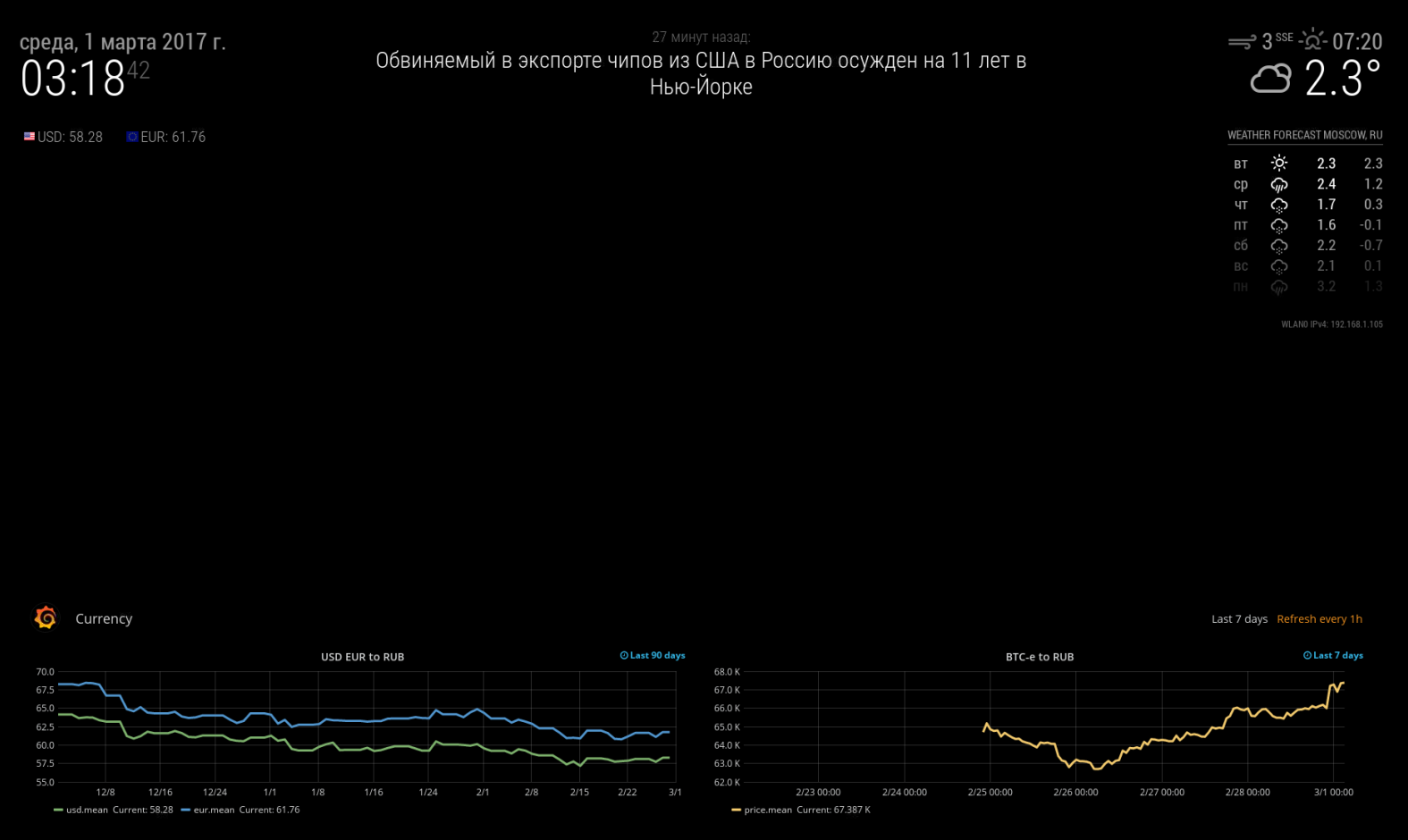
                        0_1488327795941_MM.png

                        J 1 Reply Last reply Reply Quote 0
                        • F Offline
                          feedparakeet @qistoph
                          last edited by

                          @qistoph, thank you, I really appreciate your response. It took me few weeks to understand how do graphs work and get what I need. Finally I did it with Grafana + InfluxDB + PHP scripts. Now I understand that each graph is very special and you need quite a few options to get it work like you want. So, Grafana is the solution for what I was looking for. Don’t think it will be easy to create a universal graph module to satisfy all my needs, like I thought it before. Thanks anyway!

                          1 Reply Last reply Reply Quote 0
                          • F Offline
                            feedparakeet @d3r
                            last edited by

                            @d3r It is absolutely possible with Grafana + iFrame module and a bit of magic lol

                            1 Reply Last reply Reply Quote 0
                            • J Offline
                              jalmaas @feedparakeet
                              last edited by

                              @feedparakeet How did you get grafana to use all black background?

                              F 1 Reply Last reply Reply Quote 0
                              • F Offline
                                feedparakeet @jalmaas
                                last edited by

                                @jalmaas I did it with a very rude way. I have changed all 141414 color to 000000 for background settings in /usr/share/grafana/public/css/grafana.dark.* files
                                Same way you can remove everything else, like Grafana logo.

                                N 1 Reply Last reply Reply Quote 0
                                • N Offline
                                  nerakhon @feedparakeet
                                  last edited by

                                  @feedparakeet Have you also seen the nasty empty square on the bottom of grafana iframe exports? I’m trying to get rid of it, but so far with no success. As well if you by chance found out how to get rid of the background grey without messing up with grafana CSS, that would be a great asset :)!

                                  F 1 Reply Last reply Reply Quote 0
                                  • F Offline
                                    feedparakeet @nerakhon
                                    last edited by

                                    @nerakhon nope, I didn’t see any square really. The only thing I did is CSS change. You can select this square in Chrome browser and right click “View the source”, it will show you the certain part of the HTML, which you can later find in Grafana’s templates.
                                    Don’t think there is any workaround to change background without changing CSS.

                                    1 Reply Last reply Reply Quote 0
                                    • P Offline
                                      planet4
                                      last edited by

                                      @feedparakeet Thanks for sharing. I have really tried to remove the Grafana header but it wont work. Were able to replace the grey with black. Would it be possible for you to share your css files. Tried every setting in Grafana but it does not seem to be any good way to remove the header. Is the css files you have modified only for the snaphots and shared graphs?

                                      F 1 Reply Last reply Reply Quote 0
                                      • F Offline
                                        feedparakeet @planet4
                                        last edited by feedparakeet

                                        @planet4 , what I did is:

                                        cd /usr/share/grafana/public/css
                                        find . -type f -exec sed -i.bak "s/141414/000000/g" {} \;
                                        

                                        This command creates a .bak files with the original content of each modified file in case you would like to turn everything back.
                                        Then, I enabled General-Dimentions-Transparent for each graph. And enabled General-Toggles-Hide controls for a dashboard.
                                        My grafana’s header automatically goes away in few minutes if I don’t touch anything or move mouse. But even if I don’t see grafana’s grey header line, I can still see grafana’s orange-colored label.
                                        Does your grafana’s grey header goes away if you don’t touch anything for 5 minutes? If not, then you should update to a new version. This feature is quite new.

                                        1 Reply Last reply Reply Quote 0
                                        • SvenSommerS Offline
                                          SvenSommer
                                          last edited by SvenSommer

                                          I wrote a little blog post, to describe how to use Influxdb and Grafana to build a weather chart. It’s available here.

                                          Looking for some building inspiration?
                                          Check out my large, thin and metal framed mirror on robstechlog.com.

                                          Modules released:
                                          MMM-GoogleAnalytics
                                          MMM-GrafanaChart
                                          MMM-GrafanaGauges

                                          P 1 Reply Last reply Reply Quote 1
                                          • P Offline
                                            planet4 @SvenSommer
                                            last edited by

                                            @SvenSommer Very nice! I will try this as soon as I have reinstalled my old RPI. I have used the database to get info from home assistant so I can display graphs from my z wave sensor. However I am just wondering how it can display the graph as Grafana have a login page with password. Do I have to do something special in order to make this work.

                                            SvenSommerS F 2 Replies Last reply Reply Quote 0

                                            Hello! It looks like you're interested in this conversation, but you don't have an account yet.

                                            Getting fed up of having to scroll through the same posts each visit? When you register for an account, you'll always come back to exactly where you were before, and choose to be notified of new replies (either via email, or push notification). You'll also be able to save bookmarks and upvote posts to show your appreciation to other community members.

                                            With your input, this post could be even better 💗

                                            Register Login

                                            • 1
                                            • 2
                                            • 1 / 2
                                            • First post
                                              Last post
                                            Enjoying MagicMirror? Please consider a donation!
                                            MagicMirror created by Michael Teeuw.
                                            Forum managed by Sam, technical setup by Karsten.
                                            This forum is using NodeBB as its core | Contributors
                                            Contact | Privacy Policy