MagicMirror Forum
    • Recent
    • Tags
    • Unsolved
    • Solved
    • MagicMirror² Repository
    • Documentation
    • 3rd-Party-Modules
    • Donate
    • Discord
    • Register
    • Login
    A New Chapter for MagicMirror: The Community Takes the Lead
    Read the statement by Michael Teeuw here.

    How hot does your mirror run?

    Scheduled Pinned Locked Moved Hardware
    29 Posts 8 Posters 22.4k Views 8 Watching
    Loading More Posts
    • Oldest to Newest
    • Newest to Oldest
    • Most Votes
    Reply
    • Reply as topic
    Log in to reply
    This topic has been deleted. Only users with topic management privileges can see it.
    • W Offline
      wered
      last edited by

      Mine doesnt get quite that hot, I put a small vent openings on the back of mine to allow the heat to escape and i wrote a cron job to check the temperature and if it gets over 70c it will turn off the display which reduces the temperature quite a bit and it waits for it to get back to 55c before turning back on. I also set it to shut down the pi too and not come back on if it gets over 80c, Im currently in the process of adding a time control to the script so it will shut off durring certain hours of the day for power saving and if its in an area where you dont want any light at night such as in a bedroom. I will post it with installation instructions once it is finished and undergone a little testing. Here is how the inside of my box looks for comparison.

      alt text

      C 1 Reply Last reply Reply Quote 0
      • C Offline
        chieftainSupreme @wered
        last edited by

        @wered would you mind sharing that script to turn it off at 70c and back on at 55c? Would solve some problems I’ve been having lately. Thanks!

        W 1 Reply Last reply Reply Quote 0
        • W Offline
          wered @chieftainSupreme
          last edited by

          @chieftainSupreme

          I Have finished the script, I have a link to the git repo for it here https://git.serverforge.org:8082/Wered/rpi-mm-tempcontrol and i have installation instructions/Config guide here https://wiki.serverforge.org/index.php/Tempcontrol

          C 2 Replies Last reply Reply Quote 1
          • C Offline
            chieftainSupreme @wered
            last edited by

            @wered awesome thanks man! I’ll give it a shot tonight

            1 Reply Last reply Reply Quote 0
            • C Offline
              chieftainSupreme @wered
              last edited by

              @wered I can’t install rpi-temp or tempcontrol, says it can’t locate the packages. Would you mind checking if there’s something wrong on your end?

              W 1 Reply Last reply Reply Quote 0
              • lucallmonL Offline
                lucallmon
                last edited by

                Mine gets very hot. I think it’s because of my old monitor. I actually had the heat affect my HDMI cable and had to replace it as my monitor kept cutting out.

                1 Reply Last reply Reply Quote 0
                • W Offline
                  wered @chieftainSupreme
                  last edited by

                  @chieftainSupreme What distro are you running on your pi?

                  C 1 Reply Last reply Reply Quote 0
                  • C Offline
                    chieftainSupreme @wered
                    last edited by

                    @wered running a multibootpi setup with retropie, raspbian and libreElec. Trying to install this on Raspbian, and i couldn’t get it done with either install method, apt-repo or manual. I’m pretty new so it may be an error on my part

                    1 Reply Last reply Reply Quote 0
                    • W Offline
                      wered
                      last edited by

                      Apt method will only work on ubuntu currently, the manual install should work if done correctly though, is it giving you an error when you try to run it?

                      1 Reply Last reply Reply Quote 0
                      • C Offline
                        chieftainSupreme
                        last edited by

                        I forget what the exact error was, I’ll check it out when I get home. Does this setup require a GPIO connection? My fan right now just has 5V power and ground wires

                        1 Reply Last reply Reply Quote 0
                        • W Offline
                          wered
                          last edited by

                          It requires no gpio, its just a simple bash script that turns on an off the display based on time and temperatures

                          1 Reply Last reply Reply Quote 0
                          • A Offline
                            Advokaten
                            last edited by

                            Has anybody here tried attaching a copper heatsink to their pi? I saw a few fellas on youtube doing this but I’m quite unsure if that’s an option I’ll go for.

                            hartattackH 1 Reply Last reply Reply Quote 1
                            • hartattackH Offline
                              hartattack @Advokaten
                              last edited by

                              @Advokaten My Pi is in a pretty closed off area, I have 3 small aluminum heatsinks attached plus a small fan. The pi itself never gets above 50c

                              Mykle1M 1 Reply Last reply Reply Quote 1
                              • W Offline
                                wered
                                last edited by

                                I have the aliuminum heat sinks on mine aswell however the monitors used in the box are quite old and generate most of the heat, but even still mine hovers around 55C currently.

                                hartattackH 1 Reply Last reply Reply Quote 0
                                • hartattackH Offline
                                  hartattack @wered
                                  last edited by

                                  @wered From what I read, the Pi’s can handle temps up like 80c. Mine is behind my TV and it is pretty modern, so it doesnt get very hot. The fan helps a bit.

                                  1 Reply Last reply Reply Quote 0
                                  • C Offline
                                    chieftainSupreme
                                    last edited by

                                    I have a fan and heatsinks, very simple addition and makes a big difference

                                    1 Reply Last reply Reply Quote 1
                                    • Mykle1M Offline
                                      Mykle1 Project Sponsor Module Developer @hartattack
                                      last edited by

                                      @hartattack

                                      I wanted to add a fan from the very beginning although all searches say that the Pi can run without problems up to 80°C or more. That “seemed” hot to me. My Pi was running at 60°C, which is well under the maximum that I discovered. So, I took it upon myself to add a 12v fan (I have spare parts lying around) and connected it to a 5V pin and a GRD pin on the GPIO header. I’ve been running the mirror more than a month without a hitch and my CPU temp is nearly 20°C cooler. Fans are cheap. If you can salvage one, even better. The result is pretty dramatic. Have a look.
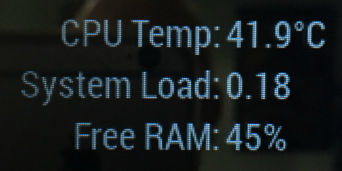
                                      0_1491441071197_temp.png

                                      Create a working config
                                      How to add modules

                                      C hartattackH 2 Replies Last reply Reply Quote 2
                                      • C Offline
                                        chieftainSupreme @Mykle1
                                        last edited by

                                        @Mykle1 not only is it cheap, it was a great learning experience for me, both overclocking and learning how to integrate other hardware into your Pi setup. Still working on an on/off switch that can also switch between OS’s tho…

                                        1 Reply Last reply Reply Quote 1
                                        • hartattackH Offline
                                          hartattack @Mykle1
                                          last edited by

                                          @Mykle1 said in How hot does your mirror run?:

                                          @hartattack

                                          I wanted to add a fan from the very beginning although all searches say that the Pi can run without problems up to 80°C or more. That “seemed” hot to me. My Pi was running at 60°C, which is well under the maximum that I discovered. So, I took it upon myself to add a 12v fan (I have spare parts lying around) and connected it to a 5V pin and a GRD pin on the GPIO header. I’ve been running the mirror more than a month without a hitch and my CPU temp is nearly 20°C cooler. Fans are cheap. If you can salvage one, even better. The result is pretty dramatic. Have a look.
                                          0_1491441071197_temp.png

                                          I started with a fan and 3 heatsinks from the beginning. Mine runs around 45C and gets close to 50C when doing anything intensive.

                                          Mykle1M 1 Reply Last reply Reply Quote 1
                                          • Mykle1M Offline
                                            Mykle1 Project Sponsor Module Developer @hartattack
                                            last edited by

                                            @hartattack said in How hot does your mirror run?:

                                            I started with a fan and 3 heatsinks from the beginning

                                            Yes, I started with the heatsinks that came in the Pi kit that I bought. There’s just no reason NOT to add a fan, in my case anyway. Besides, the cool factor (pun) of having a fan that’s half the size of the Pi sitting right on top. A 12v fan re-purposed from an old Mac G5 power supply connected to a 5v Pi pin. Come on, that’s cool! :-)


                                            Create a working config
                                            How to add modules

                                            A 1 Reply Last reply Reply Quote 1

                                            Hello! It looks like you're interested in this conversation, but you don't have an account yet.

                                            Getting fed up of having to scroll through the same posts each visit? When you register for an account, you'll always come back to exactly where you were before, and choose to be notified of new replies (either via email, or push notification). You'll also be able to save bookmarks and upvote posts to show your appreciation to other community members.

                                            With your input, this post could be even better 💗

                                            Register Login

                                            • 1
                                            • 2
                                            • 1 / 2
                                            • First post
                                              Last post
                                            Enjoying MagicMirror? Please consider a donation!
                                            MagicMirror created by Michael Teeuw.
                                            Forum managed by Sam, technical setup by Karsten.
                                            This forum is using NodeBB as its core | Contributors
                                            Contact | Privacy Policy
