Read the statement by Michael Teeuw here.
Monitor not awaking from sleep
-
I’m running a RPi4 with the latest MM release and using MMM-Screen-Powersave-Notification and MMM-GPIO-Notifications along with a motion sensor.
 {
	module: 'MMM-Screen-Powersave-Notification',
	config: {
        delay: 60
	}
    },


    {
	module: 'MMM-GPIO-Notifications',
	config: {
	    '4': {
		    gpio_state: 1,
		    gpio_debounce: 0,
            delay: 30000,
		    notifications: [
		        {
				    notification: 'SCREEN_ON',
		            payload: { 'forced': false }
		        },
                {

                }
		    ]
	    }
	}
    },
I had this setup on a Dell monitor and it worked perfectly.
I just installed a new monitor - a Lenovo Thinkvision P32p-20
After starting the sensor works as it’s supposed to, waking the monitor when someone passes by and sleeping after 60 seconds of inactivity.
But after a while, the monitor does not wake from sleep. The MM instance is running fine (I can look at the dispaly from a remote browser).
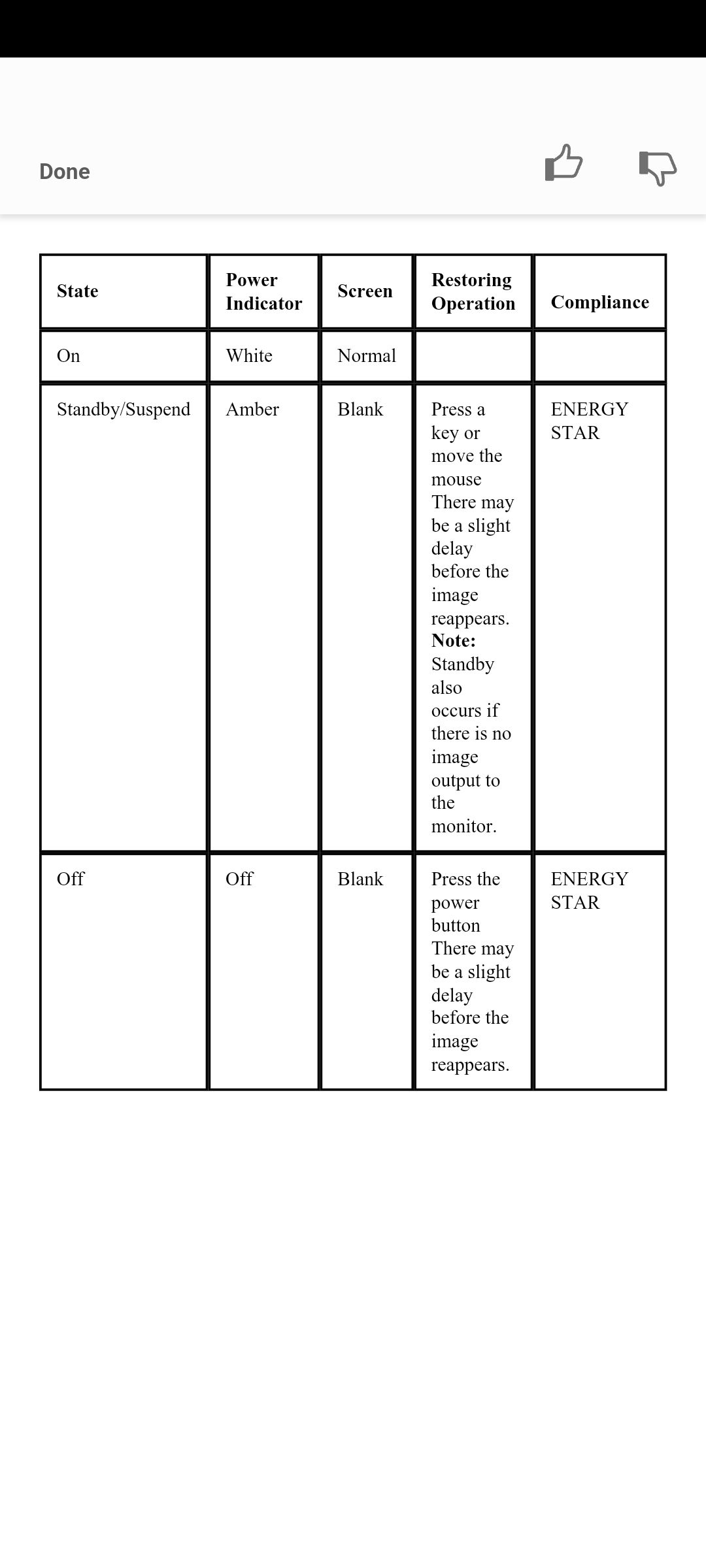
The monitor is in powersave mode (amber LED)
The only way to wake the monitor is to touch a button on the monitor’s control panel.
The monitor has no configuration options for powersave or sleep.
Any suggestions on how to fix this?
-
@mvrlogins I had a display like that, if no input, it would turn off, even if I was hiding modules.
I had to make a change to one of my modules to wake up mm for 1 second every 14 minutes to keep it from going into shutdown
the monitor doc says moving a mouse (if it were visible) should wake up the monitor
-
@sdetweil said in Monitor not awaking from sleep:
@mvrlogins I had a display like that, if no input, it would turn off, even if I was hiding modules.
I had to make a change to one of my modules to wake up mm for 1 second every 14 minutes to keep it from going into shutdown
May I ask how you did that?
Thanks
-
@mvrlogins I had to add code to my module, that started a 14 minute timer on entering sleep mode. if motion happened before the timer expired the timer was stopped.
if the timer expired, I set a variable and then started the wake up routine.
during the wakeup, if the variable was set is started a second timer for 1 secondwhen that second timer expired I cleared the variable and then started the sleep routine again…
repeat as needed.
causes a short flash every 14 minutes, but mostly this happens at night, when u are sleeping anyhow.
energy star compliance requires power off (or low power suspend mode) after 15 minutes of no use.
Hello! It looks like you're interested in this conversation, but you don't have an account yet.
Getting fed up of having to scroll through the same posts each visit? When you register for an account, you'll always come back to exactly where you were before, and choose to be notified of new replies (either via email, or push notification). You'll also be able to save bookmarks and upvote posts to show your appreciation to other community members.
With your input, this post could be even better 💗
Register Login