MagicMirror Forum
    • Recent
    • Tags
    • Unsolved
    • Solved
    • MagicMirror² Repository
    • Documentation
    • 3rd-Party-Modules
    • Donate
    • Discord
    • Register
    • Login
    A New Chapter for MagicMirror: The Community Takes the Lead
    Read the statement by Michael Teeuw here.

    I want to display txt files from outside at the bottom

    Scheduled Pinned Locked Moved Custom CSS
    30 Posts 2 Posters 9.8k Views 3 Watching
    Loading More Posts
    • Oldest to Newest
    • Newest to Oldest
    • Most Votes
    Reply
    • Reply as topic
    Log in to reply
    This topic has been deleted. Only users with topic management privileges can see it.
    • 史 Offline
      史新瑞 @sdetweil
      last edited by

      @sdetweil There is no error message

      S 1 Reply Last reply Reply Quote 0
      • S Offline
        sdetweil @史新瑞
        last edited by

        @史新瑞 if npm start doesn’t work, show me ALL the messages

        Sam

        How to add modules

        learning how to use browser developers window for css changes

        史 1 Reply Last reply Reply Quote 0
        • 史 Offline
          史新瑞 @sdetweil
          last edited by

          @sdetweil Is it the information in the terminal

          S 1 Reply Last reply Reply Quote 0
          • S Offline
            sdetweil @史新瑞
            last edited by

            @史新瑞 yes… you can redirect that to a file

            npm start >somefile.txt 2>&1

            wait…

            then ctrl-c

            then examine and post

            make sure to pm2 stop all before npm start

            Sam

            How to add modules

            learning how to use browser developers window for css changes

            史 2 Replies Last reply Reply Quote 0
            • 史 Offline
              史新瑞 @sdetweil
              last edited by

              @sdetweil 1.png

              1 Reply Last reply Reply Quote 0
              • 史 Offline
                史新瑞 @sdetweil
                last edited by

                @sdetweil Sorry, I can’t find the document you said.

                S 1 Reply Last reply Reply Quote 0
                • S Offline
                  sdetweil @史新瑞
                  last edited by

                  @史新瑞 you must create it with the redirection operator >

                  same as windows. you can capture the output of a command to a file

                  Sam

                  How to add modules

                  learning how to use browser developers window for css changes

                  史 1 Reply Last reply Reply Quote 0
                  • 史 Offline
                    史新瑞 @sdetweil
                    last edited by

                    @sdetweil npm ERR! code ENOENT
                    npm ERR! syscall open
                    npm ERR! path /home/pi/package.json
                    npm ERR! errno -2
                    npm ERR! enoent ENOENT: no such file or directory, open ‘/home/pi/package.json’
                    npm ERR! enoent This is related to npm not being able to find a file.
                    npm ERR! enoent

                    npm ERR! A complete log of this run can be found in:
                    npm ERR! /home/pi/.npm/_logs/2022-08-14T14_09_00_102Z-debug-0.log

                    S 1 Reply Last reply Reply Quote 0
                    • S Offline
                      sdetweil @史新瑞
                      last edited by

                      @史新瑞 again, not in the MagicMirror folder

                      Sam

                      How to add modules

                      learning how to use browser developers window for css changes

                      史 1 Reply Last reply Reply Quote 0
                      • 史 Offline
                        史新瑞 @sdetweil
                        last edited by

                        @sdetweil Thank you for your patient guidance

                        npm ERR! code ENOENT
                        npm ERR! syscall open
                        npm ERR! path /home/pi/package.json
                        npm ERR! errno -2
                        npm ERR! enoent ENOENT: no such file or directory, open ‘/home/pi/package.json’
                        npm ERR! enoent This is related to npm not being able to find a file.
                        npm ERR! enoent

                        npm ERR! A complete log of this run can be found in:
                        npm ERR! /home/pi/.npm/_logs/2022-08-14T14_13_06_562Z-debug-0.log

                        S 1 Reply Last reply Reply Quote 0
                        • S Offline
                          sdetweil @史新瑞
                          last edited by

                          @史新瑞 still not in the MagicMirror folder

                          cd ~/MagicMirror
                          npm start

                          Sam

                          How to add modules

                          learning how to use browser developers window for css changes

                          史 1 Reply Last reply Reply Quote 0
                          • 史 Offline
                            史新瑞 @sdetweil
                            last edited by

                            @sdetweil Sorry, I misunderstood what you said just now

                            S 1 Reply Last reply Reply Quote 0
                            • S Offline
                              sdetweil @史新瑞
                              last edited by sdetweil

                              @史新瑞 MagicMirror is installed in a subfolder named MagicMirror

                              the npm command reads the package.json file in the CURRENT folder to determine what to do

                              npm means node package manager (n.p.m.)

                              you are in the users home folder

                              /home/pi

                              no package.json here…

                              you must change the current directory (cd command)

                              Sam

                              How to add modules

                              learning how to use browser developers window for css changes

                              1 Reply Last reply Reply Quote 0
                              • S Offline
                                sdetweil
                                last edited by

                                @史新瑞 said in I want to display txt files from outside at the bottom:

                                start > somefile Txt

                                you are missing the . somefile.txt

                                also Linux is case sensitive
                                so somefile.Txt is not the same as somefile.txt

                                Sam

                                How to add modules

                                learning how to use browser developers window for css changes

                                史 1 Reply Last reply Reply Quote 0
                                • 史 Offline
                                  史新瑞 @sdetweil
                                  last edited by

                                  @sdetweil

                                  magicmirror@2.20.0 start
                                  DISPLAY=“${DISPLAY:=:0}” ./node_modules/.bin/electron js/electron.js

                                  [14.08.2022 22:18.26.091] [LOG] Starting MagicMirror: v2.20.0
                                  [14.08.2022 22:18.26.095] [LOG] Loading config …
                                  [14.08.2022 22:18.26.106] [LOG] Loading module helpers …
                                  [14.08.2022 22:18.26.109] [LOG] No helper found for module: alert.
                                  [14.08.2022 22:18.26.120] [LOG] Initializing new module helper …
                                  [14.08.2022 22:18.26.120] [LOG] Module helper loaded: updatenotification
                                  [14.08.2022 22:18.26.122] [LOG] No helper found for module: clock.
                                  [14.08.2022 22:18.26.430] [LOG] Initializing new module helper …
                                  [14.08.2022 22:18.26.431] [LOG] Module helper loaded: calendar
                                  [14.08.2022 22:18.26.432] [LOG] No helper found for module: weather.
                                  [14.08.2022 22:18.26.916] [LOG] Initializing new module helper …
                                  [14.08.2022 22:18.26.917] [LOG] Module helper loaded: MMM-ImagesPhotos
                                  [14.08.2022 22:18.26.918] [LOG] No helper found for module: helloworld.
                                  [14.08.2022 22:18.26.919] [LOG] No helper found for module: MMM-SimpleText.
                                  [14.08.2022 22:18.26.919] [LOG] All module helpers loaded.
                                  [14.08.2022 22:18.27.092] [LOG] Starting server on port 8080 …
                                  [14.08.2022 22:18.27.115] [LOG] Server started …
                                  [14.08.2022 22:18.27.116] [LOG] Connecting socket for: updatenotification
                                  [14.08.2022 22:18.27.117] [LOG] Starting module helper: updatenotification
                                  [14.08.2022 22:18.27.117] [LOG] Connecting socket for: calendar
                                  [14.08.2022 22:18.27.118] [LOG] Starting node helper for: calendar
                                  [14.08.2022 22:18.27.118] [LOG] Connecting socket for: MMM-ImagesPhotos
                                  [14.08.2022 22:18.27.119] [LOG] Starting node helper for: MMM-ImagesPhotos
                                  [14.08.2022 22:18.27.119] [LOG] Sockets connected & modules started …
                                  [14.08.2022 22:18.27.400] [LOG] Launching application.
                                  [14.08.2022 22:18.29.770] [LOG] Create new calendarfetcher for url:
                                  [14.08.2022 22:18.29.871] [INFO] Checking git for module: MMM-ImagesPhotos
                                  [14.08.2022 22:18.29.965] [INFO] Checking git for module: MMM-SimpleText
                                  [14.08.2022 22:18.29.985] [INFO] Checking git for module: default
                                  [14.08.2022 22:18.32.381] [INFO] Calendar-Fetcher: Broadcasting 6 events.

                                  1 Reply Last reply Reply Quote 0
                                  • S Offline
                                    sdetweil
                                    last edited by sdetweil

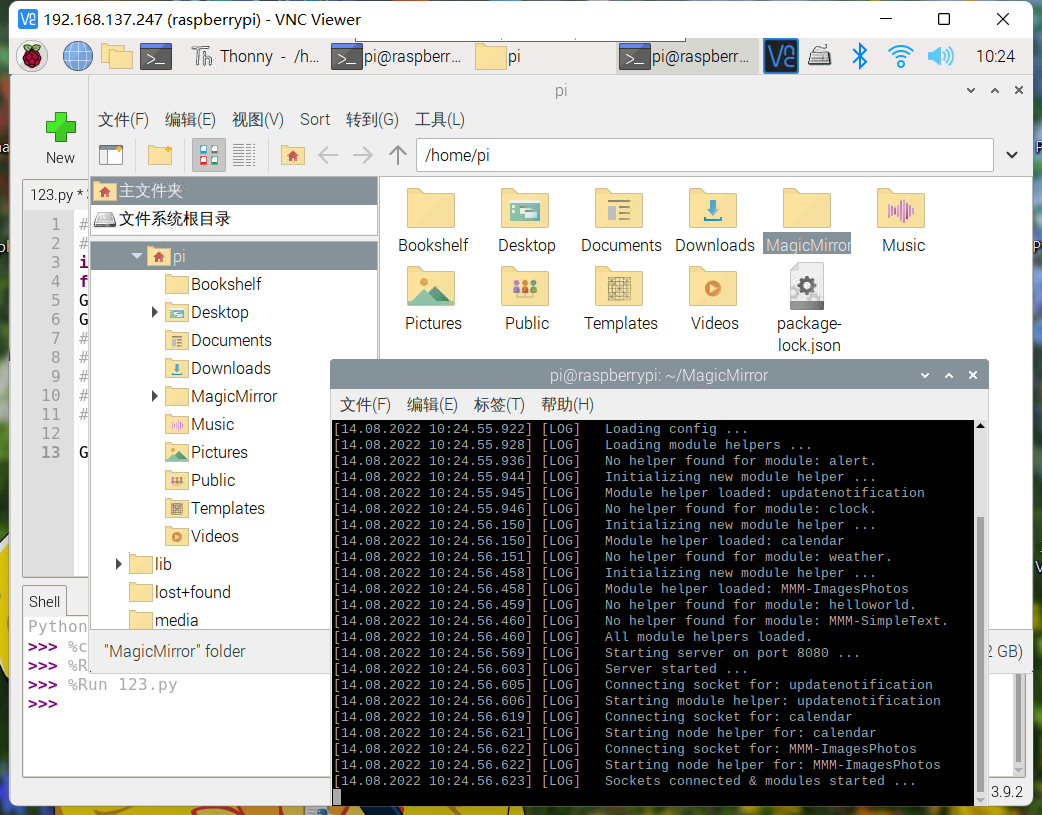
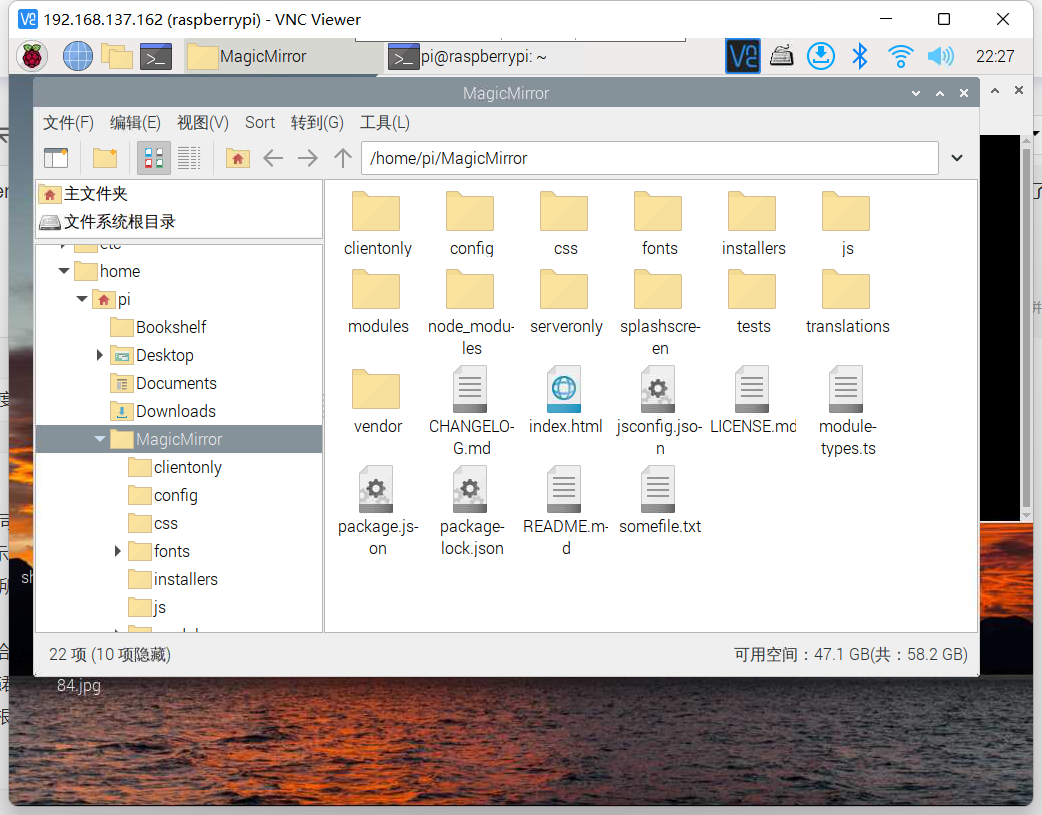
                                    @史新瑞 also u didnt show me contents of MagicMirror folder… you showed user root
                                    /home/pi

                                    Sam

                                    How to add modules

                                    learning how to use browser developers window for css changes

                                    史 2 Replies Last reply Reply Quote 0
                                    • 史 Offline
                                      史新瑞 @sdetweil
                                      last edited by

                                      @sdetweil 1.png

                                      1 Reply Last reply Reply Quote 0
                                      • 史 Offline
                                        史新瑞 @sdetweil
                                        last edited by

                                        @sdetweil Thank you, sir. Is my problem easy to solve? In addition, it’s nearly 23 o’clock here, so I will turn off my computer and use my mobile phone to receive your messages. However, in this way, I will not be able to correct it as quickly as possible according to your method

                                        S 1 Reply Last reply Reply Quote 0
                                        • S Offline
                                          sdetweil @史新瑞
                                          last edited by

                                          @史新瑞 i just installed the module…

                                          can u show me the config.js for this?

                                          the filePath parm is assuming the file is located in the same module folder…

                                          Sam

                                          How to add modules

                                          learning how to use browser developers window for css changes

                                          史 1 Reply Last reply Reply Quote 0
                                          • 史 Offline
                                            史新瑞 @sdetweil
                                            last edited by

                                            @sdetweil Sorry, I can’t show it to you now, because my mother doesn’t allow me to use the computer at this time in the evening. It is already 12 o 'clock here, so I can only send it to you tomorrow morning, that is, August 15, around 9 o 'clock in Dong8 district. I am very sorry, and thank you very much for your guidance
                                            S 1 Reply Last reply Reply Quote 0

                                            Hello! It looks like you're interested in this conversation, but you don't have an account yet.

                                            Getting fed up of having to scroll through the same posts each visit? When you register for an account, you'll always come back to exactly where you were before, and choose to be notified of new replies (either via email, or push notification). You'll also be able to save bookmarks and upvote posts to show your appreciation to other community members.

                                            With your input, this post could be even better 💗

                                            Register Login

                                            • 1
                                            • 2
                                            • 1 / 2
                                            • First post
                                              Last post
                                            Enjoying MagicMirror? Please consider a donation!
                                            MagicMirror created by Michael Teeuw.
                                            Forum managed by Sam, technical setup by Karsten.
                                            This forum is using NodeBB as its core | Contributors
                                            Contact | Privacy Policy