Read the statement by Michael Teeuw here.
MMM-SystemMonitor
-
Hello,
I wanted something to display my current system stats to monitor my magic mirror hardware.
There is a module called MMM-SystemStats, but it seemed buggy and was seemingly not maintained anymore. So I decided to make my own.
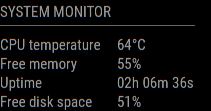
https://github.com/btastic/MMM-SystemMonitor
Feel free to discuss, ask questions or add suggestions for further development.
Best regards
Ben -
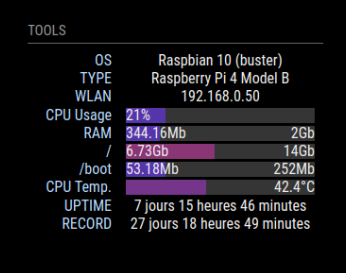
@btastic Nice. If I hadn’t already done some stupid pi tricks to get that info into a notification so I can display it with MMM-Valuesbynotification…
-
-
@lxne Ah bummer I didn’t know about it. Thats mostly what I had envisioned.
-
MMM-Tools is archived. (with some complex history)
I rarely support that module. It became too far during on my absence from what it was, and I made at the first time. Anyway, I have left it as it currently is.
If you want to be a successor, always welcome. -
@btastic to double down on what @MMRIZE said - taking over someone else’s archived module is an exceptional way to learn how to do things. I Would highly encourage it, as the author has directly said he’s okay with it. I did that with a module myself. Taught me so much about javascript working out bugs in an existing module and adding my own flair (and I really should get back on it for one bit…)
-
@BKeyport I will probably take a thing or two, but I think the code can be written a bit better by todays standards. The project is almost 6 years old and was probably refactored a few times. No offense towards @MMRIZE - thats probably one reason he does not want to develop it further without rewriting it.
-
@btastic You are right. Cheer up for your work!
I wish a new module which can be more flexible and modular with modern techniques, and especially, not dedicated to RPI(recently I never work with it), but I have not enough time and interest to do so… -
@MMRIZE Thank you.
I want to make it OS independant too, but that will be a bit harder I think. I don’t have that much time either. But will work on it in the foreseeable future.
-
Installed, added to config.js
		{
            module: 'MMM-SystemMonitor',
            position: 'bottom_right',
            config: {
                updateInterval: 60000,
                cpuThermalZone: 0,
                units: config.units,
            }
        },
MM fails to load.
Comment those lines out, MM is OK. What have I missed? -
@Richard238 what is the end of the last prior module
-
It’s the currently misbehaving weather forecast:
{ module: 'weather', position: 'top_right', header: 'Weather Forecast for: ', config: { type: 'forecast', location: 'nnnnnnnnn', locationID: '11111111', //ID from https://www.openweathermap.org apiKey: 'aaaa444444444444444444' } }, //{ //module: 'MMM-SystemMonitor', //position: 'bottom_right', //config: { //updateInterval: 60000, -
@Richard238 what is the error?
npm run config:check
-
@sdetweil said in MMM-SystemMonitor:
npm run config:check
pi@mmv2:~ $ npm run config:check npm error code ENOENT npm error syscall open npm error path /home/pi/package.json npm error errno -2 npm error enoent Could not read package.json: Error: ENOENT: no such file or directory, open '/home/pi/package.json' npm error enoent This is related to npm not being able to find a file. npm error enoent npm error A complete log of this run can be found in: /home/pi/.npm/_logs/2025-02-02T19_09_35_627Z-debug-0.log pi@mmv2:~ $ -
@Richard238 in the MagicMirror folder
-
[2025-02-02 21:35:32.330] [INFO]  Checking modules structure configuration ...
[2025-02-02 21:35:32.511] [ERROR] Cannot read properties of undefined (reading 'units')
Module says:
units: config.units,And also tried with
units: metric,Which failed with:
[ERROR] metric is not definedconfig.js towards the beginning says:
units: 'metric', -
@Richard238 to the right of :
Numbers and true/false do not need quotes
Any thing that has a letter needs quotes -
I don’t understand, sorry?
-
@Richard238 in config.js all properties are
name : value
The value, to the right of the colon (:)
If a number or tr/false
Does not need quotesIf it contains a letter or symbol
It needs quotesunits : metric
To the right is metric
It has letters, so needs quotes -
That’s fixed it.
Module in config.js
units: 'config.units'config.js before modules
was
units: 'metric',Changed it to
units: "metric",Quite how Free Memory can be 128% I’ve no idea, that’s for another day.
For now, it’s working. Thank you!

Hello! It looks like you're interested in this conversation, but you don't have an account yet.
Getting fed up of having to scroll through the same posts each visit? When you register for an account, you'll always come back to exactly where you were before, and choose to be notified of new replies (either via email, or push notification). You'll also be able to save bookmarks and upvote posts to show your appreciation to other community members.
With your input, this post could be even better 💗
Register Login