Read the statement by Michael Teeuw here.
Scale website in MMM-EmbedURL
-
Hello,
I use docker version of MM and want to show a URL with the energy consumption figures of my house.
The URL is shown, but only a small part of it. I added settings in css to change the size of the window, but I want the complete screen(site) to be shown in the window. Is that possible?The settings for the module in config.js are:
{
                        module: "MMM-EmbedURL",
                        position: "bottom_left",
                        header: "P1 Monitor",
                        config: {
                                updateInterval: 120,
                                embedElementType: "webview",
                                basicElementType: "div",
                                embed: [
                                {
                                        attributes: [
                                                "frameborder=0",
                                                "scrolling=no"
                                        ],
                                        embed:  [
                                                "http://p1monitor/main-1.php"
                                        ]
                                },
                                ]
                        },
                },
And I made this adjust at the top of the config.js:
let config = {
        electronOptions: {
                webPreferences: {
                webviewTag: true,
                },e
        },
In custom.css I have added these settings:
.MMM-EmbedURL .embed .embeded {
    width: 600px;
}
This is showing on the mirror:
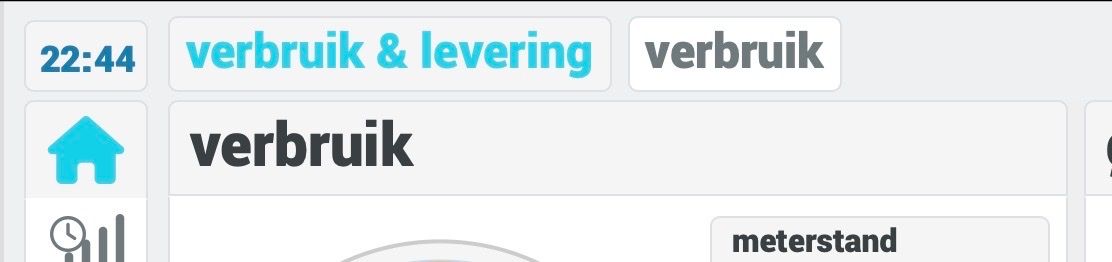
So how can I show the entire site in the window of 600px?
Thanks in advance.
Regards,
Gerben -
@gerbenvs Hi, I think it might be possible if you add a width and height to the attributes of the webview:
{
                        module: "MMM-EmbedURL",
                        position: "bottom_left",
                        header: "P1 Monitor",
                        config: {
                                updateInterval: 120,
                                embedElementType: "webview",
                                basicElementType: "div",
                                embed: [
                                {
                                        attributes: [
                                                "frameborder=0",
                                                "scrolling=no",
                                                "width=600px",
                                                "height=400px",
                                        ],
                                        embed:  [
                                                "http://p1monitor/main-1.php"
                                        ]
                                },
                                ]
                        },
                },
I do not have a chance to test it at the moment but you may want to give it a try.
-
@wishmaster270 said in Scale website in MMM-EmbedURL:
“height=400px”,
Hi wishmaster270,
Thanks for your reply.
I did try those options, but they don’t seem to have any impact on the size that is shown.
Also the scrolling option is not working, because I still see scrolling bars at right side and bottom.Adjusting the css will change the size that is shown, but the site is not scaled and only a very small piece is shown.
-
@gerbenvs Interesting…
Maybe the page you want to display does not support properly.
Does it scale down automatically if you display the page in a normal browser, resize the browser window and refresh the page? -
@wishmaster270
The page doesn’t scale automatically, so maybe that’s the issue.Now I have used a different module: MMM-WebView, set the width and height in config.js and used the “transform: scale(0.6)” in custom.css to adjust the size. Now the complete website is shown with a proper size.
Thanks for your help!
Regards,
Gerben

Hello! It looks like you're interested in this conversation, but you don't have an account yet.
Getting fed up of having to scroll through the same posts each visit? When you register for an account, you'll always come back to exactly where you were before, and choose to be notified of new replies (either via email, or push notification). You'll also be able to save bookmarks and upvote posts to show your appreciation to other community members.
With your input, this post could be even better 💗
Register Login