Read the statement by Michael Teeuw here.
Current Weather Not Dimmed
-
Hey, I’ve been playing with the CSS (total newbie) and have tweaked a bunch of things. But I ran into an issue with the current weather. Aside from the current temperature and weather icon, everything is dimmed text. I’d like it all to be bright white but I can’t figure out how to do that. Can anyone help?
Thanks!
-
You want this?
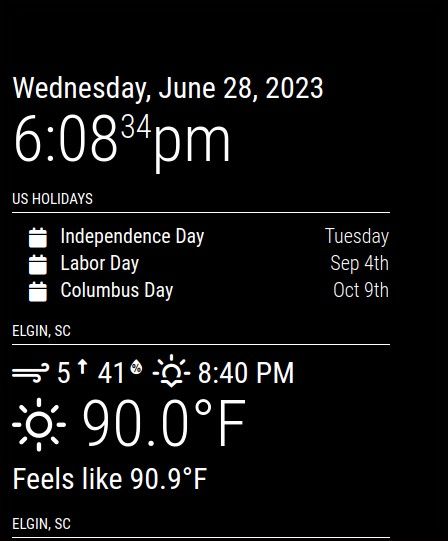
Change
--color-text-dimmed: #fff;
I wanted everything to be white across the board so did that by copying the whole root font configuration into custom.css and made change in custom.css NOT in main.css -
Yes, that’s what I am aiming for and your tip was perfect! It’s looking great now!
-
@Elkanah Glad I could help.
You can stack modules one after the other because in some respects something like top_left has no bottom. You can have modules below the bottom of the physical monitor.
If you want modules in a particular order, arrange them that way in config.jsIf you are looking for a particular color or say colors that compliment each other you can do a search on “hex color codes” and you will get the hex nomenclature for every color imaginable. Some colors you can just say “black” or “white” and that will work but I’ve personally stuck with using the hex codes for the most part.

Hello! It looks like you're interested in this conversation, but you don't have an account yet.
Getting fed up of having to scroll through the same posts each visit? When you register for an account, you'll always come back to exactly where you were before, and choose to be notified of new replies (either via email, or push notification). You'll also be able to save bookmarks and upvote posts to show your appreciation to other community members.
With your input, this post could be even better 💗
Register Login