MagicMirror Forum
    • Recent
    • Tags
    • Unsolved
    • Solved
    • MagicMirror² Repository
    • Documentation
    • 3rd-Party-Modules
    • Donate
    • Discord
    • Register
    • Login
    A New Chapter for MagicMirror: The Community Takes the Lead
    Read the statement by Michael Teeuw here.

    Magic Dashboard & Whiteboard

    Scheduled Pinned Locked Moved Show your Mirror
    10 Posts 7 Posters 5.3k Views 7 Watching
    Loading More Posts
    • Oldest to Newest
    • Newest to Oldest
    • Most Votes
    Reply
    • Reply as topic
    Log in to reply
    This topic has been deleted. Only users with topic management privileges can see it.
    • S Offline
      sum2023
      last edited by

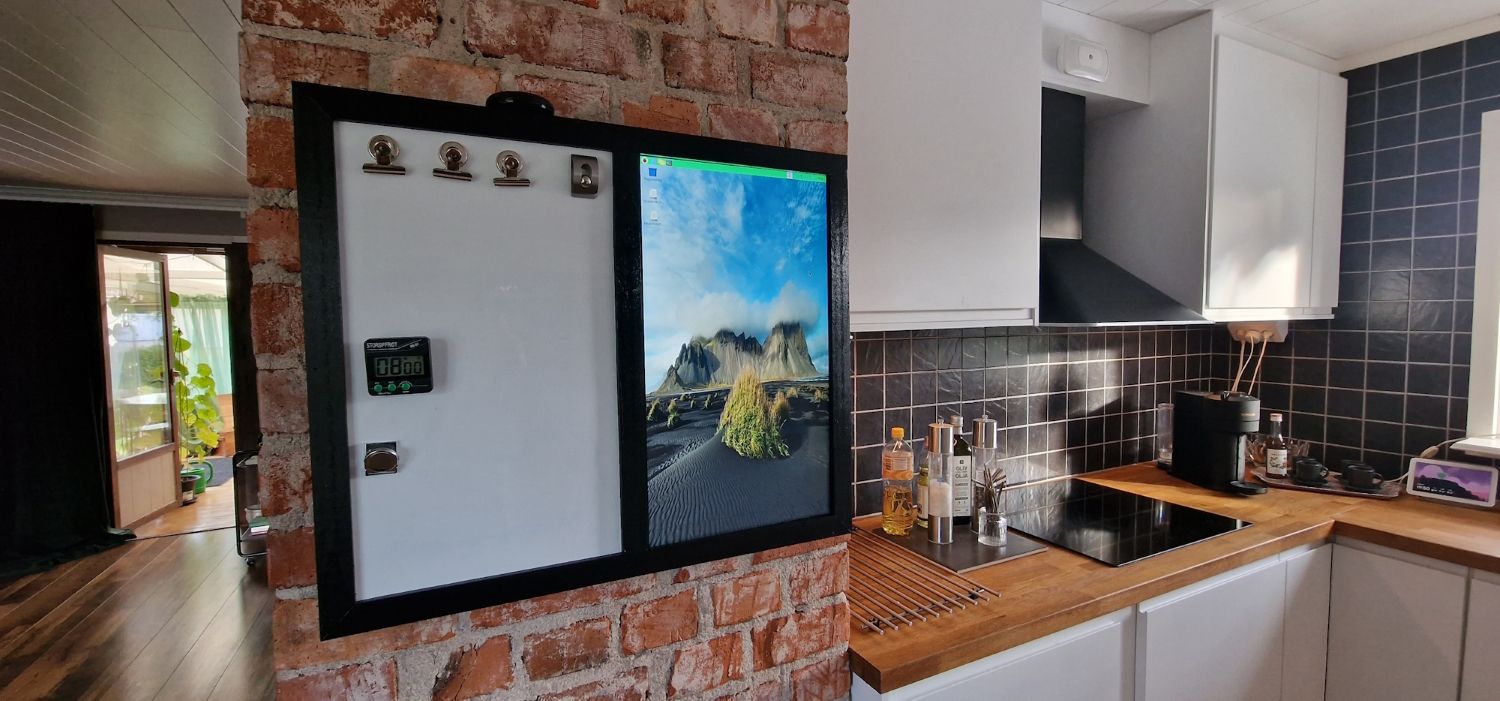
      The solution is a vertical 23 inch display (23" LG IPS231P FullHD) and a whiteboard of the same size.
      They are built together in a wooden frame.
      front1.jpg
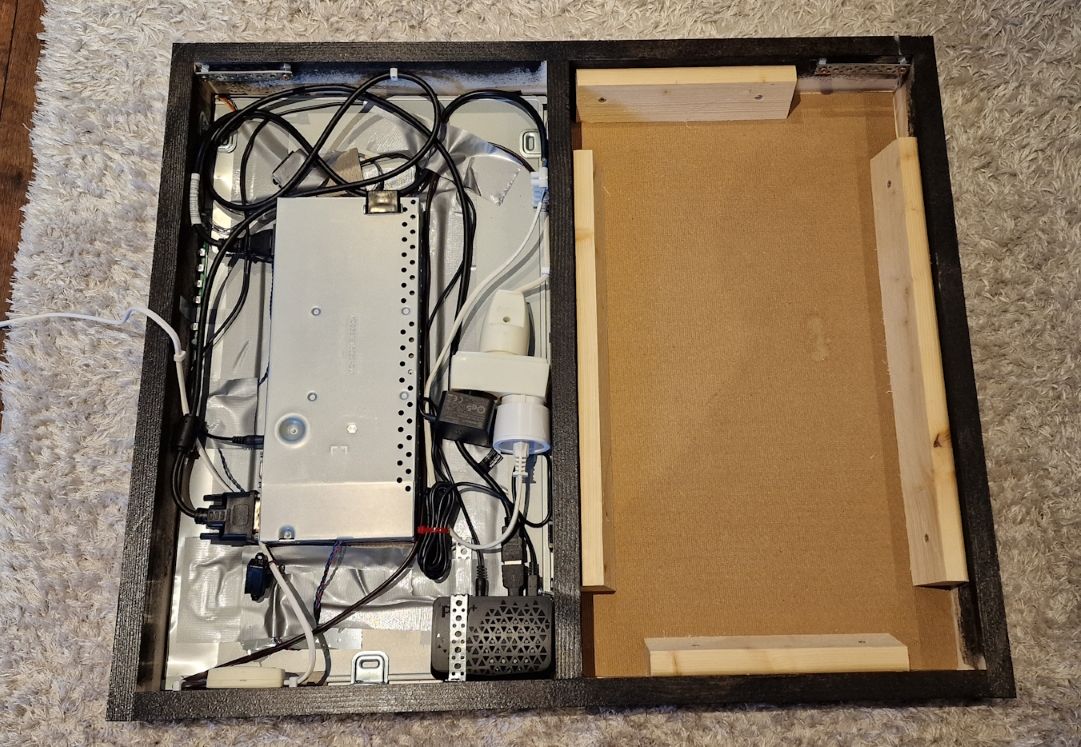
      A Raspberry pi4 runs MagicMirror, it is in the frame behind the display, it is controlled remotely by VNC Viewer.
      backside.jpg

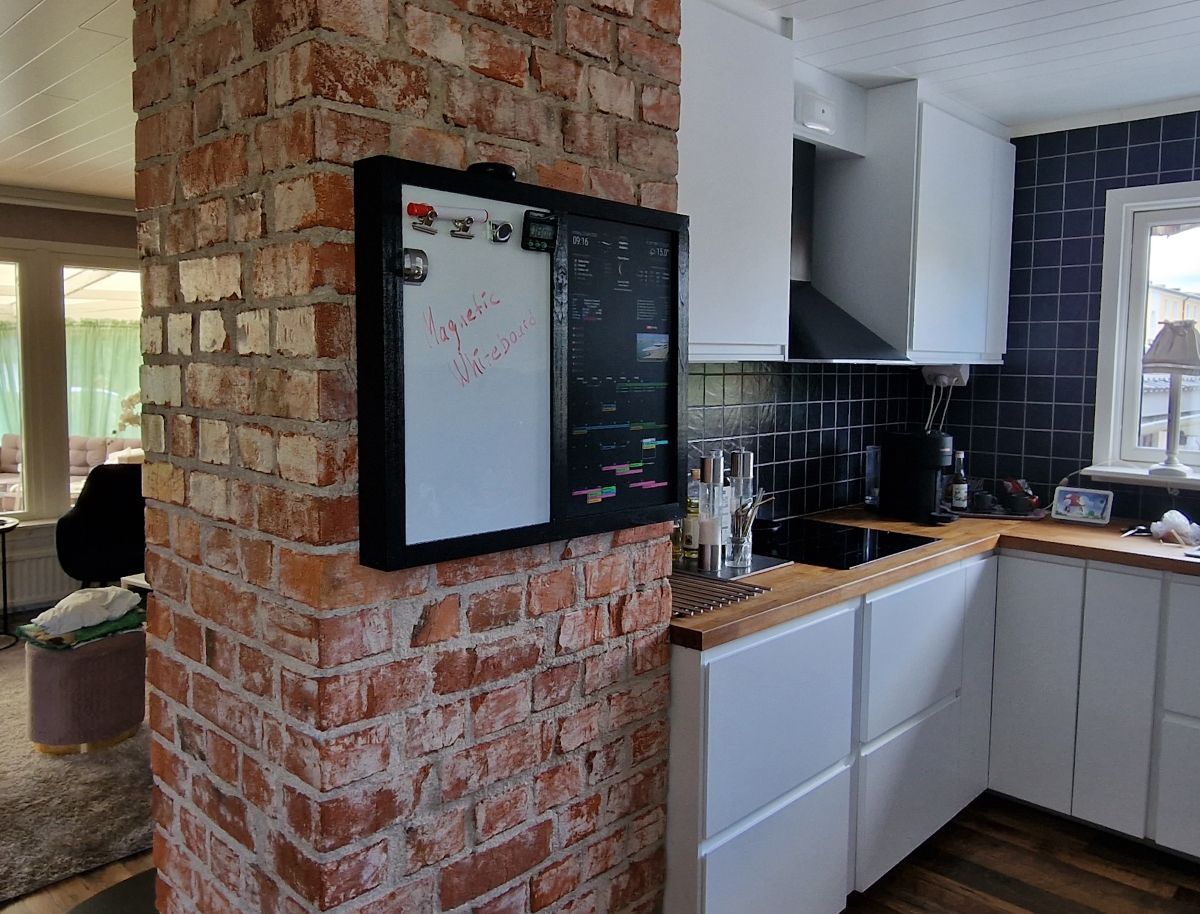
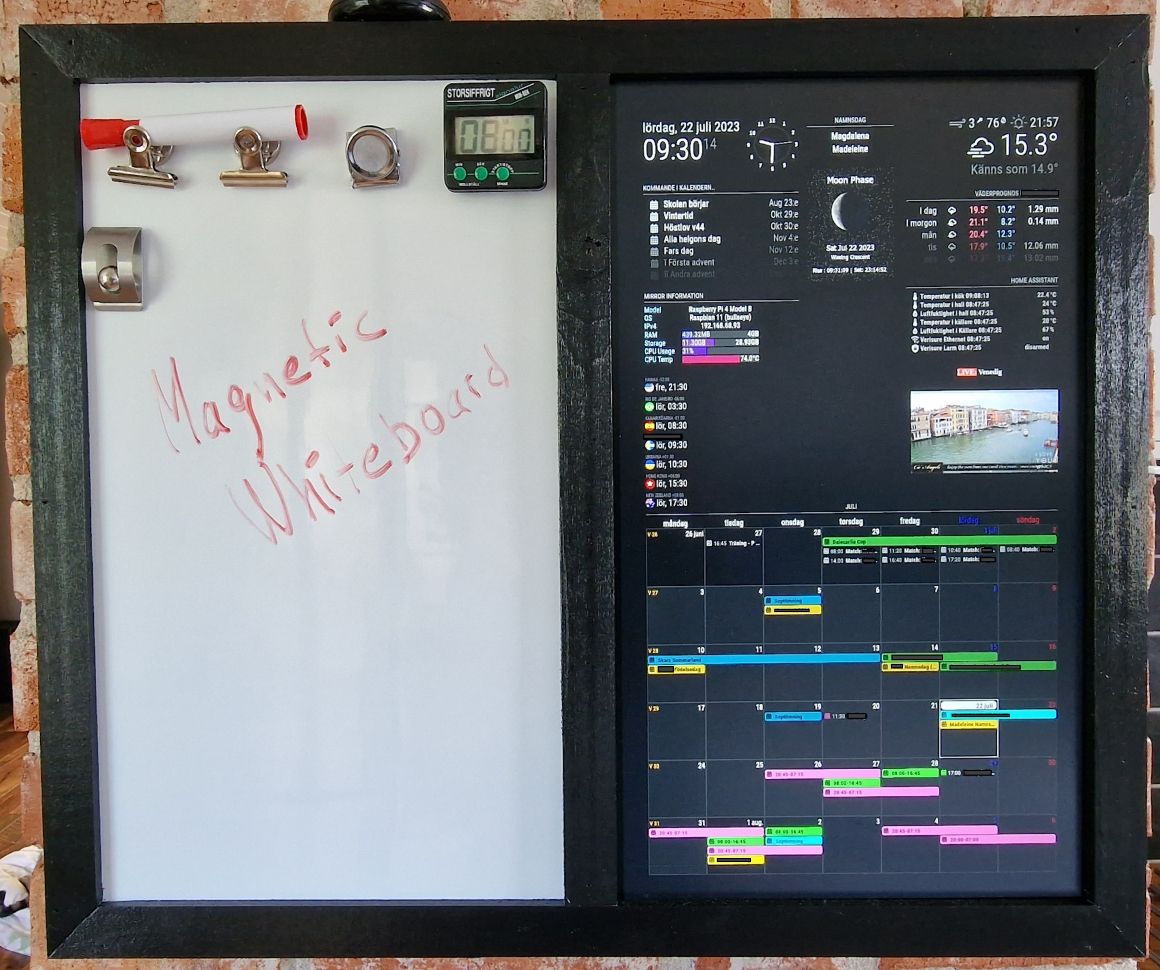
      I use the following modules

      Clock
      Calendar
      Weather
      MMM-AutoDimmer
      MMM-Namnsdag
      MMM-Moon
      MMM-Pinfo
      MMM-homeassistant-sensors
      MMM-Worldclock
      MMM-HTMLSnippet
      MMM-EmbedYoutube
      MMM-CalendarExt3
      with 7 different google calendars
      - Family calendar
      - Mom’s calendar
      - Dad’s calendar
      - the daughter’s calendar
      - the son’s calendar
      - the son’s soccer team
      - birthdays

      Then also some that are currently disabled:
      MMM-HumanClock
      MMM-PlaceInfo
      MMM-EmbedURL
      MMM-Skolmaten
      MMM-EyeCandy
      MMM-EARTH
      MMM-Wallpaper
      front2.jpg
      front3.jpg

      Thanks to all who developed the great modules and keep them alive! :clapping_hands: :grinning_face_with_smiling_eyes: :thumbs_up_medium-light_skin_tone:

      bheplerB T 2 Replies Last reply Reply Quote 6
      • zdenekZ Offline
        zdenek
        last edited by

        @sum2023 said in Magic Dashboard & Whiteboard:

        MMM-CalendarExt3

        amazing - u did something with CSS? Or how did u get agenda view (MMM-CalendarExt3) over all width of screen?
        thanks

        BKeyportB 1 Reply Last reply Reply Quote 0
        • BKeyportB Offline
          BKeyport Module Developer @zdenek
          last edited by

          @zdenek That’s either bottom_bar or CSS to stretch it.

          The "E" in "Javascript" stands for "Easy"

          zdenekZ 1 Reply Last reply Reply Quote 0
          • zdenekZ Offline
            zdenek @BKeyport
            last edited by

            @BKeyport ok, thanks

            1 Reply Last reply Reply Quote 0
            • bheplerB Offline
              bhepler Module Developer @sum2023
              last edited by

              @sum2023 - Excellent idea. And great execution.

              1 Reply Last reply Reply Quote 0
              • T Offline
                themoe
                last edited by

                Very nice solution!

                I was thinking about a very similar setup. But I would like to have very thin or no borders between the screen and the whiteboard.

                And is there a white background scene for magic mirror with dark font colours?

                Best case would be the white of the screen is the same white of the whiteboard.

                bheplerB 1 Reply Last reply Reply Quote 0
                • bheplerB Offline
                  bhepler Module Developer @themoe
                  last edited by

                  @themoe - I’m pretty sure one of the forum members has a custom CSS file that does a white background. If you check out that portion of the forum you can probably find it.

                  karsten13K BKeyportB 2 Replies Last reply Reply Quote 0
                  • karsten13K Offline
                    karsten13 @bhepler
                    last edited by

                    https://forum.magicmirror.builders/topic/12815/bright-ui?page=1

                    https://forum.magicmirror.builders/topic/13108/css-experiments-for-newbies

                    1 Reply Last reply Reply Quote 1
                    • BKeyportB Offline
                      BKeyport Module Developer @bhepler
                      last edited by BKeyport

                      @themoe Most of what you need is the root section of main.css, which you can modify by adding it to custom.css

                      Here’s the defaults, adjust as you desire. However, I will warn you, you may also have to do it on a module by module basis - many modules don’t use these defaults for even their base text.

                      :root {
                        --color-text: #999;
                        --color-text-dimmed: #666;
                        --color-text-bright: #fff;
                        --color-background: #000;
                        --font-primary: "Roboto Condensed";
                        --font-secondary: "Roboto";
                        --font-size: 20px;
                        --font-size-xsmall: 0.75rem;
                        --font-size-small: 1rem;
                        --font-size-medium: 1.5rem;
                        --font-size-large: 3.25rem;
                        --font-size-xlarge: 3.75rem;
                        --gap-body-top: 60px;
                        --gap-body-right: 60px;
                        --gap-body-bottom: 60px;
                        --gap-body-left: 60px;
                        --gap-modules: 30px;
                      }
                      

                      The "E" in "Javascript" stands for "Easy"

                      1 Reply Last reply Reply Quote 0
                      • T Offline
                        ToneStrife @sum2023
                        last edited by

                        @sum2023 Do you mind sharing your CSS code or config? I’m looking to do somethign similar but a newbie here


                        1 Reply Last reply Reply Quote 0

                        Hello! It looks like you're interested in this conversation, but you don't have an account yet.

                        Getting fed up of having to scroll through the same posts each visit? When you register for an account, you'll always come back to exactly where you were before, and choose to be notified of new replies (either via email, or push notification). You'll also be able to save bookmarks and upvote posts to show your appreciation to other community members.

                        With your input, this post could be even better 💗

                        Register Login

                        • 1 / 1
                        • First post
                          Last post
                        Enjoying MagicMirror? Please consider a donation!
                        MagicMirror created by Michael Teeuw.
                        Forum managed by Sam, technical setup by Karsten.
                        This forum is using NodeBB as its core | Contributors
                        Contact | Privacy Policy
