MagicMirror Forum
    • Recent
    • Tags
    • Unsolved
    • Solved
    • MagicMirror² Repository
    • Documentation
    • 3rd-Party-Modules
    • Donate
    • Discord
    • Register
    • Login
    A New Chapter for MagicMirror: The Community Takes the Lead
    Read the statement by Michael Teeuw here.

    Module calendar - whole day event

    Scheduled Pinned Locked Moved Utilities
    19 Posts 5 Posters 4.8k Views 5 Watching
    Loading More Posts
    • Oldest to Newest
    • Newest to Oldest
    • Most Votes
    Reply
    • Reply as topic
    Log in to reply
    This topic has been deleted. Only users with topic management privileges can see it.
    • S Do not disturb
      sdetweil @wilco.kuijt
      last edited by

      @wilco-kuijt yes if u change the default shipped code it will block updates. you would have to apply your changes again .

      whole day events do have a time, as it’s ALL DAY. every hour…

      Sam

      How to add modules

      learning how to use browser developers window for css changes

      1 Reply Last reply Reply Quote 0
      • M Offline
        MMRIZE @wilco.kuijt
        last edited by MMRIZE

        @wilco-kuijt
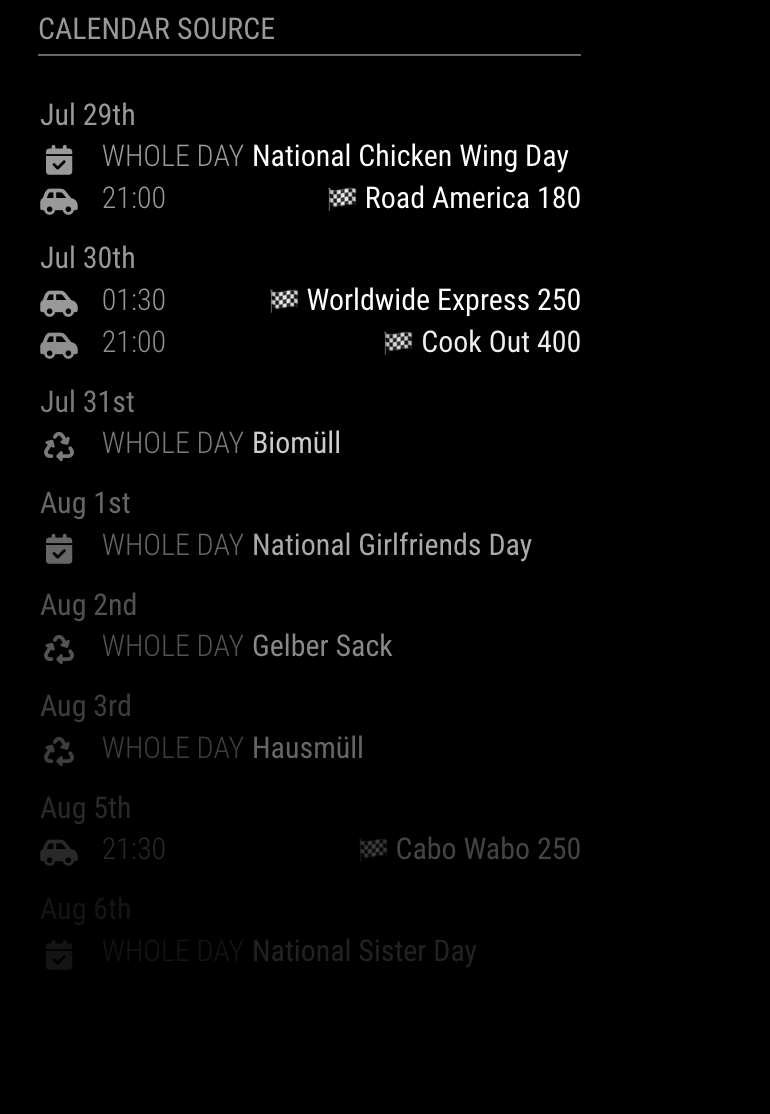
        What you want is this?

        929b2268-5776-437c-9756-3da69e19078d-image.png

        After I read your post, I built a small killing-time project this Saturday morning.
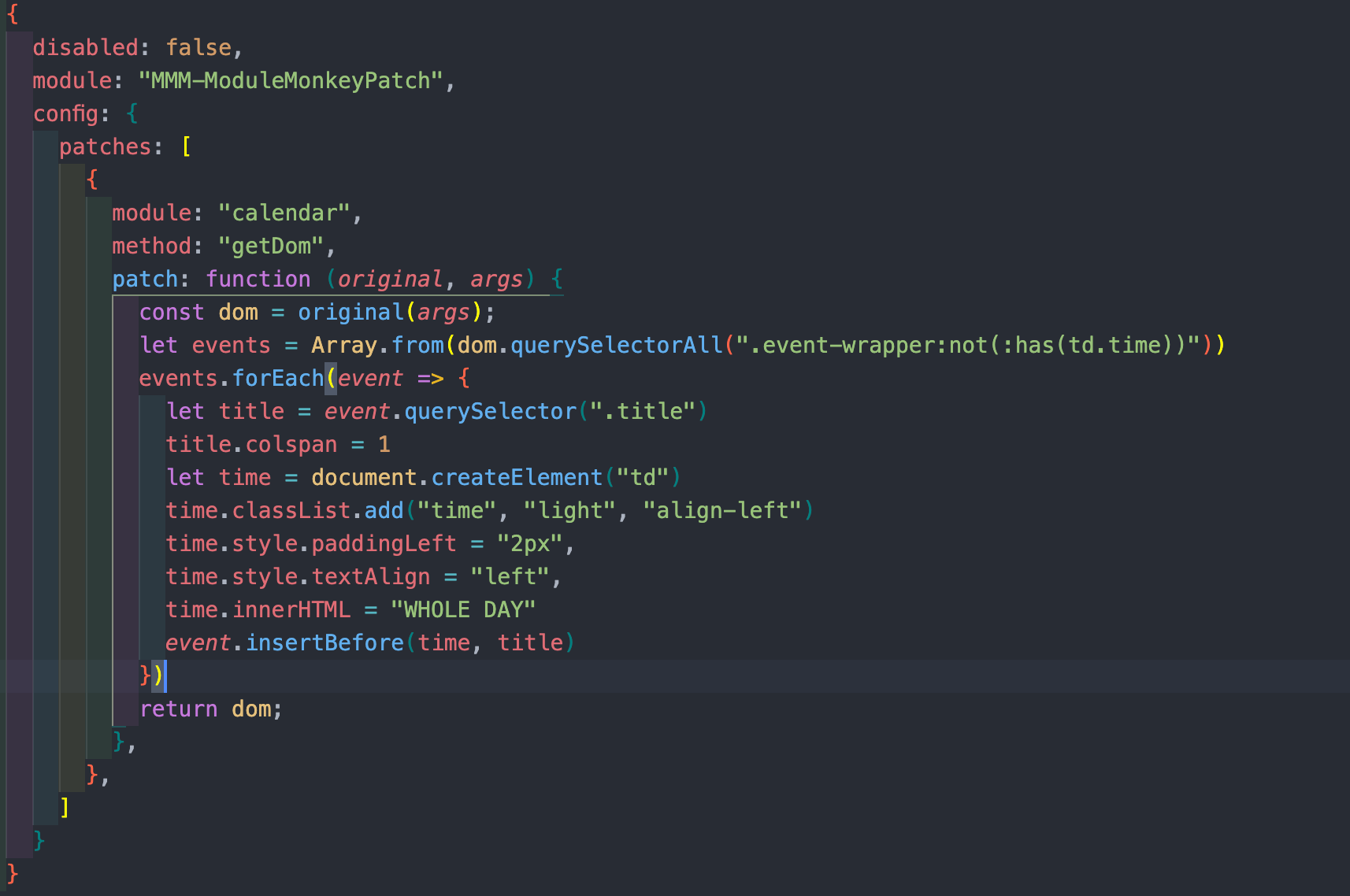
        https://github.com/MMRIZE/MMM-ModuleMonkeyPatch

        With this on-flight patch, it works. (exception Rules be needed for different timeFormat, anyway, this is just a monkeypatching)
        3358281d-8b07-48fd-afe9-83c10099a63d-image.png

        This is monkey-patcher, so you don’t have to worry updating/upgrading original module.

        W htilburgsH 2 Replies Last reply Reply Quote 0
        • W Offline
          wilco.kuijt @MMRIZE
          last edited by

          @MMRIZE Yes, this is the way I would like to see it!
          Unfortunately (😉) on holiday right now, so I am not able to implement it.

          Best regards and thanks for helping me out!
          Wilco

          1 Reply Last reply Reply Quote 0
          • htilburgsH Offline
            htilburgs @MMRIZE
            last edited by

            @MMRIZE how do you get different icons in front of the calendar items?
            Is this a default feature? Btw which calendar module are u using?

            (still trying to learn JS, but not afraid to ask and AI is my best friend) ☺

            M 1 Reply Last reply Reply Quote 0
            • M Offline
              MMRIZE @htilburgs
              last edited by MMRIZE

              @htilburgs
              Basically, default calendar module can hold icons (symbol) and even multiple, and all CX3* support multi-icons also.
              But in this case, that is just an emoji included in the event title. :D (If what you mented is the flag symbol)

              htilburgsH 1 Reply Last reply Reply Quote 0
              • B Offline
                Babene1 Project Sponsor
                last edited by

                @MMRIZE I like your calendar view, how does it work with the date and under it the individual calendar entries?

                M 1 Reply Last reply Reply Quote 0
                • htilburgsH Offline
                  htilburgs @MMRIZE
                  last edited by htilburgs

                  @MMRIZE what I ment are the truck, recycling and other symbols in front of each row.
                  Never seen this before.

                  (still trying to learn JS, but not afraid to ask and AI is my best friend) ☺

                  M 1 Reply Last reply Reply Quote 0
                  • M Offline
                    MMRIZE @htilburgs
                    last edited by MMRIZE

                    @htilburgs
                    Add “symbol” to each calendar in your calendar config.
                    https://docs.magicmirror.builders/modules/calendar.html#configuration-options
                    The icon symbol derives from “font-awesome”.

                    htilburgsH 1 Reply Last reply Reply Quote 0
                    • M Offline
                      MMRIZE @Babene1
                      last edited by

                      @Babene1
                      Use timeFormat: “dateheaders”, in your calendar config.

                      https://docs.magicmirror.builders/modules/calendar.html#configuration-options

                      B 1 Reply Last reply Reply Quote 0
                      • htilburgsH Offline
                        htilburgs @MMRIZE
                        last edited by

                        @MMRIZE Thanks, I’m currently using MMM-MyCalendar but I’m going to give it a try this evening.

                        (still trying to learn JS, but not afraid to ask and AI is my best friend) ☺

                        htilburgsH 1 Reply Last reply Reply Quote 0
                        • 1
                        • 2
                        • 1 / 2
                        • First post
                          Last post
                        Enjoying MagicMirror? Please consider a donation!
                        MagicMirror created by Michael Teeuw.
                        Forum managed by Sam, technical setup by Karsten.
                        This forum is using NodeBB as its core | Contributors
                        Contact | Privacy Policy