Read the statement by Michael Teeuw here.
Newbie - Need to ask about the best pi to use for MagicMirror
-
Evening guys! Hope you are doing well
I have recently bought a Raspberry Pi 3 A+ with the intention of installing MM. However, I am coming up against various issues. The main one being that it feels like my Pi simply can’t handle it. I have been at it for days now and I have even gone as far as removing all the modules besides the time, weather and news and it still seems to be struggling.Have I bought the wrong Pi? Is there anything I can do to speed it up? Any help would be greatly appreciated :)
Thanks for reading!
John -
@johnnyfaddo maybe increasing the swap space will help.
if you can my install script it might have done that already. I’ve never seen a 3a.
see https://github.com/sdetweil/MagicMirror_scripts
do and show the results
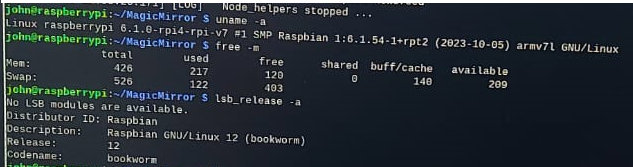
uname -a free -m lsb_release -a -
Hey @sdetweil
It seems to be working a bit better since installing something called ZRAM?
I don’t know how to remote into the pi and all that haha. I have attached a picture of the results, let me know what you think
John
-
@johnnyfaddo remote in, in the pi preferences from the desktop turn on ssh
this will let you connect from your PC
ssh usernane@pi_name
typically
ssh pi@raspberrypi
the the userid & password you setup when installing. (I used pi for the userid here)
so your output says 426 meg of ram , using 122 meg of swap
a 3b has 1 gig of ram.
for easier access on your pc install the free bitvise or winscp client
they will give you easier ssh window AND a file manager type view of the pi file system so you can edit, rename, erase, create files from your PC
I never edit ON the pi anymore
-
@sdetweil Ill give that a go! Thank you!
So, is there anything I can do to speed it up.
Sometimes it runs okay, but something as simple as opening a webpage or a config file seems to make it go really slow or sometimes it just crashes completely.
-
@johnnyfaddo a lot of the slowness is reading and writing the SD card, due to the small memory size.
on one of my systems I added a USB SSD stick and run from there. I did that before boot from USB was supported. haven’t retried since then.
I do not know if boot from USB is supported on the 3a.
-
@sdetweil Yeah can’t say I am too sure myself.
Thanks for your help
Hello! It looks like you're interested in this conversation, but you don't have an account yet.
Getting fed up of having to scroll through the same posts each visit? When you register for an account, you'll always come back to exactly where you were before, and choose to be notified of new replies (either via email, or push notification). You'll also be able to save bookmarks and upvote posts to show your appreciation to other community members.
With your input, this post could be even better 💗
Register Login