Read the statement by Michael Teeuw here.
MMM-Moon shows only "No Image!"
-
I installed the MMM-Moon module and put in the default config from the git page and all I see is “No Image!”. Has anyone else gotten this to work?
Here’s my config:
{ module: "MMM-Moon", position: "top_left", config: { // Coordinates for my place: lat: 37.nnnnn, lon: -122.nnnnn, timezone: "America/Los_Angeles" } }, -
@sdetweil Thanks to a comment on another thread, I’ve found the answer – I needed to restart the RPi. Once I did that, both the MoonPhase and MMM-Earth modules started working.
-
I tried using MMM-MoonPhase and didn’t have any luck there either. Here is my config for that:
                {
                        module: "MMM-MoonPhase",
                        position: "top_left",
                        config: {
                                updateInterval: 43200000,
                                hemisphere: "N",
                                resolution: "detailed",
                                basicColor: "white",
                                title: true,
                                phase: true,
                                size: 200,
                                moonAlign: "center",
                                textAlign: "center",
                                alpha: 0.7,
                                riseAndSet: {
                                    display: false,
                                    lat: 37.xxxxx,
                                    lon: -122.xxxxx,
                                    gmtOffset: -8.0
                                }
                        }
                },
Here’s what I’m seeing:
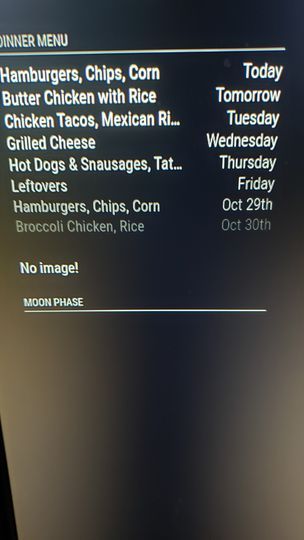
I’m starting to think that maybe it’s something more basic with my setup as MMM-SystemStats doesn’t work either (just shows “Loading…” for each item).
The moon phase isn’t, of course, critical, but it would be nice to get working.
-
@UncleRoger maybe the api changed (again)
-
@sdetweil Thanks to a comment on another thread, I’ve found the answer – I needed to restart the RPi. Once I did that, both the MoonPhase and MMM-Earth modules started working.
-
@UncleRoger cool. never had a module where I needed to reboot to make it work
-
@sdetweil I got the same issue (No image message), a restart didn’t resolve it.
-
@Fillan90 show the module config please, use code block markers
paste text
select text
hit the </> button -
@sdetweil
config.js:module: "MMM-Moon", position: "top_left", config: { width: "400px", // as per requirement height: "400px", // as per requirement lat: 59.325, lon: 18.050, timezone: "Europe/Stockholm"MMM-Moon.js:
start: function () {}, getDom: function () { const outerDiv = document.createElement("div"); if (this.content) { const img = document.createElement("img"); img.src = this.content; img.style.width = this.config.width || "100%"; // add this line to set the width of the image img.style.height = this.config.height || "auto"; // add this line to set the height of the image outerDiv.appendChild(img); } else { outerDiv.innerText = "No image!"; } return outerDiv; -
@Fillan90 which MMM-Moon
(git remote -v)
NEVER edit the source…
all config goes in config/config.js
all css goes in css/custom.cssthere is not enough code there to do the job
-
@sdetweil
[https://github.com/EnderFlop/MMM-Moon](link url) -
@Fillan90 yes, I installed it and used your config and got error 422 (not executed)
i’d say that the API changed, but the module hasn’t
I see there is a submitted pull request that supposedly fixes this
do this
cd ~/MagicMirror/modules/MMM-Moonif you changed any files, change them back
git statuswill tell you which were modified
git checkout xxxwhere xxx is a filename that changed
then
git fetch origin pull/5/head:pr_branch
git checkout  pr_branch
then restart mm
-
@sdetweil
That fixed it, thank you so much.
/F

Hello! It looks like you're interested in this conversation, but you don't have an account yet.
Getting fed up of having to scroll through the same posts each visit? When you register for an account, you'll always come back to exactly where you were before, and choose to be notified of new replies (either via email, or push notification). You'll also be able to save bookmarks and upvote posts to show your appreciation to other community members.
With your input, this post could be even better 💗
Register Login