Read the statement by Michael Teeuw here.
Modifying the Config File
-
Sam, as a last resort (operating from 2 computers) I attemped to take a picture with my phone and copy that here. No luck. I hear you about working from my PC on the pi, but beyond my experience level. I could try and copy to another place or system?
-
@jimb posting your pic is the third icon from the right above the message editor
-
Sam, I get an error when trying to copy the file. Does it need to have a particular extension? -
@jimb copy what file?
-
Phone picture of the Config.js file. The picture has a jpg extension.
-
@jimb never any trouble, 3rd icon from the right
-
Sam, I don’t know why the picture is not copied, I suspect it is over-sized. Dev yield
The first 12 s the following error message:
Failed to load resource: the api.openweatherapp.0…c6acaacfb123ce212:1 server responded with a status of 401 (unauthorized)
(twice)
Could not locate data …TypeError: Cannot read openweathermap.is 43 properties of undefined (reading ‘humidity’)
…then as time increases and it tries to update the screen more specific error messages occurThye first 12 characters of my api id are truncated in the first error message text above
-
@jimb yes I have had to upload to my PC, then edit the.pic smaller sometimes. technology is so cool sometimes
-
@jimb once you download it search for your location. For example, city. It with show your locationID or long or lat. Etc
-
Guys,
It’s obvious that I am not specifying the correct item or leaving something out. It’s difficult because noe of the examples I’ve see "lay out’ the complete line of the config only some parts. I’ve played with different items changing them aroud and I get different reports from running in dev of either “401 no authorized” to “404 not found” on the string sent to weathermap. I am using the following-
apiVersion: “3.0”
location: “Houston”
locationID: “4699066”
apiKey: “xxx” a 32 digit hexadecimal received after registering.
I am not using the Lat or Lon at this time -
@jimb weather is a pain in the rear. the providers are mess, openweather is the worst
I believe if you have the new API version you must set the endpoint:“/onecall”
AND then you MUST USE lat/lon -
A lillte ray of sunshine… It 'apears" to be talking with operweather now since the MM display shows-
UNDEFINED
(wind symbol) 0 north INVALID DATE
NaN (degrees)
Feels like 32.0 degrees
WEATHER FORECAST UNDEFINED
I’m still getting 401 Unauthorized failed to load resource file. And getting other Cannot Read errors from openweather when using DEV option while running MM
-
@jimb can you post the complete module definition
xxx out the apikey field
-
Sam, here tis. I just noticed the string symbol ($) and the brackets ({}) in the apiKey. I found that in the instructions in MM. I didn’t try the config without them…
module: “weather”,
units: “imperial”,
windUnits: “imperial”,
tenpUnits: “imperial”,
position: 'top right",
config: {
apiVersion: “3.0”,
weatherProvider: “openweather”,
weatherEndpoint: “/onecall”,
lat: “33.50872”,
lon: “-96.612213”,
type: “current”,
location: “Houston”,
locationID: 4699066",
apiKey: “${xxxxxxxxxxxxxxxxxxxxxxxxxxxxxxxx}”,
}
},
{
module: “weather”,
units: “imperial”,
windUnits: “imperial”,
tenpUnits: “imperial”,
position: 'top right",
config: {
apiVersion: “3.0”,
weatherProvider: “openweather”,
weatherEndpoint: “/onecall”,
lat: “33.50872”,
lon:" -96.612213",
type: “current”,
location: “Houston”,
locationID: 4699066",
apiKey: “${xxxxxxxxxxxxxxxxxxxxxxxxxxxxxxxx}”, -
@jimb I don’t understand that comment about $[] as the sample looks like this
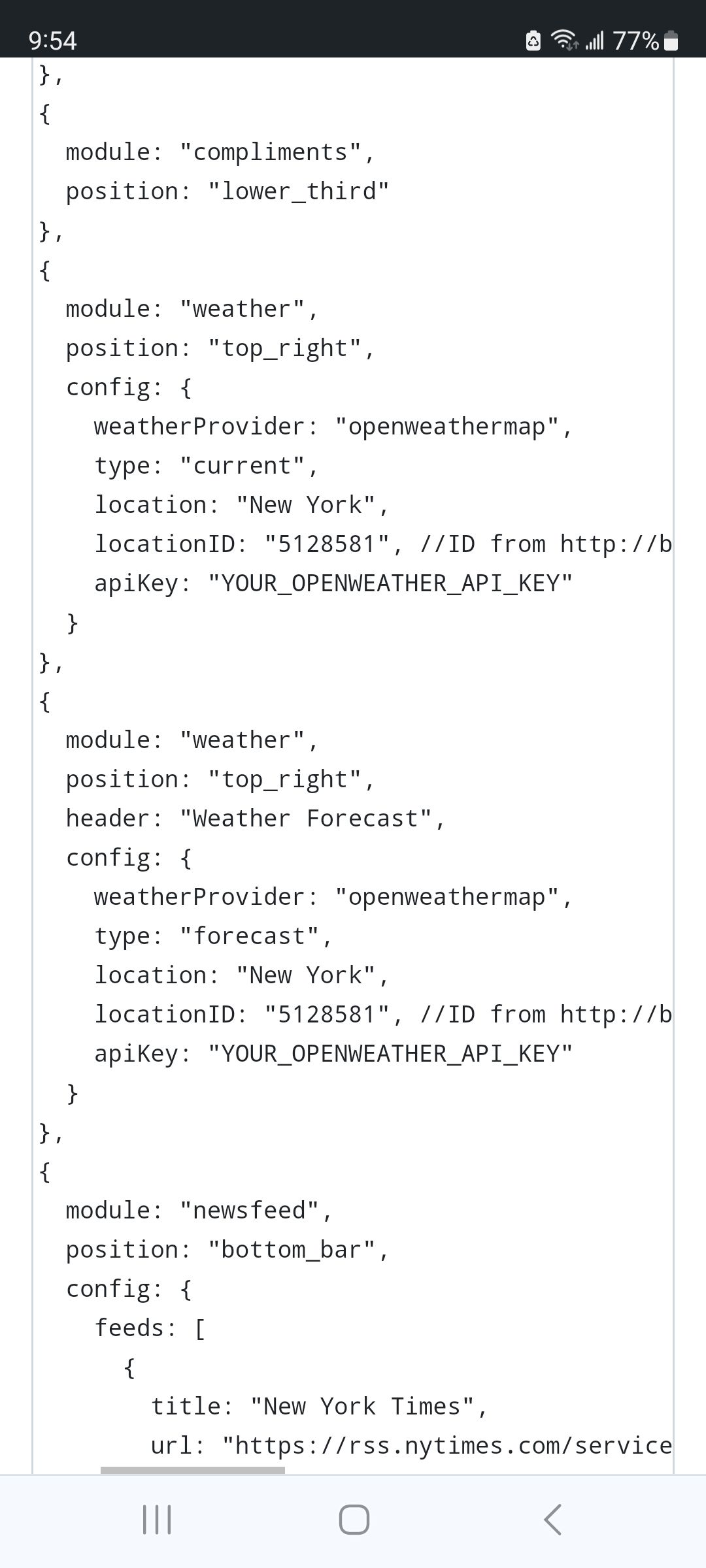
please take those characters off, it should just be the text provided by openweather, in quotes
-
Sam, this was from one source (above that you pasted). Mo config with the weather data is above that and includes the items I mentioned. BTW, I keyed it separately as I am unable to paste from the Rasberry Pi to my windows PC.
-
@jimb on the pi desktop, menu top left
preferences, pi preferences.
interfaces, check ssh on. ok,
change host name, just look at it, should be raspberrypithen save/exit, reboot
on your PC do
ssh pi@raspberrypiif the userid you created on the pi is pi.
use the password you set when you booted the first time
now you have a terminal on the pi from your PC, and you can copy/paste in both directions…
-
Sam, I remember the name I gave to the Pi, but unfortunately not the password. Is there a way to find it?
-
@jimb np, but you should be able to change it from the preferences without knowing it
-
Sam, I know the name assigned to the rasberry. I now know the password as I have changed it. SSH is not resolving the hostname. So, what is the proper way to populate the following-
ssh {what goes here}@{what goes here}
Example: ssh {{hostname} @ {password} ???
Hello! It looks like you're interested in this conversation, but you don't have an account yet.
Getting fed up of having to scroll through the same posts each visit? When you register for an account, you'll always come back to exactly where you were before, and choose to be notified of new replies (either via email, or push notification). You'll also be able to save bookmarks and upvote posts to show your appreciation to other community members.
With your input, this post could be even better 💗
Register Login