Read the statement by Michael Teeuw here.
-
@karsten13 Awesome! I updated the module and my config, and see the imperial units. Thanks!
-
@Manu85 said in ISS tracker:
it works however there are no longer the names of the cities
that was meant with “they combine several layers” but I don’t know how at the moment …
-
@karsten13 ok, thank you for your work
-
@karsten13 I just realized that I was using 2 accounts Manu85 and manu85340!!!
-
I added options for city and country layers, see https://gitlab.com/khassel/MMM-ISS-Map#add-country-and-city-layers
If they are missing in the used map you can add them now in the config.
-
@karsten13 great, I’m traveling until Wednesday, I’m going to try this when I get back, have a good day and thank you
-
@karsten13 great, I just did the update and everything is functional, thank you for your work
-
@karsten13 I saw in your list that you planned the route of the ISS I hate to see that
-
@karsten13 Do you think it is possible to add the position of the ISS like below?

-
for this we need a free public api which provides these info’s depending on the position (longitude/latitude), so if you find one …
-
@karsten13 thank you for your answer, I don’t know where we find these APIs…I will search on the internet if I can find an answer and I will keep you informed but as I am not an expert I hope to find
-
@karsten13 Hello, I’m looking but I can’t find it, although it exists for example on:
https://www.youtube.com/watch?v=xRPjKQtRXR8
Or on
https://www.youtube.com/watch?v=_fdQK4lfjL8
we see this information but I am not able to find it on the internet :grimacing_face: -
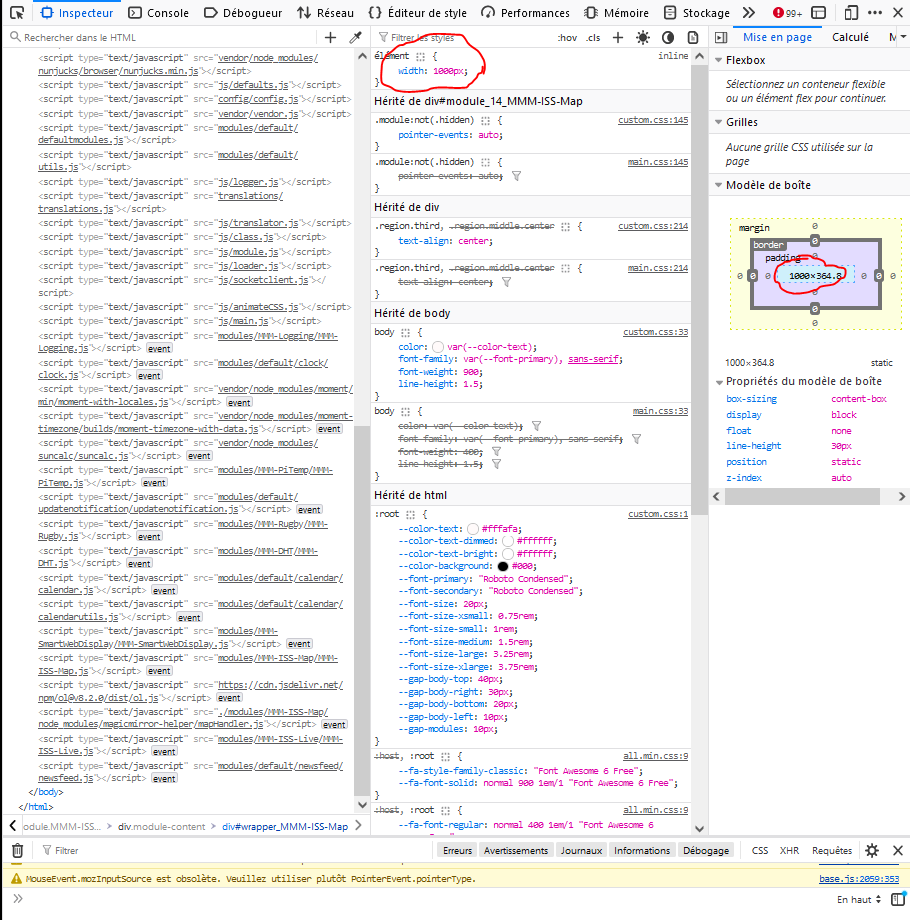
@karsten13 Hello, it’s me again, I’m coming to ask you for help once again… I would like to resize the module but when I modify:
width: "762px", // Double width than defaultit modifies the size but I still have a white line above the module which is the width of the screen, I went to console mode and I saw that if I modify the size of the “box” then I can modify the width and the white line, on the other hand I can’t understand how I can modify this in my css.custom, I’ll give you a screenshot, if you could help me please, thank you in advance


Hello! It looks like you're interested in this conversation, but you don't have an account yet.
Getting fed up of having to scroll through the same posts each visit? When you register for an account, you'll always come back to exactly where you were before, and choose to be notified of new replies (either via email, or push notification). You'll also be able to save bookmarks and upvote posts to show your appreciation to other community members.
With your input, this post could be even better 💗
Register Login