Read the statement by Michael Teeuw here.
MP3 Player
-
Hi there
I am tyring to modify this mp3 player module: https://github.com/justjim1220/MMM-MP3Player
and I am trying to make it more nicer by trying to mimic this music player:
https://codepen.io/letea/pen/egmazy
What I am struggling with is, is it possible to make a module on magicmirror using html code? because the one from codepen uses html and I am not sure how I can do that?
Any help or guidance will be very much appreciated.
Thanks.
-
@bachoo786 yes just return the html from getDom
-
@sdetweil do you mind showing my an example? I cant get my head round with the html and a magic mirror module. thank you for the heads up
-
@bachoo786 a module returns just a div containing the html content. in text form or in node form
'<div><p>this is a paragraph</><table><th>...</th><tr>...</>tr></table></div>'or you create the same structure with document.createElement(type). where type is a string with the html element type, ‘div’, ‘table’…
i helped jim write that module.
if the content needs access to some scripts, then u tell mm about them in the response to the getScripts method. likewise for css the module can provide a file thru the response to getStyles
in either case you have to do all the work of ordering the content correctly
mm just injects the content in the page fom where you configured the module positioni created a routine to create the element put it under the parent, and is classes and set its value
see it and how its used in my birthdaylist module
-
so i had modified the mp3 player module and here is the js file:
/* MagicMIrror Module - MMM-MP3Player * * This is a 3rd Party Module for the [MagicMirror² By Michael Teeuw http://michaelteeuw.nl] * (https://github.com/MichMich/MagicMirror/). * * A mp3 player -- * can use a url or a local directory (music) * * NOT tested with Raspberry Pi. * It DOES work with Windows 10!!! * * version: 1.0.0 * * Module created by @justjim1220 @Seann & @sdetweil * * Licensed with a crapload of good ole' Southern Sweet Tea * and a lot of Cheyenne Extreme Menthol cigars!!! */ var MP3; var substr; Module.register("MMM-MP3Player", { defaults: { songs: [], musicPath: "modules/MMM-MP3Player/music", extensions: ["mp3", "wma", "acc", "ogg"], songs: null, autoPlay: false, random: false, }, audio: null, songTitle: null, mediaPlayer: null, dataAvailable: true, curSong :0, curLength : 0, time: null, play: null, firstTime: true, substr: null, getStyles: function(){ return ["MMM-MP3Player.css", "font-awesome.css"]; }, start: function(){ MP3 = this; console.log("autoPlay configuration:", MP3.config.autoPlay); Log.info("Starting module: " + MP3.name); }, getDom: function(){ var wrapper = document.createElement("div"); if(MP3.config.songs != null) { // Display the list of MP3 files var songList = MP3.createElement("ul", "songList", "songList"); for(var i = 0; i < MP3.config.songs.length; i++) { var listItem = MP3.createElement("li", "songItem", "songItem" + i); listItem.innerHTML = MP3.config.songs[i].substr(0, MP3.config.songs[i].length - 4); listItem.addEventListener("click", function(index) { return function() { MP3.setCurrentSong(index); MP3.audio.play(); MP3.play.getElementsByTagName('i')[0].className = "fa fa-pause"; MP3.mediaPlayer.classList.add("play"); }; }(i)); songList.appendChild(listItem); } wrapper.appendChild(songList); // Add the rest of the existing code... MP3.mediaPlayer = MP3.createElement("div", "mediaPlayer", "mediaPlayer"); MP3.audio = MP3.createElement("audio", "audioPlayer", "audioPlayer"); MP3.audio.addEventListener("loadeddata", () => { MP3.dataAvailable = true; MP3.curLength = MP3.audio.duration; MP3.updateDurationLabel(); }), MP3.audio.addEventListener("ended", () => { Log.log(" play ended") MP3.audio.currentTime = 0; if(MP3.config.autoPlay) { MP3.loadNext(MP3.config.random) } else MP3.mediaPlayer.classList.toggle("play"); }), MP3.mediaPlayer.appendChild(MP3.audio); // Add the rest of the controls to MP3.mediaPlayer var controls = MP3.createElement("div", "controls", false); MP3.songTitle = MP3.createElement("span", "title", "songTitle"); MP3.setCurrentSong(MP3.curSong); controls.appendChild(MP3.songTitle); var discArea = MP3.createElement("div", "discarea", false); discArea.appendChild(MP3.createElement("div", "disc", false)); var stylus = MP3.createElement("div", "stylus", false); stylus.appendChild(MP3.createElement("div", "pivot", false)); stylus.appendChild(MP3.createElement("div", "arm", false)); stylus.appendChild(MP3.createElement("div", "head", false)); discArea.appendChild(stylus); MP3.mediaPlayer.appendChild(discArea); var buttons = MP3.createElement("div", "buttons", false); // Previous Button var prev = MP3.createButton("back", "prevButton", "fa fa-backward"); prev.addEventListener("click", () => { MP3.mediaPlayer.classList.toggle("play"); MP3.dataAvailable = false; MP3.loadNext(MP3.config.random); MP3.audio.play(); MP3.play.getElementsByTagName('i')[0].className = "fa fa-pause"; }, false), buttons.appendChild(prev); // Play Button MP3.play = MP3.createButton("play", "playButton", "fa fa-play"); MP3.play.addEventListener("click", () => { MP3.mediaPlayer.classList.toggle("play"); if (MP3.audio.paused) { setTimeout(() => { MP3.audio.play(); }, 300); MP3.play.getElementsByTagName('i')[0].className = "fa fa-pause"; MP3.timer = setInterval(MP3.updateDurationLabel, 100); } else { //MP3.loadNext(MP3.config.random); MP3.play.getElementsByTagName('i')[0].className = "fa fa-play"; clearInterval(MP3.timer); MP3.audio.pause(); } }, false); buttons.appendChild(MP3.play); // Stop Button var stop = MP3.createButton("stop", "stopButton", "fa fa-stop"); stop.addEventListener("click", () => { MP3.mediaPlayer.classList.remove("play"); MP3.audio.pause(); MP3.audio.currentTime = 0; MP3.play.getElementsByTagName('i')[0].className = "fa fa-play"; MP3.updateDurationLabel(); }, false); buttons.appendChild(stop); // Next Button var next = MP3.createButton("next", "nextButton", "fa fa-forward"); next.addEventListener("click", () => { MP3.mediaPlayer.classList.toggle("play"); MP3.dataAvailable = false; MP3.loadNext(MP3.config.random); MP3.play.getElementsByTagName('i')[0].className = "fa fa-play"; }, false); buttons.appendChild(next); controls.appendChild(buttons); var subControls = MP3.createElement("div", "subControls", false); var duration = MP3.createElement("span", "duration", "currentDuration"); duration.innerHTML = "00:00" + "   "; subControls.appendChild(duration); var volumeSlider = MP3.createElement("input", "volumeSlider", "volumeSlider"); volumeSlider.type = "range"; volumeSlider.min = "0"; volumeSlider.max = "1"; volumeSlider.step = "0.01"; volumeSlider.addEventListener("input", () => { MP3.audio.volume = parseFloat(volumeSlider.value); }, false); subControls.appendChild(volumeSlider); controls.appendChild(subControls); MP3.mediaPlayer.appendChild(controls); wrapper.appendChild(MP3.mediaPlayer); } if(MP3.firstTime && MP3.config.autoPlay){ console.log("First time and autoPlay are true. Setting firstTime to false."); MP3.firstTime=false; } return wrapper; }, createElement: function(type, className, id){ var elem = document.createElement(type); if(className) elem.className = className; if(id) elem.id = id; return elem; }, createButton: function(className, id, icon){ var button = document.createElement('button'); button.className = className; button.id = id; var ico = document.createElement("i"); ico.className = icon; button.appendChild(ico); return button; }, updateDurationLabel: function(){ var duration = document.getElementById('currentDuration'); if(MP3.dataAvailable) { duration.innerText = MP3.parseTime(MP3.audio.currentTime) + " / " + MP3.parseTime(MP3.curLength); } else { // Since 'index' is not defined here, let's use MP3.curSong instead duration.innerText = MP3.parseTime(MP3.audio.currentTime).substr(0, MP3.config.songs[MP3.curSong].length - 4); } }, parseTime: function(time){ const minutes = Math.floor(time / 60) const seconds = Math.floor(time - minutes * 60) const secondsZero = seconds < 10 ? "0" : "" const minutesZero = minutes < 10 ? "0" : "" return minutesZero + minutes.toString() + ":" + secondsZero + seconds.toString() }, setCurrentSong: function(index){ if(MP3.audio!= undefined){ MP3.audio.src = MP3.config.musicPath + '/' + MP3.config.songs[index]; MP3.songTitle.innerHTML = MP3.config.songs[index].substr(0, MP3.config.songs[index].length - 4); MP3.curSong = index; } }, loadNext: function(next){ let index=0; console.log("loadNext: Autoplay:", MP3.config.autoPlay); // Add this line for logging MP3.audio.pause(); if(next) index= (MP3.curSong + 1) % MP3.config.songs.length; else index = (MP3.curSong - 1) < 0 ? MP3.config.songs.length - 1 : MP3.curSong - 1; MP3.setCurrentSong(index); MP3.audio.play(); }, notificationReceived: function (notification, payload) { if(notification === "ALL_MODULES_STARTED") MP3.sendSocketNotification('SOURCE_MUSIC', MP3.config); }, socketNotificationReceived: function(notification, payload){ if(notification === "RETURNED_MUSIC") MP3.config.songs = payload.songs; // set the initial song index MP3.setCurrentSong(0); // paint the player MP3.updateDom(2); }, });i am trying to get help from chatgpt to integrate the codepen music player style and i am told to replace the getdom function to this:
getDom: function() {
    var wrapper = document.createElement("div");
    wrapper.className = "music-player";

    // Using the first song as the default display if songs are available
    var currentSongTitle = this.config.songs.length > 0 ? this.config.songs[this.curSong].title : 'No song selected';
    var currentArtist = this.config.songs.length > 0 ? this.config.songs[this.curSong].artist : '';

    // Constructing the player's main section with the current song's info
    wrapper.innerHTML = `
        <div class="player-main">
            <div class="main-current">
                <div class="current-keyvisual">
                    <!-- Placeholder for current song image; adapt as necessary -->
                    <img src="path/to/your/default/image.png" />
                </div>
                <div class="current-info">
                    <h1>${currentSongTitle}</h1>
                    <p>${currentArtist}</p>
                </div>
            </div>
            <div class="main-control">
                <!-- Placeholder for controls; will be filled in programmatically -->
            </div>
        </div>
        <ul class="player-list">
            <!-- Songs list will be dynamically populated -->
        </ul>
    `;

    // Dynamically populate the song list
    var songList = wrapper.querySelector(".player-list");
    this.config.songs.forEach((song, index) => {
        var listItem = document.createElement("li");
        listItem.innerHTML = `
            <img class="list-cover" src="${song.cover}" />
            <div class="list-info">
                <div class="info-title">${song.title}</div>
                <div class="info-artist">${song.artist}</div>
            </div>
        `;
        listItem.addEventListener("click", () => {
            this.setCurrentSong(index);
            this.audio.play();
            // Update play/pause button and song info as needed
        });
        songList.appendChild(listItem);
    });

    // Programmatically add controls to the main-control div
    var controlsContainer = wrapper.querySelector(".main-control");
    controlsContainer.appendChild(this.play); // Reusing the play button you've already created
    // Add other controls (previous, next, stop) by reusing your existing elements or creating new ones if needed

    return wrapper;
},
the buttons and controls are not integrated I think
-
@bachoo786 said in MP3 Player:
I am tyring to modify this mp3 player module: https://github.com/justjim1220/MMM-MP3Player
Maybe use this newer fork as base: https://github.com/x3mEr/MMM-MP3Player
-
@KristjanESPERANTO hey thanks for that. how do i control the buttons? it says its done via notifications but I dont want to install another module to control the playback. is it possible to just use buttons like play,pause,stop,next and previous?
i am running my magic mirror on a 7 inch touch screen display
-
@bachoo786 said in MP3 Player:
MP3.createElement(“ul”, “songList”, "
you cant create multiple elements at once
https://developer.mozilla.org/en-US/docs/Web/API/Document/createElementsongList is not an html element
html is not magic just grunt work on laying out tye structure
css is the magic. it can turn the output into completely different looking stuff.im a teacher, not doer.
first thing is to get your head around the way you want it to look, draw it on paper
then side by side create the html view on paper. start w div,etc.
figure out where the data (song) components go title, image…
figure out where there are repeating elements… all this is for A song, and it repeats for the nextthen figure out the user interaction. play/stop, progress bar.
there is no magic. you can create a button, but YOU have to attach a routine yo the button for when its pressed. gor a progress bar, you have to start some timer, with routine , to get the progress as a nunber% calculate what the progress bad element needs and then tell it to change.
that means you need to have a place where the progress bar element is known to use itonce you figure this out, then you can create code to do it.
chatgpt is a cheat waste of time. it can give you the shell of something, but it doesnt know the business logic. thats your job. and THAT is the work. -
@bachoo786 said in MP3 Player:
how do i control the buttons?
your chatgpt code added the event/notification handler (eventlistener)
listItem.addEventListener("click", () => { this.setCurrentSong(index) -
@bachoo786 i looked thru the code and see we used a routine to create the elements so my comments above were misleading. sorry.
my newer routine also adds parent and value
from the birthdayList module referenced above// create document element worker createEl : function (type, id, className, parent, value) { var el= document.createElement(type) if(id) el.id = id if(className) el.className = className if(parent) parent.appendChild(el) if(value) { var e = document.createTextNode(value) el.appendChild(e) } return el },and how its used
	getDom: function() {
		var wrapper = this.createEl("div",null,null,null,null);
		if(this.suspended==false){

			if(Object.keys(this.active_birthdays).length > 0) {

				let counter = 0

				// create your table here
				var table = this.createEl("table", "birthday-table","TABLE", wrapper, null);

				// create table header here, array of column names

				var table_header = this.createTableHeader(table, null, [" "," "])

				// create looped row section
				var tBody = this.createEl('tbody', "birthday-tbody", "TBODY", table, null);
this makes the main code smaller and more readable.
just like the html indentation, the elements have parent/child relationships
you have to build them either way -
Sam I appreciate you are a teacher and honestly I know that you help and teach everyone around here. I believe I am nearly there with this mp3 player module but its just the ui is not that aesthetic, hence why I thought of changing it.
however I did build another module some what a religious one but it can be used as an mp3 player if one wishes. here are the files:
MMM-QuranPlayer.js:
Module.register("MMM-QuranPlayer", {
    // Default module config.
    defaults: {},


    // start method
    start: function() {
        this.reciters = [];
        this.selectedReciter = null;
        this.surahs = [];
        this.selectedSurah = null;
        this.sendSocketNotification("GET_RECITERS");
        this.currentIndex = 0;
    },

    getStyles: function() {
        return ["MMM-QuranPlayer.css"];
    },

    // Override dom generator to build the UI
    getDom: function() {
        var wrapper = document.createElement("div");
        wrapper.className = "MMM-QuranPlayer";

        var leftPanel = document.createElement("div");
        leftPanel.className = "left-panel";
        var rightPanel = document.createElement("div");
        rightPanel.className = "right-panel";

        this.audioPlayer = document.createElement("audio");
        this.audioPlayer.className = "audio-player";
        this.audioPlayer.controls = true;
        rightPanel.appendChild(this.audioPlayer);

        this.reciters.forEach((reciter) => {
            var folderElement = document.createElement("div");
            folderElement.innerHTML = reciter;
            folderElement.className = "folder";
            folderElement.onclick = () => {
                this.selectedReciter = reciter;
                this.sendSocketNotification("GET_SURAH_LIST", reciter);
            };
            leftPanel.appendChild(folderElement);
        });

        var surahListElement = document.createElement("div");
        surahListElement.className = "surah-list";
        leftPanel.appendChild(surahListElement);

var controls = ["Play", "Pause", "Stop", "Next", "Previous"];
controls.forEach((control) => {
    var controlElement = document.createElement("div");
    controlElement.innerHTML = control;
    controlElement.className = "control";
    // Bind the actual functionalities here, inside the loop
    controlElement.onclick = () => {
        if (control === "Play") {
            this.playSurah(this.selectedSurah); // Assumes this.selectedSurah is the surah to play
        } else if (control === "Pause") {
            this.pauseAudio();
        } else if (control === "Stop") {
            this.stopAudio();
        } else if (control === "Next") {
            this.nextSurah();
        } else if (control === "Previous") {
            this.previousSurah();
        }


        // Implement Next and Previous based on your app logic
    };
    rightPanel.appendChild(controlElement);
});
        wrapper.appendChild(leftPanel);
        wrapper.appendChild(rightPanel);

        return wrapper;
    },

    socketNotificationReceived: function(notification, payload) {
        if (notification === "RECITERS_RESULT") {
            this.reciters = payload;
            this.updateDom();
        } else if (notification === "SURAH_LIST_RESULT") {
            var surahListElement = document.querySelector(".surah-list");
            surahListElement.innerHTML = "";
            payload.forEach((surah) => {
                var surahElement = document.createElement("div");
                surahElement.innerHTML = surah;
                surahElement.className = "surah";
                surahElement.onclick = () => {
                    this.selectedSurah = surah;
                    this.playSurah(surah);
                };
                surahListElement.appendChild(surahElement);
            });
        }
    },

playSurah: function(surah) {
    let index = this.surahs.indexOf(surah); // Find the index of the surah
    if (index !== -1) {
        this.currentIndex = index; // Update the current index
    }
    if (this.selectedReciter && surah) {
        this.audioPlayer.src = this.getFileUrl(this.selectedReciter, surah);
        this.audioPlayer.play();
        this.selectedSurah = surah; // Update the selected surah
    }
},
    pauseAudio: function() {
        this.audioPlayer.pause();
    },

    stopAudio: function() {
        this.audioPlayer.pause();
        this.audioPlayer.currentTime = 0;
    },

nextSurah: function() {
    if (this.currentIndex < this.surahs.length - 1) {
        this.currentIndex++;
        this.selectedSurah = this.surahs[this.currentIndex];
        this.playSurah(this.selectedSurah);
    } else {
        // Loop to the start or handle as desired if you're at the end of the list
        this.currentIndex = 0;
        this.selectedSurah = this.surahs[this.currentIndex];
        this.playSurah(this.selectedSurah);
    }
},

previousSurah: function() {
    if (this.currentIndex > 0) {
        this.currentIndex--;
        this.selectedSurah = this.surahs[this.currentIndex];
        this.playSurah(this.selectedSurah);
    } else {
        // Loop to the end or handle as desired if you're at the start of the list
        this.currentIndex = this.surahs.length - 1;
        this.selectedSurah = this.surahs[this.currentIndex];
        this.playSurah(this.selectedSurah);
    }
},
    // Helper function to construct the URL to the MP3 file
    getFileUrl: function(reciter, surah) {
        return `/modules/MMM-QuranPlayer/public/${reciter}/${surah}.mp3`;
    },
});
node_helper.js:
var NodeHelper = require("node_helper");
const fs = require("fs");
const path = require("path");

module.exports = NodeHelper.create({
    start: function() {
        this.expressApp.get('/MMM-QuranPlayer/play', (req, res) => {
            res.send("Playing...");
        });
    },

    socketNotificationReceived: function(notification, payload) {
        if (notification === "GET_RECITERS") {
            this.sendReciters();
        } else if (notification === "GET_SURAH_LIST") {
            this.sendSurahList(payload);
        } else if (notification === "PLAY_SURAH") {
            console.log(`Playing ${payload.surah} by ${payload.reciter}`);
        }
    },

    sendReciters: function() {
        const recitersDir = path.join(this.path, "public");
        fs.readdir(recitersDir, (err, files) => {
            if (err) {
                this.sendSocketNotification("RECITERS_RESULT", []);
                return;
            }
            this.sendSocketNotification("RECITERS_RESULT", files);
        });
    },

    sendSurahList: function(reciter) {
        const surahDir = path.join(this.path, "public", reciter);
        fs.readdir(surahDir, (err, files) => {
            if (err) {
                this.sendSocketNotification("SURAH_LIST_RESULT", []);
                return;
            }
            this.sendSocketNotification("SURAH_LIST_RESULT", files.map(file => file.replace('.mp3', '')));
        });
    },
});
and the css:
.MMM-QuranPlayer {
    position: absolute; /* Absolute positioning relative to the nearest positioned ancestor or to the body */
    top: 70%; /* Start at half the height of the screen */
    left: 0; /* Align the left of the module to the left of the screen */
    width: 100vw; /* Full width of the viewport */
    height: 50vh; /* Half the height of the viewport */
    display: flex;
    flex-direction: row; /* Align children horizontally */
    transform: translateY(-50%); /* Shift upwards by half the module's height */
    justify-content: space-around; /* Even space around items */
}

.MMM-QuranPlayer .left-panel,
.MMM-QuranPlayer .right-panel {
    flex-basis: 50%; /* Each panel will take up to 50% of the module's width */
    display: flex;
    flex-direction: column;
    justify-content: start; /* Align items to the start of the column */
    align-items: center; /* Center items horizontally */
    overflow-y: auto; /* Allows scrolling for overflowing content */
    margin-top: 20px; /* Adds some space at the top inside the panel */
}

.MMM-QuranPlayer .left-panel {
    flex-basis: 50%; /* Each panel will take up to 50% of the module's width */
    display: flex;
    flex-direction: column;
    justify-content: center; /* Center items vertically within the panel */
    align-items: flex-start; /* Align items to the start (left side) of the panel */
    overflow-y: auto; /* Allows scrolling for overflowing content */
    height: 100vh; /* Set the height to match the right panel or as needed */
    margin-top: 0; /* Reset any additional margin */
    transform: translateY(-50%); /* Shift upwards by half the module's height */
    padding-top: 60%; /* Adjust this value to push the content down */
}

body .MMM-QuranPlayer .right-panel {
    align-items: flex-end;
    justify-content: center;
    height: 100vh;
}

body .MMM-QuranPlayer .folder,
body .MMM-QuranPlayer .control {
    margin: 10px;
    padding: 10px;
    border: 1px solid #ccc;
    border-radius: 5px;
    background-color: #60DD8E;
    cursor: pointer;
    width: auto;
}

body .MMM-QuranPlayer .audio-player {
    width: 100%;
    max-width: 400px; /* Set a max-width if necessary */
}
I am trying to achieve something similar to the mp3-player module but just make it nicer and also have the module full screen on the 7 inch display like a dashboard, in which the module is split in the middle with the left hand side being the playlist i.e. all the mp3 files as per the folders. and the right hand side being the actual mp3 player with all the controls and functions etc.
-
ok i got somewhere added buttons but man when i press the buttons the mp3 files are not played and I cannot see any errors anywhere. also the notifications are sent but they are not received by the module I verified that:
here is the updated code of MMM-MP3Player module
MMM-MP3Player.js:
var arrPlayed = [];
Module.register("MMM-MP3Player",{
	defaults: {
		musicPath: "modules/MMM-MP3Player/music/",
		autoPlay: true,
		random: false,
		loopList: true,
	},
	getStyles: function() {
		return ["style.css"];
	},

getDom: function() {
    var self = this;
    var wrapper = document.createElement("div");
    wrapper.id = self.identifier + "_wrapper";

    var player = document.createElement("div");
    player.className = "player";

    self.info = document.createElement("div");
    self.info.className = "info";

    self.artist = document.createElement("span");
    self.artist.className = "artist";
    self.artist.innerHTML = "MMM-MP3Player";

    self.song = document.createElement("span");
    self.song.className = "name";
    self.song.innerHTML = self.config.autoPlay ? "AutoPlay Enabled" : "AutoPlay Disabled";
    self.song.innerHTML += self.config.random ? "<br />Random Enabled" : "<br />Random Disabled";

    var progress = document.createElement("div");
    progress.className = "progress-bar";

    self.bar = document.createElement("div");
    self.bar.className = "bar";
    progress.appendChild(self.bar);

    self.info.appendChild(self.artist);
    self.info.appendChild(self.song);
    self.info.appendChild(progress);

    self.album_art = document.createElement("div");
    self.album_art.className = "album-art";
    player.appendChild(self.album_art);
    player.appendChild(self.info);

    // Controls container
    var controls = document.createElement("div");
    controls.className = "controls";

    // Define buttons and associated notifications
    var buttons = {
        "Play": 'PLAY_MUSIC',
        "Stop": 'STOP_MUSIC',
        "Next": 'NEXT_TRACK',
        "Previous": 'PREVIOUS_TRACK',
        "Random On": 'RANDOM_ON',
        "Random Off": 'RANDOM_OFF'
    };

    Object.keys(buttons).forEach(function(key) {
        var button = document.createElement("button");
        button.innerHTML = key;
        button.addEventListener("click", function() {
    console.log("Sending notification:", buttons[key]);
            self.sendNotification(buttons[key], 'some_info'); // Sending notification when button is clicked
        });
        controls.appendChild(button);
    });

    player.appendChild(controls); // Adding controls to the player

    // Initialize the audio element and attach it to 'self' to make it globally accessible within the module

		audioElement = document.createElement("audio");
		audioElement.id = self.identifier+"_player";
		wrapper.appendChild(audioElement);
		wrapper.appendChild(player);

    setTimeout(function() {
        self.sendSocketNotification("INITIATEDEVICES", self.config);
    }, 3000);

    return wrapper;
},
	socketNotificationReceived: function(notification, payload){
		var self = this;
		switch(notification){
			case "Error": // Universal error handler
				self.musicFound = false;
				console.log("[MMM-MP3Player] Error! ", payload);
				break;
			case "Music_Files": // this populates the songs list (array)
				self.songs = payload;
				self.current = 0;
				self.musicFound = true;
				console.log("[MMM-MP3Player] Music Found");
				arrPlayed = Array(self.songs.length).fill(false);
				if (self.config.autoPlay){
					if (self.config.random){
						ind = Math.floor(Math.random() * self.songs.length); //(self.current + 1) % self.songs.length;
						arrPlayed[ind] = true;
						self.current = ind;
					}
					self.sendSocketNotification("LOADFILE", self.songs[self.current]);
				}
				break;
			case "Music_File": // this is called everytime a song is sent from the server
				//console.log(payload[3]);
				if (payload[3] == 'music.png') {
					self.album_art.className = "album-art";
					self.album_art.classList.add('active');
				}
				else {
					self.album_art.classList.toggle('active');
					self.album_art.className = "album-art-found";
					var chngstyle = document.querySelector('.album-art-found').style;
					chngstyle.setProperty("--backgroundImage", "url('" + payload[3] + "')");
					//var mystr = window.getComputedStyle(document.querySelector('.album-art-found'), '::before').getPropertyValue('background-image');
					//console.log(mystr);
				}

				// create url of the raw data received and play it
				audioElement=document.getElementById(self.identifier+"_player");
				var binaryData = [];
				binaryData.push(payload[0]);
				if ((payload[2] = 'mp3') || (payload[2] = 'flac')){
					var url = window.URL.createObjectURL(new Blob(binaryData, {type: "audio/mpeg"}));
				}
				/*else if (payload[2] = 'ogg'){
					var url = window.URL.createObjectURL(new Blob(binaryData, {type: "audio/ogg"}));
				}*/
				else if (payload[2] = 'wav'){
					var url = window.URL.createObjectURL(new Blob(binaryData, {type: "audio/wav"}));
				}
				audioElement.load();
				audioElement.setAttribute('src', url);
				audioElement.volume = 1;
				audioElement.play();
				self.artist.innerHTML = payload[1][0];
				self.song.innerHTML = payload[1][1];
				//self.album_art.classList.add('active');
				// progress bar (thanks to Michael Foley @ https://codepen.io/mdf/pen/ZWbvBv)
				var timer;
				var percent = 0;
				audioElement.addEventListener("playing", function(_event) {
					advance(_event.target.duration, audioElement);
				});
				audioElement.addEventListener("pause", function(_event) {
					clearTimeout(timer);
				});
				var advance = function(duration, element) {
					increment = 10/duration
					percent = Math.min(increment * element.currentTime * 10, 100);
					self.bar.style.width = percent+'%'
					startTimer(duration, element);
				}
				var startTimer = function(duration, element){
					if(percent < 100) {
						timer = setTimeout(function (){advance(duration, element)}, 100);
					}
				}
				// next track & loop
				audioElement.onended = function() {
					if(!self.musicFound){
						self.album_art.classList.toggle('active');
						return;
					}
					if (self.config.random){
						if (!arrPlayed.includes(false)){ // if all files are played
							if (!self.config.loopList) {
								self.artist.innerHTML = "Playlist ended";
								self.song.innerHTML = "";
								console.log("[MMM-MP3Player] Playlist ended");
								return;
							}
							arrPlayed.fill(false);
						}
						do {
							ind = Math.floor(Math.random() * self.songs.length); //(self.current + 1) % self.songs.length;
						} while ( (arrPlayed[ind]) || ((ind == self.current) && (self.songs.length>1)) ); //ind == self.current: not to play one song twice - in the end of list and in the beginning of newly created list)
						arrPlayed[ind] = true;
						self.current = ind;
					}
					else {
						if(self.current==(self.songs.length-1)){ // if all files are played
							if (!self.config.loopList){
								self.artist.innerHTML = "Playlist ended";
								self.song.innerHTML = "";
								console.log("[MMM-MP3Player] Playlist ended");
								return;
							}
							self.current = -1;
						}
						self.current++;
					}
					self.sendSocketNotification("LOADFILE", self.songs[self.current]);
				};
				console.log("[MMM-MP3Player] Music Played");
				break;
		}
	},

	notificationReceived: function(notification, payload){
		var self = this;
		if (self.musicFound){
			switch(notification){
				case "PLAY_MUSIC":
					if (audioElement.paused){
						audioElement.play();
					}
					else {
						self.sendSocketNotification("LOADFILE", self.songs[self.current]);
					}
					break;
				case "STOP_MUSIC":
					audioElement.pause();
					break;
				case "NEXT_TRACK":
					if(!self.musicFound){
						self.album_art.classList.toggle('active');
						return;
					}
					if (self.config.random){
						if (!arrPlayed.includes(false)){
							arrPlayed.fill(false);
						}
						do {
							ind = Math.floor(Math.random() * self.songs.length); // (self.current + 1) % self.songs.length;
						} while (arrPlayed[ind] || ind == self.current); // ind == self.current: not to play one song twice - in the end of list and in the beginning of newly created list)
						arrPlayed[ind] = true;
						self.current = ind;
					}
					else {
						if(self.current==(self.songs.length-1)){ // this assures the loop
							self.current = -1;
						}
						self.current++;
					}
					self.sendSocketNotification("LOADFILE", self.songs[self.current]);
					break;
				case "PREVIOUS_TRACK":
					if(self.current==0){ // this assures the loop
							self.current = (self.songs.length);
						}
					self.current--;
					self.sendSocketNotification("LOADFILE", self.songs[self.current]);
					break;
				case "RANDOM_ON":
					self.config.random = true;
					break;
				case "RANDOM_OFF":
					self.config.random = false;
					break;
			}
		}
	}
});
and the css:
/*
 * player css is amdended version of Shayan's player @ https://codepen.io/shayanea/pen/yvvjya
 * Version 1.2.0 - 2020.09.14
 */
@import url("https://fonts.googleapis.com/css?family=Fira+Sans");


.player {
  font-family: "Fira Sans", Helvetica, Arial, sans-serif;
  -webkit-font-smoothing: antialiased;
  -moz-osx-font-smoothing: grayscale;
  position: relative;
  background-color: #fff;
  border-radius: 15px;
  width: 300px;
  height: 80px;
  z-index: 5;
  -webkit-box-shadow: 0px 0px 117px -6px rgba(255,255,255,1);
  -moz-box-shadow: 0px 0px 117px -6px rgba(255,255,255,1);
  box-shadow: 0px 0px 117px -6px rgba(255,255,255,1);
  display: flex;
  /*justify-content: flex-end;  */
}
.player .info {
  padding: 15px 0px 0px 90px;
  width:65%;
}
.player .info .artist,
.player .info .name {
	display: block;
	line-height: 1.0em;
}
.player .info .artist {
  color: #222;
  font-size: 16px;
  margin-bottom: 4px;
}
.player .info .name {
  color: #808080; /*#999*/
  font-size: 16px; /*13px*/
  margin-bottom: 8px;
}
.player .info .progress-bar {
  background-color: #ddd;
  height: 3px;
  width: 100%;
  position: relative;
}

.controls {
  display: flex;
  justify-content: space-around; /* Distributes space between buttons */
  padding: 10px;
}

.controls button {
  padding: 5px 10px;
  font-size: 14px;
  color: white;
  background-color: #666; /* Dark grey button background */
  border: none;
  border-radius: 5px;
  cursor: pointer;
  transition: background-color 0.3s;
}

.controls button:hover {
  background-color: #777; /* Lighten button on hover */
}

.controls button:active {
  background-color: #555; /* Darken button on active/click */
}


.player .info .progress-bar .bar {
  position: absolute;
  left: 0;
  top: 0;
  bottom: 0;
  background-color: #666;
  transition: all 0.2s ease;
}
.player .album-art-found {
  position: absolute;
  left: -10px;
  height: 80px;
  width: 80px;
  /* background-color:white; */
  box-shadow: 0px 0px 20px 5px rgba(0, 0, 0, 0.2);
  transform: scale(1.2);
  transition: all 0.5s ease;
}
.player .album-art-found::before {
  content: "";
  position: absolute;
  top: 0;
  left: 0;
  right: 0;
  bottom: 0;
  background-position: center;
  background-repeat: no-repeat;
  background-size: 80px;
  background-image: var(--backgroundImage);
}
.player .album-art {
  position: absolute;
  left: -10px;
  height: 80px;
  width: 80px;
  border-radius: 50%;
  background-color:white;
  box-shadow: 0px 0px 20px 5px rgba(0, 0, 0, 0.2);
  transform: scale(1.2);
  transition: all 0.5s ease;
}
.player .album-art::before {
  content: "";
  position: absolute;
  top: 0;
  left: 0;
  right: 0;
  bottom: 0;
  border-radius: 50%;
  background-position: center;
  background-repeat: no-repeat;
  background-size: 50px;
  background-image: url("music.png");
}
.player .album-art.active {
  box-shadow: 0px 0px 20px 5px rgba(0, 0, 0, 0.4);
  transform: scale(1.2);
  transition: all 1s ease;
  background: linear-gradient(270deg, #2f987d, #4190bd, #d29b2d, #4bd22d, #d2692d, #9e2dd2, #d22daf, #3f2dd2);
  background-size: 1600% 1600%;
  -webkit-animation: ColorChanger 20s ease infinite;
  -moz-animation: ColorChanger 20s ease infinite;
  animation: ColorChanger 20s ease infinite;
}
.player .album-art.active::before {
  animation: rotation 3s infinite linear;
  -webkit-animation: rotation 3s infinite linear;
  animation-fill-mode: forwards;
}

@-webkit-keyframes ColorChanger {
    0%{background-position:0% 50%}
    50%{background-position:100% 50%}
    100%{background-position:0% 50%}
}
@-moz-keyframes ColorChanger {
    0%{background-position:0% 50%}
    50%{background-position:100% 50%}
    100%{background-position:0% 50%}
}
@keyframes ColorChanger {
    0%{background-position:0% 50%}
    50%{background-position:100% 50%}
    100%{background-position:0% 50%}
}
@keyframes rotation {
  0% {
    transform: rotate(0deg);
  }
  100% {
    transform: rotate(360deg);
  }
}
and the node_helper:
/* Magic Mirror Node Helper: MMM-MP3Player
 * By asimhsidd
 *
 * Remade by Pavel Smelov.
 * Version 1.2.0 - 2020.09.14
 * GPLv3 License
 */

const NodeHelper = require("node_helper");
const ID3 = require('node-id3');
const path = require('path')
const fs = require('fs');

var music_files_list = [];

module.exports = NodeHelper.create({
	socketNotificationReceived: function(notification, payload) {
		var self = this;
		switch(notification) {
			case "INITIATEDEVICES":
				music_files_list = [];
				var self = this;
				self.searchMP3(payload.musicPath);
				if(music_files_list.length){
					console.log("[MMM-MP3Player] Found ", music_files_list.length, "track(s)");
					self.sendSocketNotification("Music_Files",music_files_list);
				}
				else {
					console.log("[MMM-MP3Player] Music may not be found");
				}
				break;
			case "LOADFILE":
				//console.log('[MMM-MP3Player] trying to play next track');
				if (fs.existsSync(payload)){
					fs.readFile(payload, function(err, data) {
						extension = path.basename(payload).split('.').pop(); //extension = path.extname(payload); //returns ext with dot
						var cover = '';
						if (extension == "mp3") {
							tags = ID3.read(data);
							if (typeof tags.image != "undefined") {
								/*var base64String = "";
								for (var i = 0; i < tags.image.imageBuffer.length; i++) {
									base64String += String.fromCharCode(tags.image.imageBuffer[i]);
								}
								cover = "data:image/" + tags.image.mime + ";base64," + Buffer.from(base64String).toString('base64'); */
								cover = "data:image/" + tags.image.mime + ";base64," + tags.image.imageBuffer.toString('base64');
							}
							if (typeof tags.artist == "undefined" && typeof tags.title == "undefined"){ tags.title = path.basename(payload); }
						}
						else {
							tags = {artist:'', title:path.basename(payload)};
						}
						if (cover == '') {
							if (fs.existsSync(path.join(path.dirname(payload),'cover.jpg'))){
								cover = path.join('/', path.dirname(payload), 'cover.jpg');
							}
							else {
								cover = "music.png";
							}
						}
						self.sendSocketNotification("Music_File",[data,[tags.artist,tags.title], extension, cover]);
					});
				}
				else {
					self.sendSocketNotification("Error","File can not be opened");
				}
				break;
		}
	},
	searchMP3(startPath){ // thanks to Lucio M. Tato at https://stackoverflow.com/questions/25460574/find-files-by-extension-html-under-a-folder-in-nodejs
		var self = this;
		var filter_mp3 = RegExp('.mp3'); // var filter = /.mp3/;
		var filter_flac = RegExp('.flac');
		//var filter_ogg = RegExp('.ogg');
		var filter_wav = RegExp('.wav');
		if (!fs.existsSync(startPath)){
			console.log("[MMM-MP3Player] no dir ",startPath);
			return;
		}
		var files=fs.readdirSync(startPath);
		for(var i=0;i<files.length;i++){
			var filename=path.join(startPath,files[i]);
			var stat = fs.lstatSync(filename);
			if (stat.isDirectory()){
				self.searchMP3(filename); //recurse
			}else if ( (filter_mp3.test(filename)) || (filter_flac.test(filename)) /*|| (filter_ogg.test(filename))*/ || (filter_wav.test(filename)) ){
				music_files_list.push(filename.replace(/\/\/+/g, '/')); // to avoid double slashes (https://stackoverflow.com/questions/23584117/replace-multiple-slashes-in-text-with-single-slash-with-javascript/23584219)
			}
		}
	}
});
can someone please point me to the right direction ? thanks
-
@bachoo786 i don’t know from the code u posted. i would use the developers window, sources tab to debug the browser code.
ctrl-shift-i to open the developers window. select the sources tab, find your module in the left nav,
select your js file and put a stop on the button handler function… I suspect the ‘this’ pointer was lost, and couldn’t call sendSocketNotificationthis is because the function to be called is labeled w the word function(parms){…}
the arrow notation (parms)=>{…} preserves the ‘this’ pointer
-
@bachoo786 I am a little confused, which module are you building? MMM-Mp3Player or MMM-QuranPlayer? Can you share the Github link to it?
-
@mumblebaj well I am trying to implement a “module” which satisfies my needs of playing any mp3 file. I do want to play the Quran but like I said initially it could play any mp3 file.
I do not have a Github link as of now sorry.
-
@sdetweil I added some logs and I can see that the notification is sent however its not received, see my updated code below with the result from developer console:

updated MMM-MP3Player.js:
var arrPlayed = []; var audioElement = null; // Define it here globally Module.register("MMM-MP3Player",{ defaults: { musicPath: "modules/MMM-MP3Player/music/", autoPlay: true, random: false, loopList: true, }, getStyles: function() { return ["style.css"]; }, getDom: function() { var self = this; var wrapper = document.createElement("div"); wrapper.id = self.identifier + "_wrapper"; var player = document.createElement("div"); player.className = "player"; self.info = document.createElement("div"); self.info.className = "info"; self.artist = document.createElement("span"); self.artist.className = "artist"; self.artist.innerHTML = "MMM-MP3Player"; self.song = document.createElement("span"); self.song.className = "name"; self.song.innerHTML = self.config.autoPlay ? "AutoPlay Enabled" : "AutoPlay Disabled"; self.song.innerHTML += self.config.random ? "<br />Random Enabled" : "<br />Random Disabled"; var progress = document.createElement("div"); progress.className = "progress-bar"; self.bar = document.createElement("div"); self.bar.className = "bar"; progress.appendChild(self.bar); self.info.appendChild(self.artist); self.info.appendChild(self.song); self.info.appendChild(progress); self.album_art = document.createElement("div"); self.album_art.className = "album-art"; player.appendChild(self.album_art); player.appendChild(self.info); // Controls container var controls = document.createElement("div"); controls.className = "controls"; // Define buttons and associated notifications var buttons = { "Play": 'PLAY_MUSIC', "Stop": 'STOP_MUSIC', "Next": 'NEXT_TRACK', "Previous": 'PREVIOUS_TRACK', "Random On": 'RANDOM_ON', "Random Off": 'RANDOM_OFF' }; Object.keys(buttons).forEach(function(key) { var button = document.createElement("button"); button.innerHTML = key; button.addEventListener("click", function() { console.log("Button clicked: " + key); console.log("Sending notification:", buttons[key], 'some_info'); self.sendNotification('buttons[key]', 'some_info'); }); controls.appendChild(button); }); player.appendChild(controls); // Initialize the audio element audioElement = document.createElement("audio"); audioElement.id = self.identifier+"_player"; wrapper.appendChild(audioElement); wrapper.appendChild(player); setTimeout(function() { self.sendSocketNotification("INITIATEDEVICES", self.config); }, 3000); return wrapper; }, socketNotificationReceived: function(notification, payload){ var self = this; switch(notification){ case "Error": // Universal error handler self.musicFound = false; console.log("[MMM-MP3Player] Error! ", payload); break; case "Music_Files": // this populates the songs list (array) self.songs = payload; self.current = 0; self.musicFound = true; console.log("[MMM-MP3Player] Music Found"); arrPlayed = Array(self.songs.length).fill(false); if (self.config.autoPlay){ if (self.config.random){ ind = Math.floor(Math.random() * self.songs.length); //(self.current + 1) % self.songs.length; arrPlayed[ind] = true; self.current = ind; } self.sendSocketNotification("LOADFILE", self.songs[self.current]); } break; case "Music_File": // this is called everytime a song is sent from the server //console.log(payload[3]); if (payload[3] == 'music.png') { self.album_art.className = "album-art"; self.album_art.classList.add('active'); } else { self.album_art.classList.toggle('active'); self.album_art.className = "album-art-found"; var chngstyle = document.querySelector('.album-art-found').style; chngstyle.setProperty("--backgroundImage", "url('" + payload[3] + "')"); //var mystr = window.getComputedStyle(document.querySelector('.album-art-found'), '::before').getPropertyValue('background-image'); //console.log(mystr); } // create url of the raw data received and play it audioElement=document.getElementById(self.identifier+"_player"); var binaryData = []; binaryData.push(payload[0]); if ((payload[2] = 'mp3') || (payload[2] = 'flac')){ var url = window.URL.createObjectURL(new Blob(binaryData, {type: "audio/mpeg"})); } /*else if (payload[2] = 'ogg'){ var url = window.URL.createObjectURL(new Blob(binaryData, {type: "audio/ogg"})); }*/ else if (payload[2] = 'wav'){ var url = window.URL.createObjectURL(new Blob(binaryData, {type: "audio/wav"})); } audioElement.load(); audioElement.setAttribute('src', url); audioElement.volume = 1; audioElement.play(); self.artist.innerHTML = payload[1][0]; self.song.innerHTML = payload[1][1]; //self.album_art.classList.add('active'); // progress bar (thanks to Michael Foley @ https://codepen.io/mdf/pen/ZWbvBv) var timer; var percent = 0; audioElement.addEventListener("playing", function(_event) { advance(_event.target.duration, audioElement); }); audioElement.addEventListener("pause", function(_event) { clearTimeout(timer); }); var advance = function(duration, element) { increment = 10/duration percent = Math.min(increment * element.currentTime * 10, 100); self.bar.style.width = percent+'%' startTimer(duration, element); } var startTimer = function(duration, element){ if(percent < 100) { timer = setTimeout(function (){advance(duration, element)}, 100); } } // next track & loop audioElement.onended = function() { if(!self.musicFound){ self.album_art.classList.toggle('active'); return; } if (self.config.random){ if (!arrPlayed.includes(false)){ // if all files are played if (!self.config.loopList) { self.artist.innerHTML = "Playlist ended"; self.song.innerHTML = ""; console.log("[MMM-MP3Player] Playlist ended"); return; } arrPlayed.fill(false); } do { ind = Math.floor(Math.random() * self.songs.length); //(self.current + 1) % self.songs.length; } while ( (arrPlayed[ind]) || ((ind == self.current) && (self.songs.length>1)) ); //ind == self.current: not to play one song twice - in the end of list and in the beginning of newly created list) arrPlayed[ind] = true; self.current = ind; } else { if(self.current==(self.songs.length-1)){ // if all files are played if (!self.config.loopList){ self.artist.innerHTML = "Playlist ended"; self.song.innerHTML = ""; console.log("[MMM-MP3Player] Playlist ended"); return; } self.current = -1; } self.current++; } self.sendSocketNotification("LOADFILE", self.songs[self.current]); }; console.log("[MMM-MP3Player] Music Played"); break; } }, notificationReceived: function(notification, payload, sender) { console.log("Notification received:", notification); var self = this; if (self.musicFound){ switch(notification){ case "PLAY_MUSIC": if (audioElement.paused){ audioElement.play(); } else { self.sendSocketNotification("LOADFILE", self.songs[self.current]); } break; case "STOP_MUSIC": audioElement.pause(); break; case "NEXT_TRACK": if(!self.musicFound){ self.album_art.classList.toggle('active'); return; } if (self.config.random){ if (!arrPlayed.includes(false)){ arrPlayed.fill(false); } do { ind = Math.floor(Math.random() * self.songs.length); // (self.current + 1) % self.songs.length; } while (arrPlayed[ind] || ind == self.current); // ind == self.current: not to play one song twice - in the end of list and in the beginning of newly created list) arrPlayed[ind] = true; self.current = ind; } else { if(self.current==(self.songs.length-1)){ // this assures the loop self.current = -1; } self.current++; } self.sendSocketNotification("LOADFILE", self.songs[self.current]); break; case "PREVIOUS_TRACK": if(self.current==0){ // this assures the loop self.current = (self.songs.length); } self.current--; self.sendSocketNotification("LOADFILE", self.songs[self.current]); break; case "RANDOM_ON": self.config.random = true; break; case "RANDOM_OFF": self.config.random = false; break; } } } }); -
@bachoo786 said in MP3 Player:
button.addEventListener(“click”, function() {
change that to
button.addEventListener(“click”,()=>{
and change the self.sendNotification
to this.sendNotificationat the time the click event happens, you are not in the module code, but in the browser.
and the getDom() function has long since ended. you want the runtime to remember the context before it executes any code.
the arrow invocation ()=>{} does that, while the function(){} type invocation does not -
@sdetweil Hey Sam
I did the changes but when i click on the “Play” or any button the mp3 file isnt played and I get this error on the developer console:
Button clicked: Play
MMM-MP3Player.js:71 Sending notification: PLAY_MUSIC some_info
MMM-MP3Player.js:72 Uncaught TypeError: this.sendNotification is not a function
at HTMLButtonElement. (MMM-MP3Player.js:72:10)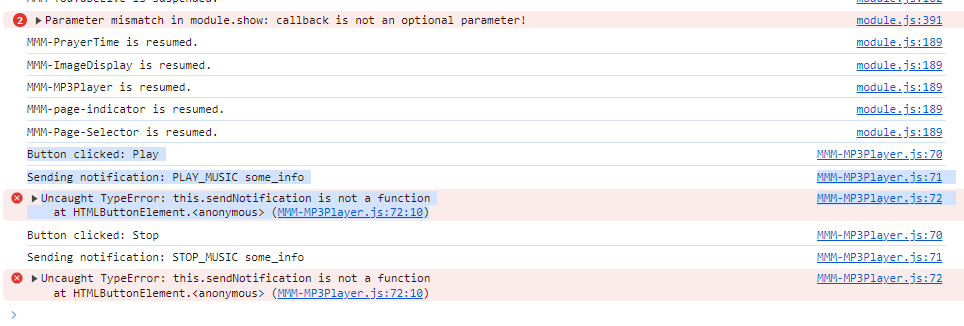
here is the updated code:
var arrPlayed = []; var audioElement = null; // Define it here globally Module.register("MMM-MP3Player",{ defaults: { musicPath: "modules/MMM-MP3Player/music/", autoPlay: true, random: false, loopList: true, }, getStyles: function() { return ["style.css"]; }, getDom: function() { var self = this; var wrapper = document.createElement("div"); wrapper.id = self.identifier + "_wrapper"; var player = document.createElement("div"); player.className = "player"; self.info = document.createElement("div"); self.info.className = "info"; self.artist = document.createElement("span"); self.artist.className = "artist"; self.artist.innerHTML = "MMM-MP3Player"; self.song = document.createElement("span"); self.song.className = "name"; self.song.innerHTML = self.config.autoPlay ? "AutoPlay Enabled" : "AutoPlay Disabled"; self.song.innerHTML += self.config.random ? "<br />Random Enabled" : "<br />Random Disabled"; var progress = document.createElement("div"); progress.className = "progress-bar"; self.bar = document.createElement("div"); self.bar.className = "bar"; progress.appendChild(self.bar); self.info.appendChild(self.artist); self.info.appendChild(self.song); self.info.appendChild(progress); self.album_art = document.createElement("div"); self.album_art.className = "album-art"; player.appendChild(self.album_art); player.appendChild(self.info); // Controls container var controls = document.createElement("div"); controls.className = "controls"; // Define buttons and associated notifications var buttons = { "Play": 'PLAY_MUSIC', "Stop": 'STOP_MUSIC', "Next": 'NEXT_TRACK', "Previous": 'PREVIOUS_TRACK', "Random On": 'RANDOM_ON', "Random Off": 'RANDOM_OFF' }; Object.keys(buttons).forEach(function(key) { var button = document.createElement("button"); button.innerHTML = key; button.addEventListener("click",()=>{ console.log("Button clicked: " + key); console.log("Sending notification:", buttons[key], 'some_info'); this.sendNotification('buttons[key]', 'some_info'); }); controls.appendChild(button); }); player.appendChild(controls); // Initialize the audio element audioElement = document.createElement("audio"); audioElement.id = self.identifier+"_player"; wrapper.appendChild(audioElement); wrapper.appendChild(player); setTimeout(function() { self.sendSocketNotification("INITIATEDEVICES", self.config); }, 3000); return wrapper; }, socketNotificationReceived: function(notification, payload){ var self = this; switch(notification){ case "Error": // Universal error handler self.musicFound = false; console.log("[MMM-MP3Player] Error! ", payload); break; case "Music_Files": // this populates the songs list (array) self.songs = payload; self.current = 0; self.musicFound = true; console.log("[MMM-MP3Player] Music Found"); arrPlayed = Array(self.songs.length).fill(false); if (self.config.autoPlay){ if (self.config.random){ ind = Math.floor(Math.random() * self.songs.length); //(self.current + 1) % self.songs.length; arrPlayed[ind] = true; self.current = ind; } self.sendSocketNotification("LOADFILE", self.songs[self.current]); } break; case "Music_File": // this is called everytime a song is sent from the server //console.log(payload[3]); if (payload[3] == 'music.png') { self.album_art.className = "album-art"; self.album_art.classList.add('active'); } else { self.album_art.classList.toggle('active'); self.album_art.className = "album-art-found"; var chngstyle = document.querySelector('.album-art-found').style; chngstyle.setProperty("--backgroundImage", "url('" + payload[3] + "')"); //var mystr = window.getComputedStyle(document.querySelector('.album-art-found'), '::before').getPropertyValue('background-image'); //console.log(mystr); } // create url of the raw data received and play it audioElement=document.getElementById(self.identifier+"_player"); var binaryData = []; binaryData.push(payload[0]); if ((payload[2] = 'mp3') || (payload[2] = 'flac')){ var url = window.URL.createObjectURL(new Blob(binaryData, {type: "audio/mpeg"})); } /*else if (payload[2] = 'ogg'){ var url = window.URL.createObjectURL(new Blob(binaryData, {type: "audio/ogg"})); }*/ else if (payload[2] = 'wav'){ var url = window.URL.createObjectURL(new Blob(binaryData, {type: "audio/wav"})); } audioElement.load(); audioElement.setAttribute('src', url); audioElement.volume = 1; audioElement.play(); self.artist.innerHTML = payload[1][0]; self.song.innerHTML = payload[1][1]; //self.album_art.classList.add('active'); // progress bar (thanks to Michael Foley @ https://codepen.io/mdf/pen/ZWbvBv) var timer; var percent = 0; audioElement.addEventListener("playing", function(_event) { advance(_event.target.duration, audioElement); }); audioElement.addEventListener("pause", function(_event) { clearTimeout(timer); }); var advance = function(duration, element) { increment = 10/duration percent = Math.min(increment * element.currentTime * 10, 100); self.bar.style.width = percent+'%' startTimer(duration, element); } var startTimer = function(duration, element){ if(percent < 100) { timer = setTimeout(function (){advance(duration, element)}, 100); } } // next track & loop audioElement.onended = function() { if(!self.musicFound){ self.album_art.classList.toggle('active'); return; } if (self.config.random){ if (!arrPlayed.includes(false)){ // if all files are played if (!self.config.loopList) { self.artist.innerHTML = "Playlist ended"; self.song.innerHTML = ""; console.log("[MMM-MP3Player] Playlist ended"); return; } arrPlayed.fill(false); } do { ind = Math.floor(Math.random() * self.songs.length); //(self.current + 1) % self.songs.length; } while ( (arrPlayed[ind]) || ((ind == self.current) && (self.songs.length>1)) ); //ind == self.current: not to play one song twice - in the end of list and in the beginning of newly created list) arrPlayed[ind] = true; self.current = ind; } else { if(self.current==(self.songs.length-1)){ // if all files are played if (!self.config.loopList){ self.artist.innerHTML = "Playlist ended"; self.song.innerHTML = ""; console.log("[MMM-MP3Player] Playlist ended"); return; } self.current = -1; } self.current++; } self.sendSocketNotification("LOADFILE", self.songs[self.current]); }; console.log("[MMM-MP3Player] Music Played"); break; } }, notificationReceived: function(notification, payload, sender) { console.log("Notification received:", notification); var self = this; if (self.musicFound){ switch(notification){ case "PLAY_MUSIC": if (audioElement.paused){ audioElement.play(); } else { self.sendSocketNotification("LOADFILE", self.songs[self.current]); } break; case "STOP_MUSIC": audioElement.pause(); break; case "NEXT_TRACK": if(!self.musicFound){ self.album_art.classList.toggle('active'); return; } if (self.config.random){ if (!arrPlayed.includes(false)){ arrPlayed.fill(false); } do { ind = Math.floor(Math.random() * self.songs.length); // (self.current + 1) % self.songs.length; } while (arrPlayed[ind] || ind == self.current); // ind == self.current: not to play one song twice - in the end of list and in the beginning of newly created list) arrPlayed[ind] = true; self.current = ind; } else { if(self.current==(self.songs.length-1)){ // this assures the loop self.current = -1; } self.current++; } self.sendSocketNotification("LOADFILE", self.songs[self.current]); break; case "PREVIOUS_TRACK": if(self.current==0){ // this assures the loop self.current = (self.songs.length); } self.current--; self.sendSocketNotification("LOADFILE", self.songs[self.current]); break; case "RANDOM_ON": self.config.random = true; break; case "RANDOM_OFF": self.config.random = false; break; } } } }); -
@bachoo786 hmm…change the this. to self. weird… because it says not a member of htmlElement .
-
Nope doesn’t work.
I feel like going back to the old MP3 Player module that you helped.set up and just changing the css from the disc to something more modern and futuristic with better buttons etc.
Oh and also adding a playlist of mp3s which should be read from the mp3 folder. Display the module in half where the half on the left displays the playlist and the one on the right displays the player buttons etc.
Is that possible you think?


Hello! It looks like you're interested in this conversation, but you don't have an account yet.
Getting fed up of having to scroll through the same posts each visit? When you register for an account, you'll always come back to exactly where you were before, and choose to be notified of new replies (either via email, or push notification). You'll also be able to save bookmarks and upvote posts to show your appreciation to other community members.
With your input, this post could be even better 💗
Register Login