Read the statement by Michael Teeuw here.
Newbie Trying to Get Started
-
I installed from the Arch Linux repos, but it did not create ~/MagicMirror/ directory. When I first launched magicmirror, it worked, but it took over my entire screen. :)
What I want is for it to be like wallpaper, and show me things like disk space, and memory and CPU usage. Here is what I see in CLI:
[config]$ magicmirror

> magicmirror@2.22.0 start
> DISPLAY="${DISPLAY:=:0}" ./node_modules/.bin/electron js/electron.js

[15.05.2024 22:02.39.397] [LOG]   Starting MagicMirror: v2.22.0
[15.05.2024 22:02.39.399] [LOG]   Loading config ...
[15.05.2024 22:02.39.400] [LOG]   Loading module helpers ...
[15.05.2024 22:02.39.401] [LOG]   No helper found for module: alert.
[15.05.2024 22:02.39.407] [LOG]   Initializing new module helper ...
[15.05.2024 22:02.39.407] [LOG]   Module helper loaded: updatenotification
[15.05.2024 22:02.39.407] [LOG]   No helper found for module: clock.
[15.05.2024 22:02.39.468] [LOG]   Initializing new module helper ...
[15.05.2024 22:02.39.468] [LOG]   Module helper loaded: calendar
[15.05.2024 22:02.39.468] [LOG]   No helper found for module: compliments.
[15.05.2024 22:02.39.469] [LOG]   No helper found for module: weather.
[15.05.2024 22:02.39.476] [LOG]   Initializing new module helper ...
[15.05.2024 22:02.39.476] [LOG]   Module helper loaded: newsfeed
[15.05.2024 22:02.39.476] [LOG]   All module helpers loaded.
[15.05.2024 22:02.39.508] [LOG]   Starting server on port 8080 ...
[15.05.2024 22:02.39.605] [ERROR] Whoops! There was an uncaught exception...
[15.05.2024 22:02.39.607] [ERROR] Error: listen EADDRINUSE: address already in use 127.0.0.1:8080
    at Server.setupListenHandle [as _listen2] (node:net:1432:16)
    at listenInCluster (node:net:1480:12)
    at GetAddrInfoReqWrap.doListen [as callback] (node:net:1629:7)
    at GetAddrInfoReqWrap.onlookup [as oncomplete] (node:dns:111:8) {
  code: 'EADDRINUSE',
  errno: -98,
  syscall: 'listen',
  address: '127.0.0.1',
  port: 8080
}
[15.05.2024 22:02.39.607] [ERROR] MagicMirror² will not quit, but it might be a good idea to check why this happened. Maybe no internet connection?
[15.05.2024 22:02.39.607] [ERROR] If you think this really is an issue, please open an issue on GitHub: https://github.com/MichMich/MagicMirror/issues
[15.05.2024 22:02.39.620] [LOG]   Launching application.
^C/usr/share/magicmirror/node_modules/electron/dist/electron exited with signal SIGINT
[config]$ cat ~/MagicMirror/config/config.js
// in your config.js add these lines.

electronOptions: {
  width: 1920,
  height: 1200,
  fullscreen:  false,
  backgroundColor: '#00000000',
  titleBarStyle: 'none',
  frame: false,
  type: 'desktop',
  hasShadow: false,
  transparent: true,
  resizable:   false,
},
electronSwitches: ["enable-transparent-visuals"],


[config]$
Any advice how to get started is appreciated.
-
@sdetweil OK, the issue was that I used this
https://aur.archlinux.org/packages/magicmirror
It’s 2.22 and I’m not sure how it works.
I installed normally from git now and it works, and also the “wallpaper” code works for me.
Thank you for your help.
Now I will try to configure this.
-
@LoneSoldier see
https://forum.magicmirror.builders/topic/15663/how_to-magicmirror-as-desktop-wallpaper-all-platform-updated?_=1715801448276by default MagicMirror IS the app running on a fixed display on the wall so it would BE
the image displayed -
@sdetweil address in use means it is running already
probably via pm2, so do
pm2 stop all
see the output of
pm2 --help
for all the command options -
@sdetweil Yes, that’s where I got my code, but I don’t think it’s using that.
Yes, I also just figured out it’s already running.
When I launch it in my Mate desktop, it covers all the windows and also the panel on one of my monitors. It’s not in the background at all.
Here is the valid CLI output:
[config]$ magicmirror

> magicmirror@2.22.0 start
> DISPLAY="${DISPLAY:=:0}" ./node_modules/.bin/electron js/electron.js

[15.05.2024 22:43.51.198] [LOG]   Starting MagicMirror: v2.22.0
[15.05.2024 22:43.51.200] [LOG]   Loading config ...
[15.05.2024 22:43.51.201] [LOG]   Loading module helpers ...
[15.05.2024 22:43.51.202] [LOG]   No helper found for module: alert.
[15.05.2024 22:43.51.208] [LOG]   Initializing new module helper ...
[15.05.2024 22:43.51.208] [LOG]   Module helper loaded: updatenotification
[15.05.2024 22:43.51.208] [LOG]   No helper found for module: clock.
[15.05.2024 22:43.51.267] [LOG]   Initializing new module helper ...
[15.05.2024 22:43.51.267] [LOG]   Module helper loaded: calendar
[15.05.2024 22:43.51.267] [LOG]   No helper found for module: compliments.
[15.05.2024 22:43.51.268] [LOG]   No helper found for module: weather.
[15.05.2024 22:43.51.275] [LOG]   Initializing new module helper ...
[15.05.2024 22:43.51.275] [LOG]   Module helper loaded: newsfeed
[15.05.2024 22:43.51.275] [LOG]   All module helpers loaded.
[15.05.2024 22:43.51.310] [LOG]   Starting server on port 8080 ...
[15.05.2024 22:43.51.394] [LOG]   Server started ...
[15.05.2024 22:43.51.394] [LOG]   Connecting socket for: updatenotification
[15.05.2024 22:43.51.395] [LOG]   Starting module helper: updatenotification
[15.05.2024 22:43.51.395] [LOG]   Connecting socket for: calendar
[15.05.2024 22:43.51.395] [LOG]   Starting node helper for: calendar
[15.05.2024 22:43.51.395] [LOG]   Connecting socket for: newsfeed
[15.05.2024 22:43.51.395] [LOG]   Starting node helper for: newsfeed
[15.05.2024 22:43.51.395] [LOG]   Sockets connected & modules started ...
[15.05.2024 22:43.51.406] [LOG]   Launching application.
[15.05.2024 22:43.52.005] [LOG]   Create new calendarfetcher for url: http://www.calendarlabs.com/ical-calendar/ics/76/US_Holidays.ics - Interval: 300000
[15.05.2024 22:43.52.016] [LOG]   Create new newsfetcher for url: https://rss.nytimes.com/services/xml/rss/nyt/HomePage.xml - Interval: 300000
[15.05.2024 22:43.52.029] [INFO]  Checking git for module: default
[15.05.2024 22:43.52.406] [INFO]  Newsfeed-Fetcher: Broadcasting 25 items.
[15.05.2024 22:43.53.215] [INFO]  Calendar-Fetcher: Broadcasting 8 events.
^C/usr/share/magicmirror/node_modules/electron/dist/electron exited with signal SIGINT
[config]$ pm2
bash: pm2: command not found
[config]$
Thank you.
-
@LoneSoldier how did you make it autostart? create a service?
that code is 3 years old
I never tried it
@MMRIZE does this still work? -
@sdetweil
For Linux, there are many distros, so I’m not sure it works on all environments.
For Mac/Windows, I think it will still work. -
@LoneSoldier
On which lines did you put the additional configurations? Last line? Show me full config.js. -
Here’s the whole file. I don’t know yet what else to put in. Just trying to get started:
// in your config.js add these lines. electronOptions: { width: 1920, height: 1200, fullscreen: false, backgroundColor: '#00000000', titleBarStyle: 'none', frame: false, type: 'desktop', hasShadow: false, transparent: true, resizable: false, }, electronSwitches: ["enable-transparent-visuals"], -
I tested on my Mac, it works still.(MM 2.27) For linux, I believe it has to work also. (Because it is one of the default features of the Electron.)
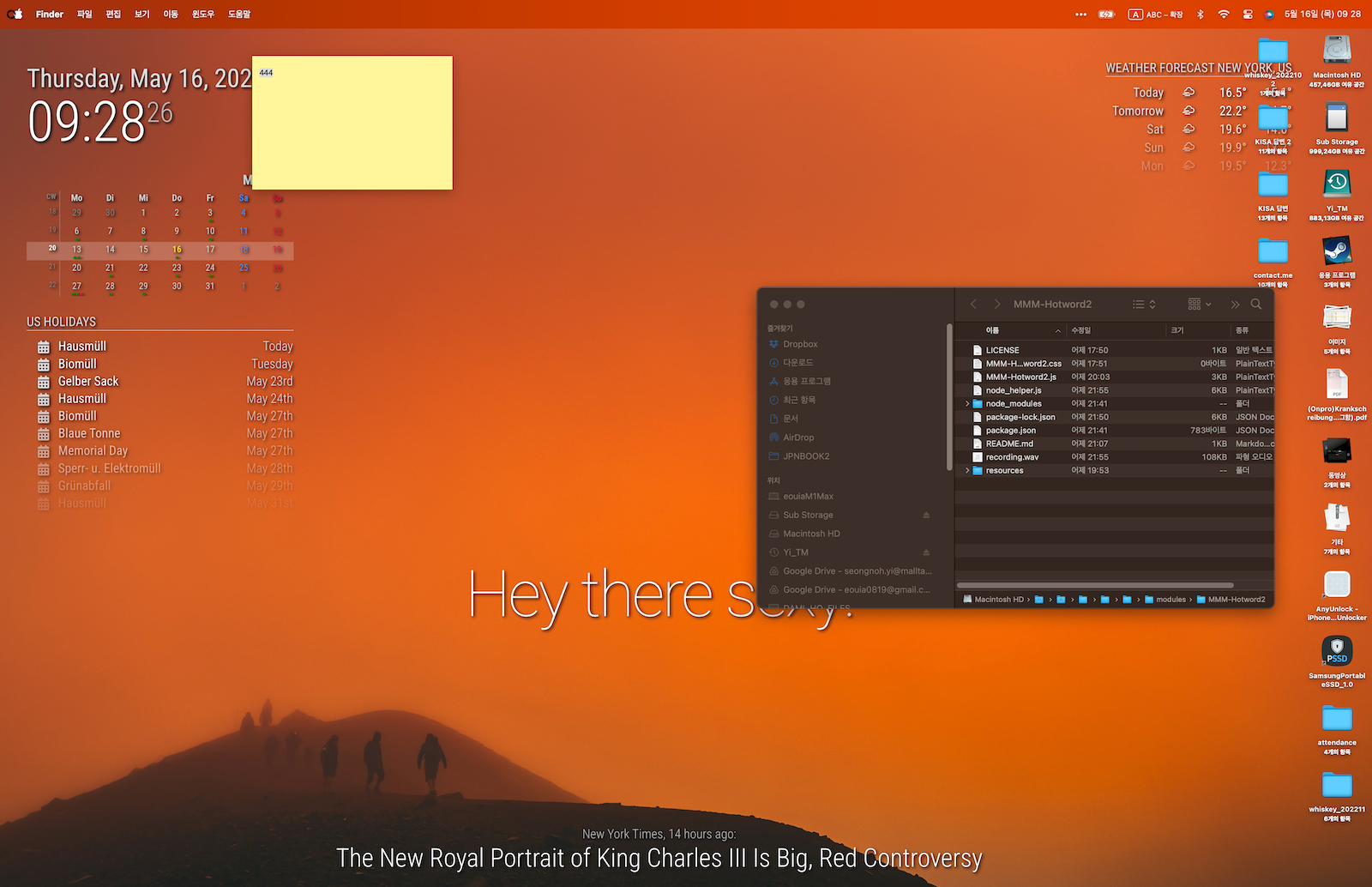
CONFIG.JS
/* config.js */
...
timeFormat: 24,
units: "metric",

/* Insert here */
electronOptions: {
	fullscreen:  false,
	backgroundColor: '#00000000',
	titleBarStyle: 'none',
	frame: false,
	type: 'desktop',
	hasShadow: false,
	transparent: true,
	resizable:   false,
},
electronSwitches: ["enable-transparent-visuals"],

modules: [
	{
		module: "clock",
		position: "top_left"
	},
...
CUSTOM.CSS
/* custom.css */ :root { --color-text: #ddd; --color-text-dimmed: #bbb; --color-text-bright: #fff; --color-background: rgba(0, 0, 0, 0); /* make fonts color brighter */ --font-size: 2vh; --font-size-small: 0.75rem; --gap-body-top: 20px; --gap-body-right: 120px; --gap-body-bottom: 20px; --gap-body-left: 40px; /* adjust margin for your screen */ } * { text-shadow: 2px 2px 5px #000000; /* make text more readable on the background image */ } -
@LoneSoldier that cannot be the whole file.
see the config.js.sample in the vonfig folder as a starter. you can add those fields to it
my install script copies the sample to start with
-
@sdetweil The issue here is indeed something with the install. The app appears to run, but it did not create a config file for me.
So I copied the one from https://github.com/MagicMirrorOrg/MagicMirror/blob/master/config/config.js.sample and also added the lines as above and launched it again, but it’s the same.
It’s supposed to be in
~/MagicMirror/config/config.js
apparently, and that’s where mine is.
But if I rename that file, I get the same results. So I think it’s not picking up that config file at all.
Perhaps I should install from the repo instead of using Arch’s build?
-
@LoneSoldier the git clone/npm install does NOT copy the sample config.js
see step 4 of the installation instructions
3. Install the application: npm run install-mm
4. Make a copy of the config sample file: cp config/config.js.sample config/config.js
you do NOT need to copy from the github repo… the file is in the config folder
also why verion 2.22?? we are on v 2.27 now
if there is an ERROR, then there is a built in minimal config.js used
easy way to determine
is to adddisabled: true,after some module:
entry
and restart magic mirrornote if you created a service to start MM on boot, THAT instance is running and you MUST stop it to change config settings…
you don’t need to reinstall… just do the correct things
to see if something is running from a terminal window do
ps -ef | grep -i magicmirrorif there is more than one line then you have to stop it…
-
@sdetweil OK, the issue was that I used this
https://aur.archlinux.org/packages/magicmirror
It’s 2.22 and I’m not sure how it works.
I installed normally from git now and it works, and also the “wallpaper” code works for me.
Thank you for your help.
Now I will try to configure this.
-
S sdetweil has marked this topic as solved on
Hello! It looks like you're interested in this conversation, but you don't have an account yet.
Getting fed up of having to scroll through the same posts each visit? When you register for an account, you'll always come back to exactly where you were before, and choose to be notified of new replies (either via email, or push notification). You'll also be able to save bookmarks and upvote posts to show your appreciation to other community members.
With your input, this post could be even better 💗
Register Login