MagicMirror Forum
    • Recent
    • Tags
    • Unsolved
    • Solved
    • MagicMirror² Repository
    • Documentation
    • 3rd-Party-Modules
    • Donate
    • Discord
    • Register
    • Login
    A New Chapter for MagicMirror: The Community Takes the Lead
    Read the statement by Michael Teeuw here.

    CPU 100%. started too many instances of MM

    Scheduled Pinned Locked Moved Unsolved Troubleshooting
    6 Posts 3 Posters 614 Views 3 Watching
    Loading More Posts
    • Oldest to Newest
    • Newest to Oldest
    • Most Votes
    Reply
    • Reply as topic
    Log in to reply
    This topic has been deleted. Only users with topic management privileges can see it.
    • C Offline
      capedbuffethero
      last edited by

      So I’m technical, but I don’t normally work with node.

      How do I clean up this mess I’ve made for myself?

      I started up node via npm and pm2 and noticed the system getting slower. Now, it’s unusable. I tried running htop to see what was running, and as I suspected, I started too many instances. Even after reboot, the instances seem keep running.

      The screenshots below show. multiple instances of npm start, Daemon.js, node serveronly, npm, npm start, node /home/thelows/MagicMirror/node_modules/.bin/pm2 -

      what’s a quick way to clean this all up, and … as a bonus, how should I start, stop, restart the MM process?
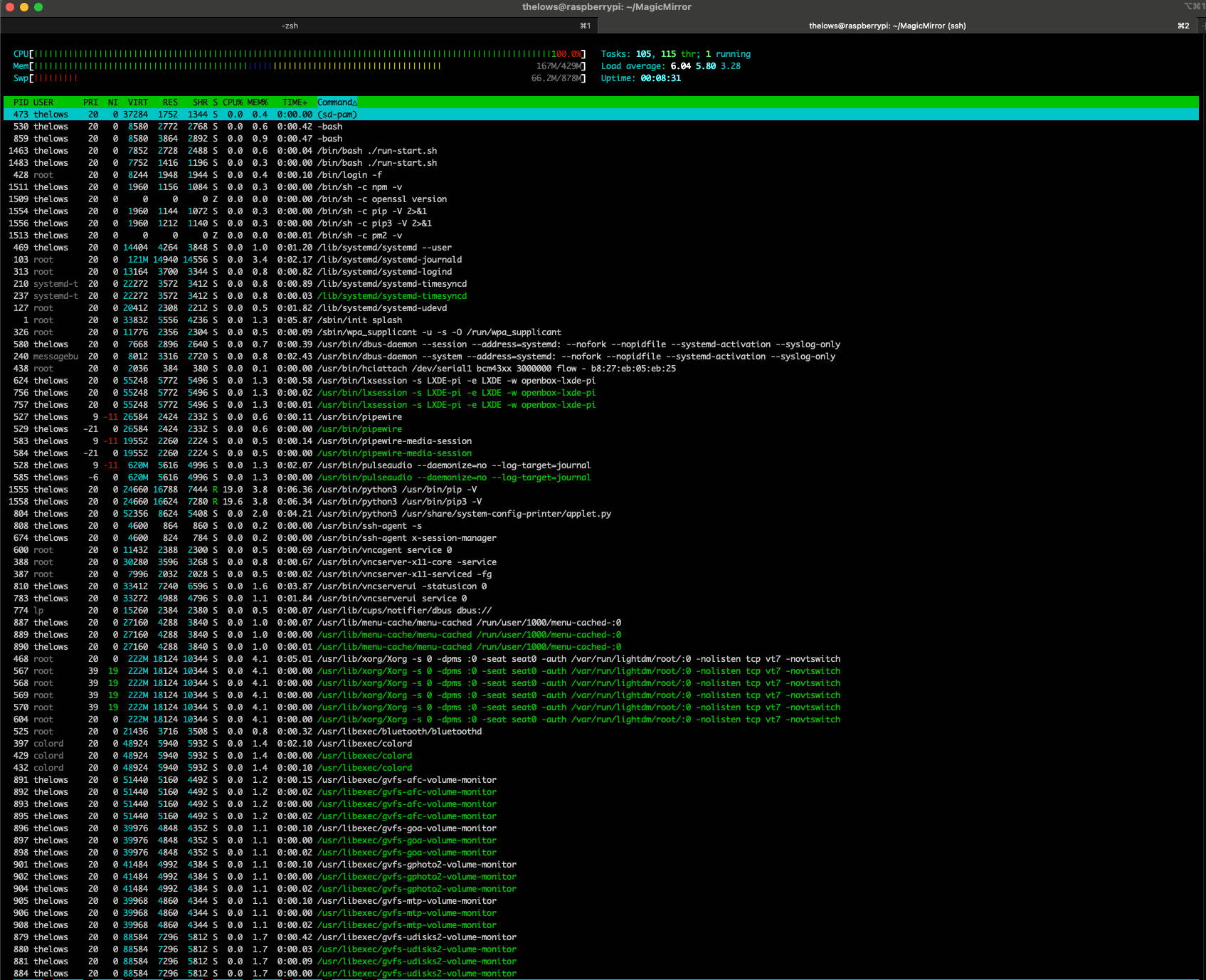
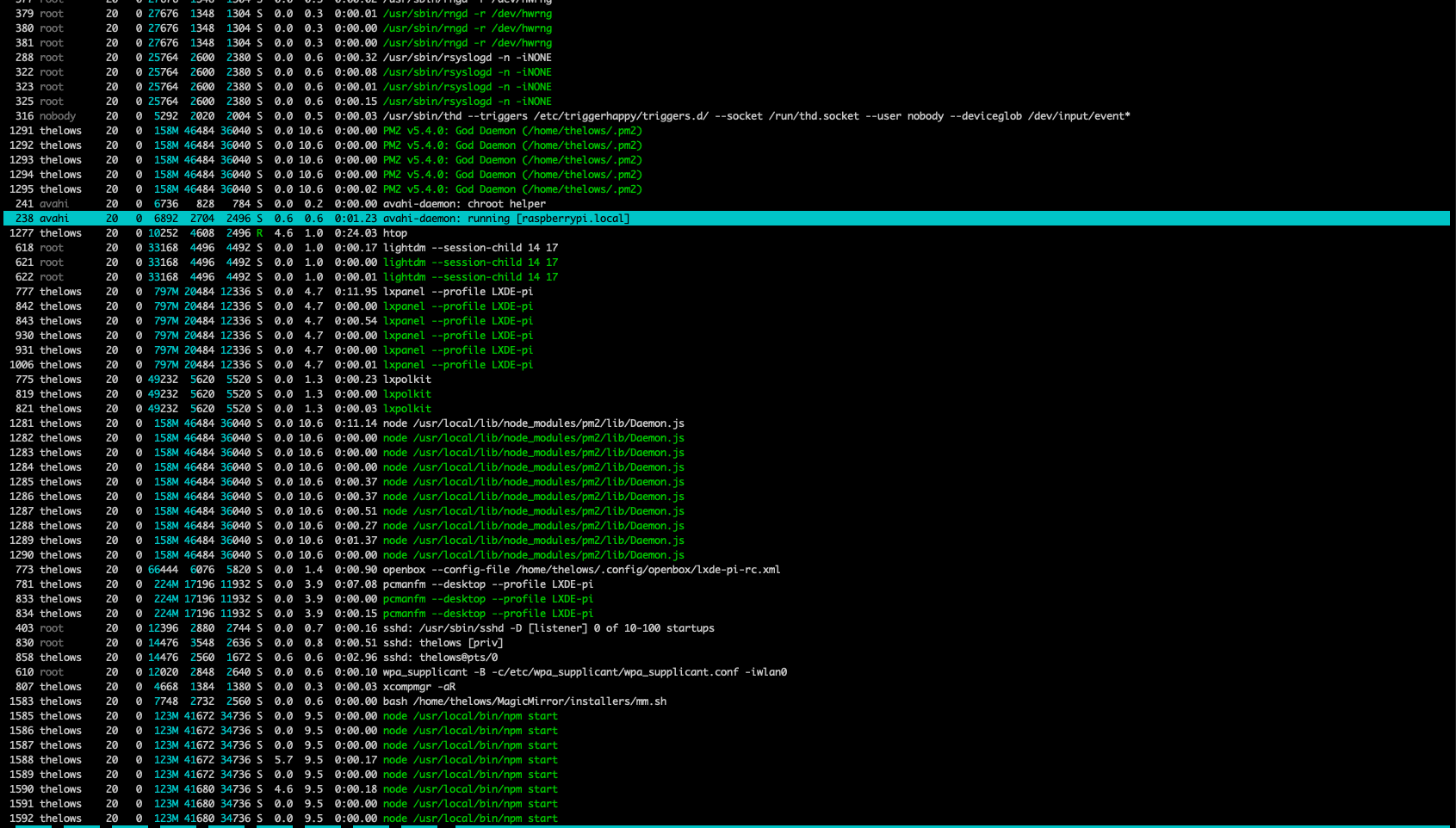
      Screenshot 2024-06-29 at 2.49.17 PM.png Screenshot 2024-06-29 at 2.49.33 PM.png

      1 Reply Last reply Reply Quote 0
      • C Offline
        capedbuffethero
        last edited by capedbuffethero

        I also noticed that pip and pip3 instances are hogging the CPU. That can’t be good either!
        I restarted, so I’m not sure why pip is running.

        Screenshot 2024-06-29 at 2.57.01 PM.png

        asking for help here! I’m a java dev, but now in management roles, so I don’t do this stuff as much. I can be a good contributor to the community, I just need a little help with getting off the ground, promise!

        S 1 Reply Last reply Reply Quote 0
        • S Do not disturb
          sdetweil @capedbuffethero
          last edited by sdetweil

          @capedbuffethero you can’t start w both npm AND pm2… one or the other

          pm2 stop all
          only one can use the port at a time

          pip sounds like a module

          Sam

          How to add modules

          learning how to use browser developers window for css changes

          C 1 Reply Last reply Reply Quote 0
          • C Offline
            capedbuffethero @sdetweil
            last edited by

            @sdetweil pip is the python package manager

            S evroomE 2 Replies Last reply Reply Quote 0
            • S Do not disturb
              sdetweil @capedbuffethero
              last edited by

              @capedbuffethero I understand that. MagicMirror doesn’t use python.

              Sam

              How to add modules

              learning how to use browser developers window for css changes

              1 Reply Last reply Reply Quote 0
              • evroomE Offline
                evroom @capedbuffethero
                last edited by

                @capedbuffethero
                Hi there,

                Concerning pip you will need to find out what is calling it.
                Normally it is not a daemon process, meaning something else is calling it.

                Can you get the following output:

                ps aux | grep pip
                

                And then using the lowest PID found:

                pstree -a <PID>
                

                You can find the lowest PID using:

                ps aux | grep pid | awk '{print $2}' | sort -u
                

                You can also check if there is a cronjob running that is calling pip:

                crontab -l | egrep 'pip|python'
                

                From there we can Google ourselves to a solution :-)

                Best regards,

                E.J.

                MagicMirror version: 2.33.0
                Raspberry Pi 4 Model B Rev 1.5 (8 GB RAM)
                Raspbian GNU/Linux 12 (bookworm)

                Test environment:
                MagicMirror version: v2.33.0
                Raspberry Pi 3 Model B Plus Rev 1.3 (1 GB RAM)
                Raspbian GNU/Linux 12 (bookworm)

                1 Reply Last reply Reply Quote 1

                Hello! It looks like you're interested in this conversation, but you don't have an account yet.

                Getting fed up of having to scroll through the same posts each visit? When you register for an account, you'll always come back to exactly where you were before, and choose to be notified of new replies (either via email, or push notification). You'll also be able to save bookmarks and upvote posts to show your appreciation to other community members.

                With your input, this post could be even better 💗

                Register Login

                • 1 / 1
                • First post
                  Last post
                Enjoying MagicMirror? Please consider a donation!
                MagicMirror created by Michael Teeuw.
                Forum managed by Sam, technical setup by Karsten.
                This forum is using NodeBB as its core | Contributors
                Contact | Privacy Policy