MagicMirror Forum
    • Recent
    • Tags
    • Unsolved
    • Solved
    • MagicMirror² Repository
    • Documentation
    • 3rd-Party-Modules
    • Donate
    • Discord
    • Register
    • Login
    A New Chapter for MagicMirror: The Community Takes the Lead
    Read the statement by Michael Teeuw here.

    MMM-WifiPassword, oudated ?

    Scheduled Pinned Locked Moved Solved Troubleshooting
    25 Posts 2 Posters 1.7k Views 2 Watching
    Loading More Posts
    • Oldest to Newest
    • Newest to Oldest
    • Most Votes
    Reply
    • Reply as topic
    Log in to reply
    This topic has been deleted. Only users with topic management privileges can see it.
    • J Offline
      Jben1969
      last edited by

      Hello, I tried to fetch the module MMM-WifiPassword, but I need a Username and a password to get it. My Name and Password doesn’t fit.
      Anybody any idea how I can download and install the repository ?
      Thx Jochen

      S 1 Reply Last reply Reply Quote 0
      • S Offline
        sdetweil @Jben1969
        last edited by

        @Jben1969 i just tested that both logged in and not

        can you show the link you are using, and describe where you got it from?

        Sam

        How to add modules

        learning how to use browser developers window for css changes

        J 1 Reply Last reply Reply Quote 0
        • J Offline
          Jben1969 @sdetweil
          last edited by

          I get it from github, https://github.com/TeraTech/MMM-WiFiPassword, and I follow the installation guide.
          "Installation

          In your terminal, change to your Magic Mirror module directory

          cd ~/MagicMirror/modules

          Clone this repository git clone git@github.com:TeraTech/MMM-WiFiPassword.git OR git clone https://github.com/TeraTech/MMM-WiFiPassword.git"

          Then, in terminal, I should enter username an password. I tried my github isername and password, but I think my account is not, what is recommend.

          Jochen

          S 1 Reply Last reply Reply Quote 0
          • S Offline
            sdetweil @Jben1969
            last edited by

            @Jben1969 can you show me the git clone command string you are using

            Sam

            How to add modules

            learning how to use browser developers window for css changes

            J 1 Reply Last reply Reply Quote 0
            • J Offline
              Jben1969 @sdetweil
              last edited by

              @sdetweil

              First I try this

              git clone https://github.com/TeraTech/MMM-WiFiPassword.git
              The download starts, but short after the download there is the question about the username and after that the password.

              The same when I tried the second method
              git clone git@github.com:TeraTech/MMM-WiFiPassword.git

              Can you try it on your raspberry / magicmirror?

              Thx
              Jochen

              S 1 Reply Last reply Reply Quote 0
              • S Offline
                sdetweil @Jben1969
                last edited by

                @Jben1969 i tried it without problems

                can you login to github before trying the git clone

                Sam

                How to add modules

                learning how to use browser developers window for css changes

                J 1 Reply Last reply Reply Quote 0
                • J Offline
                  Jben1969 @sdetweil
                  last edited by

                  @sdetweil Hello, many thanks. I tried it and now I have no Problems with the download. The module runs. Whatever I have made a mistake.
                  Thank you

                  Jochen

                  S 1 Reply Last reply Reply Quote 0
                  • S Offline
                    sdetweil @Jben1969
                    last edited by

                    @Jben1969 said in MMM-WifiPassword, oudated ?:

                    @sdetweil Hello, many thanks. I tried it and now I have no Problems with the download. The module runs. Whatever I have made a mistake.
                    Thank you

                    Jochen

                    mistake?

                    Sam

                    How to add modules

                    learning how to use browser developers window for css changes

                    J 1 Reply Last reply Reply Quote 0
                    • J Offline
                      Jben1969 @sdetweil
                      last edited by

                      @sdetweil I don’t know the mistake I made when I install the module, but now I have another problem, the instalation was alright, but I can’t see the QR Code anywhere. I have no special characters or something in my password or SSID. I copied the array from the README.md into my config.

                      Any idea ?

                      Jochen

                      S 1 Reply Last reply Reply Quote 0
                      • S Offline
                        sdetweil @Jben1969
                        last edited by

                        @Jben1969 can you show me that part of your config.js

                        Sam

                        How to add modules

                        learning how to use browser developers window for css changes

                        1 Reply Last reply Reply Quote 0
                        • J Offline
                          Jben1969
                          last edited by

                          {
                          		module: 'MMM-WiFiPassword',
                          position: "top_left",
                            config: {
                              //See 'Configuration options' for more information.
                              network: "FRITZBoxGzugang", 
                              password: "Xxxxxxxxxxx",
                          		*this I tried before*
                          

                          // module: “MMM-WiFiPassword”,
                          // position: “top_right”,
                          // header: “Gastzugang”,
                          // config: {
                          // qrSize : 100,
                          // authType: “WPA”,
                          // network: “FRITZBoxGzugang”,
                          // password: “Xxxxxxxxxxx”,
                          // debug: true,
                          }
                          },

                          S 1 Reply Last reply Reply Quote 0
                          • S Offline
                            sdetweil @Jben1969
                            last edited by sdetweil

                            @Jben1969 I used your config above and see this
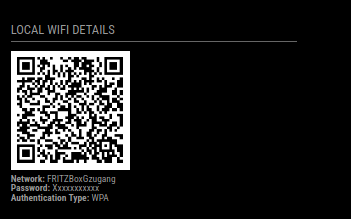
                            Screenshot at 2024-09-01 20-03-18.png

                            one question… each area is a stack, top down,
                            if there are too many modules in a position, it will be clipped at the bottom of the screen

                            I put the module as the first in the modules list. try that

                                modules: [
                                  {
                                  module: 'MMM-WiFiPassword',
                                  position: "top_left",
                                  config: {
                                    //See 'Configuration options' for more information.
                                    network: "FRITZBoxGzugang",
                                    password: "Xxxxxxxxxxx",
                                    }
                                  },
                            

                            Sam

                            How to add modules

                            learning how to use browser developers window for css changes

                            J 1 Reply Last reply Reply Quote 0
                            • J Offline
                              Jben1969 @sdetweil
                              last edited by

                              @sdetweil well, I tried, your suggestion but the Wifi QR won´t appear, can you help me to debug the config, or can you tell me where I can find the debug protocol ?

                              Thanks

                              Jochen

                              S 1 Reply Last reply Reply Quote 0
                              • S Offline
                                sdetweil @Jben1969
                                last edited by

                                @Jben1969 because the module is all in browser., all the logging will be found in the browser developers console tab

                                ctrl-shift-i
                                select the console tab
                                and add some unique part of the module name to the filter field

                                wifi

                                in this case

                                Sam

                                How to add modules

                                learning how to use browser developers window for css changes

                                1 Reply Last reply Reply Quote 0
                                • J Offline
                                  Jben1969
                                  last edited by

                                  Load script: modules/MMM-WiFiPassword/MMM-WiFiPassword.js
                                  :8080/modules/MMM-Wi…M-WiFiPassword.js:1
                                  Failed to load resource: the server responded with a status of 404 (Not Found)
                                  localhost/:1 Refused to execute script from ‘http://localhost:8080/modules/MMM-WiFiPassword/MMM-WiFiPassword.js’ because its MIME type (‘text/html’) is not executable, and strict MIME type checking is enabled.
                                  loader.js:168 Error on loading script: modules/MMM-WiFiPassword/MMM-WiFiPassword.js

                                  S 1 Reply Last reply Reply Quote 0
                                  • J Offline
                                    Jben1969
                                    last edited by

                                    Hi Sam,
                                    I send the message from browser in a separate post, because.
                                    It´s seems that there ios a bug in my configuration.

                                    Look at my other answer please.

                                    thanks

                                    Jochen

                                    1 Reply Last reply Reply Quote 0
                                    • S Offline
                                      sdetweil @Jben1969
                                      last edited by

                                      @Jben1969 very interesting. We added checks for missing files in this release, so this type error should not occur

                                      Can you do

                                      cd ~/MagicMirror/modules
                                      ls -laF
                                      cd MMM-WifiPassword
                                      ls -laF
                                      

                                      And post the results, maybe it’s a permissions problem

                                      Sam

                                      How to add modules

                                      learning how to use browser developers window for css changes

                                      1 Reply Last reply Reply Quote 0
                                      • J Offline
                                        Jben1969
                                        last edited by

                                        raspberry@MagicMirror2:~/MagicMirror/modules $ ls -laF
                                        insgesamt 76
                                        drwxr-xr-x 19 raspberry raspberry 4096 30. Aug 14:22 ./
                                        drwxr-xr-x 17 raspberry raspberry 4096 27. Aug 00:23 …/
                                        drwxr-xr-x 10 raspberry raspberry 4096 4. Mai 17:58 default/
                                        drwxr-xr-x 6 raspberry raspberry 4096 4. Mai 17:10 MMM-CalendarExt3/
                                        drwxr-xr-x 5 raspberry raspberry 4096 24. Feb 2024 MMM-CalendarExt3Agenda/
                                        drwxr-xr-x 8 raspberry raspberry 4096 22. Mär 15:27 MMM-Fuel/
                                        drwxr-xr-x 13 raspberry raspberry 4096 10. Feb 2024 MMM-GoogleAssistant/
                                        drwxr-xr-x 5 raspberry raspberry 4096 21. Mär 16:39 MMM-GoogleCalendar/
                                        drwxr-xr-x 5 raspberry raspberry 4096 10. Feb 2024 MMM-GoogleMapsTraffic/
                                        drwxr-xr-x 6 raspberry raspberry 4096 10. Feb 2024 MMM-GooglePhotos/
                                        drwxr-xr-x 3 raspberry raspberry 4096 27. Aug 00:12 MMM-GuestWifiQR/
                                        drwxr-xr-x 6 raspberry raspberry 4096 10. Feb 2024 MMM-MQTT/
                                        drwxr-xr-x 4 raspberry raspberry 4096 10. Feb 2024 MMM-OpenmapWeather/
                                        drwxr-xr-x 6 raspberry raspberry 4096 16. Jun 17:44 MMM-OpenWeatherMapForecast/
                                        drwxr-xr-x 10 raspberry raspberry 4096 21. Mär 17:14 MMM-Pir/
                                        drwxr-xr-x 4 raspberry raspberry 4096 23. Feb 2024 MMM-PIR-Sensor/
                                        drwxr-xr-x 10 raspberry raspberry 4096 22. Mär 17:00 MMM-soccer/
                                        drwxr-xr-x 4 raspberry raspberry 4096 18. Feb 2024 MMM-Wallpaper/
                                        drwxr-xr-x 4 raspberry raspberry 4096 5. Sep 12:57 MMM-WifiPassword/
                                        raspberry@MagicMirror2:~/MagicMirror/modules $ cd MMM-WifiPassword
                                        raspberry@MagicMirror2:~/MagicMirror/modules/MMM-WifiPassword $ ls -laF
                                        insgesamt 80
                                        drwxr-xr-x 4 raspberry raspberry 4096 5. Sep 12:57 ./
                                        drwxr-xr-x 19 raspberry raspberry 4096 30. Aug 14:22 …/
                                        drwxr-xr-x 8 raspberry raspberry 4096 30. Aug 23:43 .git/
                                        drwxr-xr-x 3 raspberry raspberry 4096 30. Aug 14:22 .github/
                                        -rw-r–r-- 1 raspberry raspberry 6 30. Aug 14:22 .gitignore
                                        -rw-r–r-- 1 raspberry raspberry 1061 30. Aug 14:22 LICENSE
                                        -rw-r–r-- 1 raspberry raspberry 266 30. Aug 14:22 MMM-WiFiPassword.css
                                        -rw-r–r-- 1 raspberry raspberry 4482 5. Sep 12:57 MMM-WiFiPassword.js
                                        -rw-r–r-- 1 raspberry raspberry 13901 30. Aug 14:22 mm.png
                                        -rw-r–r-- 1 raspberry raspberry 19927 30. Aug 14:22 qrcode.min.js
                                        -rw-r–r-- 1 raspberry raspberry 2697 30. Aug 14:22 README.md
                                        -rw-r–r-- 1 raspberry raspberry 804 30. Aug 14:22 WifiPasswordModal.njk

                                        S 2 Replies Last reply Reply Quote 0
                                        • S Offline
                                          sdetweil @Jben1969
                                          last edited by

                                          @Jben1969 is MagicMirror running under the raspberry userid?

                                          if using pm2 do
                                          pm2 stop all

                                          then
                                          cd ~/Magicmirror
                                          npm start

                                          Sam

                                          How to add modules

                                          learning how to use browser developers window for css changes

                                          S 1 Reply Last reply Reply Quote 0
                                          • S Offline
                                            sdetweil @sdetweil
                                            last edited by

                                            @Jben1969 also, what are the MM config.js settings for

                                            address:
                                            port:
                                            ipWhitelist:
                                            

                                            Sam

                                            How to add modules

                                            learning how to use browser developers window for css changes

                                            1 Reply Last reply Reply Quote 0

                                            Hello! It looks like you're interested in this conversation, but you don't have an account yet.

                                            Getting fed up of having to scroll through the same posts each visit? When you register for an account, you'll always come back to exactly where you were before, and choose to be notified of new replies (either via email, or push notification). You'll also be able to save bookmarks and upvote posts to show your appreciation to other community members.

                                            With your input, this post could be even better 💗

                                            Register Login

                                            • 1
                                            • 2
                                            • 1 / 2
                                            • First post
                                              Last post
                                            Enjoying MagicMirror? Please consider a donation!
                                            MagicMirror created by Michael Teeuw.
                                            Forum managed by Sam, technical setup by Karsten.
                                            This forum is using NodeBB as its core | Contributors
                                            Contact | Privacy Policy