MagicMirror Forum
    • Recent
    • Tags
    • Unsolved
    • Solved
    • MagicMirror² Repository
    • Documentation
    • 3rd-Party-Modules
    • Donate
    • Discord
    • Register
    • Login
    A New Chapter for MagicMirror: The Community Takes the Lead
    Read the statement by Michael Teeuw here.

    Default Calendar stuck on loading

    Scheduled Pinned Locked Moved Solved Troubleshooting
    55 Posts 2 Posters 12.1k Views 2 Watching
    Loading More Posts
    • Oldest to Newest
    • Newest to Oldest
    • Most Votes
    Reply
    • Reply as topic
    Log in to reply
    This topic has been deleted. Only users with topic management privileges can see it.
    • R Offline
      rushmuzik
      last edited by

      Re: Calendar Module not working with Google Calendar

      Magic Mirror Default Calendar not working. Just stuck loading. I get this with the US Holidays link. I installed node-ical@0.16.1 and Electron@28.1.1. I even disabled IPv6.

      S 1 Reply Last reply Reply Quote 0
      • R Offline
        rushmuzik @sdetweil
        last edited by

        @sdetweil I reverted back to socket.io@4.7.2 that was used on MagicMirror@2.26.0 and that fixed the issue! I tried socket.io@4.7.5 but that didnt work. So I went back to @4.7.2 and that fixed it. It might just be a compatibility issue with Firefox ESR. Mystery Solved! Thanks for all your help!

        S 1 Reply Last reply Reply Quote 0
        • S Offline
          sdetweil @rushmuzik
          last edited by

          @rushmuzik can you show the output of npm start

          be careful some of the messages about calendar contain the full url from config

          Sam

          How to add modules

          learning how to use browser developers window for css changes

          S R 3 Replies Last reply Reply Quote 0
          • S Offline
            sdetweil @sdetweil
            last edited by

            @rushmuzik new calendar updates coming next release, jan 1

            depend on fixes in node-ical 0.20.1

            Sam

            How to add modules

            learning how to use browser developers window for css changes

            1 Reply Last reply Reply Quote 0
            • R Offline
              rushmuzik @sdetweil
              last edited by

              @sdetweil how do I show that?

              1 Reply Last reply Reply Quote 0
              • R Offline
                rushmuzik @sdetweil
                last edited by

                @sdetweil

                98dfb2cf-3d3b-40de-ad07-959515607fb7-image.png

                S 1 Reply Last reply Reply Quote 0
                • S Offline
                  sdetweil @rushmuzik
                  last edited by

                  @rushmuzik you have to be in the MagicMirror folder for npm start

                  Sam

                  How to add modules

                  learning how to use browser developers window for css changes

                  R 1 Reply Last reply Reply Quote 0
                  • R Offline
                    rushmuzik @sdetweil
                    last edited by

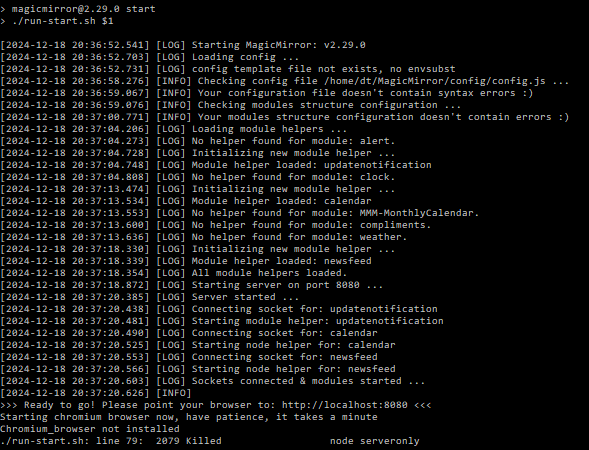
                    @sdetweil c340b558-01ef-4d33-bdc5-9fdabf234c3a-image.png

                    I apologize for my ignorance. Im a noob but I learn quickly. Im using firefox not chromium

                    S 1 Reply Last reply Reply Quote 0
                    • S Offline
                      sdetweil @rushmuzik
                      last edited by

                      @rushmuzik i’m confused, that is running my run-start script,
                      but setup for chromium not firefox.

                      if you are using this script and want firefox then you have to add the
                      export external_browser=firefox
                      before you do npm start

                      else my script will just loop

                      Sam

                      How to add modules

                      learning how to use browser developers window for css changes

                      R 3 Replies Last reply Reply Quote 0
                      • R Offline
                        rushmuzik @sdetweil
                        last edited by

                        @sdetweil after running your script I did the following

                        sudo apt-get remove chromium-browser
                        sudo apt autoremove

                        sudo apt-get update
                        sudo apt-get install firefox-esr

                        cd ~/MagicMirror
                        export external_browser=firefox
                        DISPLAY=:0 npm start

                        bash -c “$(curl -sL https://raw.githubusercontent.com/sdetweil/MagicMirror_scripts/master/fixuppm2.sh)”

                        cd ~/MagicMirror/
                        pm2 start MagicMirror

                        1 Reply Last reply Reply Quote 0
                        • R Offline
                          rushmuzik @sdetweil
                          last edited by

                          @sdetweil 83033128-b835-4ef6-921a-11ec18862e08-image.png

                          This is what I get from npm start now after running

                          export external_browser=firefox
                          DISPLAY=:0 npm start

                          1 Reply Last reply Reply Quote 0
                          • R Offline
                            rushmuzik @sdetweil
                            last edited by

                            @sdetweil This came after that. Its just stuck here now

                            ef7a3303-edcc-4336-ac33-8418416e9605-image.png

                            S 1 Reply Last reply Reply Quote 0
                            • S Offline
                              sdetweil @rushmuzik
                              last edited by sdetweil

                              @rushmuzik did firefox come up? those messages are from the server side

                              but they were initiated by the browser side so some browser started loading the page from the server

                              Sam

                              How to add modules

                              learning how to use browser developers window for css changes

                              R 1 Reply Last reply Reply Quote 0
                              • R Offline
                                rushmuzik @sdetweil
                                last edited by

                                @sdetweil Yes, it came up and is running. Everything is working except the calendar. Just stuck at loading…

                                S 1 Reply Last reply Reply Quote 0
                                • S Offline
                                  sdetweil @rushmuzik
                                  last edited by

                                  @rushmuzik and there should be messages on the server side

                                  Sam

                                  How to add modules

                                  learning how to use browser developers window for css changes

                                  R 1 Reply Last reply Reply Quote 0
                                  • R Offline
                                    rushmuzik @sdetweil
                                    last edited by

                                    @sdetweil Strangly I didnt see any fetch messages for the calendar.

                                    S 1 Reply Last reply Reply Quote 0
                                    • S Offline
                                      sdetweil @rushmuzik
                                      last edited by

                                      @rushmuzik interesting, can you show messages after
                                      the point your browser at message

                                      those would be after the browser loads the web page

                                      Sam

                                      How to add modules

                                      learning how to use browser developers window for css changes

                                      R 1 Reply Last reply Reply Quote 0
                                      • R Offline
                                        rushmuzik @sdetweil
                                        last edited by

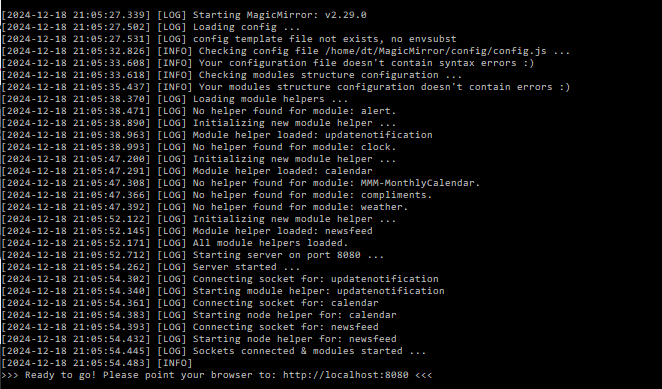
                                        @sdetweil This is as far as it goes. for some reason I dont get “Create new calendarfetcher for url:”

                                        59b898aa-3afd-4ae0-ace3-ebfb0d2b37e1-image.png

                                        S 1 Reply Last reply Reply Quote 0
                                        • S Offline
                                          sdetweil @rushmuzik
                                          last edited by

                                          @rushmuzik weird

                                          can you
                                          open the developers window and find the console tab and see if there is an error

                                          i don’t know for sure how to do that on firefox. i will check it out in the morning running this way

                                          Sam

                                          How to add modules

                                          learning how to use browser developers window for css changes

                                          R 1 Reply Last reply Reply Quote 0
                                          • R Offline
                                            rushmuzik @sdetweil
                                            last edited by

                                            @sdetweil Definitely appears to be some errors in the console. Its CTRL + SHIFT + I to access it in Firefox
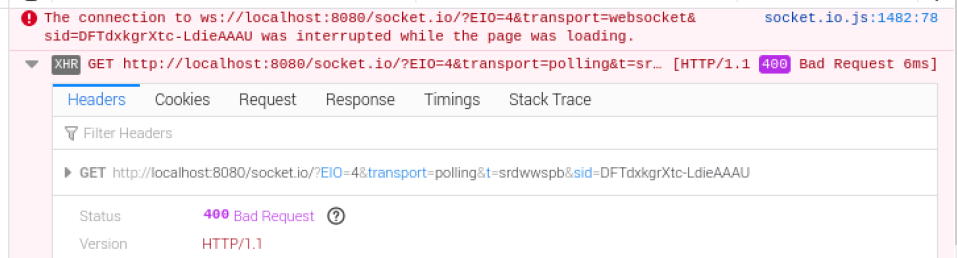
                                            efa86a79-46cb-4c0e-bfee-7ade3419c990-image.png

                                            S 1 Reply Last reply Reply Quote 0
                                            • S Offline
                                              sdetweil @rushmuzik
                                              last edited by

                                              @rushmuzik thanks will review

                                              Sam

                                              How to add modules

                                              learning how to use browser developers window for css changes

                                              S 1 Reply Last reply Reply Quote 0

                                              Hello! It looks like you're interested in this conversation, but you don't have an account yet.

                                              Getting fed up of having to scroll through the same posts each visit? When you register for an account, you'll always come back to exactly where you were before, and choose to be notified of new replies (either via email, or push notification). You'll also be able to save bookmarks and upvote posts to show your appreciation to other community members.

                                              With your input, this post could be even better 💗

                                              Register Login

                                              • 1
                                              • 2
                                              • 3
                                              • 3 / 3
                                              • First post
                                                Last post
                                              Enjoying MagicMirror? Please consider a donation!
                                              MagicMirror created by Michael Teeuw.
                                              Forum managed by Sam, technical setup by Karsten.
                                              This forum is using NodeBB as its core | Contributors
                                              Contact | Privacy Policy