Read the statement by Michael Teeuw here.
Made a birthday module
-
Unfortunately I have a few problems with your MMM-Birthday module. When I start the MM and there is a birthday, it is immediately displayed in the
middle (middle_center) on all pages without taking the position from config.js into account. The display is not yet dimmed on all pages.
Confetti is displayed in the correct position (lower_third) on the specified page as specified in the config.js, fireworks only sometimes but the
icons are missing!
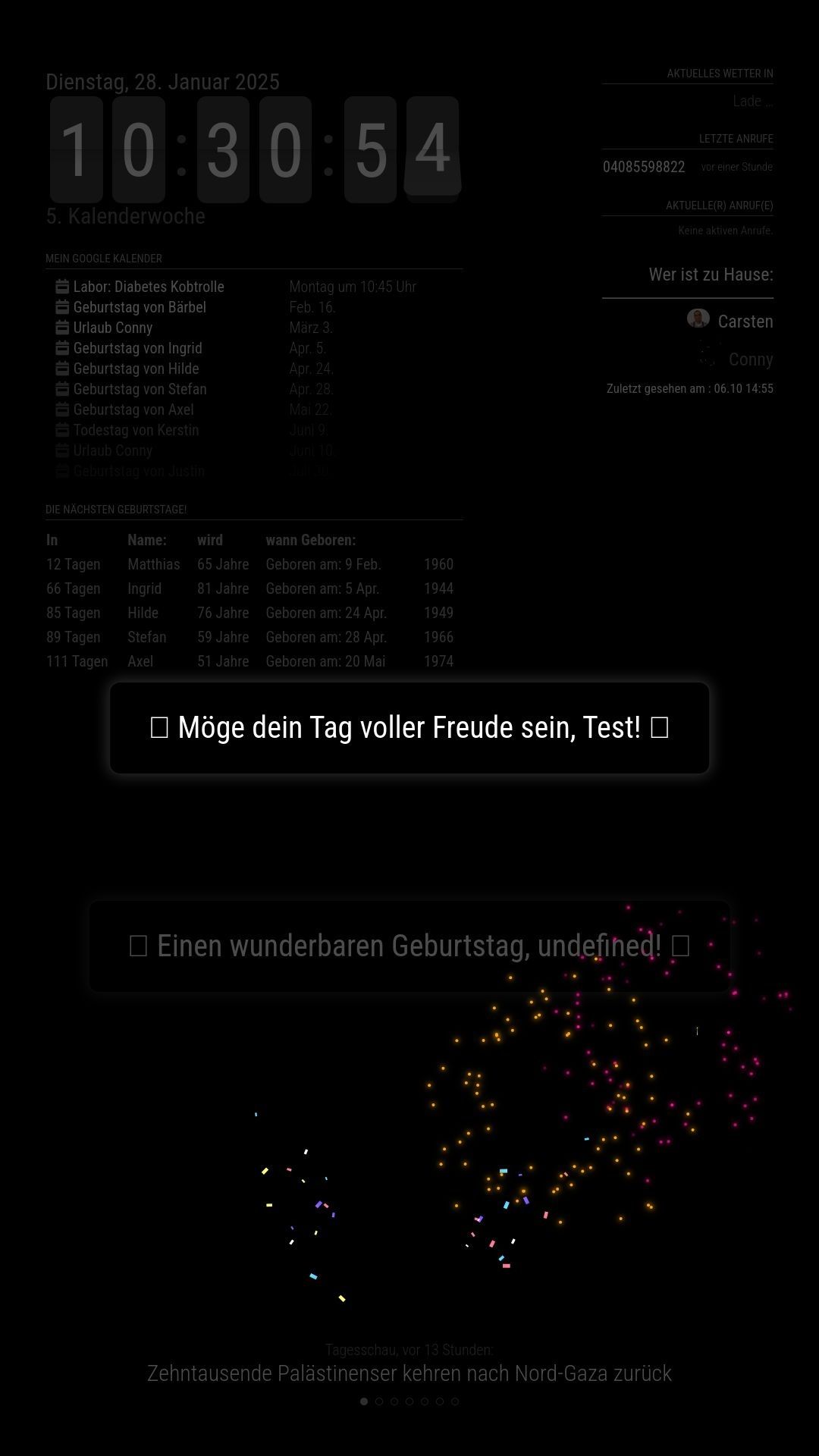
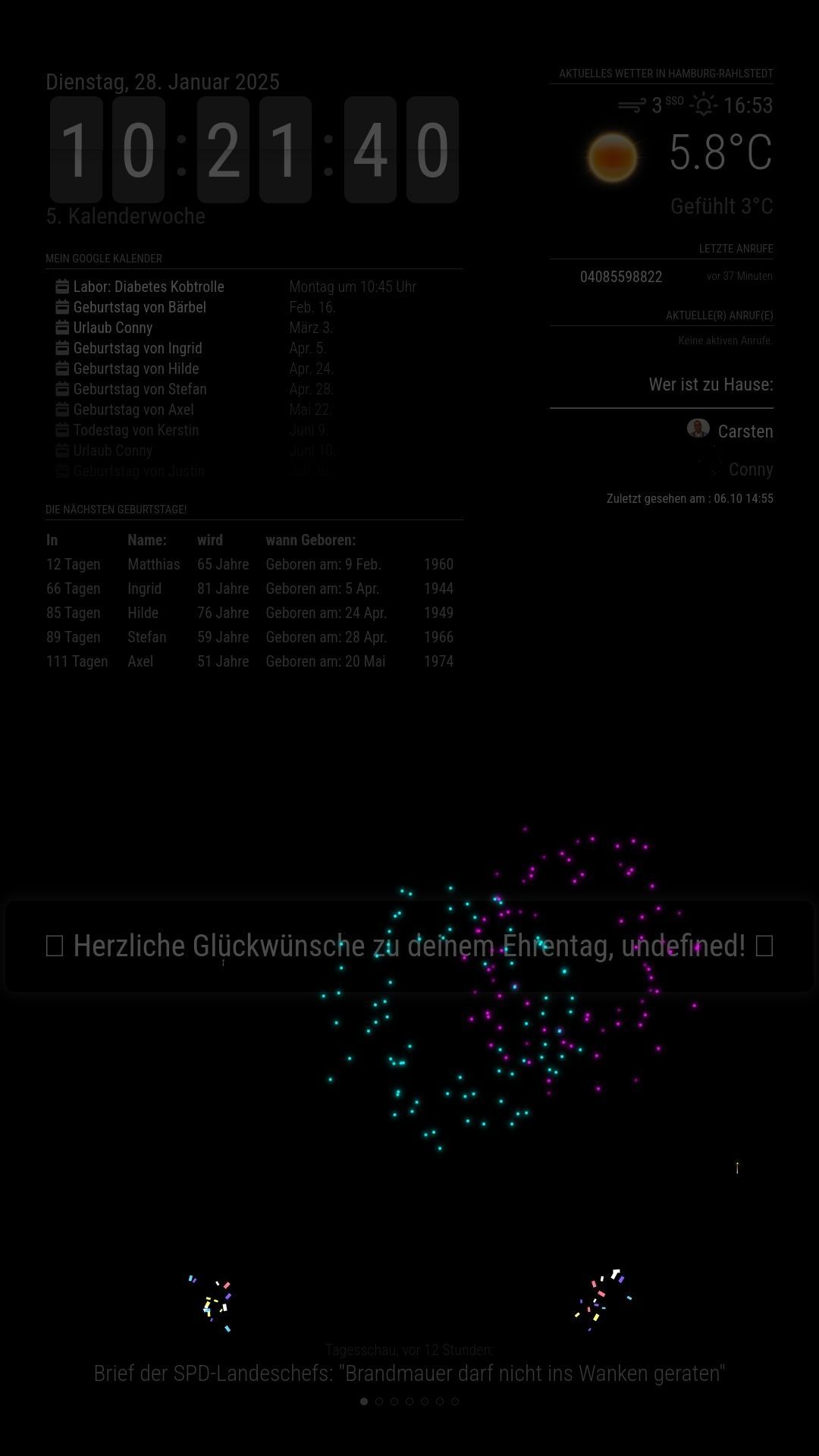
On the 2nd and all subsequent runs of the pages, the birthday is also displayed in the correct position (lower_third) but without a name (undefined!)
with confetti (always) and fireworks (only sometimes) but still without icons. The display now will be dimmed on all pages.
If I start the MM and there is no birthday, everything is fine, nothing is displayed.
If a birthday is coming up from 00:00, it will be displayed as described above in the correct position (lower_third) with confetti but without a
name (undefiend!), without fireworks and without icons. The display is darkened on all pages so that it is barely legible.See Pictures!
Hardware:
Raspberry Pi4 4GB RAM RaspiOS: Bookworm
Software:
MM 2.30 with MMM-Pages

-
@xIExodusIx Yes, there is an issue with it working alongside MMM-Pages. It seems that the methods I use to make it display interfere with MMM-Pages. MMM-Birthday doesn’t play well with others and tends to do its own thing, which doesn’t work with MMM-Pages. I’m working on a solution, but I haven’t had much time to spare lately.
-
see the
suspend() and resume() functions you can add to be notified when being hidden (suspend) and shown (resume)
-
@cgillinger
I was going to ask if you had found a work around for pages and MMM-Birthdays. I also tried it with pages and just one other module. MMM-Birthdays takes over even MMM-MPlayer and it is a bully too.
Always wanting to be on top… You idea is awesome, but the deployment needs a little work…
I am trying a few different setups now that I have a “test setup”.
I really want to make MPLayer and Birthdays to play nice on one of my displays. So far no bueno… -
@plainbroke they cannot be on same page
-
@plainbroke Working on it! The plain and simple truth is I took a few shortcuts with the behaviour of the module, and that came back to bite me. I’m working on it, but its in my spare time and right now I have precious little of it. But as soon as I get it fixed, I’ll post here.
-
@cgillinger
Sounds good. I will watch this form post for the update. -
I THINK I’ve solved it. At least, it works on my test installation MagicMirror running on Linux Mint. I’ve tested it with MMM-Pages and MMM-Carousel, and now the transitions are working. However, there are a few things to note:
It looks really weird when you first start MagicMirror. The reason is that the system starts up, immediately detects that a birthday is happening, and then triggers an untimed startup where the module isn’t fully initialized yet. It sorts itself out after the first transition, and since it’s somewhat of an edge case to start from scratch, I haven’t spent time fine-tuning it. A more reasonable scenario is that MagicMirror runs continuously, the day changes, and then the birthday event occurs—where everything works as expected.
I wasn’t able to make the module overlay existing modules while dimming them slightly, as it did in my first version. This is due to the fact that my initial solution aggressively took control over the display. To make it work with Pages and Carousel while respecting their handling of module visibility, I had to take a different approach. This means that the module now displays on its own. Im going to look into how this might be solved next, I’d really like for it to show above the other modules of that page. Because of this, I had to rename it and treat it as a completely separate module, now called “MMM-Birthday-Paged”. I’ll also mark the original module so that users who rely on module switchers don’t accidentally pick the wrong one.
As a bonus, after all my tweaking, I ended up with several different fireworks effects, so I left them in a separate subfolder. If you want to test them, just copy the existing “fireworks.js” from the root directory.
Give it a try, and I hope it works for you too!
-
@cgillinger instead of using the start function directly
Use the ALL_MODULES_STARTED notification
Then call your renamed startup() functionSee https://docs.magicmirror.builders/development/notifications.html#system-notifications
-
Hi cgillinger,
I tested your new modul, MMM-Birthday-Paged, sadly it does not work for me, it should shown up on my MagicMirror on Page 1 with a lot of more informations, it does, firework and confetti work well, but it kills all of my other Informations on that page and the icons in front and back of the “gratulation text” will not be displayed, exactly as mentioned in my post some Days earlier.
For me this version of yor Modul must have its own Page. -
@xIExodusIx On the first issue, that is, currently, by design as I outline in my previous post. I’m looking into if there is a method to fix it, but Im not there yet.
On the second issue that sounds like a font problem. What system are you on?
-
@cgillinger Hi cglinger,
I’m using a Raspberry Pi 4B 4GB with RaspiOS Bookworm
MM Version is 2.30,
npm Version is 10.9.2,
node Version is 23.6.1.I hope this would help.
-
@xIExodusIx said in Made a birthday module:
I’m using a Raspberry Pi 4B 4GB with RaspiOS Bookworm
MM Version is 2.30,
npm Version is 10.9.2,
node Version is 23.6.1.I think RaspiOS is missing the font. It might be solved by issuing:
sudo apt update
sudo apt upgrade -y
sudo apt install -y fonts-noto-color-emoji fonts-symbola ttf-ancient-fonts
and then rebuild font cache
sudo fc-cache -f -vThen restarting Magic Mirror and/or Pi.
And if I get the time, Ill look into a more elegant solution.
-
@cgillinger said in Made a birthday module:
@xIExodusIx said in Made a birthday module:
I’m using a Raspberry Pi 4B 4GB with RaspiOS Bookworm
MM Version is 2.30,
npm Version is 10.9.2,
node Version is 23.6.1.I think RaspiOS is missing the font. It might be solved by issuing:
sudo apt update
sudo apt upgrade -y
sudo apt install -y fonts-noto-color-emoji fonts-symbola ttf-ancient-fonts
and then rebuild font cache
sudo fc-cache -f -vThen restarting Magic Mirror and/or Pi.
And if I get the time, Ill look into a more elegant solution.
Thank you :-) , this solved my problem with the funny Icons in front and then end of the text.
Now the last problem(s) is to tell your Module not to hijack the whole page for itself and not to ignore the position where to be displayd on the mirror.
Your Module is really great, because there is a little bit of (funny) action on the mirror :-)
I’m sure you will solve the two Problems too an I’m looking forward for that. :-) -
@xIExodusIx I believe I’ve solved the issue where MMM-Birthday-Pages was taking over the entire screen when active. There’s now a new toggle, immersiveMode, which can be set to either “true” or “false”.
"false" allows the birthday celebration to overlay existing modules while keeping them visible.
"true" means only the birthday celebration is displayed, hiding everything else.
This also means you can have different behaviors on different Pages.
That said, I’ve only had time for a quick test, and it worked as expected on my Linux Mint installation. To be safe, I’ve uploaded it to a separate test repository. If it proves to be stable, I’ll merge it into the main one (I’m sure there are easier ways to do this, but I suck at Git). Repo URL:
https://github.com/cgillinger/mmm-Birthday-paged-test (and please note that you need to rename the folder to “mmm-Birthday-paged” after cloning)So, give it a try and let me know how it goes!
-
@cgillinger
Hi cgillinger,
I installe your new module “MMM-Birthday-Pages-test” as described, and added the “immersiveMode” to the MM2 main config file.
It seems to work partly, it accepted the positon, on my MM2 “lower_third”, but it ignores the page and it shows some debug informations with green text on the left side by partly hiding the funny icon and parts of the gratulation text.
The fireworks is displayd on fullscreen but in my short test i can’t see the confetti.A little idea for make it for user a bit easier: make it possible to set the firworks in the MM2 main config-file instead to copy it from to… somthing like “Fireworks: “spiral”” and let it load directly out of the of the “…/fireworks/” folder instead to copy it to the MMM-Birthday-Paged folder.
I will install the “old” MMM-Birthday-paged" and install it as I had it before. It has its own page on my MM2, and it worked very well.
-
@xIExodusIx Hi!
First, the green debug code was displayed because I forgot to set it to “false” by default. You can change this in config.js, but I’ll update the default setting so it only appears when the user wants it (ie when setting “true” in config.js).
Second, the module still has some quirks in its startup behavior—it requires a full cycle before everything runs smoothly. I’m working on it, but to be honest, it’s a low-priority fix since it’s a fringe case. Typically, the module will be running continuously, so birthday initialization should trigger when the mirror is already active. That’s probably why you’re not seeing the confetti right away.
Third, regarding the different versions of Fireworks—absolutely! The reason there are multiple versions is simply that I left them in from my experiments. I didn’t originally plan to include that functionality, but once the core features are fully ironed out, I’d be happy to refine and expand on it.
As for positioning, the module is currently designed to use the entire screen. I might look into allowing more customization in the future, but for now, it just places the message in the center and then launches confetti and fireworks.
When you say it “ignores the page,” are you referring to the page cycling?
I’ve also attached my test config.js. It has three pages, and after cycling through them to align the timings, the expected behavior should be:
Page 1 – Normal modules
Page 2 – Birthday celebration with dimming
Page 3 – Birthday celebration without dimming
Test config.js (which needs MMM-page-indicator). I’ve let this run for about an hour now, and everything (apart from weather module because its not part of the test) works as intended:
/* MagicMirror² Config for testing MMM-Birthday-Paged with immersiveMode */ let config = { address: "localhost", port: 8080, basePath: "/", ipWhitelist: ["127.0.0.1", "::ffff:127.0.0.1", "::1"], useHttps: false, httpsPrivateKey: "", httpsCertificate: "", language: "en", locale: "en-US", logLevel: ["INFO", "LOG", "WARN", "ERROR", "DEBUG"], timeFormat: 24, units: "metric", modules: [ { module: "alert", }, { module: "clock", position: "top_left", classes: "page1 page3" // Show on page 1 and 3 }, { module: "calendar", header: "Holidays", position: "top_left", classes: "page1 page3", // Show on page 1 and 3 config: { calendars: [ { symbol: "calendar-check", url: "webcal://www.calendarlabs.com/ical-calendar/ics/76/US_Holidays.ics" } ] } }, { module: "weather", position: "top_right", classes: "page1 page3", // Show on page 1 and 3 config: { weatherProvider: "yr", type: "current", location: "Stockholm", locationID: "2673730", // Stockholm's ID roundTemp: true } }, { module: "compliments", position: "lower_third", classes: "page1 page3", // Show on page 1 and 3 }, // MMM-Birthday-Paged with immersiveMode = true (dims modules) { module: "MMM-Birthday-Paged", position: "middle_center", classes: "page2", // Show on page 2 config: { birthdays: [ // Today's date (March 16, 2025) with name John { name: "John", date: "03-16" } ], fireworkDuration: "infinite", confettiDuration: "infinite", immersiveMode: true, // Dims other modules debug: true, startupDelay: 500 // Shorter startup delay for testing } }, // MMM-Birthday-Paged with immersiveMode = false (original module behavior) { module: "MMM-Birthday-Paged", position: "middle_center", classes: "page3", // Show on page 3 config: { birthdays: [ // Today's date (March 16, 2025) with name John { name: "John", date: "03-16" } ], fireworkDuration: "infinite", confettiDuration: "infinite", immersiveMode: false, // Does NOT dim other modules debug: true, startupDelay: 500 // Shorter startup delay for testing } }, // Page indicator to see which page is showing { module: "MMM-page-indicator", position: "bottom_bar", config: { pages: 3 } }, // MMM-pages for page switching { module: "MMM-pages", config: { modules: [ ["page1"], // Page 1 - Normal modules ["page2"], // Page 2 - Birthday celebration with dimming ["page3"] // Page 3 - Birthday celebration without dimming ], fixed: ["alert", "MMM-page-indicator"], rotationTime: 15000, // 15 seconds between page changes rotationDelay: 15000, animationTime: 1000 } } ] }; /*************** DO NOT EDIT THE LINE BELOW ***************/ if (typeof module !== "undefined") {module.exports = config;} -
@cgillinger
Instead of infinite can a time be used in the 2 Duration fields?
If I set it to the same value as my pages rotate in, I was wondering if that might fix the problem of it over riding into my other pages.?
Just a thought, but do you think it would work? -
@plainbroke Yes, that might do the trick! If MagicMirror manages to keep the two settings in sync.

Hello! It looks like you're interested in this conversation, but you don't have an account yet.
Getting fed up of having to scroll through the same posts each visit? When you register for an account, you'll always come back to exactly where you were before, and choose to be notified of new replies (either via email, or push notification). You'll also be able to save bookmarks and upvote posts to show your appreciation to other community members.
With your input, this post could be even better 💗
Register Login