MagicMirror Forum
    • Recent
    • Tags
    • Unsolved
    • Solved
    • MagicMirror² Repository
    • Documentation
    • 3rd-Party-Modules
    • Donate
    • Discord
    • Register
    • Login
    A New Chapter for MagicMirror: The Community Takes the Lead
    Read the statement by Michael Teeuw here.

    Made a birthday module

    Scheduled Pinned Locked Moved Entertainment
    39 Posts 4 Posters 11.8k Views 5 Watching
    Loading More Posts
    • Oldest to Newest
    • Newest to Oldest
    • Most Votes
    Reply
    • Reply as topic
    Log in to reply
    This topic has been deleted. Only users with topic management privileges can see it.
    • S Do not disturb
      sdetweil @cgillinger
      last edited by sdetweil

      @cgillinger the other thing you can do is add support for the

      suspend(){}
      and resume{}

      methods in your modulename.js

      suspend means being hidden

      resume means being shown

      Sam

      How to add modules

      learning how to use browser developers window for css changes

      C 1 Reply Last reply Reply Quote 1
      • plainbrokeP Offline
        plainbroke @cgillinger
        last edited by

        @cgillinger
        Well I tried your idea about putting MMM-Birthday in the “fixed” area in Pages.
        I guess I can try your idea of using it without MMM-Pages, but it would be better if you could fix your module per sdetweil’s suggestion.

        Slow learner. But trying anyways.
        MM is on Raspberry Pi 4B w/8gb ram loaded on a 128gb nvme drive.
        Running Trixie and the latest MM version.

        plainbrokeP 1 Reply Last reply Reply Quote 0
        • plainbrokeP Offline
          plainbroke @plainbroke
          last edited by

          @cgillinger
          I tried your idea, I renamed my config.js to config.js2
          copied the config.js.sample to config.js
          added this to the new config.js

          /* Config Sample
           *
           * For more information on how you can configure this file
           * see https://docs.magicmirror.builders/configuration/introduction.html
           * and https://docs.magicmirror.builders/modules/configuration.html
           *
           * You can use environment variables using a `config.js.template` file instead of `config.js`
           * which will be converted to `config.js` while starting. For more information
           * see https://docs.magicmirror.builders/configuration/introduction.html#enviromnent-variables
           */
          let config = {
                  address: "192.168.1.222",       // Address to listen on, can be:
                                                                  // - "localhost", "127.0.0.1", "::1" to listen on loopback interface
                                                                  // - another specific IPv4/6 to listen on a specific interface
                                                                  // - "0.0.0.0", "::" to listen on any interface
                                                                  // Default, when address config is left out or empty, is "localhost"
                  port: 8080,
                  basePath: "/",  // The URL path where MagicMirror² is hosted. If you are using a Reverse proxy
                  ipWhitelist: [],        // Set [] to allow all IP addresses
          
                  useHttps: false,                        // Support HTTPS or not, default "false" will use HTTP
                  httpsPrivateKey: "",    // HTTPS private key path, only require when useHttps is true
                  httpsCertificate: "",   // HTTPS Certificate path, only require when useHttps is true
          
                  language: "en",
                  locale: "en-US",   // this variable is provided as a consistent location
          
                  logLevel: ["INFO", "LOG", "WARN", "ERROR"], // Add "DEBUG" for even more logging
                  timeFormat: 12,
                  units: "imperical",
          
                  modules: [
                          {
                                  module: "MMM-Birthday",
                                  position: "middle_center", // Module will be centered d>
                                  config: {
                                          birthdays: [
                                                  { name: "Test1", date: "1-21" },
                                                  { name: "Test2", date: "1-22" },
                                                  { name: "Test3", date: "1-23" },
                                                  { name: "Test4", date: "1-24" },
                                                  { name: "Test5", date: "1-25" }
                                          ],
                                          fireworkDuration: "infinite", // or specific du>
                                          confettiDuration: "infinite"  // or specific du>
                                  }
                          },
                  ],
          };
          
          /*************** DO NOT EDIT THE LINE BELOW ***************/
          if (typeof module !== "undefined") { module.exports = config; }


          Still does not work.
          I removed and reinstalled
          Still nothing. Maybe it only works on MINT?

          Slow learner. But trying anyways.
          MM is on Raspberry Pi 4B w/8gb ram loaded on a 128gb nvme drive.
          Running Trixie and the latest MM version.

          S 1 Reply Last reply Reply Quote 0
          • S Do not disturb
            sdetweil @plainbroke
            last edited by

            @plainbroke you can also use the environment variable to set the config file

            export MM_CONFIG_FILE=config/xxxxx.js
            npm start
            or
            npm run server

            Both will use that config

            export MM_CONFIG_FILE=

            To reset it

            Sam

            How to add modules

            learning how to use browser developers window for css changes

            plainbrokeP 1 Reply Last reply Reply Quote 1
            • plainbrokeP Offline
              plainbroke @sdetweil
              last edited by

              @sdetweil
              I got it to work on another pi4 with only 4 mb ram.
              On the exact same setup
              Bookworm
              MM 2.30
              fully updated.
              It seems it has to be the only module besides some of the default ones.
              Which it covers up completely like the MPlayer does…
              Good thing I have an extra pi, I guess. The wifey likes it alot…
              I thought it would be cool add-on for my main mirror that is in the living room right above the TV. Gives us something to focus on during commercial’s…
              Updated your MMM-Config. LOOKING better every update…

              Slow learner. But trying anyways.
              MM is on Raspberry Pi 4B w/8gb ram loaded on a 128gb nvme drive.
              Running Trixie and the latest MM version.

              S 1 Reply Last reply Reply Quote 0
              • S Do not disturb
                sdetweil @plainbroke
                last edited by

                @plainbroke if you use my fork of mmm-pages it has the ability to show different pages for different amounts of time

                See the pageTimeout property

                Sam

                How to add modules

                learning how to use browser developers window for css changes

                plainbrokeP 1 Reply Last reply Reply Quote 0
                • plainbrokeP Offline
                  plainbroke @sdetweil
                  last edited by

                  @sdetweil
                  I am using your mmm-pages. I just haven’t gotten that involved in it yet…
                  I know sooner or later I will definitely take advantage of the different amounts of viewable content.

                  Slow learner. But trying anyways.
                  MM is on Raspberry Pi 4B w/8gb ram loaded on a 128gb nvme drive.
                  Running Trixie and the latest MM version.

                  1 Reply Last reply Reply Quote 1
                  • C Offline
                    cgillinger @sdetweil
                    last edited by cgillinger

                    @sdetweil said in Made a birthday module:

                    @cgillinger the other thing you can do is add support for the

                    suspend(){}
                    and resume{}

                    methods in your modulename.js

                    suspend means being hidden

                    resume means being shown

                    Done, but haven’t tried it with MMM-Pages yet, a bit to busy at work to install and try it that way. But its in the repo now.

                    plainbrokeP 1 Reply Last reply Reply Quote 0
                    • plainbrokeP Offline
                      plainbroke @cgillinger
                      last edited by

                      @cgillinger
                      Works on the fireworks, but not on the MESSAGE part, It stays on the screen.
                      The fireworks came and went with the page it was supposed to.

                      Slow learner. But trying anyways.
                      MM is on Raspberry Pi 4B w/8gb ram loaded on a 128gb nvme drive.
                      Running Trixie and the latest MM version.

                      C 1 Reply Last reply Reply Quote 0
                      • C Offline
                        cgillinger @plainbroke
                        last edited by

                        @plainbroke said in Made a birthday module:

                        @cgillinger
                        Works on the fireworks, but not on the MESSAGE part, It stays on the screen.
                        The fireworks came and went with the page it was supposed to.

                        This annoys the hell out of me, if I get the time, I’ll try to set up a MM with MMM-Pages to test it here.

                        But to be clear:

                        The fireworks (and confetti?) works
                        But the message a) doesn’t show or b) shows, but does not get removed when MMM-Pages initiate page change?

                        S 1 Reply Last reply Reply Quote 0
                        • S Do not disturb
                          sdetweil @cgillinger
                          last edited by

                          @cgillinger b

                          Sam

                          How to add modules

                          learning how to use browser developers window for css changes

                          C 1 Reply Last reply Reply Quote 0
                          • C Offline
                            cgillinger @sdetweil
                            last edited by

                            @sdetweil said in Made a birthday module:

                            @cgillinger b

                            Huh?

                            S 1 Reply Last reply Reply Quote 0
                            • S Do not disturb
                              sdetweil @cgillinger
                              last edited by

                              @cgillinger you said a or b

                              I responded he said b

                              Sam

                              How to add modules

                              learning how to use browser developers window for css changes

                              plainbrokeP 1 Reply Last reply Reply Quote 1
                              • plainbrokeP Offline
                                plainbroke @sdetweil
                                last edited by

                                @cgillinger
                                As Sam said b it stays on the screen always. Just the message though.
                                Sorry it annoys you so.
                                Take your time I am not in a hurry, never am.
                                Just thought I would let you know. I am sure others are watching this to add to their pages too…

                                Slow learner. But trying anyways.
                                MM is on Raspberry Pi 4B w/8gb ram loaded on a 128gb nvme drive.
                                Running Trixie and the latest MM version.

                                1 Reply Last reply Reply Quote 1
                                • X Offline
                                  xIExodusIx
                                  last edited by

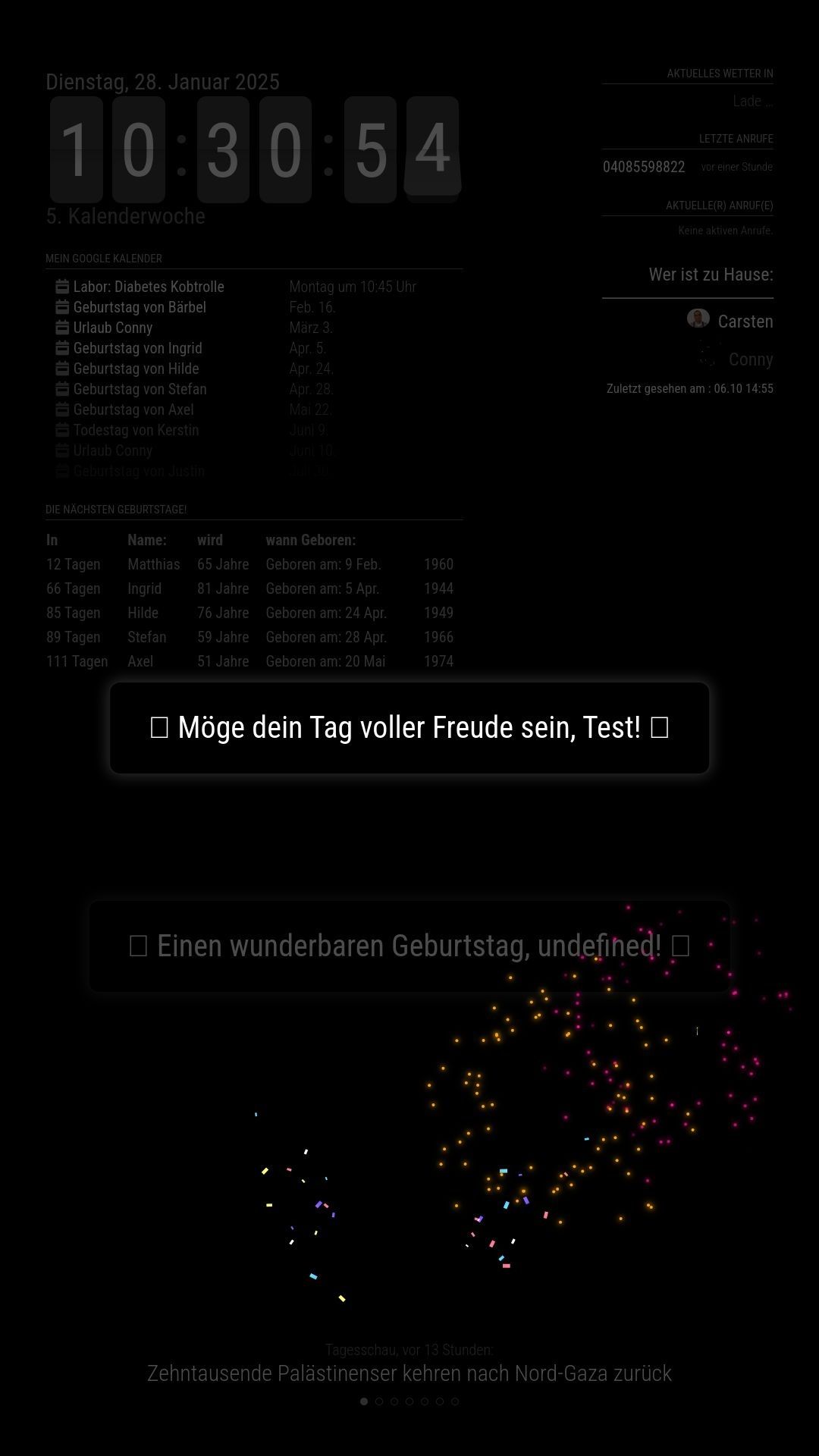
                                  Unfortunately I have a few problems with your MMM-Birthday module. When I start the MM and there is a birthday, it is immediately displayed in the
                                  middle (middle_center) on all pages without taking the position from config.js into account. The display is not yet dimmed on all pages.
                                  Confetti is displayed in the correct position (lower_third) on the specified page as specified in the config.js, fireworks only sometimes but the
                                  icons are missing!
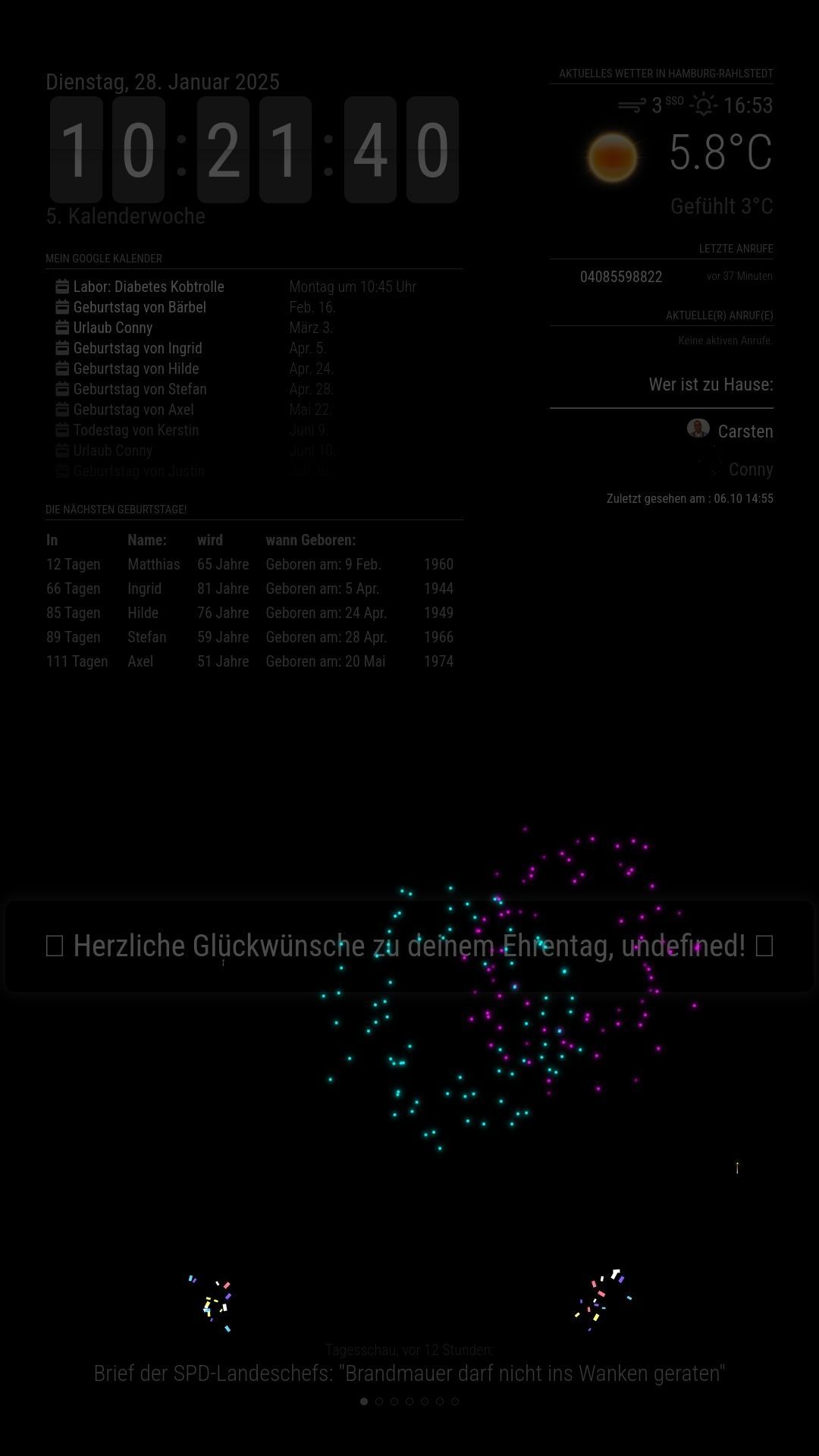
                                  On the 2nd and all subsequent runs of the pages, the birthday is also displayed in the correct position (lower_third) but without a name (undefined!)
                                  with confetti (always) and fireworks (only sometimes) but still without icons. The display now will be dimmed on all pages.
                                  If I start the MM and there is no birthday, everything is fine, nothing is displayed.
                                  If a birthday is coming up from 00:00, it will be displayed as described above in the correct position (lower_third) with confetti but without a
                                  name (undefiend!), without fireworks and without icons. The display is darkened on all pages so that it is barely legible.

                                  See Pictures!

                                  Hardware:
                                  Raspberry Pi4 4GB RAM RaspiOS: Bookworm
                                  Software:
                                  MM 2.30 with MMM-Pages
                                  MM2.30_Birthday-1_First_Run.jpg MM2.30_Birthday-2_All_other_Runs.jpg MM2.30_Birthday-3.jpg

                                  C 1 Reply Last reply Reply Quote 0
                                  • C Offline
                                    cgillinger @xIExodusIx
                                    last edited by

                                    @xIExodusIx Yes, there is an issue with it working alongside MMM-Pages. It seems that the methods I use to make it display interfere with MMM-Pages. MMM-Birthday doesn’t play well with others and tends to do its own thing, which doesn’t work with MMM-Pages. I’m working on a solution, but I haven’t had much time to spare lately.

                                    S 1 Reply Last reply Reply Quote 0
                                    • S Do not disturb
                                      sdetweil @cgillinger
                                      last edited by

                                      @cgillinger

                                      see the

                                      suspend() and resume() functions you can add to be notified when being hidden (suspend) and shown (resume)

                                      Sam

                                      How to add modules

                                      learning how to use browser developers window for css changes

                                      plainbrokeP 1 Reply Last reply Reply Quote 2
                                      • plainbrokeP Offline
                                        plainbroke @sdetweil
                                        last edited by

                                        @cgillinger
                                        I was going to ask if you had found a work around for pages and MMM-Birthdays. I also tried it with pages and just one other module. MMM-Birthdays takes over even MMM-MPlayer and it is a bully too.
                                        Always wanting to be on top… You idea is awesome, but the deployment needs a little work…
                                        I am trying a few different setups now that I have a “test setup”.
                                        I really want to make MPLayer and Birthdays to play nice on one of my displays. So far no bueno…

                                        Slow learner. But trying anyways.
                                        MM is on Raspberry Pi 4B w/8gb ram loaded on a 128gb nvme drive.
                                        Running Trixie and the latest MM version.

                                        S C 2 Replies Last reply Reply Quote 0
                                        • S Do not disturb
                                          sdetweil @plainbroke
                                          last edited by

                                          @plainbroke they cannot be on same page

                                          Sam

                                          How to add modules

                                          learning how to use browser developers window for css changes

                                          1 Reply Last reply Reply Quote 0
                                          • C Offline
                                            cgillinger @plainbroke
                                            last edited by

                                            @plainbroke Working on it! The plain and simple truth is I took a few shortcuts with the behaviour of the module, and that came back to bite me. I’m working on it, but its in my spare time and right now I have precious little of it. But as soon as I get it fixed, I’ll post here.

                                            plainbrokeP 1 Reply Last reply Reply Quote 0

                                            Hello! It looks like you're interested in this conversation, but you don't have an account yet.

                                            Getting fed up of having to scroll through the same posts each visit? When you register for an account, you'll always come back to exactly where you were before, and choose to be notified of new replies (either via email, or push notification). You'll also be able to save bookmarks and upvote posts to show your appreciation to other community members.

                                            With your input, this post could be even better 💗

                                            Register Login

                                            • 1
                                            • 2
                                            • 1 / 2
                                            • First post
                                              Last post
                                            Enjoying MagicMirror? Please consider a donation!
                                            MagicMirror created by Michael Teeuw.
                                            Forum managed by Sam, technical setup by Karsten.
                                            This forum is using NodeBB as its core | Contributors
                                            Contact | Privacy Policy