Read the statement by Michael Teeuw here.
MMM-Remote-Control
-
Hey everyone!
Even though MMM-Remote-Control is the most popular third-party MagicMirror² module (measured by GitHub stars), it looks like it never properly introduced here in the forum. Today’s v4 release seems like the perfect opportunity to change that!
What is MMM-Remote-Control?
MMM-Remote-Control lets you control your MagicMirror² from any device on your network – your phone, tablet, or computer. So you can control your mirror from your couch using your cell phone, for example.
No need to SSH into your Pi or edit config files manually anymore. With a simple web interface, you can:- Show/hide modules on the fly
- Adjust brightness and color temperature
- Update modules and MagicMirror² itself
- Install new modules directly from the interface
- Edit your config.js with a visual editor
- Restart or shut down your mirror
- Send notifications and alerts
- Control your monitor (turn on/off)
- And much more through a comprehensive REST API
How to use it?
Just follow the instructions on the GitHub page.
What’s new in v4?
This release is the biggest update in years – a complete modernization of both the user interface and the underlying code:
For Users:
- Completely redesigned interface – Modern look, smoother animations, better usability
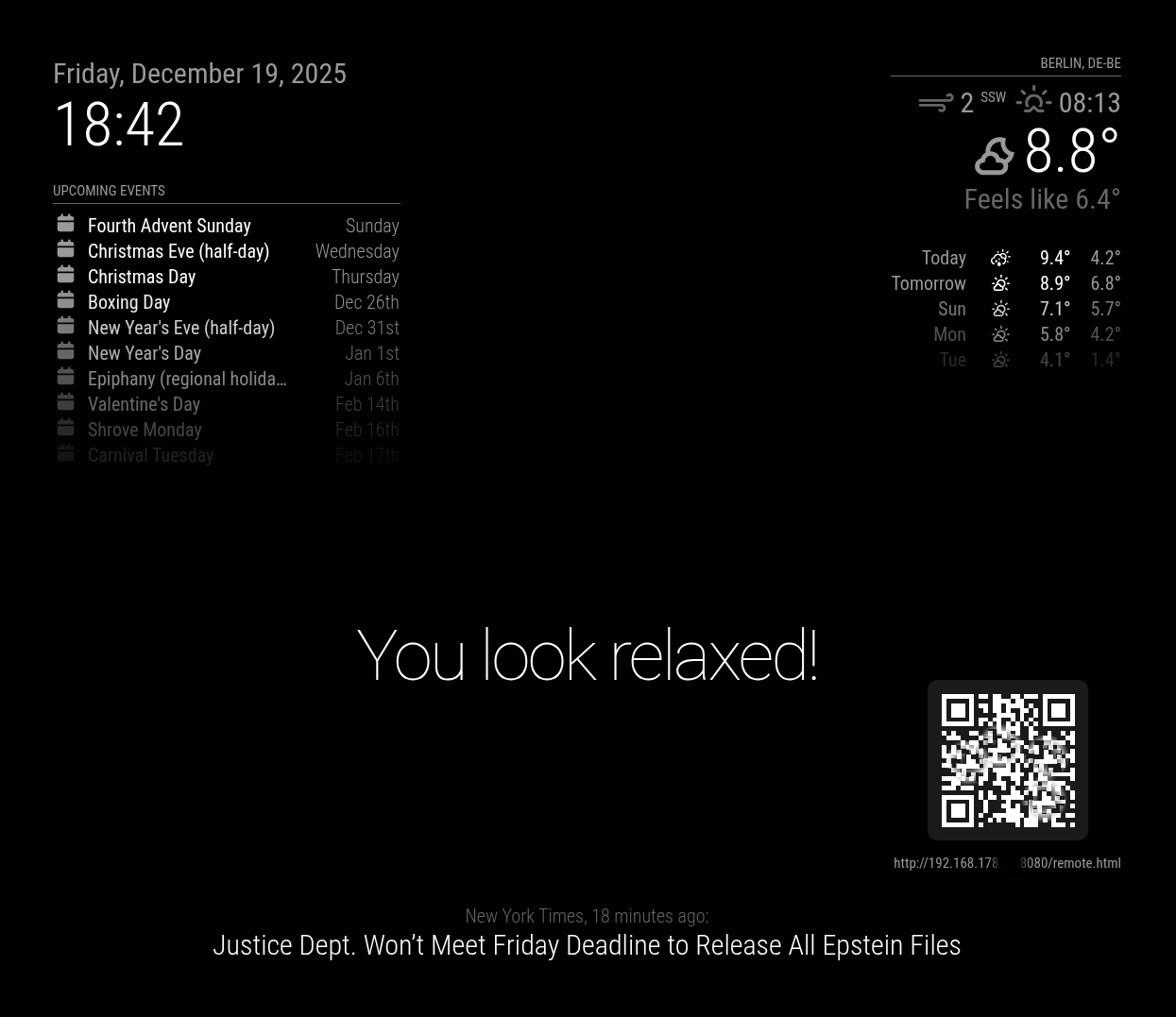
- QR Code on your mirror – Just scan it with your phone to instantly access the remote control. No more typing IP addresses!
Under the Hood:
- Code modernized to current JavaScript standards
- Massively expanded test suite for better reliability
- Enhanced error handling throughout
- Better documentation and maintainability
Important Note: While there shouldn’t be any breaking changes, I recommend testing thoroughly after updating due to the extent of the changes.
You can find the complete changelog and installation instructions on GitHub.
I’m looking forward to your feedback! If you run into any issues or have ideas for improvements, feel free to open an issue on GitHub.
Have fun with the update!
Some Screenshots
On Mobile Device
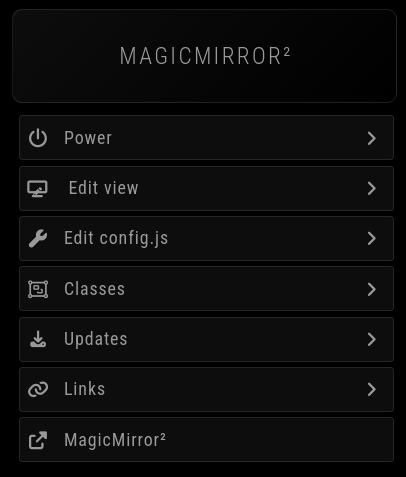
Main Menu
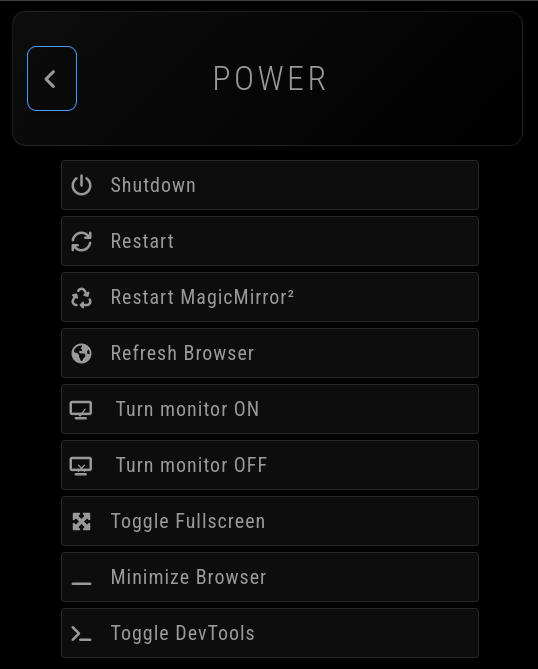
Power Menu
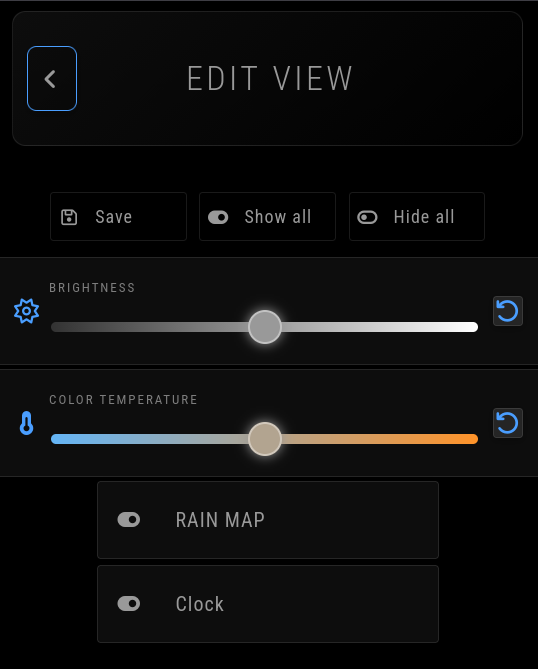
View Menu
optional QR Code on the mirror
-
@KristjanESPERANTO Good Evening!
Nice work!
I like it but with this update it doesn’t work anymore (for me, at least).
I get an error message: “Cannot GET /remote.html”.I first tried to update with
git pull
npm ci --omit=dev
This runs smooth, but results in the mentioned error message (mirror restarted :-) :
pi@MagicMirrorPi5:~/MagicMirror/modules/MMM-Remote-Control $ npm ci --omit=dev

> mmm-remote-control@4.0.1 postinstall
> node scripts/postinstall.js

modules.json already exists, skipping copy.

> mmm-remote-control@4.0.1 prepare
> simple-git-hooks || echo 'No problem. Skipping git hooks installation.'

sh: 1: simple-git-hooks: not found
No problem. Skipping git hooks installation.

added 38 packages, and audited 39 packages in 9s

4 packages are looking for funding
  run `npm fund` for details

found 0 vulnerabilities
After this I’ve tried to do the manual installation via:
pi@MagicMirrorPi5:~/MagicMirror/modules/MMM-Remote-Control $ ~/MagicMirror/modules/MMM-Remote-Control/installer.shthis at least showed an error:
Installation for the MagicMirror² Remote-Control module started!

Notice: This script and the installed software is provided “as is”, without warranty of any kind, express or implied, including but not limited to the warranties of merchantability, fitness for a particular purpose and noninfringement. In no event shall the authors or copyright holders be liable for any claim, damages or other liability, whether in an action of contract, tort or otherwise, arising from, out of or in connection with the software or the use or other dealings in the software.

>>> Continue? [y/N]? y

Directory /home/pi/MagicMirror/modules/MMM-Remote-Control already exists.

You are currently on the master branch.

>>> Do you want to switch to the develop branch? [y/N]? N

>>> Do you want to update your branch? [Y/n]? Y

Pulling changes...
Already up to date.

Checking for new dependencies to install...


> mmm-remote-control@4.0.1 postinstall
> node scripts/postinstall.js

modules.json already exists, skipping copy.

> mmm-remote-control@4.0.1 prepare
> simple-git-hooks || echo 'No problem. Skipping git hooks installation.'

sh: 1: simple-git-hooks: not found
No problem. Skipping git hooks installation.

added 38 packages, and audited 39 packages in 3s

4 packages are looking for funding
  run `npm fund` for details

found 0 vulnerabilities
Done.

Update finished!
node:internal/modules/cjs/loader:1544
      throw err;
      ^

**Error [ERR_REQUIRE_ESM**]: require() of ES Module /home/pi/MagicMirror/modules/MMM-Remote-Control/node_modules/uuid/dist-node/index.js from /home/pi/MagicMirror/modules/MMM-Remote-Control/[eval] not supported.
Instead change the require of index.js in /home/pi/MagicMirror/modules/MMM-Remote-Control/[eval] to a dynamic import() which is available in all CommonJS modules.
    at [eval]:1:13
    at [eval]-wrapper:6:24 {
  code: 'ERR_REQUIRE_ESM'
}

Node.js v20.18.1

>>> Do you want to view instructions on how to configure the module? [Y/n]? n

You should also set an API key in your config section!
  It's dangerous to go alone! Take this.
  apiKey: ''
  I made it just for you.

Have fun with the module, if you have any problems, please search for help on github or in the forum:

   Github : https://github.com/Jopyth/MMM-Remote-Control
   Forum  : https://forum.magicmirror.builders

Do not forget to restart your MagicMirror² to activate the module! Installation finished.
So my third and last try was a complete fresh installation - but again with no luck - and the same error message, which I’m not able to handle:
pi@MagicMirrorPi5:~/MagicMirror/modules $ bash -c "$(curl -s https://raw.githubusercontent.com/Jopyth/MMM-Remote-Control/master/installer.sh)"

Installation for the MagicMirror² Remote-Control module started!

Notice: This script and the installed software is provided “as is”, without warranty of any kind, express or implied, including but not limited to the warranties of merchantability, fitness for a particular purpose and noninfringement. In no event shall the authors or copyright holders be liable for any claim, damages or other liability, whether in an action of contract, tort or otherwise, arising from, out of or in connection with the software or the use or other dealings in the software.

>>> Continue? [y/N]? y

MagicMirror² detected in: /home/pi/MagicMirror

>>> Is this correct and do you want to start installation? [y/N]? y

You can use either the master or the develop branch.
The develop branch contains more features, but is also more likely to cause errors or crashes.
This can be changed later by executing this script again, or using the git branch command.

By default the master branch will be installed.

>>> Do you want to install the develop branch instead? [y/N]? n

Cloning the repository on master branch...

Cloning into 'MMM-Remote-Control'...
remote: Enumerating objects: 2748, done.
remote: Counting objects: 100% (1098/1098), done.
remote: Compressing objects: 100% (317/317), done.
remote: Total 2748 (delta 866), reused 932 (delta 780), pack-reused 1650 (from 3)
Receiving objects: 100% (2748/2748), 2.50 MiB | 1.13 MiB/s, done.
Resolving deltas: 100% (1913/1913), done.

Installing dependencies...


> mmm-remote-control@4.0.1 postinstall
> node scripts/postinstall.js

Successfully created modules.json from template.

> mmm-remote-control@4.0.1 prepare
> simple-git-hooks || echo 'No problem. Skipping git hooks installation.'

sh: 1: simple-git-hooks: not found
No problem. Skipping git hooks installation.

added 38 packages, and audited 39 packages in 3s

4 packages are looking for funding
  run `npm fund` for details

found 0 vulnerabilities
Done.

Installation finished.
node:internal/modules/cjs/loader:1544
      throw err;
      ^

**Error [ERR_REQUIRE_ESM]**: require() of ES Module /home/pi/MagicMirror/modules/MMM-Remote-Control/node_modules/uuid/dist-node/index.js from /home/pi/MagicMirror/modules/MMM-Remote-Control/[eval] not supported.
Instead change the require of index.js in /home/pi/MagicMirror/modules/MMM-Remote-Control/[eval] to a dynamic import() which is available in all CommonJS modules.
    at [eval]:1:13
    at [eval]-wrapper:6:24 {
  code: 'ERR_REQUIRE_ESM'
}

Node.js v20.18.1

>>> Do you want to view instructions on how to configure the module? [Y/n]? n

You should also set an API key in your config section!
  It's dangerous to go alone! Take this.
  apiKey: ''
  I made it just for you.

Have fun with the module, if you have any problems, please search for help on github or in the forum:

   Github : https://github.com/Jopyth/MMM-Remote-Control
   Forum  : https://forum.magicmirror.builders

Do not forget to restart your MagicMirror² to activate the module! Installation finished.
Do you please have a hint for me how to solve this?
MM is running on a Pi5 / NVME.
Thanks for any advice!
Warmest regards,
Ralf -
@rkorell said in MMM-Remote-Control:
Node.js v20.18.1
@rkorell Thanks for the feedback and the good error description! I’ll optimize the error logging, but unfortunately you have to update to at least node 22. I recommend version 24.
For the current MagicMirror version, you also need at least version 22.
-
what’s with the microupdates? I’ve updated three times today. 🤣
-
4 updates today… :/ Kind of annoying to see the mirror changes the view with this notification.
anyway:- GUI looks better. Thanks!
- First update changes my main.css - took me a while to figure it out and redo all my customizations.
- Restart - doesn’t work. Shutdown i didn’t even try.
- Restart Magicmirror2 - doesn’t work, says mm2 is not running.
- Turn monitor on/off doesn’t work.
- Minimize browser does it but then no way to revert. So point less, now need to reboot.
Any way to make it SSH from the phone? :)
-
OK…
New version now shows the same error…
Actually my mirror works pretty fine…
So I hesitate to update node …
What are the risks - and if: How do I do update node?- Will my mirror run afterwards or do I have to upgrade the mirror as well?
Thanks for any advise!
Warmest regards,
RalfI’m not able to attach the logfile…
[2025-12-20T10_58_15_392Z-debug-0.log](Invalid file type. Allowed types are: .jpg, .jpeg, .png, .gif, .png, .jpg, .jpeg, .gif) -
@rkorell to upgrade node use one of the tools
nvm or n
I prefer n
stop MagicMirror if runningsudo npm install n -g sudo n 22.18 hash -r node -vShould confirm node is upgraded
Now we need to fix the MagicMirror dependencies
cd ~/MagicMirror
rm -rf node_modules
npm install
Then start MagicMirror
In the future, if you want to upgrade MagicMirror, use my upgrade script and it will also upgrade node if necessary
-
@rkorell you can only upload pics here, you can paste some of the log into a message ( use the code block )
-
@sdetweil
Dear Sam,
thanks for this.Until now I had avoided to upgrade with the thought “never touch a running system” …
Now it seems to be time for an upgrade - because I like MMM-Remote-Control.
@kristjanesperanto said: " at least node 22. I recommend version 24" - would one of these versions be installed by your current upgrade-script?Than I would feel much better using your script than doing it manually …
As far as I remember i had some local (code) modifications in standard-weather module - this would prevent your upgrade-script from upgrading, as far as I remember.
Is this still true? And if yes: There was a “force” ooption in the script?Thanks a lot for your work!
Warmest regards,
Ralf -
@rkorell force was if you already had started installing MM and had the latest code… NOT if you have code changes
the upgrade will report if files are changed and allow you to save them in git. but generally its intended to remind you where you made changes and do something about it…
the node upgrade should not impact the running MM… (I say that with ’ quote marks, cause I am not sure…)
WHY do you NEED the RemoteControl update?? if you don’t NEED it, then don’t take it…
-
@rkorell said in MMM-Remote-Control:
would one of these versions be installed by your current upgrade-scrip
today it will install node 22.18.0
after Jan 1 (2 weeks away) it will install 22.21.1 (for the next release) -
@sdetweil
Good point!
Unfortunately I’ve already DONE the upgrade of remote-control - and now it doesn’t work anymore :-) -
@sdetweil
just ran a testrun of your upgrade script:pi@MagicMirrorPi5:~/MagicMirror $ bash -c "$(curl -sL https://raw.githubusercontent.com/sdetweil/MagicMirror_scripts/master/upgrade-script.sh)" update log will be in /home/pi/MagicMirror/installers/upgrade.log doing test run = true, NO updates will be applied! Check current Node installation ... Node currently installed. Checking version number. Minimum Node version: v22.18.0 Installed Node version: v20.18.1 Node should be upgraded. Node.js upgrade defered, doing test run Check current NPM installation ... NPM currently installed. Checking version number. Minimum npm version: V10.9.2 Installed npm version: V10.8.2 npm should be upgraded. npm upgrade defered, doing test run ... saving custom.css reverting to master branch from _fix_clipping, saving changed files would restore file modules/default/weather/current.njk before switch back to master branch would restore file package-lock.json before switch back to master branch would restore file package.json before switch back to master branch error: Your local changes to the following files would be overwritten by checkout: package-lock.json package.json Please commit your changes or stash them before you switch branches. Aborting unable to change back to master branch, stopping executionWhat does the last message mean?
“unable to change back to master branch, stopping execution”
What have I to do? -
@sdetweil
BTW: Do you know if it is possible to restore the “old” version from remote-control?
May THIS is the better option for me? -
@rkorell can you tell me when old was? luckily this module uses tags for releases, so you could restore to one of the previous releases…
in the module folder do
git fetch --all --tagsthen when we figure out which release to try, we can
git checkout <tag_name>Release 3.2.1 was about 5 months ago.
-
@sdetweil I’ve found V3.3.2 and just try "git checkout 1f451ce "
-
@rkorell if you pull the tags, you can use the tag name
git checkout v3.3.2
-
@sdetweil
For some really strange reasons, neitherpi@MagicMirrorPi5:~/MagicMirror/modules/MMM-Remote-Control $ git fetch --all --tags pi@MagicMirrorPi5:~/MagicMirror/modules/MMM-Remote-Control $ git fetch --tagscurrently give any feedback…
So I’ve worked with the found git-hash:
git checkout 1f451ceThis at least worked and rolled back to V. 3.3.2.
Unfortunately some dependencies (package-lock.json ???) are not strict enough, so the rollback produces an error message:
[ERROR] Error when loading MMM-Remote-Control: require() of ES Module /home/pi/MagicMirror/modules/MMM-Remote-Control/node_modules/uuid/dist-node/index.js from /home/pi/MagicMirror/modules/MMM-Remote-Control/API/api.js not supported.So I downgraded UUID:
cd ~/MagicMirror/modules/MMM-Remote-Control
npm install uuid@9.0.1
npm ci --omit=dev
With this module is running again.
From now on I’m in a in ‘detached HEAD’ state - but this seems OK.
Thanks for your time, effort and always great help!Ralf
-
@rkorell I was just about to add that you needed to redo the npm install for the module after deleting the node_modules folder
else you were trying to run the new dependencies with the old codebut you fixed it…
-
@sdetweil
Yes :-)In fact I’ve used
npm ci --omit=devthis does the deletion of the node_modules folder inherently AFAIK …
Thanks again, dear Sam!
Ralf



Hello! It looks like you're interested in this conversation, but you don't have an account yet.
Getting fed up of having to scroll through the same posts each visit? When you register for an account, you'll always come back to exactly where you were before, and choose to be notified of new replies (either via email, or push notification). You'll also be able to save bookmarks and upvote posts to show your appreciation to other community members.
With your input, this post could be even better 💗
Register Login